Introduction#
Roadmap#
- Internet: Network 的 network
- Protocol: 定義的訊息傳送 format, order,全世界通用
Network edge#
- Host: Client, Server (end system)
Cable-based#
- FDM: Frequency Division Multiplexing,有線傳輸通常用「頻率」來做多工處理,通常使用
- 是一種 Share network,Cable 雖然很大但會被大家分掉
- HFC: hybrid fiber coax,40Mbps ~ 1.2Gbps downstream, 30 ~ 100 Mbps upstream
DSL#
- 單戶用傳輸不遠,但 cable 比較小
Wireless#
- Wifi
- 4G, 5G
Host#
- Packet 必須完整才能傳出
- Sending packets, 每個 packets 的長度
- Transmit packets, 這條 link 的 transmit rate 是
- 經過 個 router 傳送就會延遲
Link#
- 分爲 Guided 跟 Unguided
- Guided: Solid media Fiber(光纖), Coax(銅線傳輸)
- Unguided: Radio
- TP (Twisted Pair): 雙絞線,可以減少干擾
- Radio link:
- Wireless LAN (Wifi)
- wide-area (4G)
- Bluetooth
Network Core#
- Forwarding: Local action 只在自己身上作用,從正確接口接收封包再從正確出口送出
- Forwarding table 用來確認送出的方向
- Routing: Global action 在所有 core 上都會作用,決定送出的 source, destination
- 使用 routing algorithm
Packet-switching#
- Core 除了會 forward 還有 store 功能,為了要讓送出的 packet 完整
- Great for bursty (突發) data,data 來的不頻繁大家可以共用
- 可能會發生 Congestion 導致 Loss 或 Queue
Circuit-switching#
- 不會發生 Queuing 或是 Loss 因為有預先留了傳輸管道
- Guarantee 一定有完整的一條 path 上面不會有其他人(圖例:四條中保證一條為空)
- 如果你那段沒有用到,其他人也不能用
- Inefficient
-
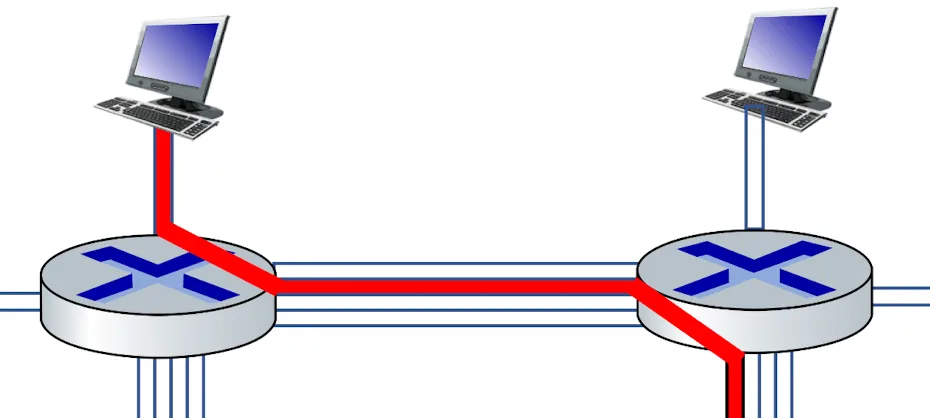
Circuit-switching
FDM vs TDM#
- FDM
- 完整使用那個頻段
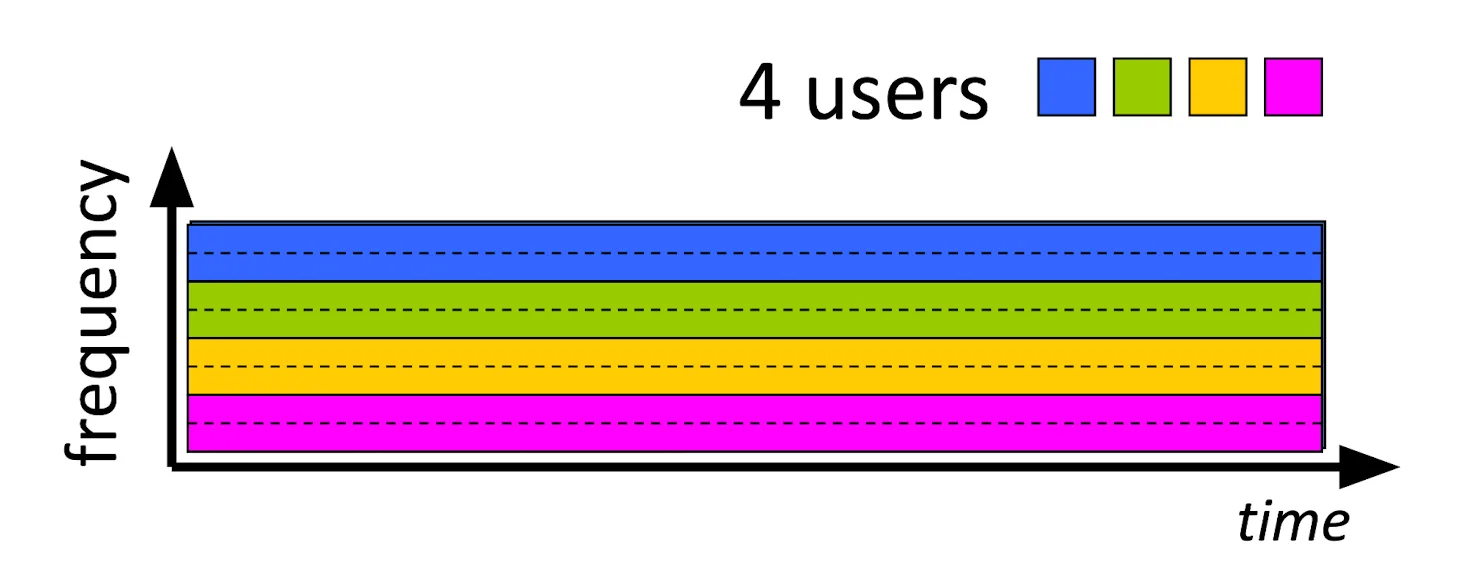
FDM vs TDM 1
-TDM
- Sharing,但頻寬 (bandwidth) 大,只要在自己的 time slot 都可以用
-
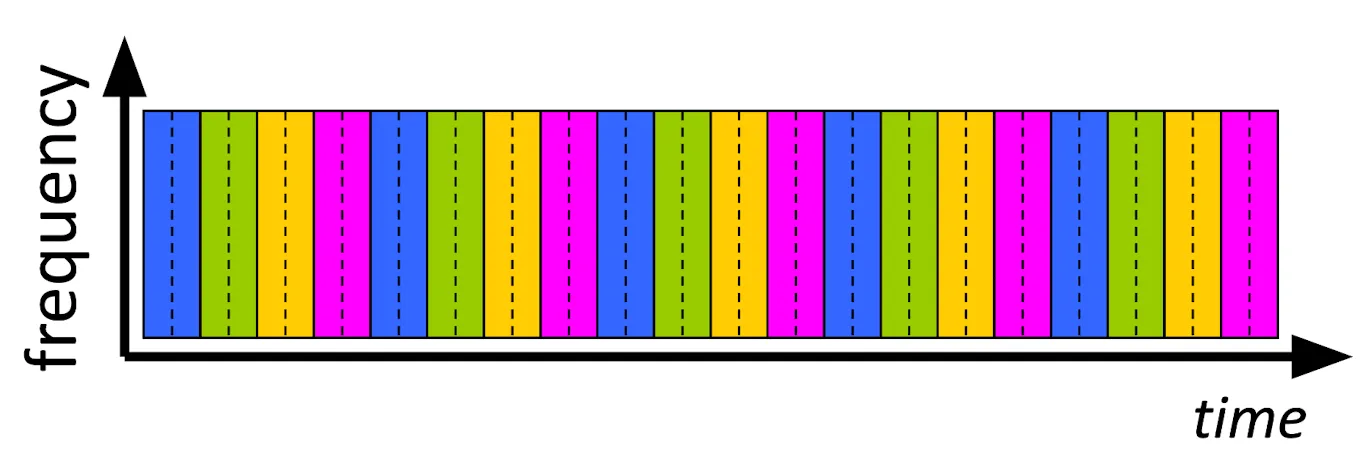
FDM vs TDM 2
Structure#
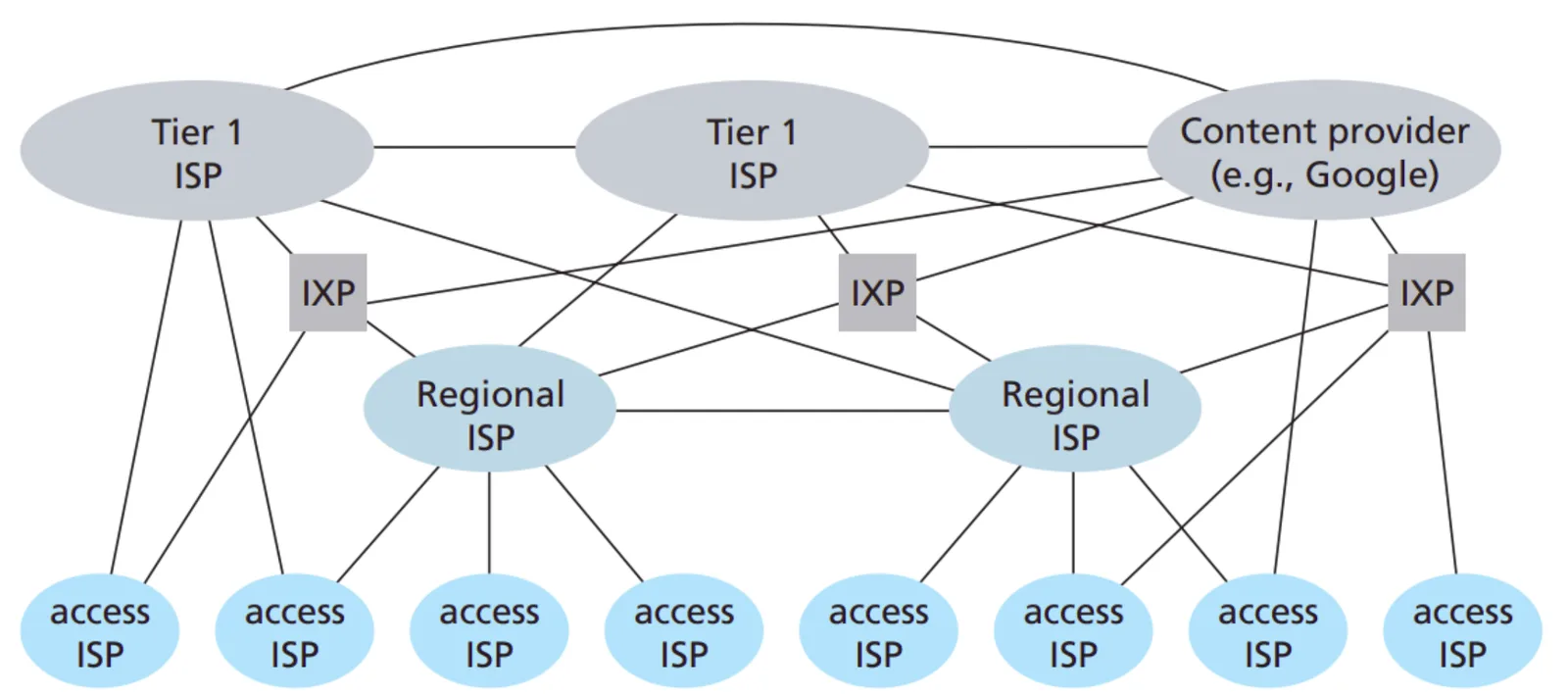
- 如果每個人都用互相連結的話,那成本將會極高
- ISP: Host 會用 Global ISP (Internet Services Provider) 連接 Internet
- ISP 之間也會互相連接
- Global ISP 會跟 Regional ISP 連接
- IXP: Internet exchange point (IXP) 會把 ISP 互相連接
- 不可能讓 ISP 全部掌握在誰手裡,所以每個地區有自己的 ISP
- CPN: 大公司也會需要自己的 Global ISP 我們稱為 Content Provider Network (CPN)
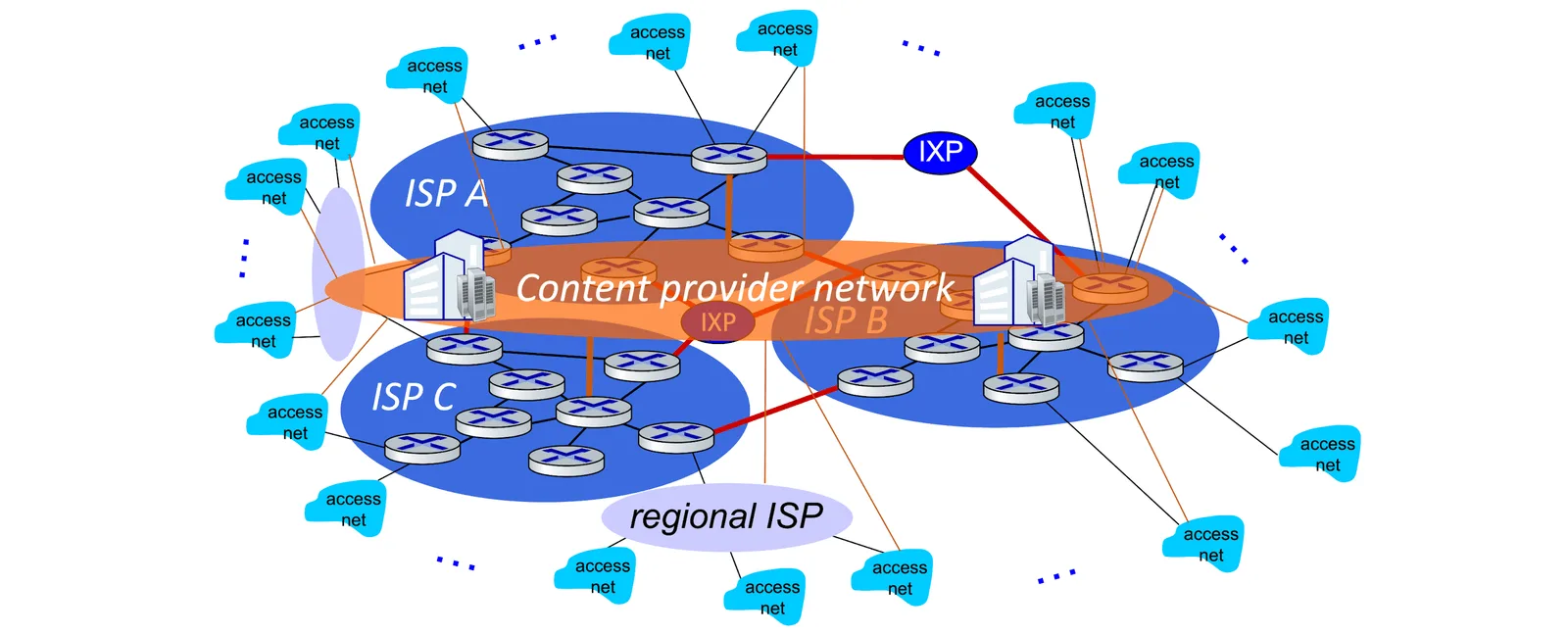
- Tier-1: Commercial ISPs (National or International)
Performance#
也就是分析各種 delay 來源
Packet delay#
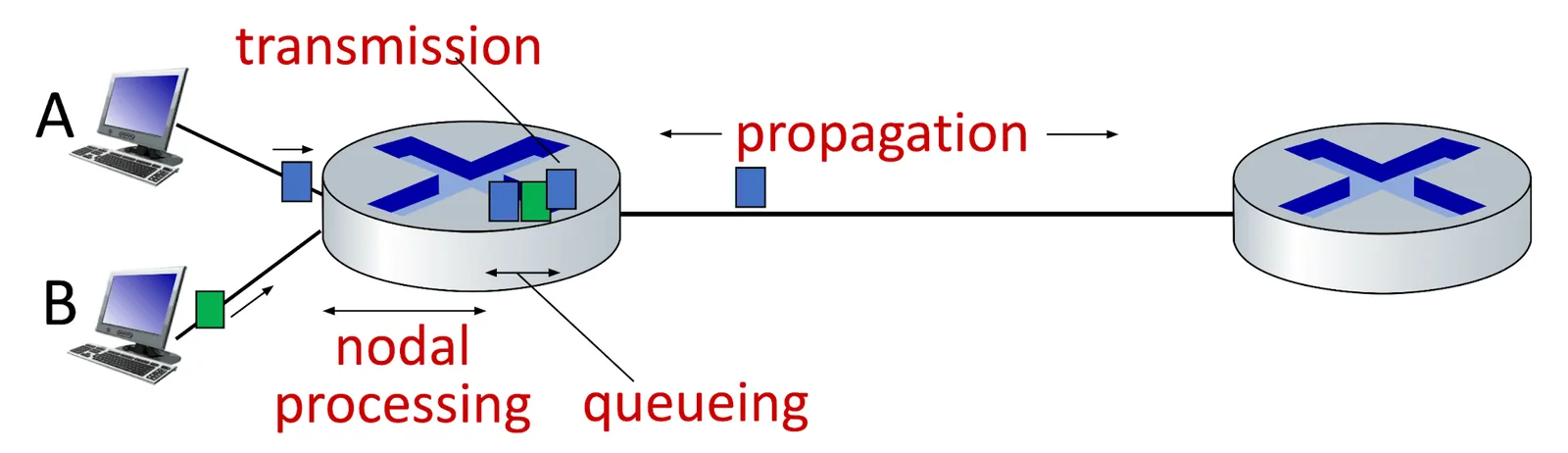
- : Processing delay (typically < microsec)
- 檢查 forwarding table
- forwarding 過程
- Integrity Check
- : Queuing delay
- Congestion
- : Transmission delay
- : Propagation delay
- : length of physical link
- : propagation speed
traceoute
- Return 到每個 router 的 ,可以藉由設定每個 request 設定
ttl = ?(Time To Live) * * *表示 no response- format 是
128.119.3.154 (128.119.3.154) 0.931 ms 0.441 ms 0.651 ms
Throughput#
- Instantaneous throughput: 瞬時收到的資料量
- Average throughput: 平均收到的資料量
- 在這個簡單的 pipe 裡面,前者速率 ,後者則為
- 如果 那 Client 感受到的會是 的傳輸速度,反之亦然
- 因此一個網路線路的 Throughput 取決於最慢的那條,我們稱這條 link 為 bottleneck link (瓶頸線路)

- 在一條正常的網路裡 Bottleneck link 為
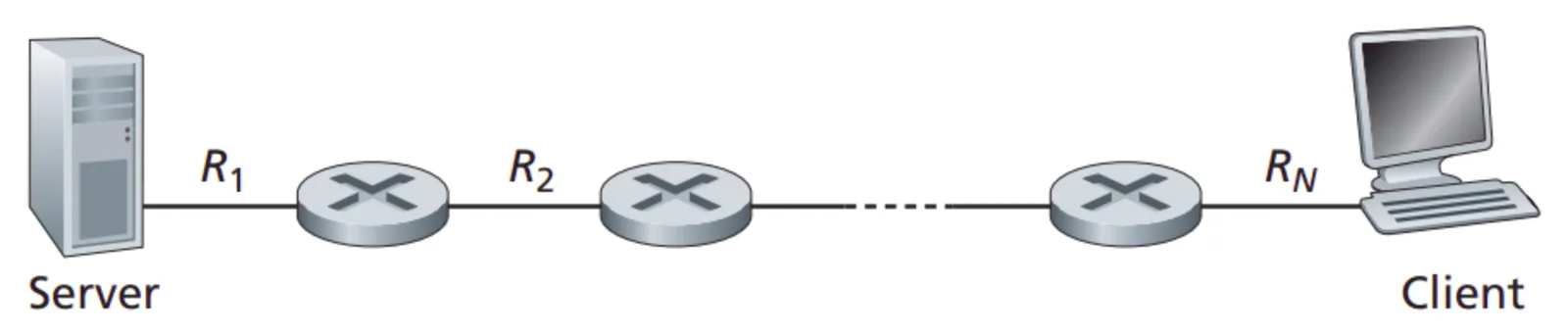
- 而他的速率就是
- 真實情況還會有這種共用 pipe 的情況,所以我們還要再考慮
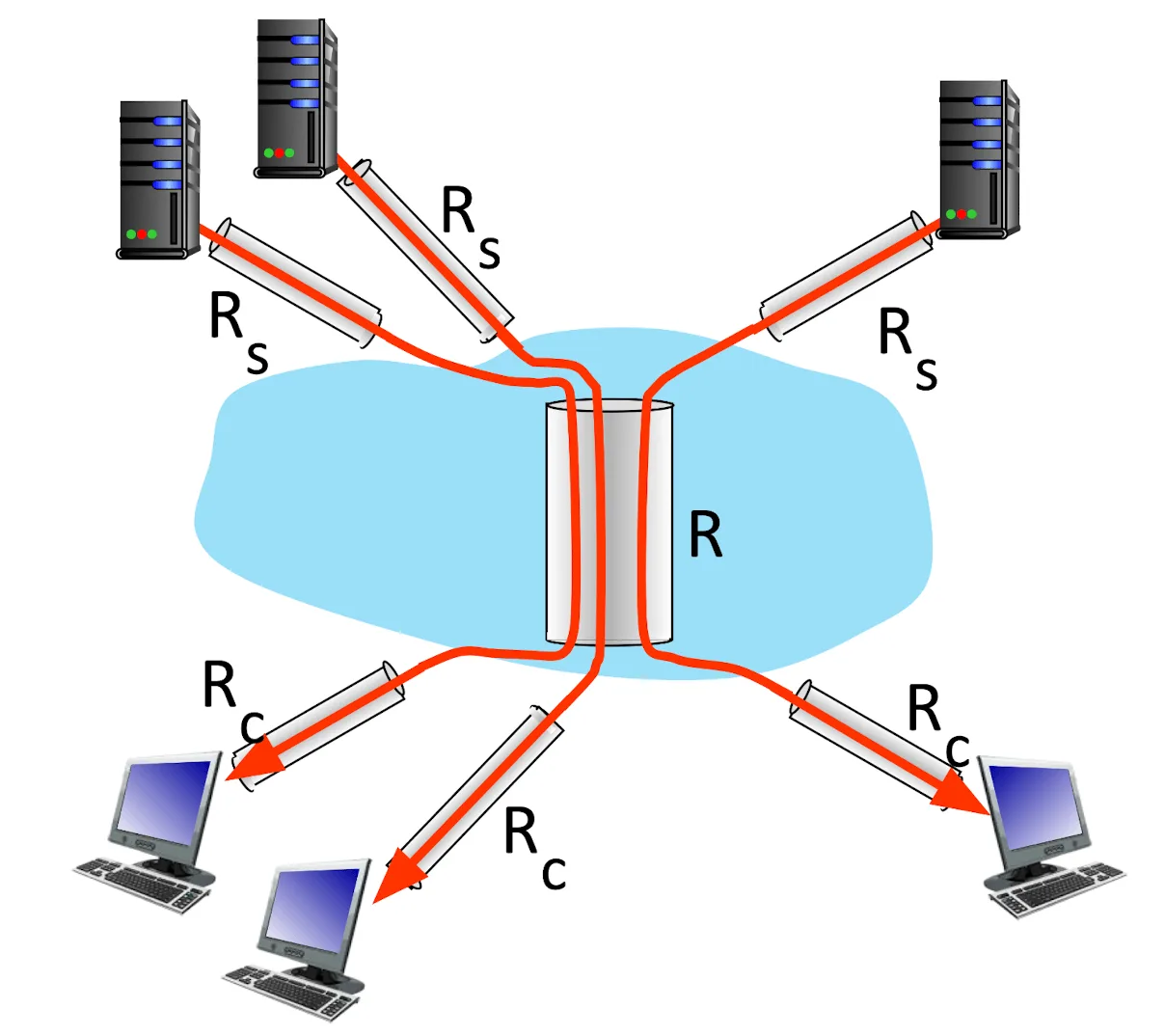
- 真實情況中 ,bottleneck 通常都是 edge link
Layering, Encapsulation#
- 複雜的系統常常需要做 layering 的工作
- 便於了解每個 system pieces 之間的 relationship
- 對 system 做了 modularization 便於維護(像是當我們要改變 server implement 我們不需要改變 inference)
- Layering 時我們會把這個結構叫做 protocol stack 因為他是一層一層解讀/封裝的
Layered Internet Protocol tack#
flowchart TB
    A[Application Layer]
    B[Transport Layer]
    C[Network Layer]
    D[Link Layer]
    E[Physical Layer]
A --> B --> C --> D --> E- Application layer (應用層): 實現網路功能,對下層發送 message packet
- HTTP, SMTP, DNS
- Transport layer (傳輸層): 在 application endpoint 之間傳送訊息,發送 segment packet (process to process)
- TCP, UDP
- Network layer (網路層): 在 host 之間傳送資料,並不保證 reliable transfer 發送 datagram packet (host to host)
- IP, routing protocol
- Link layer (連結層): 發送 frame packet 把資料送到下一個節點後,讓下一個節點的 link layer 往上送給 Network layer
- Wifi, Ethernet, PPP
- Physical layer (物理層): 真正的傳輸,把一個一個 bit 傳送過去下一個節點
Services, Layering, Encapsulation#
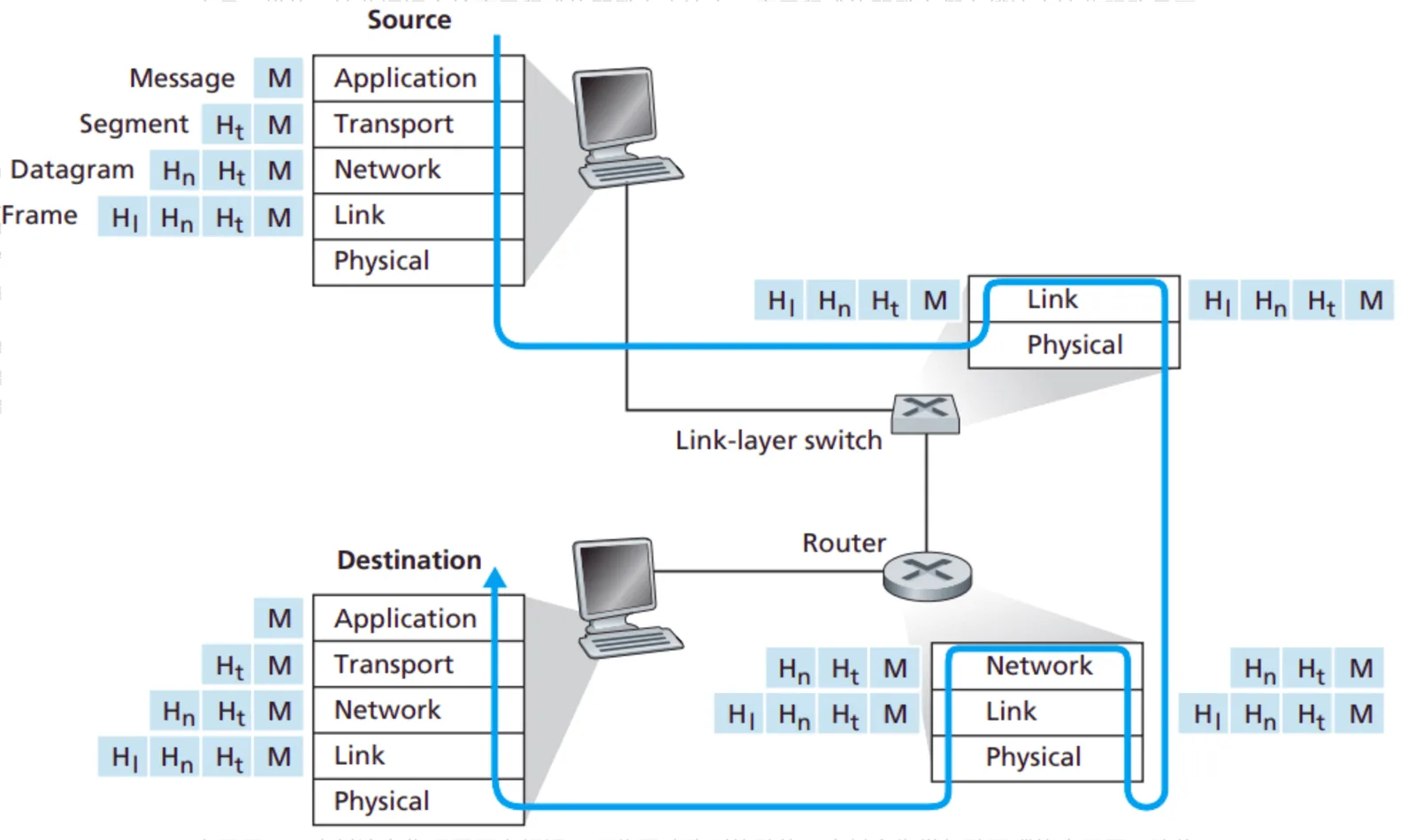
- 每個 layer 會在 Application layer 的 message 前面加上自己需要辨識用的 header 這個過程稱為 Encapsulation
- 例如 Transport layer 會在 header 中加入他屬於哪個 process,Network layer 會加上 Destination
- 到了 destination 後一層一層的解讀最終在正確地方獲得正確資料,這個解讀 header 的過程叫 Decapsulation
Security#
Packet “sniffing”#
- 此處的 C 可以讀到所有 B 要傳送到其他地方的 packet
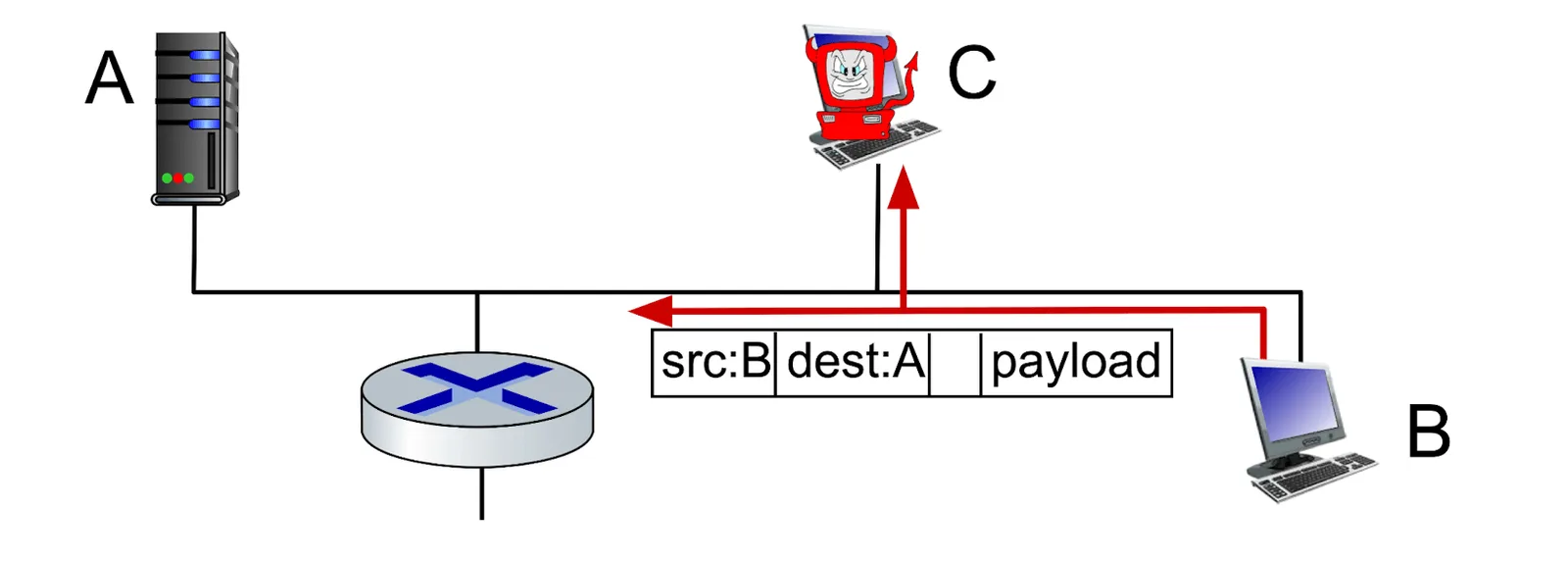
- Wireshark 就是一款免費的 packet-sniffer
IP Snoofing#
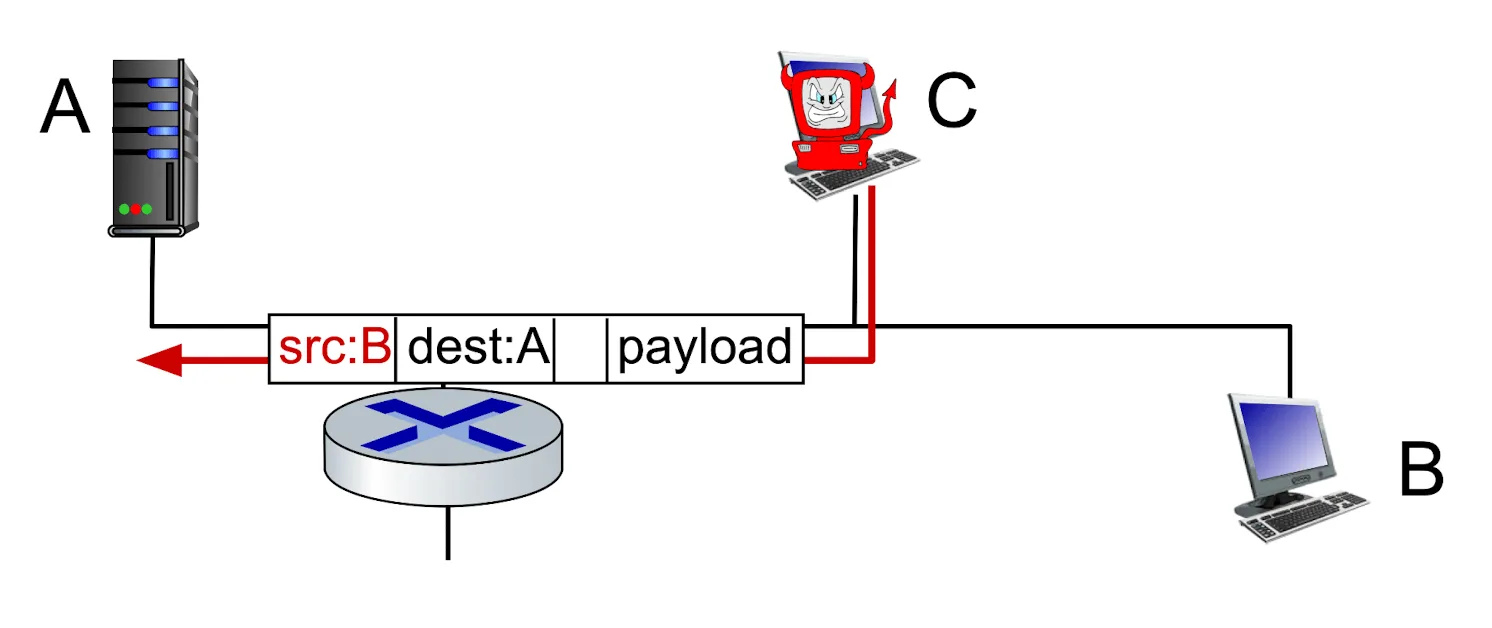
- 對 packet 進行操作,此處 C 假裝自己 send 的 packet 是 B 來的
Denial of Service (DoS)#
- 生成很多假的 http request 讓 server 癱瘓掉
- 選擇目標
- 侵入很多 host
- 從侵入成功的 host 端發送爆量訊息到 server
Defense#
- Authentication
- Confidentiality: encryption
- Integrity Check
- Access Restriction
- Firewalls
Back to the content
NTU Computer Networking
2025 Fall
← Back to the content