Main Memory#
Background#
一個 Instruction-Execution Cycle 會有
- Fetch an instruction from memory
- Decode the instruction
- Fetch operands from memory
- Execute the instruction
- Store back results in memory
全部都跟 memory 有關,CPU 執行其實只是一堆 memory 的操作運算而已
Basic Hardware#
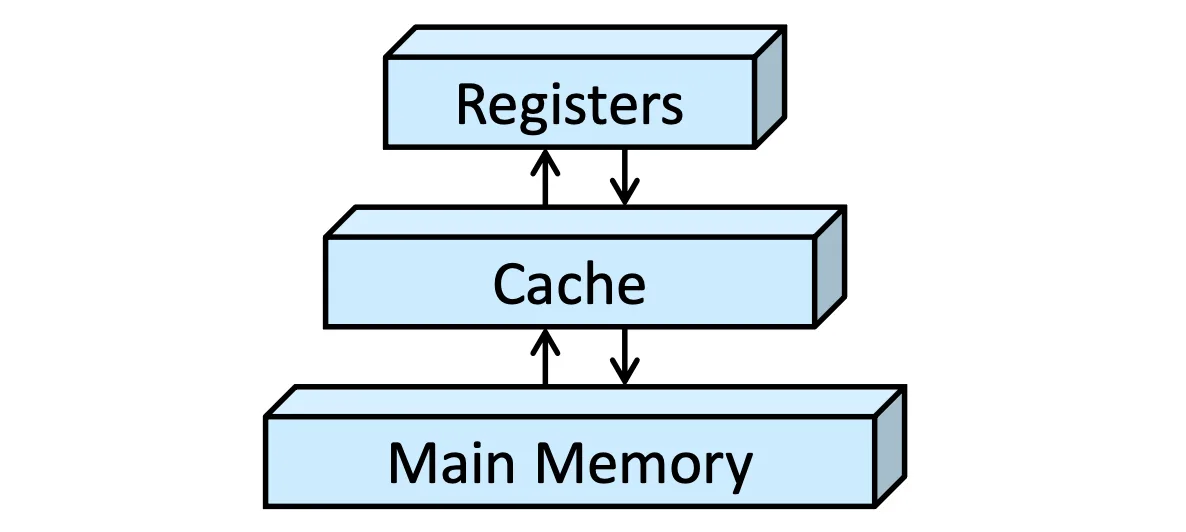
- CPU 上只有 register 是 built-in 的
- Main memory 是大部分運算資源所在地
- Cache 是用來增加效能,一個 Size 跟 Performance 的 Trade-off
- 一個指令如果涉及到 main memory 讀寫,會需要多花很多 Cycle,用 Cache 可以減少 Cycle
Address Protection#
保護是一個最簡單不讓他人 access 自己的 memory 的方法
- base register: 檢查 if
address >= base - limit register: 檢查 if
address < base + limit
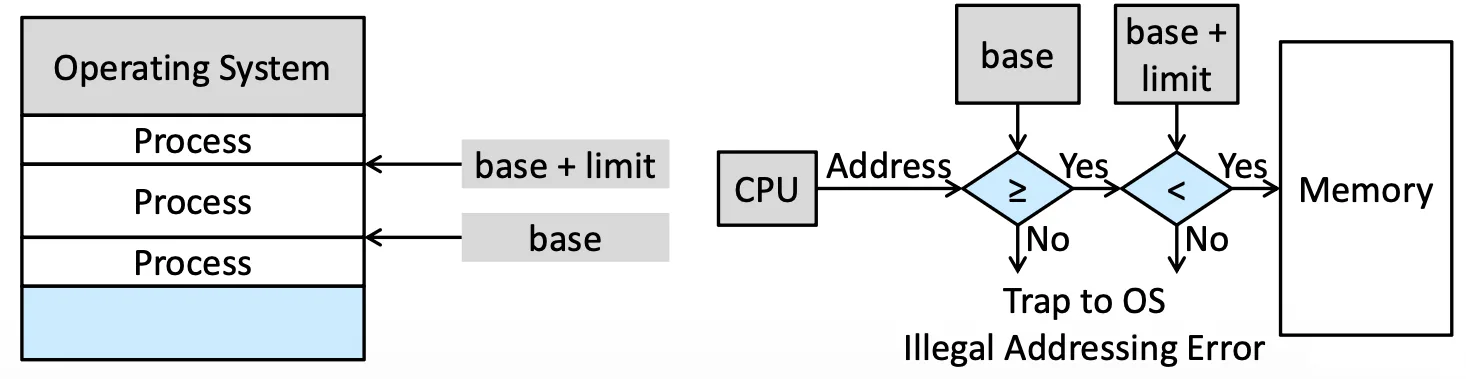
會隨著 Context Switch 變化,存在 Register 是因為這個動作要非常快,因為每個 Process 都需要檢查
Address Binding#
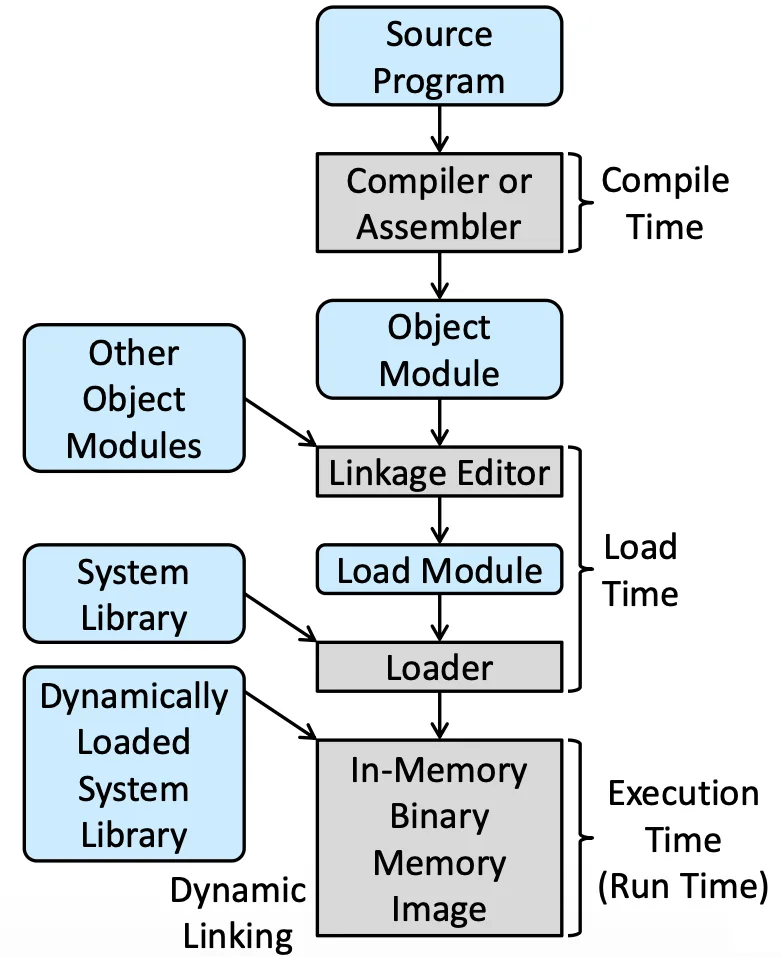
在 Memory 層面看來,所有值、變數都是記憶體的操作,Program 可以在不同時間決定實際的記憶體位置
- Compile 的時候做 Binding,決定實際的位置在哪,會變成 absolute code
- Load 的時候做會變 relocatable code
- Execution 的時候也可以 Dynamic Linking
現在的系統通常都是 Execution time Binding,後面也都討論這個
Logical Versus Physical Address Space#
- Logical address:CPU 產生的 Address,通常也叫 virtual address
- Physical address:真正在 Hardware 上存取的位置,在 memory-address register 裡的位置
我們會把所有可能的 Logical address, Physical address 稱為 Logical address space, Physical address space
Memory-Management Unit (MMU)#
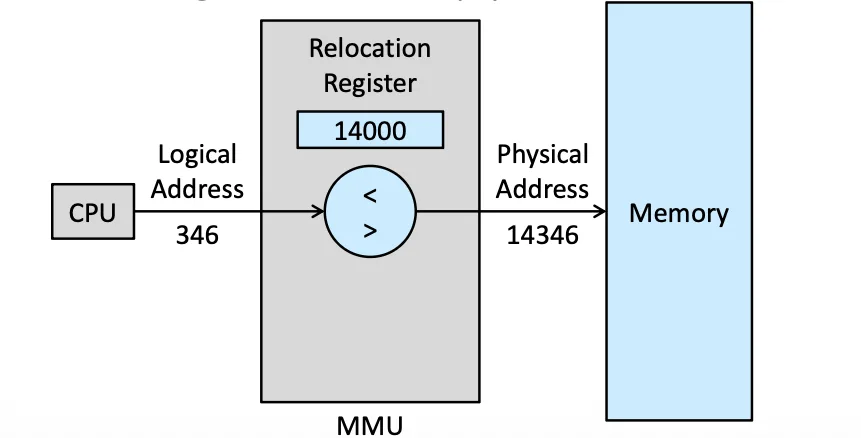
這裡的 364 是 CPU 認為的「在這個 Process 裡的第 364 個 Bytes」,而 MMU 會去做轉換,轉換成真正在 Memory 裡的位置
Dynamic Loading#
有些 Library 不一定要一開始就放進 code 裡面,不然太佔空間了(e.g. Error Routine)這通常是 Programmer 的責任
Dynamic Linking and Shared Libraries#
Static Linking 就是把 Library 當作一個新的 Object File
這件事不是 Programmer 的責任,要讓 Program 的 Execution File 變小,共用 Dynamically linked libraries (DLLs)
- 更新的時候只需要更新被 Link 到的就好了
- 是一種 Shared Library
Contiguous Memory Allocation#
可以把 Memory 分成兩大塊
- OS 用的 partition(Windows, Linux 都放在高位置)
- User Process 用的 partition
連續分配是一種古早的方法,有一些問題存在
Memory Protection#
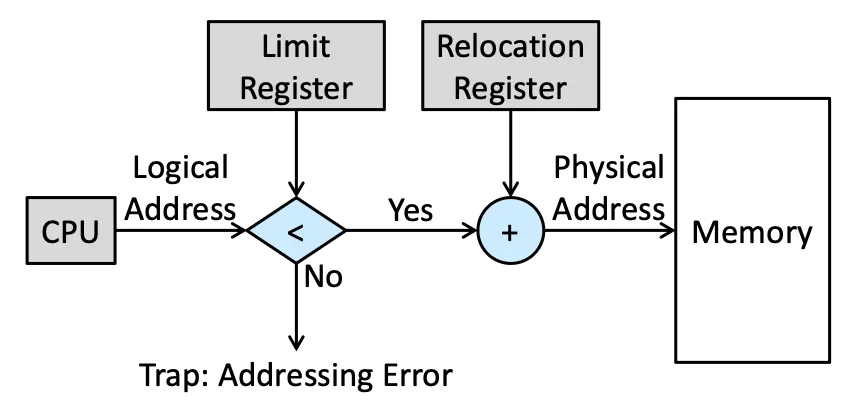
一個 logical address 進來之後先檢查有沒有超過 Limit,因為是 Continuous 所以只需要檢查有沒有超過某個 limit
Memory Allocation#
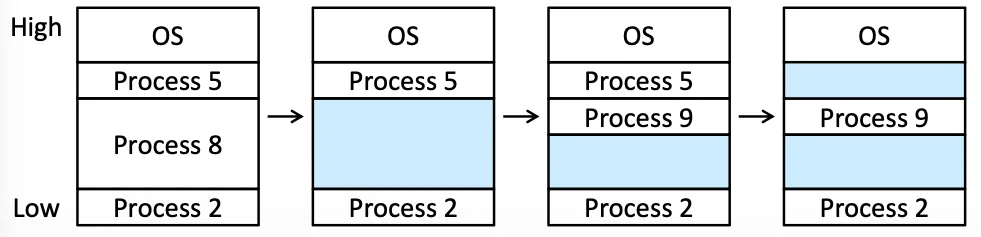
原始的 Memory 會有很多 Hole,也就是空的空間,空間不夠的話可以
- Reject
- 排進 Wait Queue 裡面
Dynamic Storage Allocation Problem#
會遇到一個很大的問題,就是應該要放到哪裡,有三種策略
- First Fit:找到第一個可以放的
- Best Fit:找到最小並且可容納的空間
- 做 Linear search(花時間)
- 特殊的 Data Structure(花空間)
- Worst Fit:找到最大的那個洞
Simulation 之後發現 First fit 跟 Best fit 會很不錯
Heuristic 來講,Best fit 可以留下最小的不連續的洞,而 First fit 則是很快
Fragmentation#
Internal Fragmentation#
如果有一個 hole 18,464 bytes,而一個 Process 需要 18,462 bytes,這時候會剩下兩個 byte,我們不會留下那兩個 Bytes,因為為了 2 bytes 非常不符合效能,多紀錄要多花空間,而且兩 bytes 其他人也用不太了
這兩個 bytes 就會造成 Internal Fragmentation,累積起來會有問題,但去處理的 Overhead 反而更大
External Fragmentation#
如果 10 單位的 memory 被切成 1 單位的 hole,如果一個 Process 需要 2 單位的 Memory,照理來說 10 > 2,但這十單位的 Memory 並不是 Contiuous 因此無法使用
- 50-percent rule:統計分析,given allocated blocks, another blocks will be lost to fragmentation
所以我們有兩種解決方法:
- Compaction:Dynamically 把不連續的 Memory 連起來(Link List)
- Paging:(下個單元)可以讓 physical address 可以不連續分配
Paging#
Basic Method#
Pages 是一個 fixed size 的 Logical Memory,Frames 是一個 fixed size 的 Physical Memory 通常
一段 Logical address 通常會有
- Page Number
p前半,是在 Page Table 裡的 index - Page Offset
d
如果我們有 個 logical address space,page size 是 那前 個 bits 就是 page number,後面 個則是 offset
Paging 一樣是在 MMU 裡面實現的
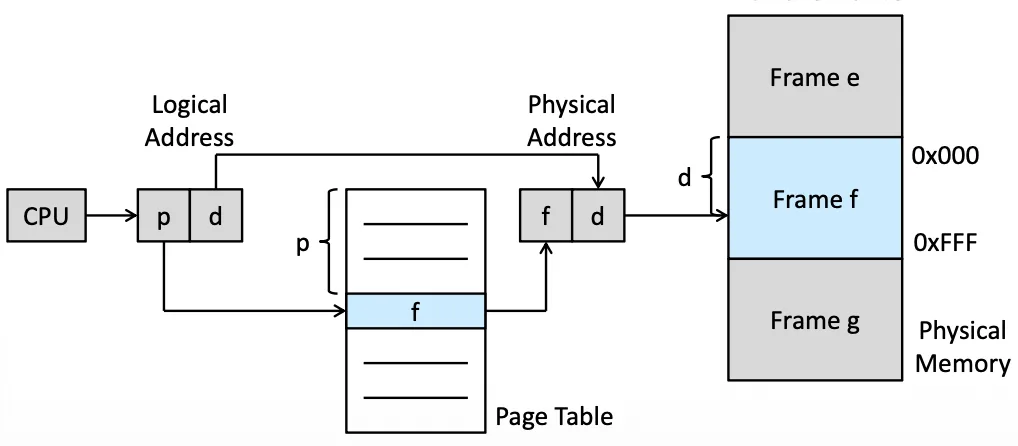
- CPU 產生
p+d的 logical address p被當作 index,去 Page table 裡面替換成f- 用
f+d當作 Physical address 去 access 真正的 frame 裡的位置
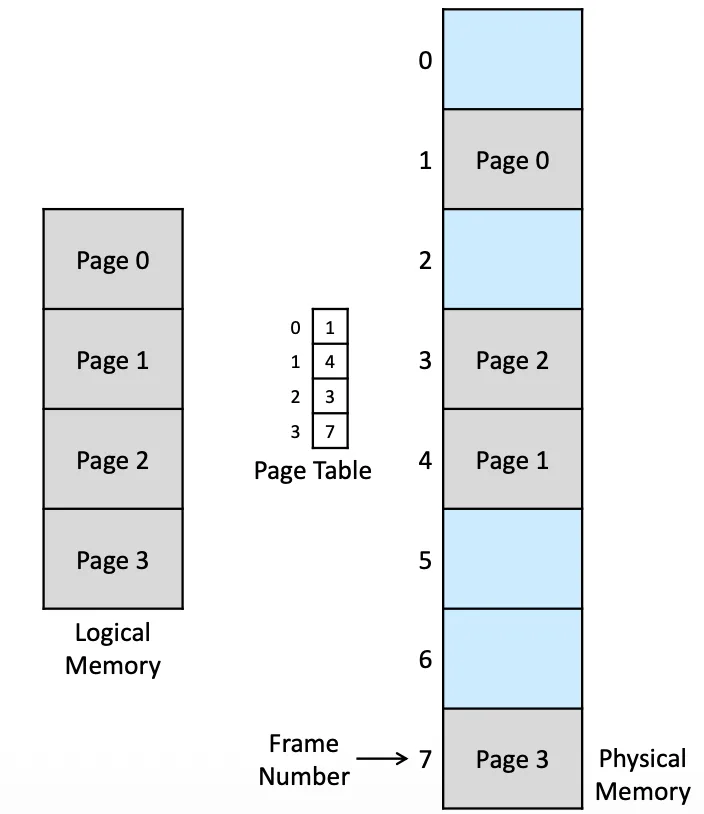
可以是不連續的 Access,Logical 上看 Page 0~3 是連續的,但在 Frame 上看是不連續的
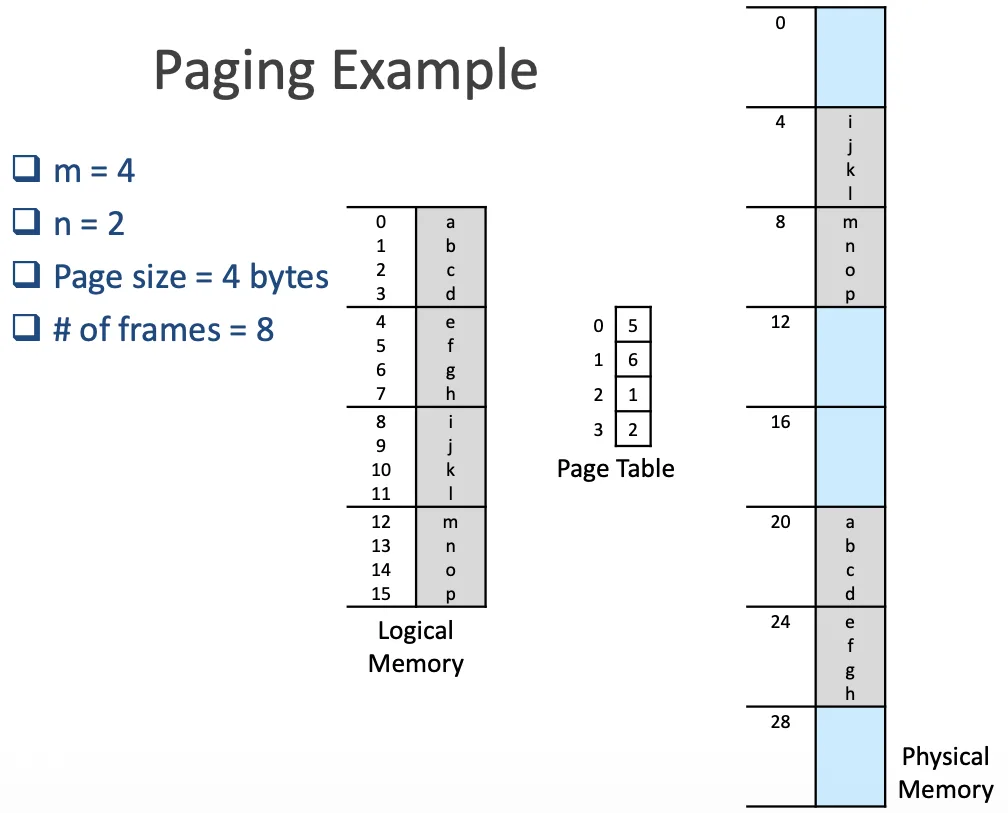
access 10 會變成 60 也就是 6*4 + 0 = 24 是 e
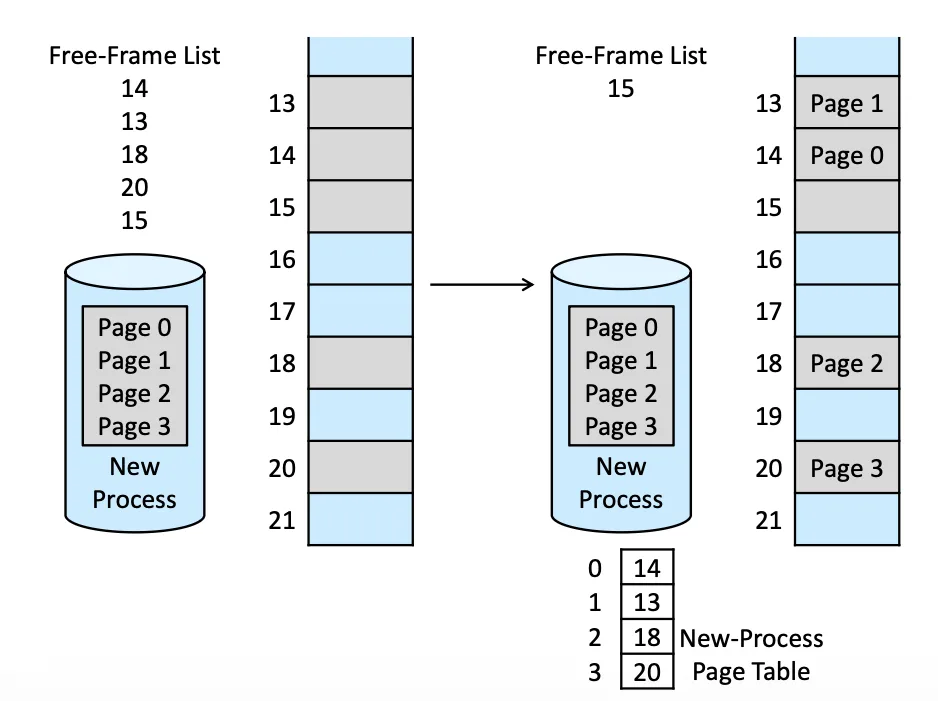
OS 會先 keep 一個 Free-Frame List,有新 Process 要 allocate 的時候就 Dynamically 的去從 list 裡找,再更改那個 List
Paging’s Internal Fragmentation#
- Page size =
2,048bytes - Process size =
72,766bytes =35pages +1,086bytes - Internal fragmentation =
2,048 − 1,086bytes =962bytes
最後剩餘的 bytes 還是得全部塞進一個 page 裡面,而這種情況 Worst Case 就是
如果這是個 Uniform Distribution 的話,那平均會剩下 ,那是否是 Page size 越小越好?
其實並不是,這是一種 Trade-off,系統整體來看,Page table 會太大,那 overhead 還是很大,所以要取到一個 balance 的點
- 一般來講都是 4KB 或是 8KB 的大小(要在更大的話需要 hardware 的配合)
Amount of Address Memory#
32-bit CPU 假設每個 page-table entry 只有 4-byte long,但卻可以指向 個 Physical page frame,如果每個 Frame size 是 4KB( bytes)那我們就可以 access bytes 的 Physical memory,但我們並不會真的把 32 bits 全部用來存這個,還有一些 attribute 可以存在這 32 bit 裡面
Frame table#
Page table 是 per process 的,但 OS 還是需要記錄一個全域的 Frame table,並且其實每個 Process 的 Page table 也需要被記錄,讓 Context Switch 更順利
Hardware Support#
Page Table#
Page table 是一個 per process 的 Data Structure 有兩種 implement
- 用 Register 當作 page table,快速,但 Context Switch 會非常麻煩
- 用 Page-table base register(PTBR):是一個 pointer 指向存 page table 的 main memory,慢但 Context Switch 方便
目前 OS 都偏向第二種做法
Translation Look-Aside Buffer (TLB)#
為了讓 Address 轉換的過程加速,多增加一個比較靠近硬體層面的 TLB
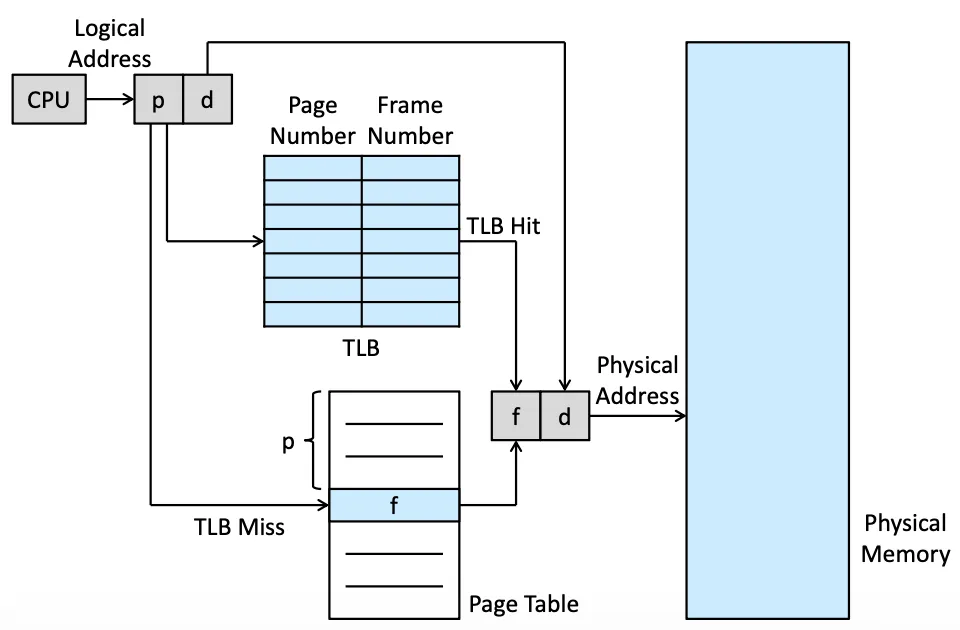
MMU 先去檢查 TLB 裡面有沒有要求的 Address
因為真正的 CPU execution 是一種 pipeline 的感覺,不同步驟可以同時做(e.g. 不同任務的讀、算可以同時進行),每當運行發生 TLB miss(當前 Address 不在 TLB 內)就要寫入 TLB
當 TLB 滿的時候我們可能可以有很多策略去拿掉
- least recently used (LRU)
- round-robin
有些 CPU 可以讓 OS 去參與 LRU 的更動,並且有些 TLB 是無法更動的(wired down)像是一些 Kernel code 因為太常使用,所以不可替換
Address-Space Identifier (ASID)#
Page table 是跟著 Process 的,但 TLB 是跟著 CPU 的,但 Context switch 的時候我們可能會需要有些 trade-off,因此有一種方法 address-space identifiers (ASIDs) 可以加速,我們在 TLB 內除了紀錄 Page number, Frame number 之外還紀錄 Process Owned 紀錄這欄位是哪個 Process 的
如果沒有 ASIDs 每次 Context Switch 都需要 Flush 掉 TLB,因為兩個 Process 可能共用一個 logical address,但指向的 page 卻不一樣,紀錄誰 Own 就可以先檢查一不一樣
Effective Memory-Access Time#
若每次 access memory 都要 10 nanosec.
- If the page number is in the TLB
- If not in the TLB
此時我們計算 Effective memory-access time If
If
實際上 TLB 也可以是 Hierarchical 的,但是運作起來更加複雜
Protection#
有一些 Protection bit 可以防止不同 Process 互相 Access
Valid-invalid bit#
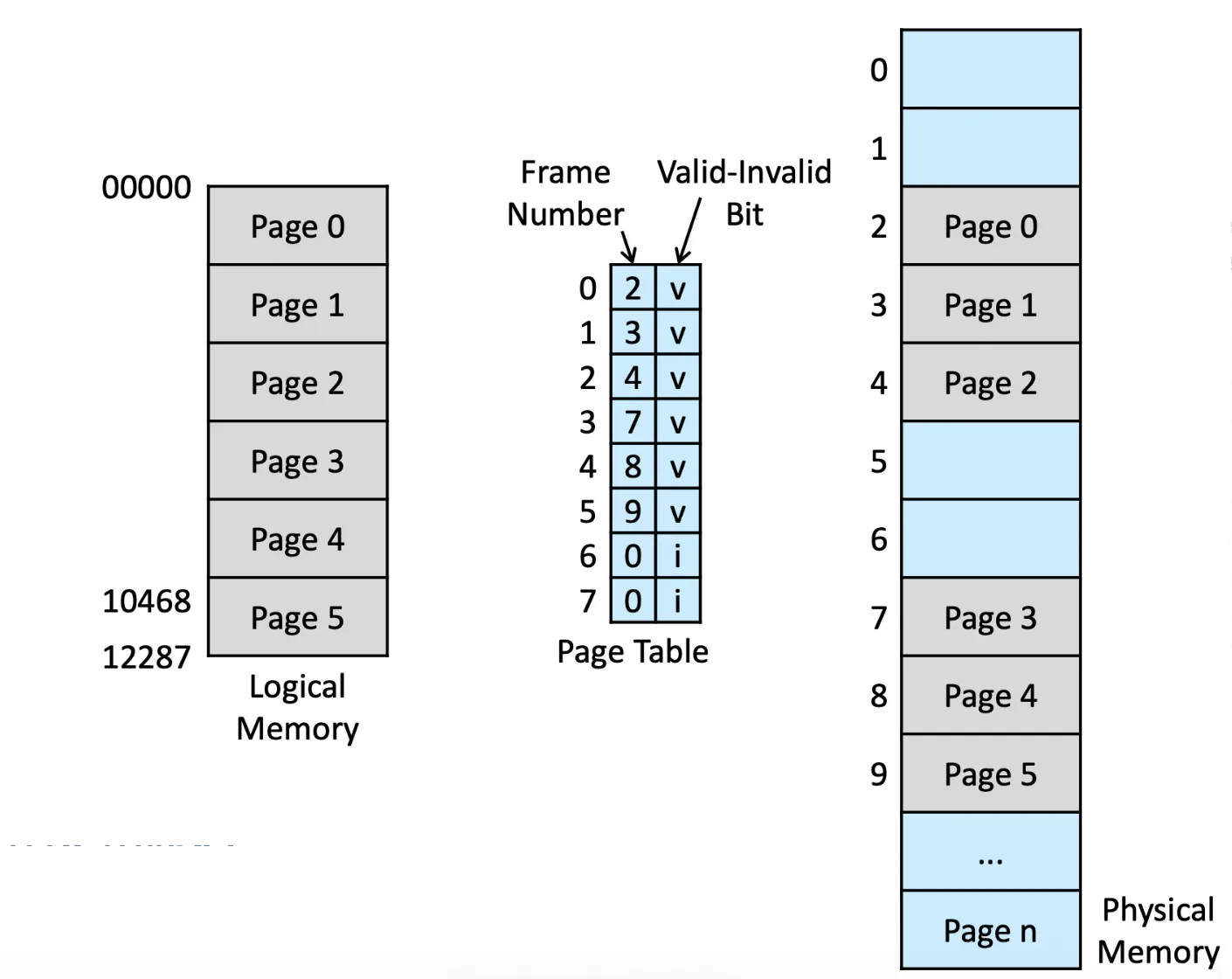
可以告訴我們哪個欄位不能 access,一遇到 invalid 就可以直接 Error trap,有可能是發生 page fault
但會有一個小問題,假設 page 5 只用了一半,但我要 access 後半的 page 5,就會產生問題
Page-table length register (PTLR)#
有一個 Memory 已經存了 Page table 的 base,這個用來存長度
Shared Pages#
有一種 Reentrant code 是不能在 Execution 的時候變化的 code,是可以被 share 的,此時如果有 Paging 就可以非常方便的在 Physical memory 上 Share 這段 code
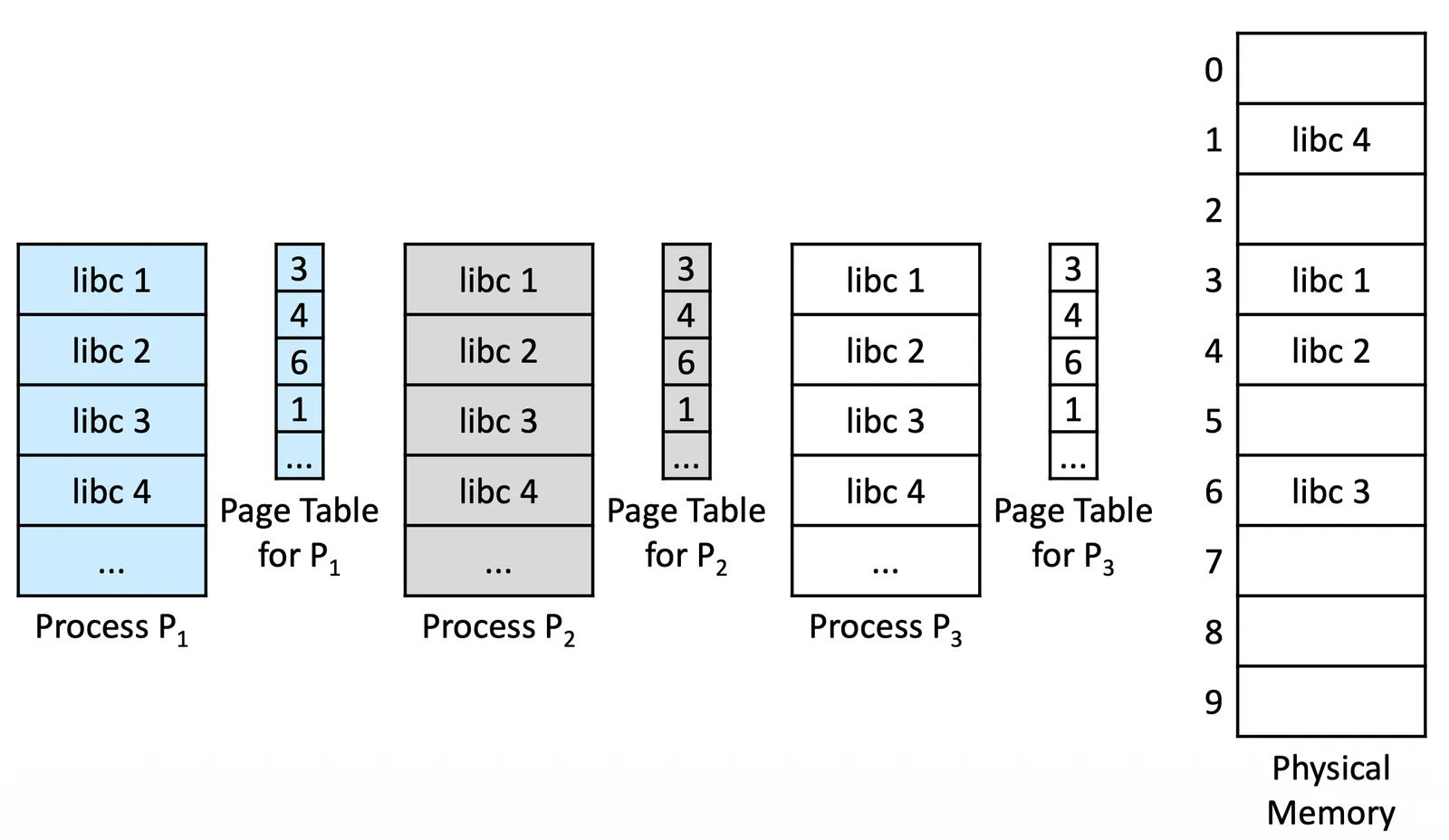
只要 Process 把自己需要的那段 Share code 放到自己的 Page table 上 mapping 過去就好了
Structure of the Page Table#
Hierarchical Paging#
考慮一個 32-bit 的系統(需要 maintain bytes, 4GB 的 virtual memory address space)假設有 4KB ( bytes) 的 page size,那 page table 就可以存
如果一個 entry 可以要用 4 bytes 存,那這個 process 就會需要 4MB 的 Physical Address Space 來存 page table,4MB 的 continuous space 是一個非常難 maintain 的東西,這種情況下我們就可以把 Page Table 切開
Two-Level Paging#
把 Page number 的存取變成一個 tree structure,讓他可以分開來(但其實使用的 total memory 會比較多,也是一種 trade-off)
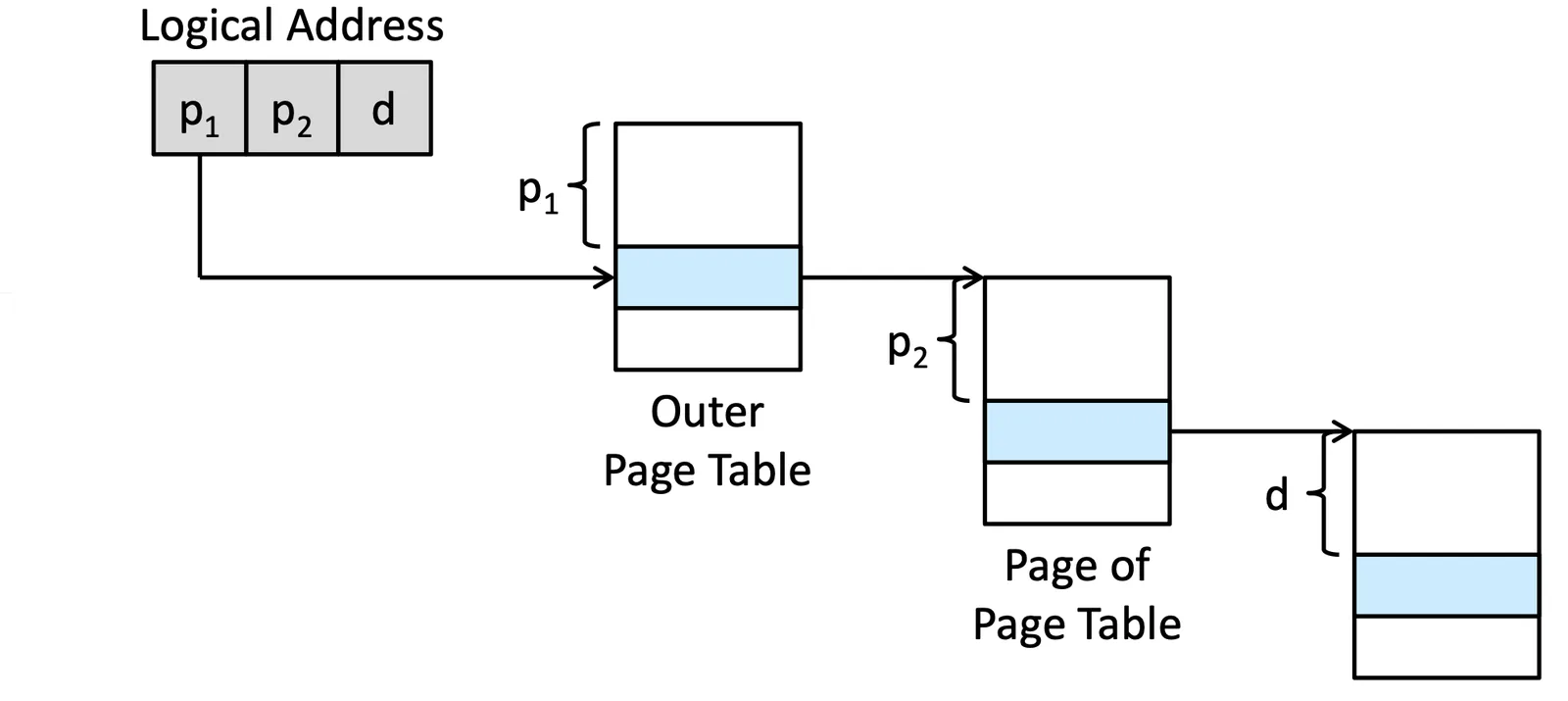
32-bit 的話就可以是: 10 bit, 10 bit
Multi-Level Paging#
但在 64-bits 的情況又不行了,又會產生嚴重的連續記憶體問題,用 two-level 的話就需要把 outer page table 變成 42 bits 依然會產生嚴重的問題,但是這樣持續分層下去,如果變成 3 層以上,又可能會產生大問題,照理來說 Page table 應該要是 one shot,這樣的多層結構可能會產生大量的 overhead
Hashed Page Tables#
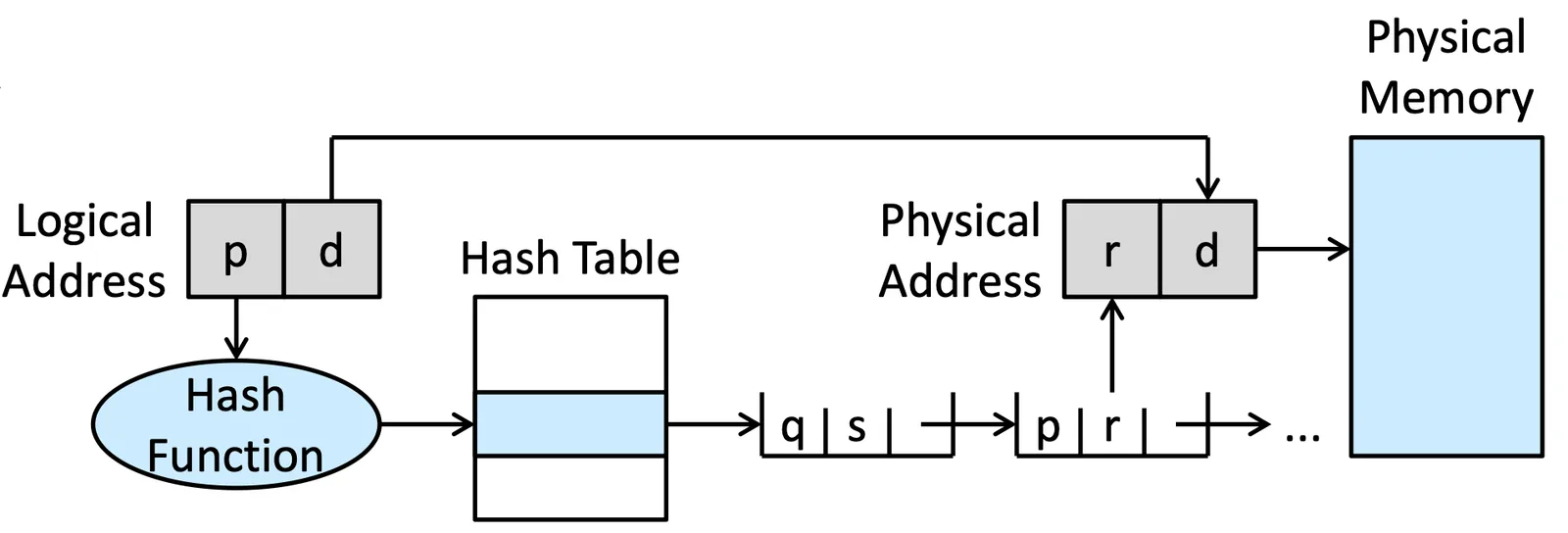
把 Page table 改成一個 Hash table,用 Hash function 到達指定 entry 後,透過 link list 的 traverse 找到對應的 Frame number
或是有種變形是在 Hash table 的 entry 換成一個 table 可以跳過 search 的步驟,我們稱為 clustered page tables
Inverted Page Tables#
檢查現在這個 Frame 正在被誰使用,也就是說這並不是個 Per process 的 data structure
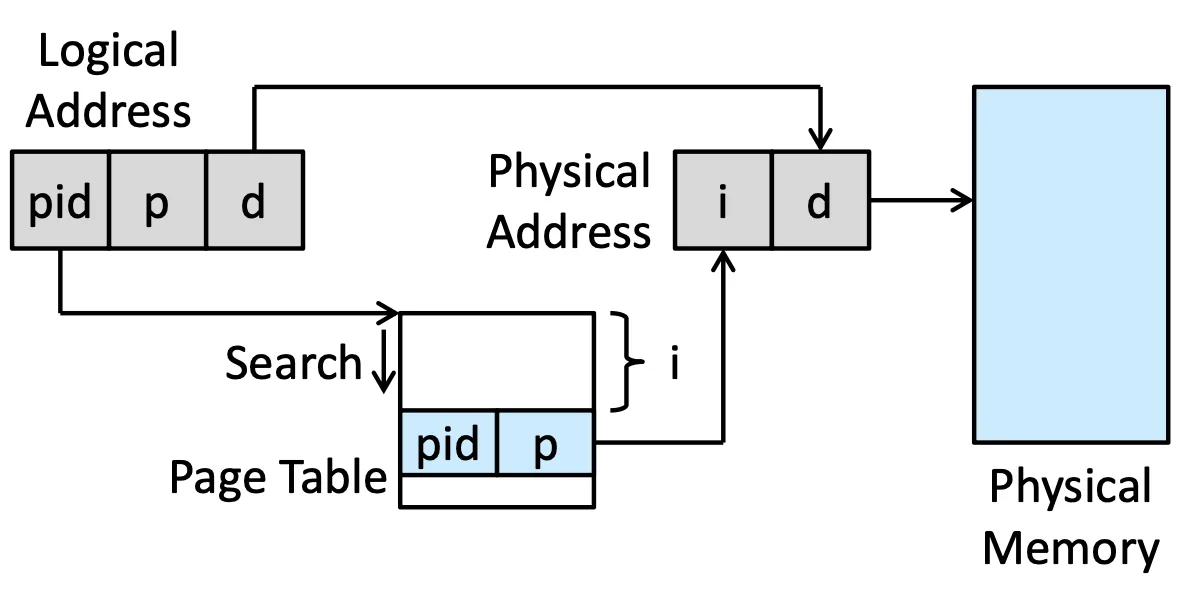
i 是 frame 的 index,如果要 access pid+p+d 這個 address,對 Page table 做 search,假設第 i 個 entry 剛好符合這個條件,那 Physical address 就會是 i+d
簡而言之,table 上的 第 i 個 entry 上面寫誰就代表 Frame i 是哪個 process 佔用的,再去 process 裡面找 offset 就好了
這樣就不需要每個 process 都存 Page table 了,但壞處是必須做 search,並且要做 Share data 會變得非常困難
Oracle SPARC Solaris#
Solaris on the SPARC CPU is a fully 64-bit operating system,他有一個 Hierarchical 的 TLB,先找 TTEs 再去看 TLB
Swapping#
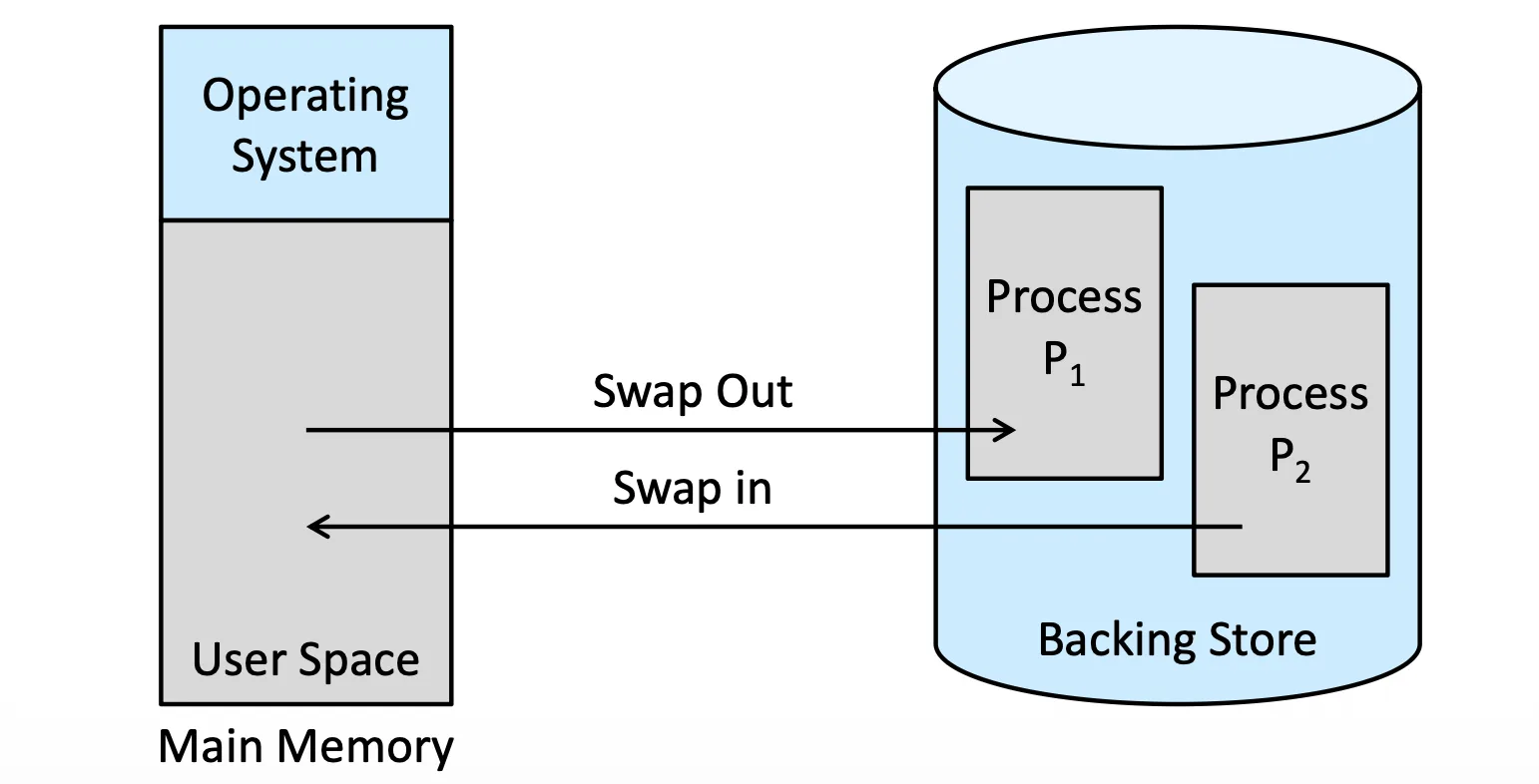
一個 Process 其實可以暫時先把它挪去 Backing Store,再回來,這樣可以造成一個效果
Standard Swapping#
標準的 Swapping 就是把整個 Process 都挪走,通常會選
- 在等待 I/O 的 Process
- 在 Sleeping 的 Process
Swapping with Paging#
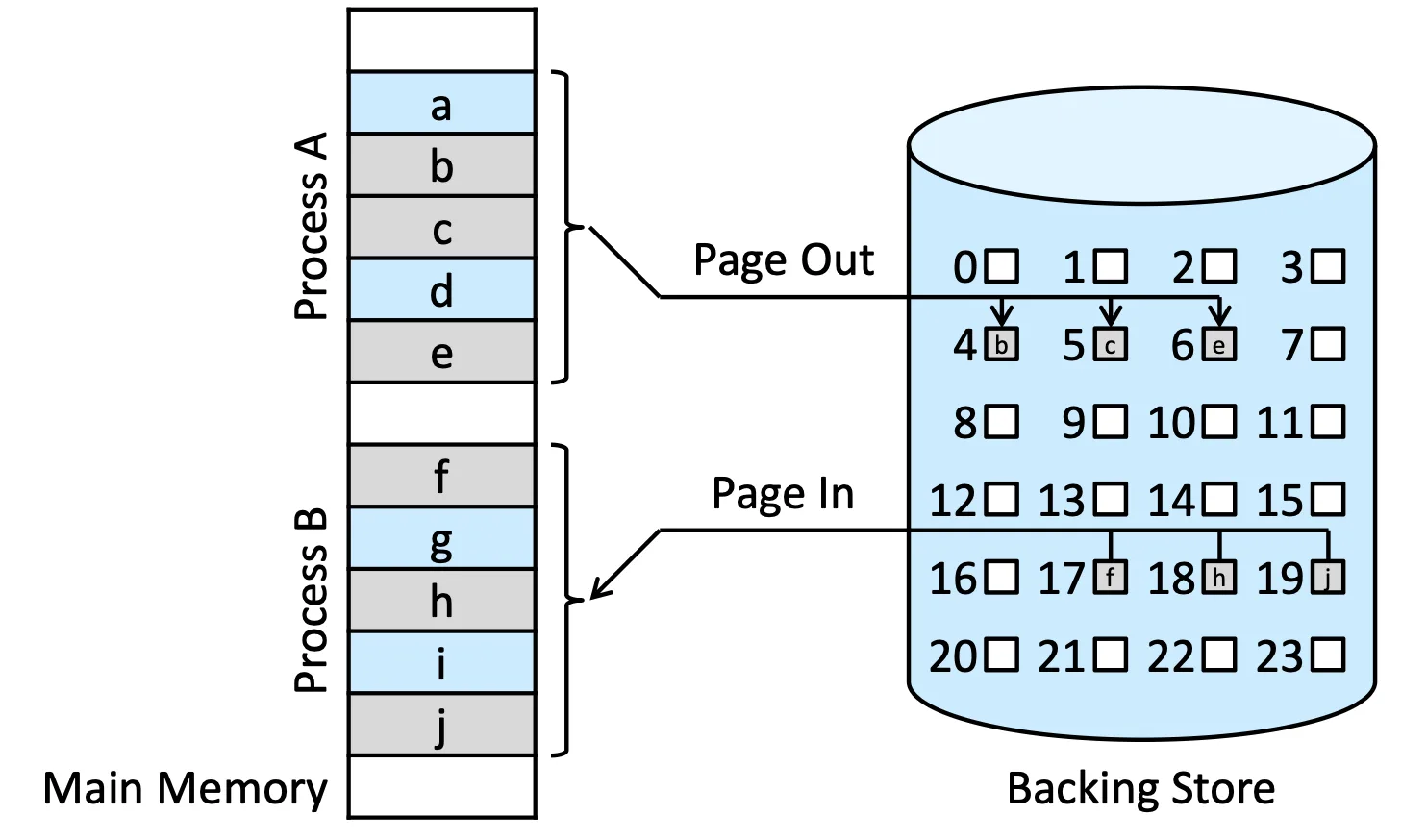
有時候不夠的 memory 只有一點點,不需要整個 Process 都搬走,又或者有些情況下,一個 Process 只有一些 resource 是不需要的,我們就搬那一些走,考慮到成本的問題,我們通常就以 Page 為單位去做搬動
該如何選擇誰要搬走就是 Ch.10 Virtual Memory 的問題
Swapping on Mobile Systems#
iOS 會要求某些 Process 釋放資源,可能從 readonly data 先,Android 也有類似的情況
Intel 32- and 64-bit Architecture#
IA-32 Architecture#
- two-level paging scheme where
p1,p2,d= 10, 10, 12 - Segmentation
x86-64#
Intel adopted AMD’s x86-64 architecture
- 可支援 64-bits
- 52-bit physical addresses with page address extension
ARMv8 Architecture#
有三種不同的 translation granules,有不同的 regions 也就是連續的 memory

有 two level TLB
- micro TLBs: inner, ASIDs supported
- main TLB: outer