Files and Directories#
Intro#
前面幾章我們都是拿到一個 fd 之後,透過 read()、write() 去操作 file content,但一個 file 除了內容以外,還有 owner、permission、size 等等資訊。這一章就是要往前追,看看我們傳進去的 pathname 到底怎麼找到 file,以及 kernel 怎麼決定這個 process 可不可以操作他
舉個例子,我們平常會覺得 file.txt 就是一個檔案,但在 Unix 裡面,可以把這件事拆成三個部分來看:
- Filename: 我們用來找到 file 的名字,記錄在 directory 裡面
- i-node: 記錄這個 file 的 metadata,以及怎麼找到他的 data
- Data: 真正的 file content,也就是前面用
read()、write()操作的 bytes
因此 filename 跟 file 本人其實是分開的,理解這件事情後,後面的 hard link、rename、unlink 就會比較好懂
Directory 本身也是一種 file,裡面記錄的是 directory entries,可以先把每個 entry 想成 (filename, i-node number),kernel 會用這個對應關係找到 file 的 i-node,再取得他的 metadata 和 content
stat()、fstat()、lstat()
前面說 file 的 metadata 會放在 i-node 裡面,但 process 不能直接跑去讀 kernel 裡面的 i-node,因此 Unix 提供這幾個 function,讓我們把資訊拿到 user space:
#include <sys/stat.h>

int stat(const char *pathname, struct stat *buf);
int fstat(int fd, struct stat *buf);
int lstat(const char *pathname, struct stat *buf);stat(): 用 pathname 找 file,如果最後一個 component 是 symbolic link,會跟著 link 去看 target filefstat(): 已經有fd,直接看這個fd指向的 filelstat(): 用 pathname 找 file,但如果最後一個 component 是 symbolic link,就看 link 本人的資訊
所以 stat() 並不是不能處理 symbolic link,而是他會 follow link,後面介紹 soft link 的時候會再舉例。這三個 function 都是成功回傳 0,失敗回傳 -1,並設定 errno,詳見 stat(2) ↗
以下是 struct stat 的主要欄位示意,實際定義會依系統有所不同:
struct stat {
    mode_t    st_mode;    /* file type + permission bits */
    ino_t     st_ino;     /* i-node number */
    dev_t     st_dev;     /* device containing this file system */
    dev_t     st_rdev;    /* device represented by a special file */
    nlink_t   st_nlink;   /* number of hard links */
    uid_t     st_uid;     /* owner UID */
    gid_t     st_gid;     /* owner GID */
    off_t     st_size;    /* logical size in bytes */
    time_t    st_atime;   /* last access time */
    time_t    st_mtime;   /* last content modification time */
    time_t    st_ctime;   /* last status change time */
    blksize_t st_blksize; /* preferred I/O block size */
    blkcnt_t  st_blocks;  /* number of allocated blocks */
};先不用把每個欄位都背起來,可以把他們分成幾組:
- 哪一個 file:
st_dev、st_ino,因為 i-node number 只在同一個 file system 裡面唯一,不能只拿st_ino比較不同 file systems 的檔案 - 誰可以用:
st_mode、st_uid、st_gid - 有多大、幾個名字:
st_size、st_blocks、st_nlink - 什麼時候被動過:
st_atime、st_mtime、st_ctime
後面的 system calls 大部分就是在查詢或改動這幾組資訊
File type#
Unix 裡面很多東西都可以透過 file interface 操作,但他們不一定是一般存資料的 file,st_mode 裡面就會記錄 file type:
| File type | 做什麼用 | 判斷用的 macro |
|---|---|---|
| Regular file | 一般檔案,content 是一串 bytes | S_ISREG(mode) |
| Directory | 存放 directory entries | S_ISDIR(mode) |
| Character special file | Character device,例如 terminal | S_ISCHR(mode) |
| Block special file | Block device,例如 Linux 的 disk device | S_ISBLK(mode) |
| FIFO | 有名字的 pipe,用來做 IPC | S_ISFIFO(mode) |
| Socket | 這裡指 file system 裡的 Unix domain socket entry | S_ISSOCK(mode) |
| Symbolic link | 存放另一條 pathname | S_ISLNK(mode) |
Regular file 裡面的 text file、binary file 對 kernel 來說都是 bytes,差別在於 program 怎麼解讀,例如 text file 會把某些 bytes 解釋成文字或換行,Unix 常見的是 \n,Windows 常見的是 \r\n
下面這段 code 就可以判斷 pathname 本人是不是 symbolic link:
#include <stdio.h>
#include <sys/stat.h>

int main(int argc, char *argv[])
{
    struct stat st;

    if (argc != 2) {
        fprintf(stderr, "usage: %s pathname\n", argv[0]);
        return 1;
    }
    if (lstat(argv[1], &st) == -1) {
        perror("lstat");
        return 1;
    }

    if (S_ISLNK(st.st_mode))
        puts("symbolic link");
    else if (S_ISDIR(st.st_mode))
        puts("directory");
    else if (S_ISREG(st.st_mode))
        puts("regular file");
    else
        puts("other file type");

    return 0;
}UID, GID and Access permission#
Unix 是 multi-user system,因此一個 file 要記錄「哪些人可以對他做哪些事情」,基本 permission 會分成 owner、group、other 三組,每一組都有 r、w、x 三個 bits
-rw-r-----
 │  │  └── other: ---
 │  └───── group: r--
└──────── owner: rw-最前面那個 - 是 file type,後面才是 permission。每一組裡面,r = 4、w = 2、x = 1,所以 rw- 是 6,r-- 是 4,rwx 是 7,上面這個 file 的 permission 就是 0640
C 裡面的整數前面加上
0代表八進位,所以0640和十進位的640是不同的數字
<sys/stat.h> 也有對應的 constants,可以不用直接寫數字:
| 對象 | Read | Write | Execute / search | 三個全部 |
|---|---|---|---|---|
| Owner | S_IRUSR = 00400 | S_IWUSR = 00200 | S_IXUSR = 00100 | S_IRWXU = 00700 |
| Group | S_IRGRP = 00040 | S_IWGRP = 00020 | S_IXGRP = 00010 | S_IRWXG = 00070 |
| Other | S_IROTH = 00004 | S_IWOTH = 00002 | S_IXOTH = 00001 | S_IRWXO = 00007 |
例如 S_IRUSR | S_IWUSR | S_IRGRP 就是 0640,讓 owner 可以讀寫、group 可以讀,other 沒有權限
Operation vs Permission#
同樣都是這三個 bits,放在 file 和 directory 上卻是在控制不同的東西:
| Permission | Regular file | Directory |
|---|---|---|
r | 讀取 file content | 列出 directory 裡的 filenames |
w | 修改 file content | 新增、移除或修改 directory entries,通常要搭配 x |
x | 把 file 當成 program 執行 | Search / traverse,用名字找到 directory 裡的 entry |
Directory 的 x 比較不直觀,舉個例子,我們已經知道有一個 /home/vinsong/file.txt,要開啟他就必須能一路走過 /、home、vinsong,所以 path 沿途的 directories 都需要 search permission,最後才檢查 file.txt 本人的 read / write permission
因此 directory 有 r 沒有 x,可能可以列出名字,卻不能進一步查詢或開啟裡面的 file;有 x 沒有 r,則可以用已知的名字找到 file,但不能列出整個 directory 的名字清單,詳見 path_resolution(7) ↗
剛剛說 directory 裡面放的是 (filename, i-node number),因此刪除一個 filename 做的事情,就是把這個 entry 從 directory 裡面移除,動到的是 directory 的 content
舉個例子,我們有下面這個 file:
work/             owner: vinsong, permission: 0700
work/report.txt owner: vinsong, permission: 0400report.txt 只有 read permission,所以不能直接 write() 他的 content,但 vinsong 對 work 有 w+x,可以移除 report.txt 這個 entry,因此仍然可以刪掉這個 filename
反過來,如果 work 是 0500,就算 report.txt 是 0600,我們可以修改 file content,卻不能移除他在 work 裡面的 entry
要改 file content,看 file 的 permission;要新增或移除名字,看 parent directory 的 permission,後面介紹 unlink() 的時候,會再接著看名字移除後 file 本人什麼時候才會被釋放
GID, UID#
剛剛都是在看 file 本人的 permission,但 kernel 還要知道來操作他的 process 是誰,才知道應該看 owner、group 還是 other 那一組
一個 process 會有幾組不同用途的 ID:
| ID | 用途 |
|---|---|
| Real UID / GID | 通常反映啟動這個 process 的使用者身分 |
| Effective UID / GID | 用來決定 process 現在以誰的權限操作資源 |
| Saved set-user-ID / set-group-ID | 保存 exec 後的 effective ID,讓 program 可以依規則暫時放下、再恢復權限 |
Process 還可以屬於其他 supplementary groups,因此判斷基本 file permission 的順序是:
- 如果 effective UID 等於 file owner 的 UID,使用 owner 那一組
- 否則,如果 file 的 GID 等於 effective GID,或在 supplementary groups 裡面,使用 group 那一組
- 都不是,才使用 other 那一組
這三組不是加起來算,舉個例子,如果我們就是 owner,但 owner 那組沒有 read permission,kernel 不會因為 other 那組有 r 就改看 other
這裡先用課堂的基本 permission model 解釋,ACL 可以再細分特定 user / group 的權限,superuser 也有特權規則。Linux 實際檢查 file access 使用的是 filesystem UID / GID,通常跟 effective ID 相同,詳見 credentials(7) ↗
Set GID/UID
我們平常執行一個 program,process 的 effective UID 通常就是自己的 UID,但有些 program 需要替使用者做一件他本來沒有權限做的事情
舉個例子,普通使用者不能直接修改系統的 password database,卻可以透過 passwd 修改自己的密碼。傳統 Unix 的做法就是讓這個 program 使用 set-user-ID,執行時取得 executable owner 的 effective UID,再由 program 檢查這個使用者到底可以改哪些資料
- Set-user-ID: 執行 program 時,effective UID 變成 executable owner 的 UID,bit 是
04000 - Set-group-ID: 執行 program 時,effective GID 變成 executable 的 GID,bit 是
02000
先看沒有 set-user-ID 的情況,假設 user B 不在 A 的 group 裡面,而且沿途的 directories 都可以 search:
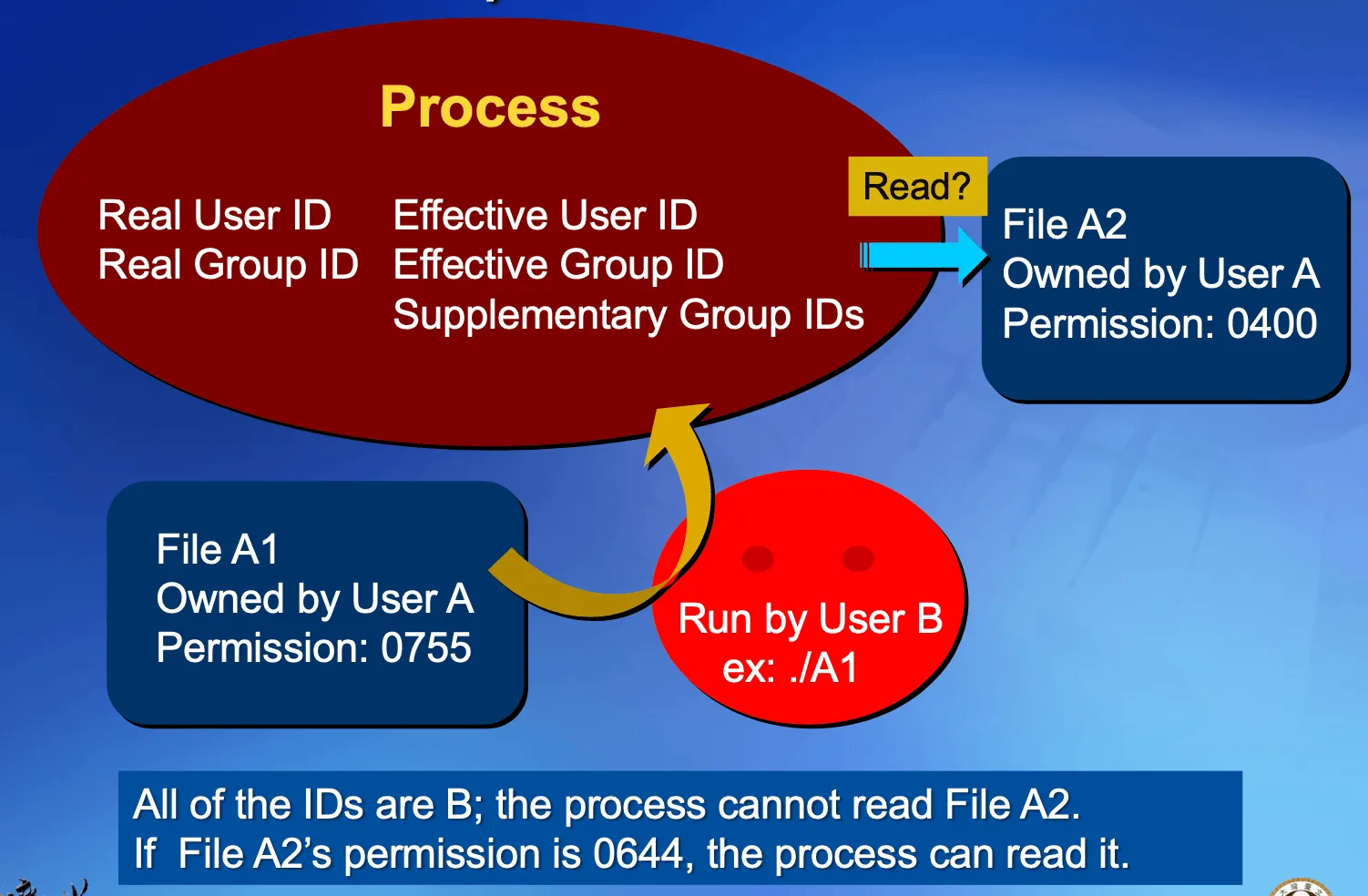
A1的 owner 是 A,permission 是0755,B 看 other 那一組r-x,所以可以執行- 執行後 process 的 real UID 和 effective UID 都還是 B
- Program 想讀取
A2,但A2是 A 的檔案,而且 permission 是0400 - 因為現在 effective UID 是 B,只能看 group / other 的 permission,這裡都沒有
r,所以不能讀
現在我們把 A1 改成 04755,也就是多加上 set-user-ID:
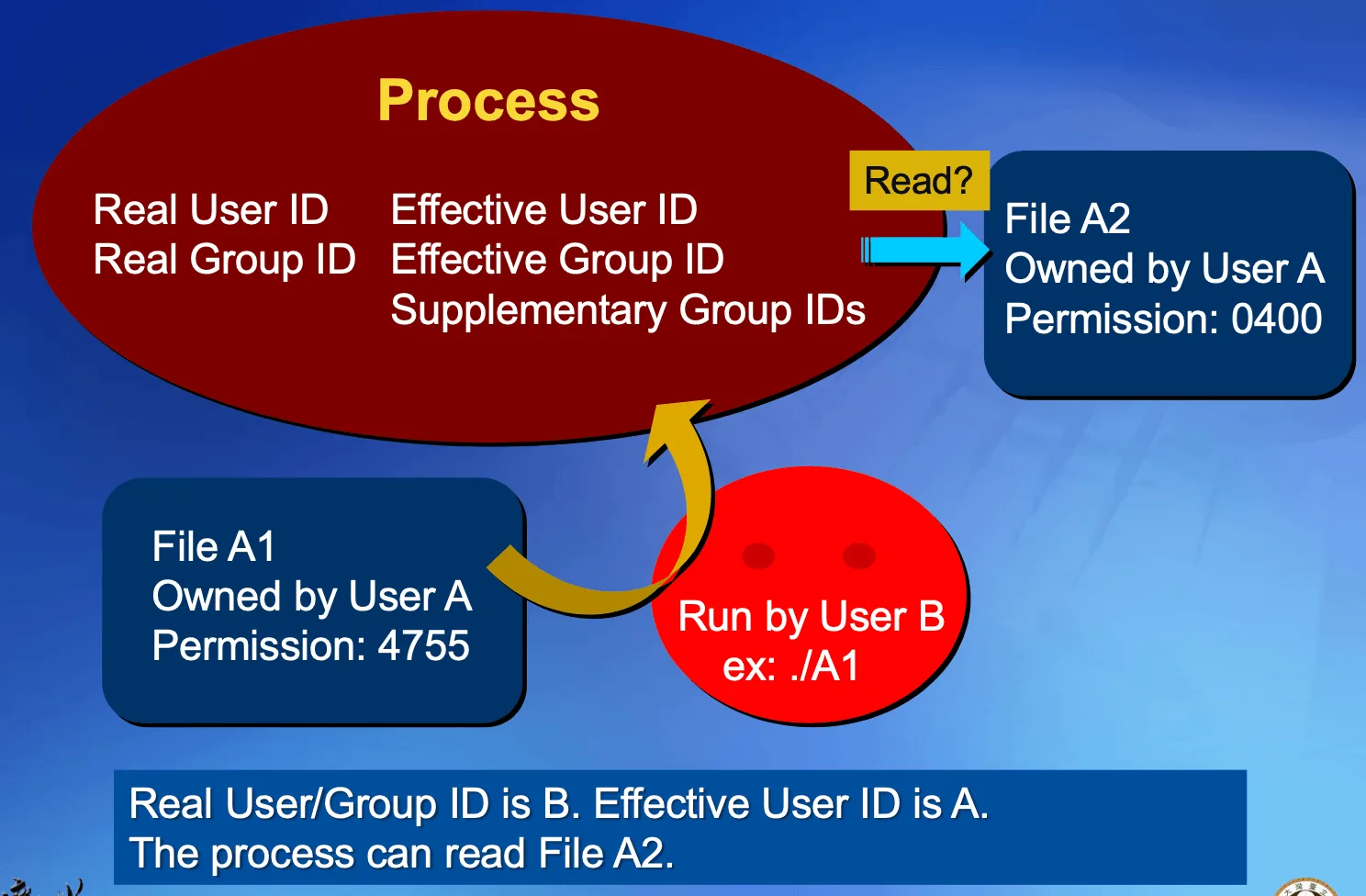
- B 一樣先用自己的身分判斷可不可以執行
A1,other 的x仍然存在,所以可以執行 - 執行後 real UID 還是 B,effective UID 變成 A
- Program 再去讀
A2時,kernel 看到 effective UID 是 A,就使用A2的 owner permission - Owner 那組有
r,因此這次可以讀取
借到權限的是正在執行 A1 的 process,B 的 shell 並沒有一起變成 A,所以 B 回到 shell 直接開啟 A2,一樣不會因此得到權限。只設定 set-user-ID 也不會順便把 GID 變成 A 的 GID
在 ls -l 裡面,set-user-ID 會顯示在 owner 的 x 位置,set-group-ID 則是在 group 的 x 位置:
-rwsr-xr-x    set-user-ID + owner execute
-rwxr-sr-x set-group-ID + group execute小寫 s 表示 special bit 和對應的 x 都有,大寫 S 則表示只有 special bit,沒有那一格的 execute permission
上面的例子假設系統允許 set-ID 生效,例如 file system 沒有用
nosuid掛載。Program 得到 owner 身分後,必須自己限制可以做的事情,並不是讓呼叫他的人任意操作 owner 的所有檔案
Ownership#
新 file 的 owner UID 通常是建立他的 process 的 effective UID,GID 則可能來自 process 的 effective GID,或 parent directory 的 GID,取決於系統和 file system 的規則
例如 Linux 上,如果 parent directory 設了 set-group-ID,新 file 就會繼承 directory 的 GID,方便同一個 group 的人共享資料。這裡是 set-group-ID 用在 directory 的效果,跟剛剛用在 executable 上改變 process effective GID 的效果不同
access()
#include <unistd.h>

int access(const char *pathname, int mode);access() 可以測試 pathname 是否存在,或某個使用者身分有沒有指定的 permission:
F_OK: 是否存在R_OK: 是否可以讀W_OK: 是否可以寫X_OK: 是否可以執行,對 directory 則是 search
他比較特殊的地方是,使用 real UID / GID 做檢查,而一般的 open() 使用 effective 身分。因此前面的 set-user-ID example 裡,real UID 是 B、effective UID 是 A,access("A2", R_OK) 可能失敗,但 open("A2", O_RDONLY) 可以成功
umask()
#include <sys/stat.h>

mode_t umask(mode_t cmask);umask() 設定的是 process 建立新 file 時要遮掉哪些 permission bits,不是設定某一個已經存在的 file,並且會回傳舊的 mask
沒有 default ACL 等額外規則時,實際 permission 可以這樣算:
實際 permission = 程式請求的 mode & ~umask舉個例子,我們設定 umask(0022),代表 group 和 other 的 write bits 要關掉:
umask(0022);
int fd = open("file.txt", O_WRONLY | O_CREAT | O_EXCL, 0666);
/* 若建立成功,新 file 的 permission 是 0644 */

mkdir("work", 0777);
/* 若建立成功,新 directory 的 permission 是 0755 */所以程式寫 0666 不代表最後一定是 0666。這是 bitwise AND,不是一般減法,例如 0666 & ~0001 還是 0666,因為原本就沒有 other execute bit 可以關掉
Shell 的 umask 通常是 built-in command,因為要改的是 shell 自己的 mask,之後從 shell 建立的 child processes 才會繼承他。如果另外開一個 child 去改自己的 mask,parent shell 的 mask 不會跟著改,詳見 umask(2) ↗
chmod()、fchmod()
#include <sys/stat.h>

int chmod(const char *pathname, mode_t mode);
int fchmod(int fd, mode_t mode);chmod() 用 pathname 找 file,fchmod() 用已經開好的 fd,兩個都是改 file 的 mode bits,例如 permission、set-user-ID、set-group-ID 等等
呼叫者通常必須是 file 的 owner,也就是 effective UID 跟 file 的 UID 相同,或具有相應特權;沒有權限會失敗,不是默默把這次操作忽略掉
chmod 600 file.txt
chmod g+r file.txt
chmod u+s program這裡修改的是 i-node 的 metadata,並沒有修改 file content,但 metadata 最後也要寫回 storage,不能把「沒有改 content」理解成「永遠不會有 disk I/O」
Sticky Bit (Save-text bit)
如果一個 directory 讓大家都有 w+x,照前面的規則,每個人都可以移除別人的 directory entry。像 /tmp 是大家共用的地方,我們會希望每個人都可以建立檔案,但不能隨便刪掉別人的檔案,因此會加上 sticky bit
Sticky bit 設在 directory 上時,除了原本需要的 w+x 以外,刪除或 rename 裡面的 entry 還必須符合以下其中一個條件:
- Process 是 file 的 owner
- Process 是 directory 的 owner
- Process 有相應的特權,例如 superuser
所以 /tmp 常見的 mode 是 01777,0777 讓大家可以使用這個 directory,前面的 01000 才是 sticky bit
drwxrwxrwt最末尾的 t 表示 sticky bit 跟 other 的 x 同時存在,如果只有 sticky bit 沒有那個 x,就會顯示成大寫 T
Sticky bit 以前也叫 save-text bit,曾經用來保留 executable 的 text segment 在 swap 裡面,方便再次執行;這是歷史用途,現在這章要記的是 directory 的刪除限制,詳見 chmod(2) ↗
chown()、fchown()、lchown()
#include <unistd.h>

int chown(const char *pathname, uid_t owner, gid_t group);
int fchown(int fd, uid_t owner, gid_t group);
int lchown(const char *pathname, uid_t owner, gid_t group);這幾個 function 是修改 file 的 owner / group,差別跟 stat() 那組很像:
chown(): 用 pathname,如果最後是 symbolic link,就 follow 到 targetfchown(): 用fdlchown(): 如果最後是 symbolic link,就改 link 本人的 ownership
owner 或 group 傳入 -1 代表那一項不改。以 Linux 為例,改 owner UID 需要相應特權,file owner 可以把 group 改成自己所屬的 group,並不是只要擁有 file 就可以隨便把 owner 改成別人,詳見 chown(2) ↗
Limit#
不同系統可能允許不同的 filename 長度、pathname 長度或 file descriptors 數量,因此有些限制可以從 header 裡的 constants 得知,有些則要在執行時查詢,不能全部寫死在程式裡面
#include <unistd.h>

long sysconf(int name);
long pathconf(const char *pathname, int name);
long fpathconf(int fd, int name);sysconf(): 查詢 system / process 相關的 configuration,例如_SC_OPEN_MAX、_SC_CHILD_MAXpathconf(): 查詢指定 file / directory 相關的 configurationfpathconf(): 做類似的查詢,但使用已經開好的fd
後兩者可以用 _PC_NAME_MAX 查單一 filename 的長度限制,_PC_PATH_MAX 查相關的 pathname 限制,_PC_LINK_MAX 查 hard link 數量限制,_PC_PIPE_BUF 查 pipe / FIFO 一次 write 能保證 atomic 的大小;_PC_SYMLINK_MAX 則是 POSIX 定義的 symbolic link 內容長度查詢項目,支援情況要看系統
回傳
-1不一定是 error,也可能是沒有確定的 limit。可以在呼叫前把errno設成0,如果結果是-1,再看errno有沒有被設定,詳見 pathconf(3) ↗
File Size#
st_size 記錄的是 file 的 logical size,regular file 就是從開頭到 EOF 有多少 bytes;symbolic link 則是他存放的 pathname 有多少 bytes,不包含結尾的 \0
Directory 的 st_size 跟 directory entries 的儲存方式有關,不是把裡面所有 file 的大小加起來,entry size 和配置方式也依 file system 而不同
第二章提過的 file hole 就是一個 logical size 跟實際配置空間不同的例子,假設我們先把 offset 移到 1 MiB 的位置,再寫入一個 byte:
lseek(fd, 1024 * 1024, SEEK_SET);
write(fd, "A", 1);如果原本是空檔案,現在 logical size 就是 1 MiB + 1 byte,但支援 sparse file 的 file system 不需要真的替前面每個 byte 配置 data block,讀取沒有配置的部分會得到 \0
反過來,一個很小的 file 如果使用了一個完整的 data block,實際配置的空間也可能比 logical size 大,因此 st_size 和 st_blocks 要分開看
st_size: Logical size,單位是 bytesst_blocks: 實際配置的 block 數量,Linux 這個欄位以 512-byte units 計算,不能直接乘上st_blksizest_blksize: 建議使用的 I/O block size,不是st_blocks的計量單位
因此 ls -l 看到的大檔案,不一定真的佔用了同樣多的 storage,詳見 inode(7) ↗
truncate()、ftruncate()
#include <unistd.h>

int truncate(const char *pathname, off_t length);
int ftruncate(int fd, off_t length);這兩個 function 可以把 regular file 的 size 調整成 length bytes,truncate() 用 pathname,ftruncate() 用 fd,後者的 fd 必須是可寫的
- 如果比原本短,多出來的 content 就會被丟掉
- 如果比原本長,在一般支援延伸的 Unix file system 上,新增的部分讀出來會是
\0 - 不會改變 current file offset
舉個例子,offset 原本在 100,我們呼叫 ftruncate(fd, 0) 把 file 清空,offset 仍然在 100。如果沒有 O_APPEND,接著直接寫入就可能在前面留下 hole,所以調整 size 和移動 offset 是兩件不同的事情,詳見 truncate(2) ↗
Unix file and directory#
Structure#
Directory 本身也是一種 file,只是他的 content 是用來記錄其他檔案的 directory entry,我們可以先把一個 entry 想成下面這樣:
(filename, i-node number)假設我們要開啟 /home/vinsong/file.txt,kernel 就會沿著這條 path 去找:
- 從
/的 directory 裡面找到home的 entry,拿到對應的 i-node - 從
home的 directory 裡面找到vinsong的 entry - 從
vinsong的 directory 裡面找到file.txt的 entry - 最後透過
file.txt的 i-node,找到他的 metadata 和 data blocks
換句話說 directory 負責記錄「這個名字對應到哪個 file」,owner、permission、size 則是記錄在 file 的 i-node 裡面
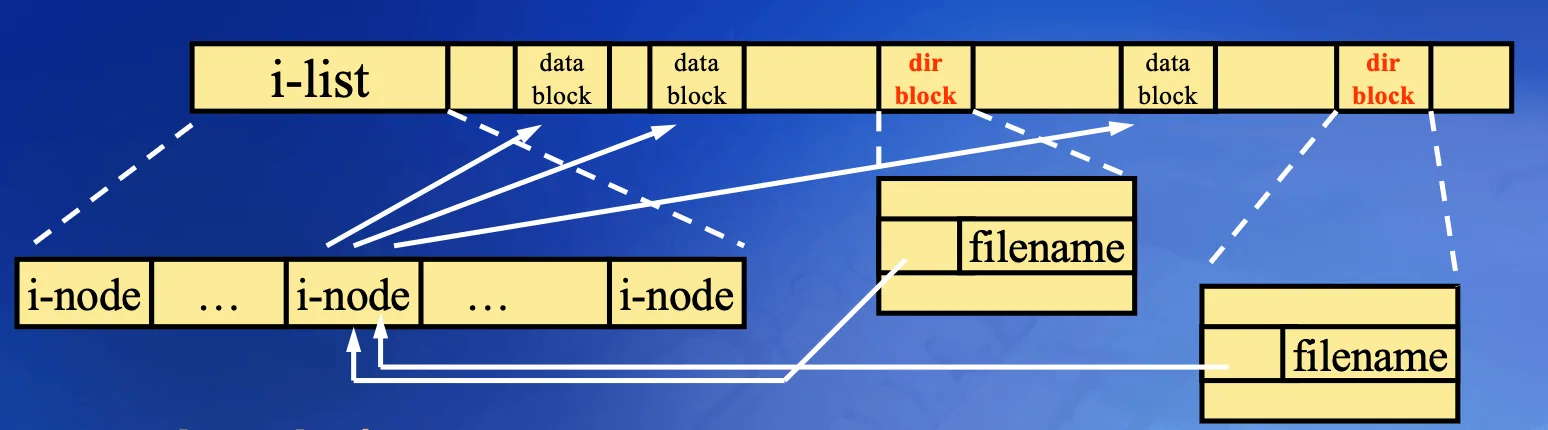
看上面這張圖,兩個不同 directory block 裡面的 filename 都可以指向同一個 i-node,因此 一個 file 可以有多個名字,但這些名字背後是同一份 metadata 和 content,這就是後面會介紹的 hard link
Directory entry 的格式由 file system 決定,process 要新增或移除 entry,必須透過 link()、unlink()、mkdir() 這類 interface,不能把 directory 當成一般 text file 隨意 write(),不然整個檔案結構就會被破壞掉
每個 directory 都可以用 . 表示自己,用 .. 表示 parent directory,下面這張圖就是一個例子:
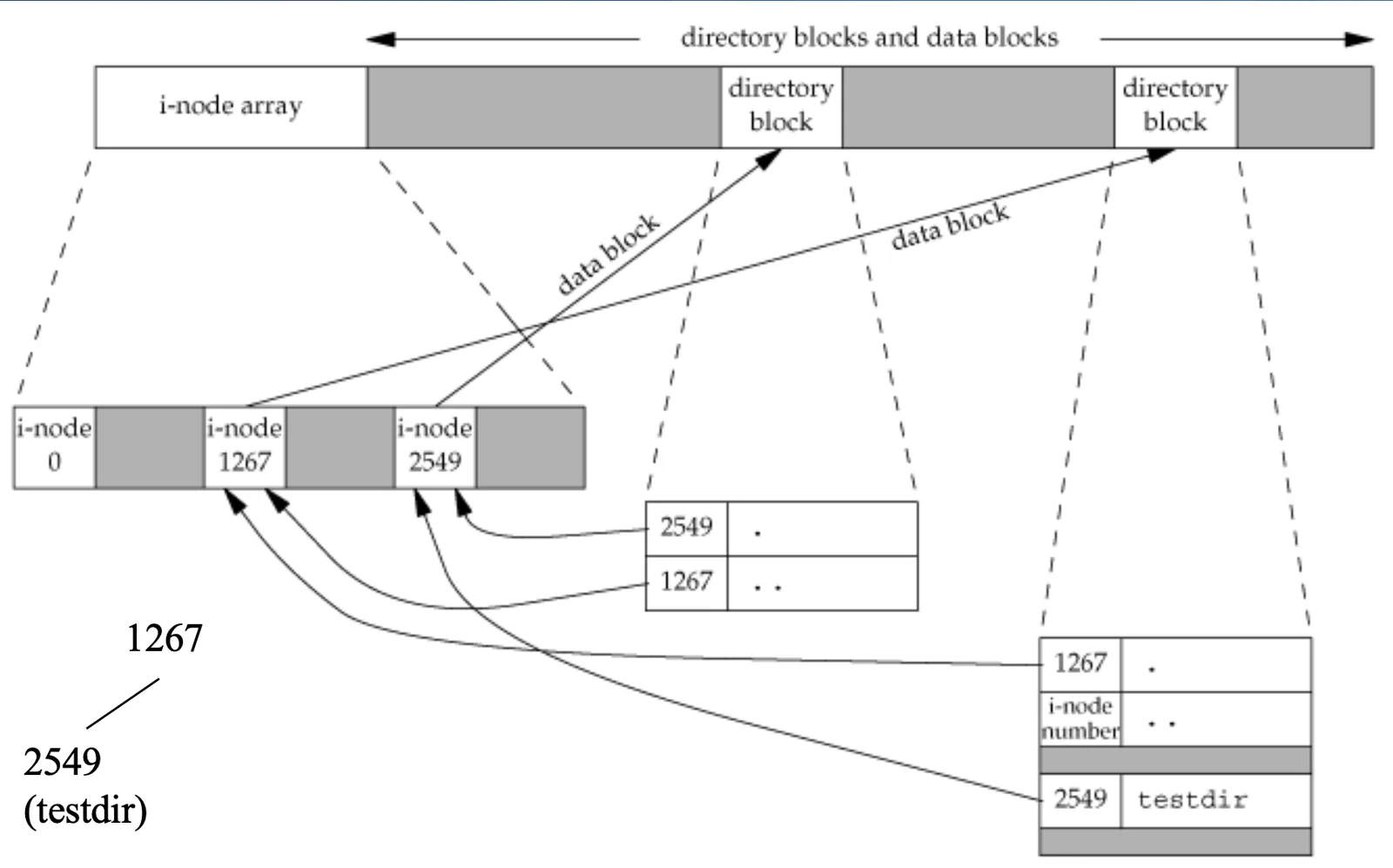
- Parent directory 的 i-node number 是
1267,裡面的testdirentry 指向2549 testdir裡面的.指向自己,所以是2549testdir裡面的..指向 parent,所以是1267
因此我們在 testdir 裡面執行 cd ..,就是回到他的 parent directory,root directory 的 .. 則還是 root 自己
傳統 Unix file system 會把這些 entry 算進 directory 的 link count,所以一個 directory 通常從 2 開始,每多一個直接的 subdirectory,就會多一個
..指向他。不同 file system 的實作可能不同,不要把這個數字當成所有系統都一定一樣的規則
Unix 會把不同 file system 接在同一棵以 / 為根的 directory tree 底下,接上去的動作就叫做 mount。例如另一個 disk partition 可以 mount 在 /mnt/data,我們一樣用 pathname 去 access,不需要換另一套 I/O API
以下是課堂用來說明的傳統 BSD file system layout:
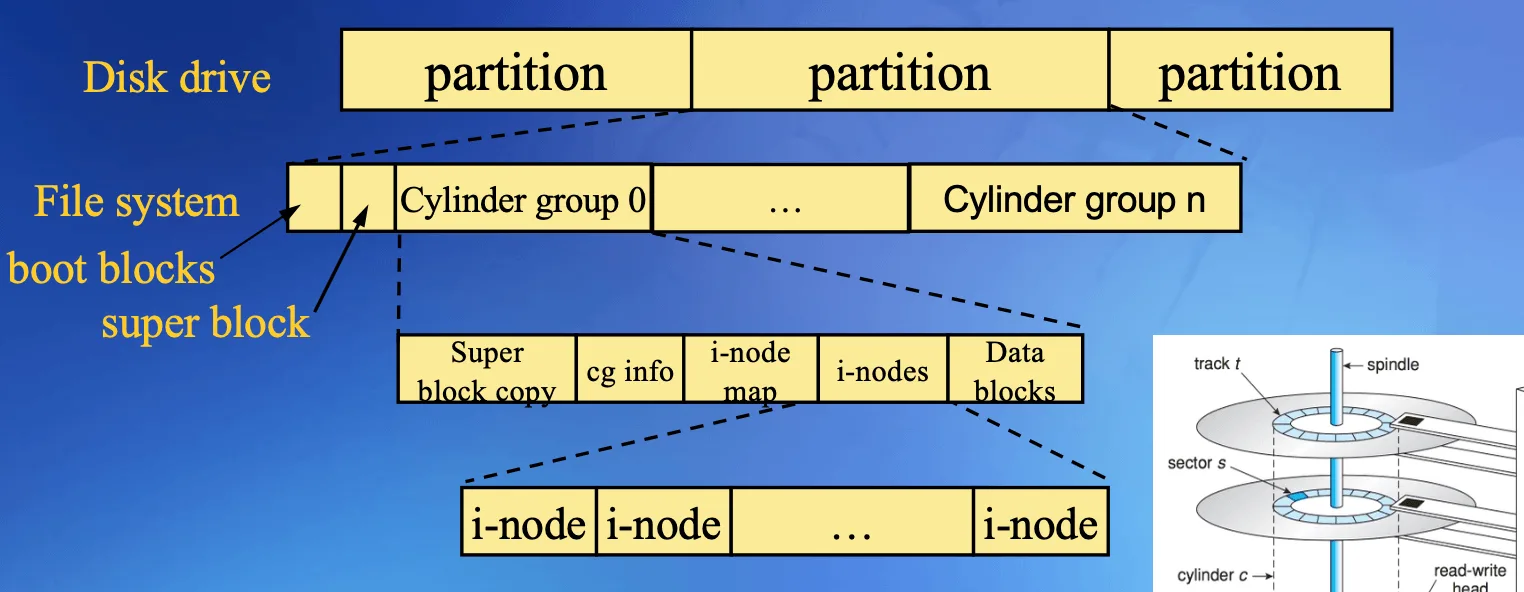
- Boot blocks: 保留給開機相關的資訊
- Super block: 記錄整個 file system 的資訊,像是大小、block size 等等
- Cylinder groups: 把 i-nodes 和 data blocks 分散成幾個 group,讓相關資料可以放得比較近,減少 HDD 移動磁頭的成本
- Maps: 記錄哪些 i-node、data block 已經被使用,建立新檔案的時候才知道哪裡還有空位
Super block 也可以有備份,不同 file system 不一定採用一樣的 layout,但我們可以看到,i-node 跟 data block 是分開管理的
一個 file 可能很小,也可能大到需要很多 blocks,如果每個 file 的 i-node 都直接放一大堆 pointers,就算檔案只有幾個 bytes,也會浪費很多空間,因此傳統 Unix 會把 pointer 分成幾個層次:
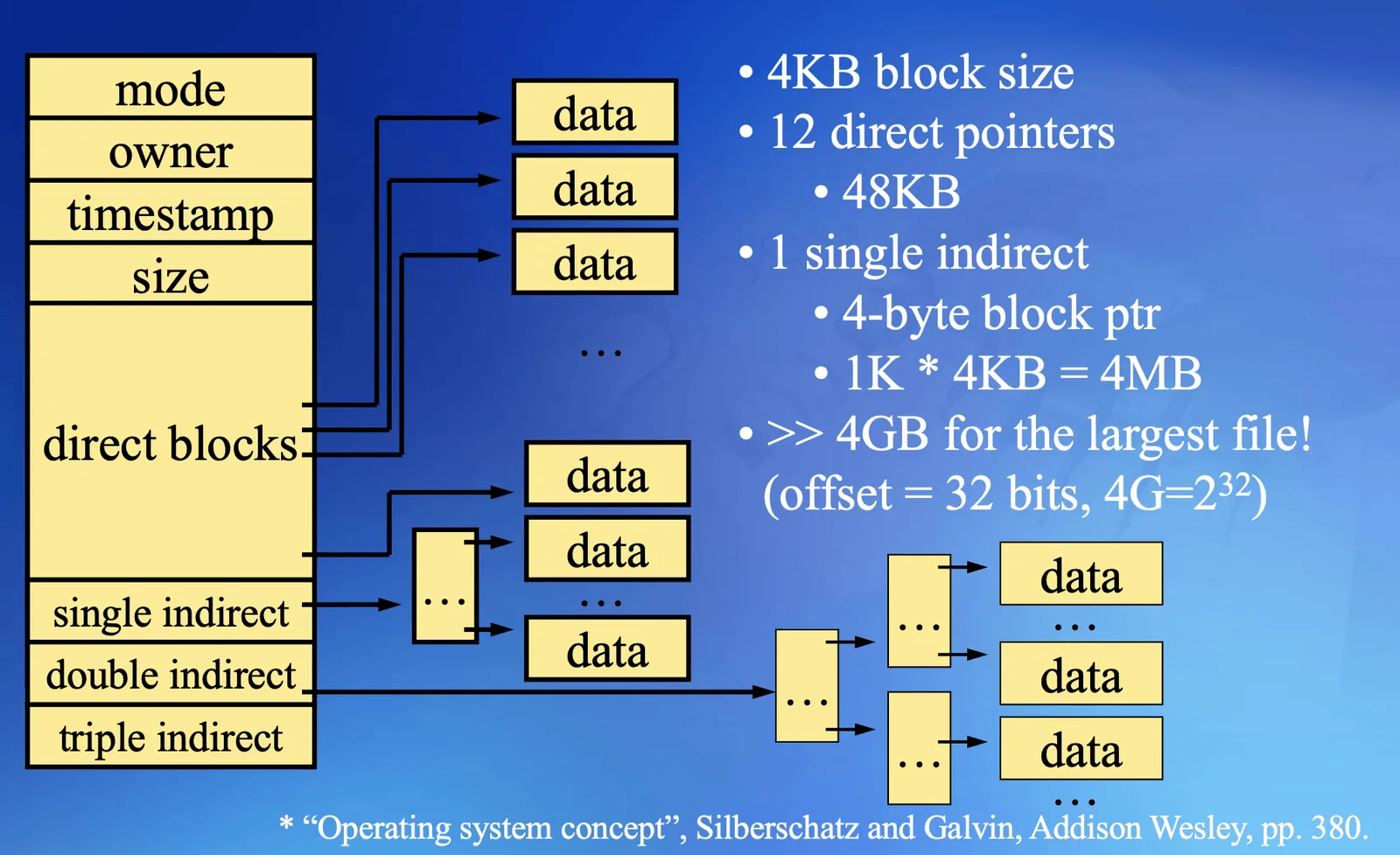
- Direct block: pointer 直接指向存放 content 的 data block
- Single indirect: pointer 指向一個裝滿 block pointers 的 block,再從那裡找到 data
- Double indirect: 多一層,先找到一個裝滿 single indirect pointers 的 block
- Triple indirect: 再多一層,讓更大的 file 也放得下
舉個例子,上面這張圖假設 block size 是 4 KiB,一個 pointer 是 4 bytes,那麼一個 indirect block 就可以放 4096 / 4 = 1024 個 pointers,single indirect 這一部分就可以找到 1024 × 4 KiB = 4 MiB 的 data
這樣小檔案只要用 direct pointers 就好,大檔案才需要多走幾層,indirect blocks 也可以被 cache 在 memory 裡面,並不是每次都要重新做 disk I/O
這是課堂的 pointer-based layout,現代 file system 也可能用 extent 等其他方式記錄 data 的位置;圖上的 pointer 數量、block size 和最大檔案大小都不是所有 Unix 系統共同的限制
現在我們把第二章的 file descriptor 放回來,就可以看到完整的關係:
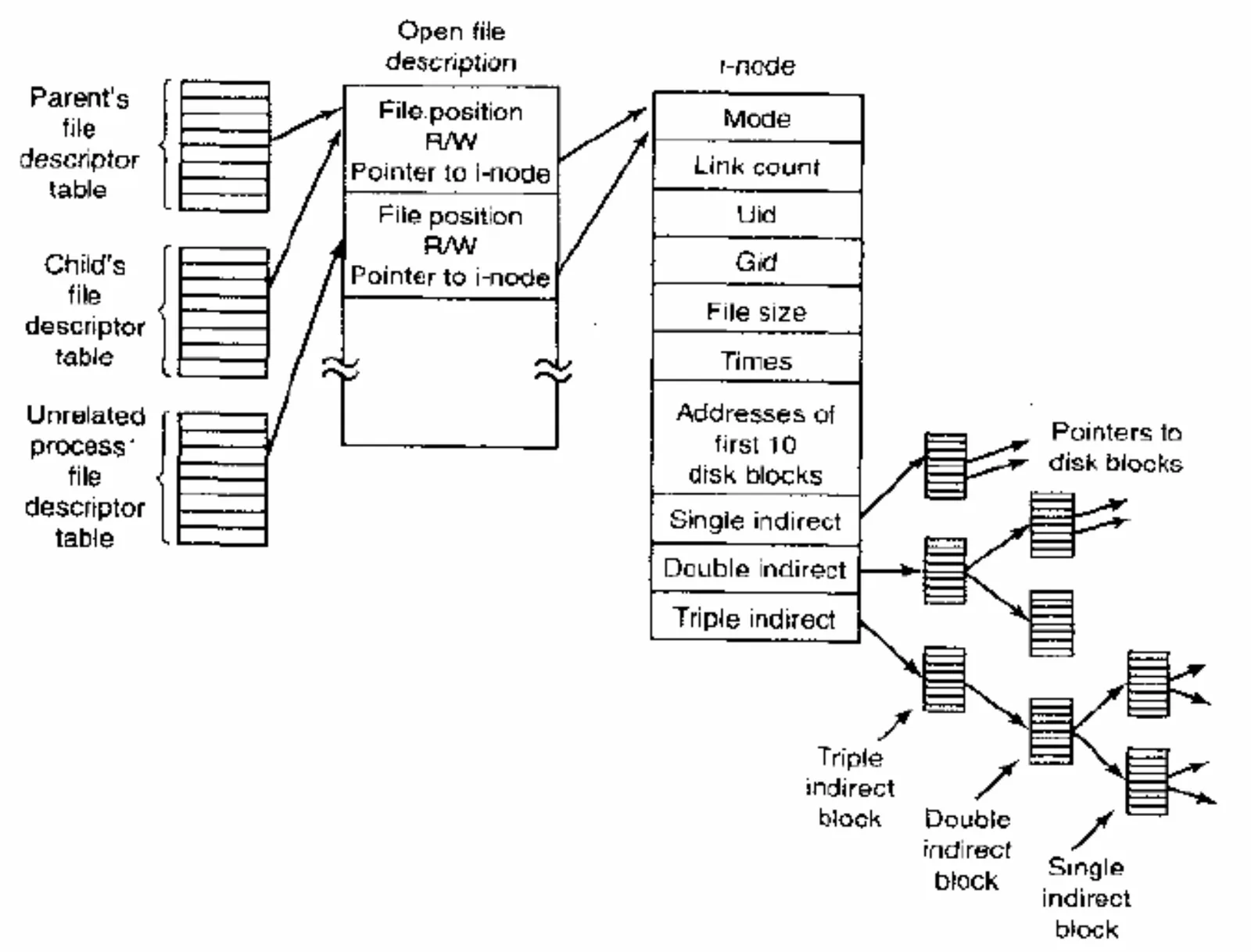
fd → open file description → i-node → data blocks- File descriptor table: 每個 process 用自己的
fd找到對應的 open file description - Open file description: 也就是前面說的 open file table entry,記錄這次開啟的 access mode、file offset 等等
- i-node: 記錄 file 本人的資訊,多個 open file descriptions 可以指向同一個 file
因此 open() 同一個 file 兩次,通常會得到兩個獨立的 open file descriptions,offset 各自移動;dup() 或 fork() 則可以讓不同 fd 指向同一個 open file description,共享 offset
Hard link & Soft link#
Hard link
前面說 filename 是記錄在 directory entry 裡面,因此我們可以新增另一個 entry,讓另一個 filename 也指向同一個 i-node,這個動作就叫做 hard link
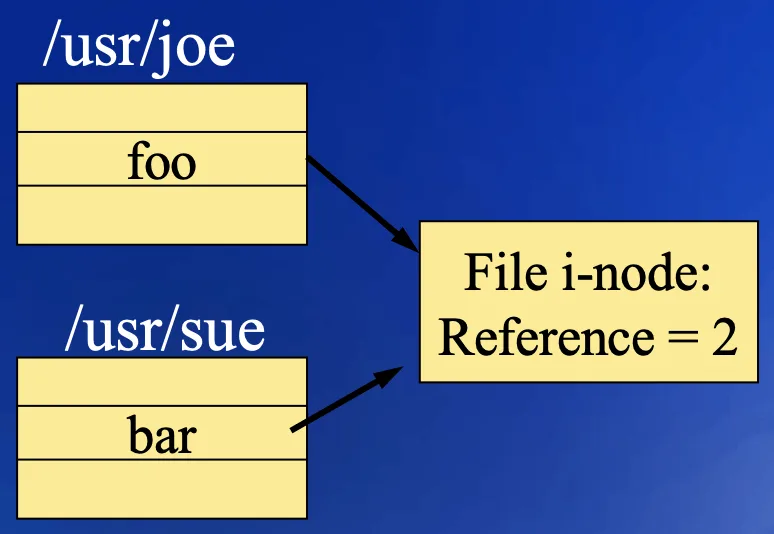
看上面這張圖,/usr/joe/foo 和 /usr/sue/bar 都指向同一個 i-node,所以 st_nlink = 2,兩個名字背後的 owner、permission、content 都是同一份
舉個例子,我們可以用 shell 做下面的操作:
printf 'hello\n' > file.txt
ln file.txt another.txt
ls -li file.txt another.txtls -i 會印出 i-node number,我們可以看到兩個名字的 number 一樣,link count 都是 2。這時候從 another.txt 寫入,就是在修改 file.txt 背後的同一份 content,並沒有多 copy 一份資料
如果把 file.txt 這個名字刪掉,link count 就從 2 變成 1,another.txt 仍然可以找到同一個 file,因此 hard link 並沒有「一個是本體、一個是捷徑」的區別
Hard link 有幾個限制:
- 不能跨 file system: i-node number 是 file system 內部的編號,不能把另一個 file system 的編號直接拿來用
- 一般不允許對 directory 建立 hard link: 否則 directory tree 可能出現額外的 parent 或 cycle,讓 traverse 和刪除變得很複雜;Linux 的
link()也不允許 superuser 用這種方式連結 directory - 仍然要通過 permission 檢查: 新 entry 所在的 directory 要有
w+x,系統也可能限制對別人的 file 建立 hard link
Soft link (Symbolic link)
Soft link 的做法不一樣,他會建立一個 新的 link file,有自己的 i-node,內容則是一條 pathname。當 kernel 遇到這個 link 時,就沿著裡面的 pathname 繼續找 target
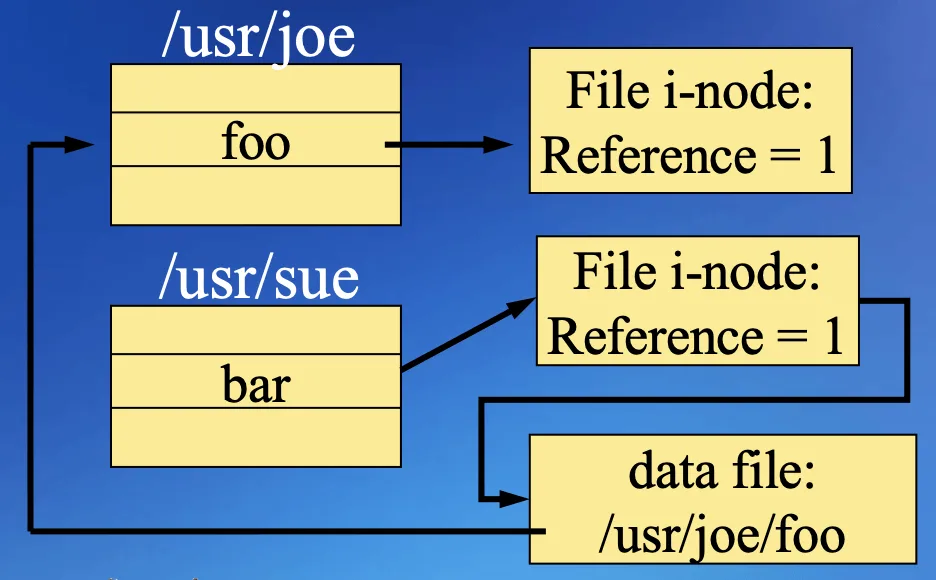
看上面這張圖,/usr/sue/bar 指向的是 link 自己的 i-node,link 裡面記錄 /usr/joe/foo,再透過這條 path 去找 foo
因此 soft link 可以跨 file system,也可以指向 directory,甚至可以指向一個目前還不存在的 pathname。但 target file 的 st_nlink 不會因為這個 soft link 而增加,target 並不知道有多少 soft links 指向自己
ln -s file.txt shortcut.txt現在開啟 shortcut.txt,一般會 follow link 去開啟 file.txt,但如果我們把 file.txt 改名或移除,shortcut.txt 裡面的字串不會自動更新,這時候 link 還在,卻找不到原本的 target,叫做 dangling link,詳見 symlink(2) ↗
Soft link 也可能互相指來指去,例如 a → b、b → a,如果一直 follow 就會走不完,因此 kernel 會限制解析 pathname 時 follow symbolic link 的次數,超過就回傳 ELOOP。自己寫 directory traversal 時,如果選擇 follow directory links,也要另外避免重複走進同一個 directory
| Hard link | Soft link | |
|---|---|---|
| 新名字指向什麼 | 同一個 i-node | Link 自己的 i-node,內容存 target pathname |
| 是否共享 metadata / content | 是 | Link 跟 target 各有自己的 metadata |
| Target 的 link count | 增加 | 不變 |
| 跨 file system | 不行 | 可以 |
| Target 原本的名字被移除 | 其他 hard links 仍然可用 | 那條 target pathname 可能失效 |
link()
#include <unistd.h>

int link(const char *existingpath, const char *newpath);link() 做的事情就是新增 newpath 這個 entry,讓他指向 existing file,並增加 link count。如果 newpath 已經存在就會失敗,不會把那個名字原本指向的 file 蓋掉,詳見 link(2) ↗
unlink()
#include <unistd.h>

int unlink(const char *pathname);unlink() 是把指定的 directory entry 移除,所以才叫 unlink,移除之後 file 的 hard link count 會減一。如果傳進去的是 symbolic link,移除的是 link 本人,並不是 target
我們分成幾種情況看:
- 還有其他 hard links: 只少一個名字,仍然可以從其他名字找到 file
- 沒有 hard links,但還有 process 開啟他: 用 pathname 找不到了,但已經開好的
fd仍然可以 access file - 沒有 hard links,也沒有開啟中的 references: Kernel 才可以回收 file 使用的空間
因此 st_nlink = 0 不代表 data 馬上消失,因為前面那條 fd → open file description → i-node 的關係還可能存在,詳見 unlink(2) ↗
remove()
#include <stdio.h>

int remove(const char *pathname);remove() 是 C library 提供的 interface,如果 pathname 是 directory,就做 rmdir() 類型的操作;其他 file 則做 unlink() 類型的操作。所以他不會自動遞迴刪除整棵 directory tree
rename()
#include <stdio.h>

int rename(const char *oldname, const char *newname);rename() 可以改名,也可以把同一個 file system 裡的 entry 移到另一個 directory。因為 filename 放在 directory entry 裡面,所以同一個 file system 內的 rename 主要是在修改 entries,不需要把整份 file content copy 一次
rename("work/report.txt", "archive/report.txt");這個操作需要對 work、archive 有相應的 w+x,如果 directory 有 sticky bit,也要符合前面說的限制。已經開啟這個 file 的 fd 不會因為 filename 改掉就失效
如果 newname 已經存在,要看兩邊的 type:
oldname是 non-directory,不能拿來覆蓋 directoryoldname是 directory,newname必須不存在,或是可以被替換的 empty directory- 不能把 directory 搬進自己的 descendant,例如
/a/b搬到/a/b/c裡面,否則結構會出問題 - 跨 file system 的
rename()會失敗;shell 的mv可能改用 copy 再移除來源,所以看起來還是可以搬
當 newname 已經存在而且可以被替換時,rename() 會 atomically replace 他,其他 process 不會看到 newname 在替換過程中突然不存在。因此可以先把新內容寫到 temporary file,再 rename 成正式的 filename,讓讀者透過這個名字開啟時,看到的是完整的舊 file 或新 file,詳見 rename(2) ↗
symlink()、readlink()
#include <unistd.h>

int symlink(const char *target, const char *linkpath);
ssize_t readlink(const char *pathname, char *buf, size_t bufsize);symlink() 把 target 這條字串存到新建立的 linkpath 裡面,建立當下不需要 target 已經存在;readlink() 則讀出 link 裡面存的 pathname,不是讀 target file 的 content
下面把我們目前遇到的幾種操作放在一起看,假設 shortcut.txt 是指向 file.txt 的 symbolic link:
open("shortcut.txt", O_RDONLY): 一般會開啟file.txt,取得 target 的fdstat("shortcut.txt", &st): 取得file.txt的 metadatalstat("shortcut.txt", &st): 取得 symbolic link 本人的 metadatareadlink("shortcut.txt", buf, size): 讀出 link 裡面存的file.txt字串
readlink() 回傳的是讀到的 bytes 數量,不會自動補 \0,如果要當成 C string 印出來,就要留一格自己補,buffer 太小也可能只讀到一部分,詳見 readlink(2) ↗
File time#
File 的三種時間可以對應到前面一直在分的 content 和 metadata:
st_atime: Access time,最後讀取 data 的時間st_mtime: Modification time,最後修改 content 的時間st_ctime: Status change time,最後修改 file status 的時間,例如 permission、owner、link count,修改 content 通常也會更新他
所以 ctime 的 c 是 change,不是 creation,不能拿他直接當作建立時間,有些系統會另外提供 birth time
下面是一般情況的對照,實際 timestamp 更新也可能受 file system 和 mount options 影響:
| 操作 | File 的時間 | Parent directory 的時間 |
|---|---|---|
| 讀取 file content | atime 可能更新 | 沒有改 entry,所以通常不變 |
| 寫入或 truncate file | mtime、ctime | 沒有改 entry,所以通常不變 |
chmod()、chown() | ctime | 沒有改 entry,所以通常不變 |
| 建立新的 file | 初始化新 file 的時間 | mtime、ctime |
| 增加 / 移除 hard link | 被連結 file 的 ctime | Entry 所在 directory 的 mtime、ctime |
這裡最容易混在一起的是 directory 的時間,directory content 是他的 entries,所以新增、移除或 rename 一個 filename,會修改相關 directory 的 mtime、ctime;但只是修改其中一個 file 的 content,並沒有修改 parent directory 的 entry
單純開啟 existing file、還沒有讀寫,通常不會因為 open() 本身就更新這三個時間。但 O_TRUNC 會清空 content,因此會更新 mtime、ctime;O_CREAT 如果真的建立新 file,就會初始化時間,也會改動 parent directory
atime不一定每次讀取都更新,例如 Linux 可以用noatime或relatime減少 timestamp 寫入的成本,因此不能只靠他判斷 file 剛剛有沒有被讀過,詳見 inode(7) ↗
utime()
#include <utime.h>

int utime(const char *pathname, const struct utimbuf *times);

struct utimbuf {
    time_t actime;
    time_t modtime;
};stat() 是查詢時間,utime() 則是設定 atime 和 mtime,例如 copy program 想讓複製後的 file 保留來源的 modification time,就可以使用這類 interface
times == NULL 代表設成現在的時間,通常 file owner、有 write permission 的 process 或具有特權的 process 可以做;如果要自己指定時間,則通常需要是 owner 或具有特權
ctime 會由系統更新成目前的時間,不能透過這個 function 自己指定。現代程式也可以使用提供更高時間精度的 utimensat()、futimens(),詳見 utime(2) ↗
mkdir()、rmdir()
#include <sys/stat.h>
#include <unistd.h>

int mkdir(const char *pathname, mode_t mode);
int rmdir(const char *pathname);mkdir() 建立 directory,mode 一樣會受到 process 的 umask 影響,rmdir() 則移除 empty directory。這裡的 empty 是沒有其他 entries,自己的 .、.. 不算在裡面
因此 rmdir() 不會幫我們清掉整個 directory 裡的檔案,要刪除整棵 tree,必須先走訪裡面的 entries,再依序移除,最後才移除 directory 本人
opendir()、readdir()、closedir()
#include <dirent.h>

DIR *opendir(const char *pathname);
struct dirent *readdir(DIR *dp);
void rewinddir(DIR *dp);
int closedir(DIR *dp);我們不需要自己解讀 disk 上的 directory block,C library 提供了 directory stream,opendir() 回傳 DIR *,每呼叫一次 readdir() 就取得下一個 entry,rewinddir() 則回到 stream 的開頭
struct dirent 的 d_name 是 filename,d_ino 是 i-node number,但不是完整的 struct stat。如果要知道 owner、permission、size 等 metadata,仍然要進一步查詢;有些系統還提供 d_type,但並不是每個 file system 都會回傳有效的 type
下面這個程式會列出 current directory 裡的 entry names:
#include <dirent.h>
#include <errno.h>
#include <stdio.h>

int main(void)
{
    DIR *dp = opendir(".");
    if (dp == NULL) {
        perror("opendir");
        return 1;
    }

    struct dirent *entry;
    for (;;) {
        errno = 0;
        entry = readdir(dp);
        if (entry == NULL)
            break;
        puts(entry->d_name);
    }

    int read_error = errno;
    if (read_error != 0) {
        errno = read_error;
        perror("readdir");
    }
    if (closedir(dp) == -1) {
        perror("closedir");
        return 1;
    }
    return read_error != 0;
}readdir() 回傳 NULL 可以是讀完,也可以是 error,所以這裡在每次呼叫前先清掉 errno,回傳 NULL 時再確認。列出的順序不保證是字母排序,也可能包含 .、..;如果要遞迴走訪,必須跳過這兩個名字,詳見 readdir(3) ↗
ftw()
如果不只是要列出一層 directory,而是要 traverse 整棵 file tree,就可以使用 file tree walk,由 library 幫我們走,每遇到一個 entry 就呼叫指定的 callback:
#include <ftw.h>

int ftw(const char *dirpath,
        int (*fn)(const char *fpath, const struct stat *sb, int typeflag),
int nopenfd);dirpath: 從哪個 directory 開始走fn: 遇到 entry 時呼叫的 function,取得 path、metadata 和 type flag,可以在裡面統計大小或處理 filenopenfd: Library 最多同時維持多少個開啟中的 directories
如果 tree 很深,但 nopenfd 太小,library 就必須關閉一些 directory streams,之後再重新開啟,減少 fd 使用量的同時也可能增加時間成本
較新的 nftw() 還可以用 flags 決定是否 follow symbolic links、是否跨 file system,以及先處理 parent 還是 children。例如要移除一棵 tree,就會需要先處理 children,才能在 parent 已經 empty 之後移除他,詳見 ftw(3) ↗
chdir()、fchdir()
#include <unistd.h>

int chdir(const char *pathname);
int fchdir(int fd);Current working directory 是 process 的狀態,當我們傳入相對路徑,kernel 就會從這個 directory 開始找。chdir() 用 pathname 改變他,fchdir() 則使用指向 directory 的 fd,兩者都需要適當的 search permission
Shell 的 cd 必須在 shell 自己裡面執行,道理跟 umask 一樣。如果 shell fork() 一個 child,讓 child 去 chdir(),改到的是 child 的 cwd,child 結束後 parent shell 還是在原本的位置
因此在自己寫的 C program 裡,直接呼叫 chdir() 就會改變那個 program 的 cwd,但不會順便改變啟動他的 shell
getcwd()
#include <unistd.h>

char *getcwd(char *buf, size_t size);getcwd() 會把目前 directory 的 absolute pathname 放到 buf 裡面,成功時回傳 buf,失敗時回傳 NULL。size 要包含結尾 \0 的空間,如果 buffer 太小會失敗,需要換更大的 buffer
這裡有個容易誤會的地方,process 記錄的是 目前所在的 directory,不是單純把我們上次傳給 chdir() 的字串存下來。因此 chdir() 可以 follow symbolic link,但 getcwd() 回傳的 path 不會保留那些 symbolic link components
沿用課堂的例子,假設系統上的 /usr/spool 是下面這個 link,而且 target directory 存在:
/usr/spool → ../var/spool我們執行:
char buf[4096];

if (chdir("/usr/spool/uucppublic") == -1) {
    perror("chdir");
    exit(1);
}
if (getcwd(buf, sizeof(buf)) == NULL) {
    perror("getcwd");
    exit(1);
}
printf("cwd = %s\n", buf);在這個設定下,結果會是:
cwd = /var/spool/uucppublic不是 chdir() 沒有成功,而是他已經 follow link,到達 /var/spool/uucppublic 這個 directory,getcwd() 再回傳不含 symbolic link 的 absolute path
Shell 的 pwd 或 $PWD 則可能保留我們走過的 logical path,所以不一定跟 C 的 getcwd() 顯示一樣。這個例子固定開 4096 bytes 的 buffer 示範操作,實際程式不能假設所有 pathname 都一定放得下,詳見 getcwd(3) ↗
Back to the content
NTU PJ System Programming
2025 Fall
← Back to the content