Files and Directories#
Intro#
這章處理 file 的 owner、permission、size 等 metadata,以及 pathname 怎麼找到 file。先區分三個部分:
- Filename: 記錄在 directory entry 裡的名字
- i-node: 記錄 metadata 與 data blocks 的位置
- Data: 真正的 file content
stat()、fstat()、lstat()
這三個 function 把 file 的 metadata 讀到 user space:
#include <sys/stat.h>

int stat(const char *pathname, struct stat *buf);
int fstat(int fd, struct stat *buf);
int lstat(const char *pathname, struct stat *buf);stat(): 使用 pathname,最後一個 component 是 symbolic link 時,讀取 target 的資訊fstat(): 使用已開啟的fdlstat(): 使用 pathname,最後是 symbolic link 時,讀取 link 本人的資訊
成功回傳 0,失敗回傳 -1 並設定 errno,詳見 stat(2) ↗。struct stat 的主要欄位如下,實際定義依系統而定:
struct stat {
    mode_t    st_mode;    /* file type + permission bits */
    ino_t     st_ino;     /* i-node number */
    dev_t     st_dev;     /* device containing this file system */
    dev_t     st_rdev;    /* device represented by a special file */
    nlink_t   st_nlink;   /* number of hard links */
    uid_t     st_uid;     /* owner UID */
    gid_t     st_gid;     /* owner GID */
    off_t     st_size;    /* logical size in bytes */
    time_t    st_atime;   /* last access time */
    time_t    st_mtime;   /* last content modification time */
    time_t    st_ctime;   /* last status change time */
    blksize_t st_blksize; /* preferred I/O block size */
    blkcnt_t  st_blocks;  /* number of allocated blocks */
};其中 st_ino 只在同一個 file system 內唯一,辨識 file 要搭配 st_dev,不能只比較 i-node number
File type#
st_mode 同時記錄 file type 與 permission bits,判斷 type 可以使用以下 macros:
| File type | 用途 | Macro |
|---|---|---|
| Regular file | 一串 bytes | S_ISREG(mode) |
| Directory | 存放 directory entries | S_ISDIR(mode) |
| Character special file | Character device,例如 terminal | S_ISCHR(mode) |
| Block special file | Block device,例如 Linux 的 disk device | S_ISBLK(mode) |
| FIFO | Named pipe,用來做 IPC | S_ISFIFO(mode) |
| Socket | File system 裡的 Unix domain socket entry | S_ISSOCK(mode) |
| Symbolic link | 存放 target pathname | S_ISLNK(mode) |
Text file 和 binary file 對 kernel 都是 bytes,差別在程式如何解讀,例如 Unix 常用 \n 表示換行,Windows 常用 \r\n
下面用 lstat() 判斷 pathname 本人的 file type:
#include <stdio.h>
#include <sys/stat.h>

int main(int argc, char *argv[])
{
    struct stat st;

    if (argc != 2) {
        fprintf(stderr, "usage: %s pathname\n", argv[0]);
        return 1;
    }
    if (lstat(argv[1], &st) == -1) {
        perror("lstat");
        return 1;
    }

    if (S_ISLNK(st.st_mode))
        puts("symbolic link");
    else if (S_ISDIR(st.st_mode))
        puts("directory");
    else if (S_ISREG(st.st_mode))
        puts("regular file");
    else
        puts("other file type");

    return 0;
}UID, GID and Access permission#
基本 permission 分成 owner、group、other 三組,每組有 r、w、x 三個 bits:
-rw-r-----
 │  │  └── other: ---
 │  └───── group: r--
└──────── owner: rw-最前面的 - 是 file type,後面才是 permission。r = 4、w = 2、x = 1,所以上面的 rw-r----- 是 0640;C 整數開頭的 0 表示八進位
<sys/stat.h> 也提供對應 constants:
| 對象 | Read | Write | Execute / search | 三個全部 |
|---|---|---|---|---|
| Owner | S_IRUSR = 00400 | S_IWUSR = 00200 | S_IXUSR = 00100 | S_IRWXU = 00700 |
| Group | S_IRGRP = 00040 | S_IWGRP = 00020 | S_IXGRP = 00010 | S_IRWXG = 00070 |
| Other | S_IROTH = 00004 | S_IWOTH = 00002 | S_IXOTH = 00001 | S_IRWXO = 00007 |
例如 S_IRUSR | S_IWUSR | S_IRGRP 就是 0640
Operation vs Permission#
相同的 bits 用在 regular file 與 directory 上,控制的事情不同:
| Permission | Regular file | Directory |
|---|---|---|
r | 讀取 content | 列出 filenames |
w | 修改 content | 新增、移除或修改 entries,通常要搭配 x |
x | 當成 program 執行 | Search / traverse,用名字找到 entry |
例如開啟 /home/vinsong/file.txt,沿途的 directories 都需要 search permission,最後才檢查 file 本人的 read / write permission
Directory 只有 r,可能列得出名字卻無法開啟;只有 x,則能用已知的名字找到 file,但無法列出完整名單,詳見 path_resolution(7) ↗
刪除 filename 修改的是 parent directory 的 entry,不是 file content:
work/             owner: vinsong, permission: 0700
work/report.txt owner: vinsong, permission: 0400report.txt 雖然只有 read permission,但 vinsong 對 work 有 w+x,仍然能移除這個名字。反過來,若 work 是 0500、report.txt 是 0600,就能修改 content,卻不能移除 entry
GID, UID#
Kernel 根據 process 的身分,決定使用 owner、group 還是 other 的 permission:
| ID | 用途 |
|---|---|
| Real UID / GID | 通常反映啟動 process 的使用者身分 |
| Effective UID / GID | 決定目前操作資源的權限 |
| Saved set-user-ID / set-group-ID | 保存 exec 後的 effective ID,供程式依規則放下與恢復權限 |
基本 permission 的判斷順序是:
- Effective UID 等於 file owner UID,使用 owner
- 否則,file GID 符合 effective GID 或 supplementary groups,使用 group
- 都不符合,使用 other
只選其中一組,不會加總;owner 那組沒有 r,不會再改看 other 的 r
ACL 與 superuser 另有規則。Linux 檢查 file access 使用 filesystem UID / GID,通常與 effective ID 相同,詳見 credentials(7) ↗
Set GID/UID
有些程式需要借用 executable owner 的權限完成特定工作,例如 passwd 修改使用者無法直接寫入的 password database:
- Set-user-ID (
04000): 執行時,effective UID 變成 executable owner UID - Set-group-ID (
02000): 執行時,effective GID 變成 executable GID
假設 B 不在 A 的 group,沿途 directories 都能 search。先看 A1 沒有 set-user-ID:
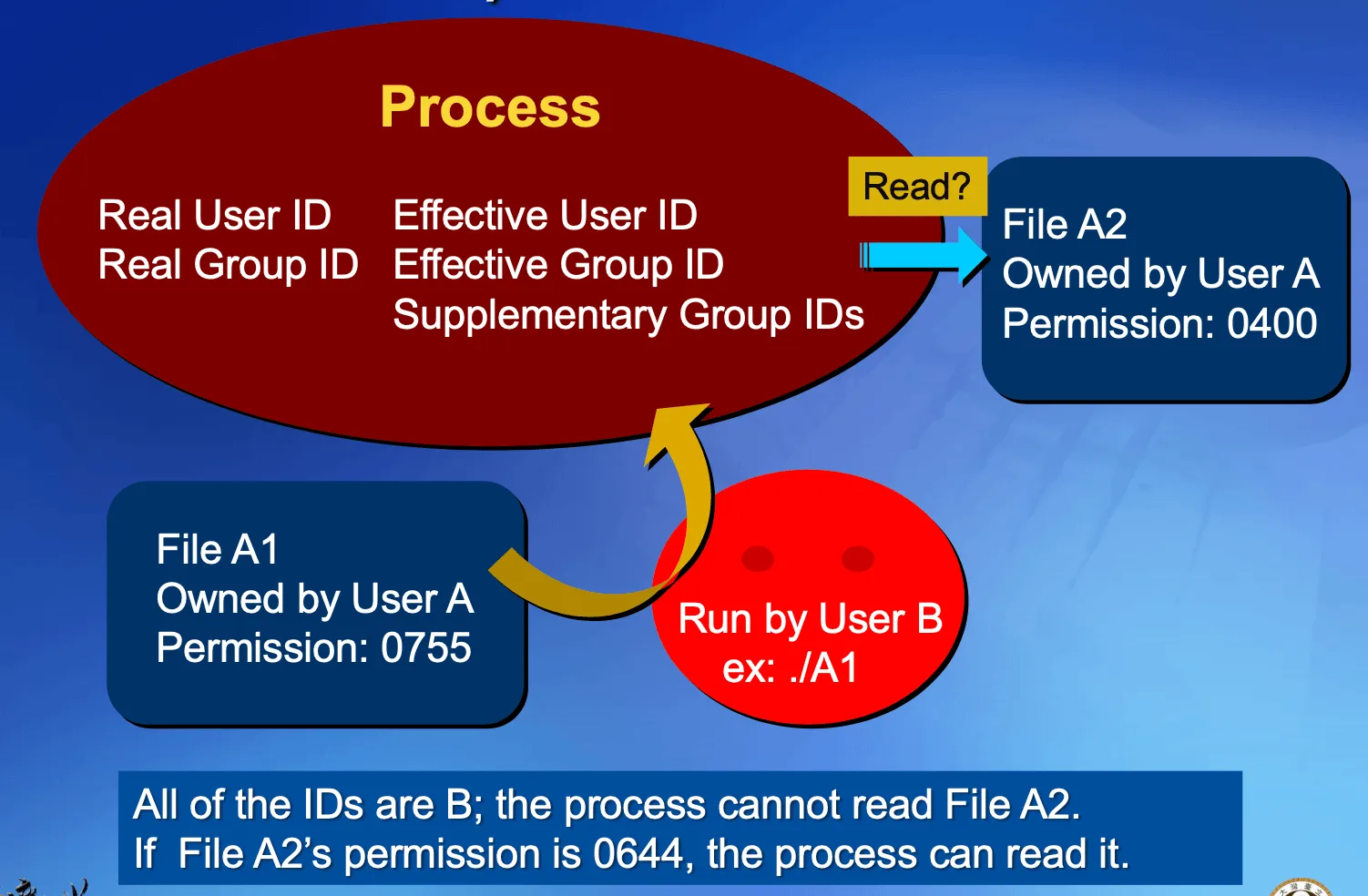
A1是0755,B 可以使用 other 的x執行- Process 的 effective UID 仍是 B,無法讀取只有 A 能讀的
A2(0400)
把 A1 改成 04755:
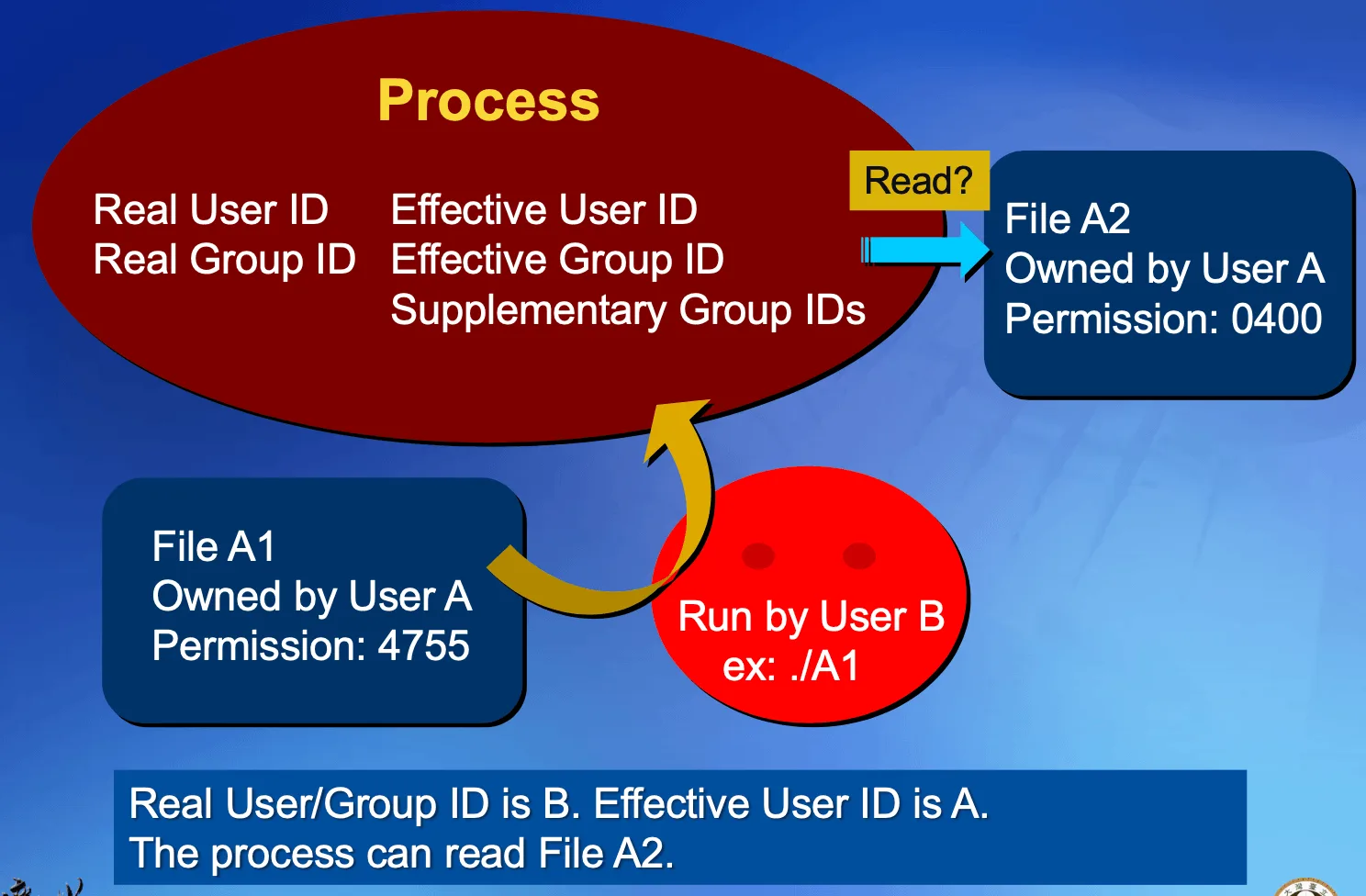
- B 仍然可以執行
A1,但 process 的 real UID 是 B、effective UID 是 A - 讀取
A2時使用 owner 的r,因此成功
改變的是執行 A1 的 process,B 的 shell 權限不變;set-user-ID 也不會連帶改變 GID
ls -l 把 set-user-ID / set-group-ID 顯示在 owner / group 的 x 位置:
-rwsr-xr-x    set-user-ID + owner execute
-rwxr-sr-x set-group-ID + group execute小寫 s 表示 special bit 和 x 都有,大寫 S 表示只有 special bit。上例假設系統允許 set-ID 生效;例如 nosuid 掛載會限制它,程式也必須自行限制可執行的操作
Ownership#
新 file 的 owner 通常是建立者的 effective UID,GID 則依系統與 file system 規則,來自 effective GID 或 parent directory
例如 Linux 的 parent directory 若設了 set-group-ID,新 file 就繼承 directory GID,方便 group 共享資料;這與 executable 上改變 process effective GID 的用途不同
access()
#include <unistd.h>

int access(const char *pathname, int mode);F_OK: 是否存在R_OK、W_OK、X_OK: 是否能讀、寫、執行;directory 的X_OK是 search
access() 使用 real UID / GID,一般 open() 使用 effective 身分。所以 set-user-ID 範例中,access("A2", R_OK) 可能失敗,但 open("A2", O_RDONLY) 成功
umask()
#include <sys/stat.h>

mode_t umask(mode_t cmask);umask() 設定 process 建立新 file 時要遮掉的 permission bits,並回傳舊 mask,不影響既有 file。沒有 default ACL 等額外規則時:
實際 permission = 程式請求的 mode & ~umask例如 umask(0022) 關閉 group 和 other 的 write bits:
umask(0022);
int fd = open("file.txt", O_WRONLY | O_CREAT | O_EXCL, 0666);
/* 若建立成功,新 file 的 permission 是 0644 */

mkdir("work", 0777);
/* 若建立成功,新 directory 的 permission 是 0755 */這是 bitwise AND,不是減法,所以 0666 & ~0001 仍然是 0666。Shell 的 umask 必須改變 shell 自己的設定,後續 children 才能繼承,詳見 umask(2) ↗
chmod()、fchmod()
#include <sys/stat.h>

int chmod(const char *pathname, mode_t mode);
int fchmod(int fd, mode_t mode);分別用 pathname 和 fd 修改 mode bits,包括 permission、set-user-ID、set-group-ID。呼叫者通常須為 file owner 或具有相應特權,否則失敗
chmod 600 file.txt
chmod g+r file.txt
chmod u+s program修改的是 i-node metadata,仍可能需要寫回 storage
Sticky Bit (Save-text bit)
/tmp 需要讓大家建立 file,卻不能隨意刪除別人的 entry,因此使用 sticky bit (01000)
Directory 設定 sticky bit 後,刪除或 rename entry 除了需要 w+x,還必須是 file owner、directory owner,或具有相應特權
/tmp 常見的 mode 是 01777:
drwxrwxrwtt 表示 sticky bit 與 other 的 x 都存在,只有 sticky bit 則顯示 T。Save-text bit 原本有保留 executable text segment 的歷史用途,現在主要看 directory 的刪除限制,詳見 chmod(2) ↗
chown()、fchown()、lchown()
#include <unistd.h>

int chown(const char *pathname, uid_t owner, gid_t group);
int fchown(int fd, uid_t owner, gid_t group);
int lchown(const char *pathname, uid_t owner, gid_t group);chown(): 使用 pathname,遇到最後的 symbolic link 會修改 targetfchown(): 使用fdlchown(): 修改 symbolic link 本人的 ownership
owner 或 group 傳入 -1 表示不改。Linux 修改 owner UID 需要相應特權;file owner 可以把 group 改成自己所屬的 group,詳見 chown(2) ↗
Limit#
Filename、pathname、fd 數量等限制依系統而異,可以在執行時查詢:
#include <unistd.h>

long sysconf(int name);
long pathconf(const char *pathname, int name);
long fpathconf(int fd, int name);sysconf(): System / process 設定,例如_SC_OPEN_MAX、_SC_CHILD_MAXpathconf()/fpathconf(): 依 pathname /fd查詢,例如_PC_NAME_MAX、_PC_PATH_MAX、_PC_LINK_MAX、_PC_PIPE_BUF;_PC_SYMLINK_MAX的支援依系統而定
回傳 -1 也可能表示沒有確定的 limit:呼叫前先設 errno = 0,再檢查是否有 error,詳見 pathconf(3) ↗
File Size#
st_size 是 logical size:regular file 從開頭到 EOF 的 bytes 數;symbolic link 則是 pathname 長度,不含 \0。Directory 的 size 與 entries 的儲存方式有關,不是內部所有 files 的總和
第二章的 file hole 就能說明 logical size 與實際配置空間的差別:
lseek(fd, 1024 * 1024, SEEK_SET);
write(fd, "A", 1);原本是空檔案時,這樣會得到 1 MiB + 1 byte 的 logical size,但 sparse file 不需要替前面的洞配置 data blocks,讀出來會是 \0。反過來,小 file 也可能佔用完整 block:
st_size: Logical size,單位 bytesst_blocks: 已配置的 block 數,Linux 以 512-byte units 計算st_blksize: 建議的 I/O block size,不能拿來乘st_blocks
詳見 inode(7) ↗
truncate()、ftruncate()
#include <unistd.h>

int truncate(const char *pathname, off_t length);
int ftruncate(int fd, off_t length);把 regular file 調整成 length bytes,分別使用 pathname 與可寫的 fd:
- 縮短時丟掉多餘內容;延長時,支援延伸的 file system 會讓新增部分讀出
\0 - 不改變 current file offset
例如 offset 在 100,ftruncate(fd, 0) 後仍在 100;若沒有 O_APPEND 就直接寫入,前面可能留下 hole,詳見 truncate(2) ↗
Unix file and directory#
Structure#
Directory 的 content 是 directory entries,概念上每個 entry 記錄:
(filename, i-node number)例如開啟 /home/vinsong/file.txt,kernel 依序從 / 找 home,再找 vinsong、file.txt,最後透過 file 的 i-node 取得 metadata 與 data blocks
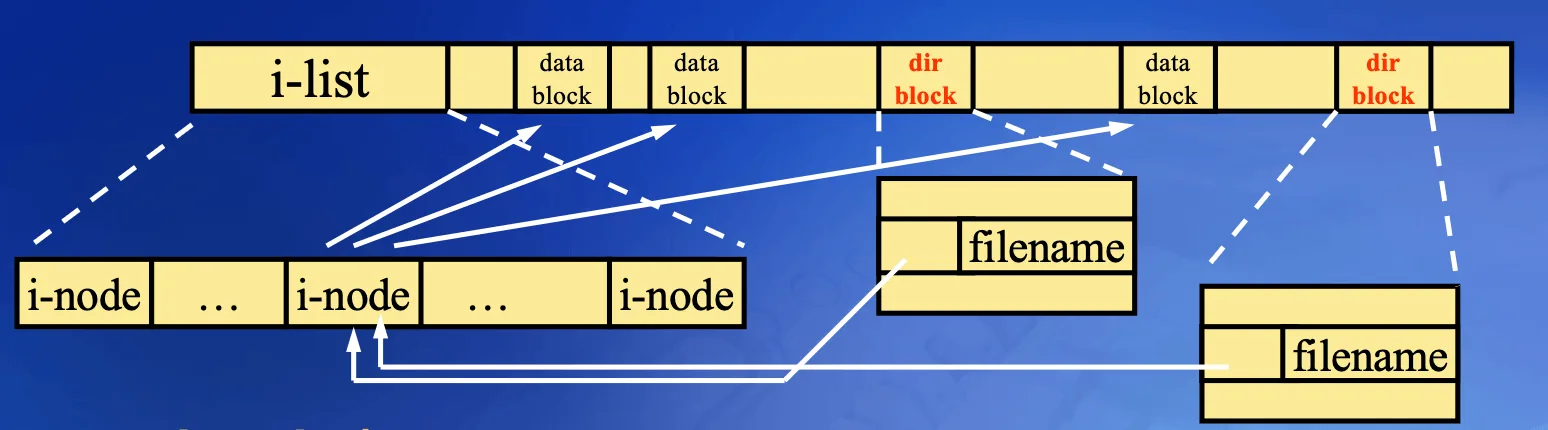
圖中不同 directory entries 可以指向同一個 i-node。新增或移除 entries 要透過 link()、unlink()、mkdir() 等介面,不能直接把 directory 當一般 file 寫入
. 指向自己,.. 指向 parent directory:
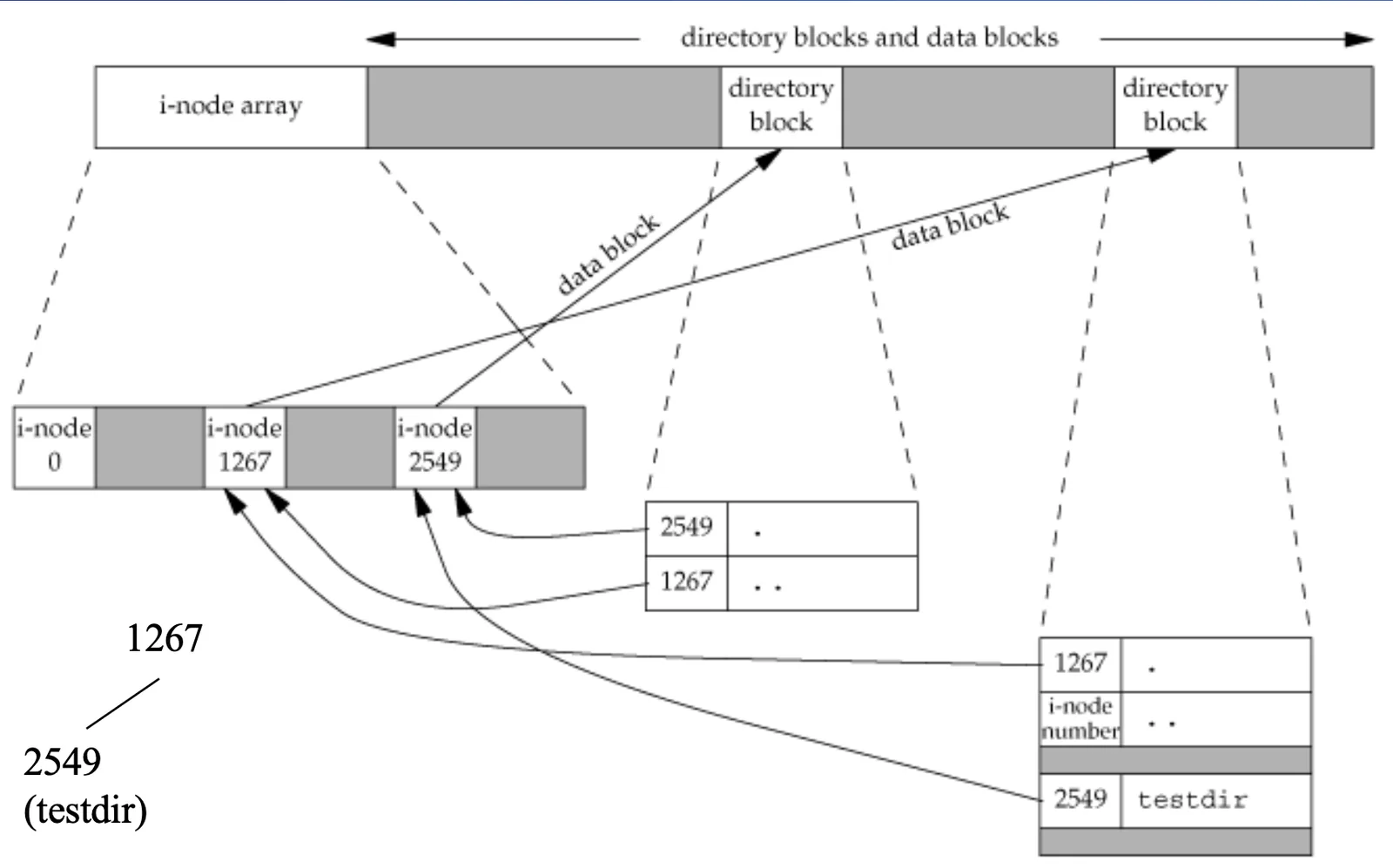
圖中的 testdir 是 i-node 2549,所以 . 是 2549、.. 是 parent 的 1267;root 的 .. 則仍是自己
傳統 file system 把這些 entries 算入 link count,所以 directory 通常從 2 開始,每多一個直接 subdirectory,其 .. 又讓 parent 的 link count 加一;實作可能有所不同
Unix 透過 mount 把不同 file systems 接到同一棵 directory tree,例如把另一個 partition 接在 /mnt/data。下面是課堂的傳統 BSD layout:
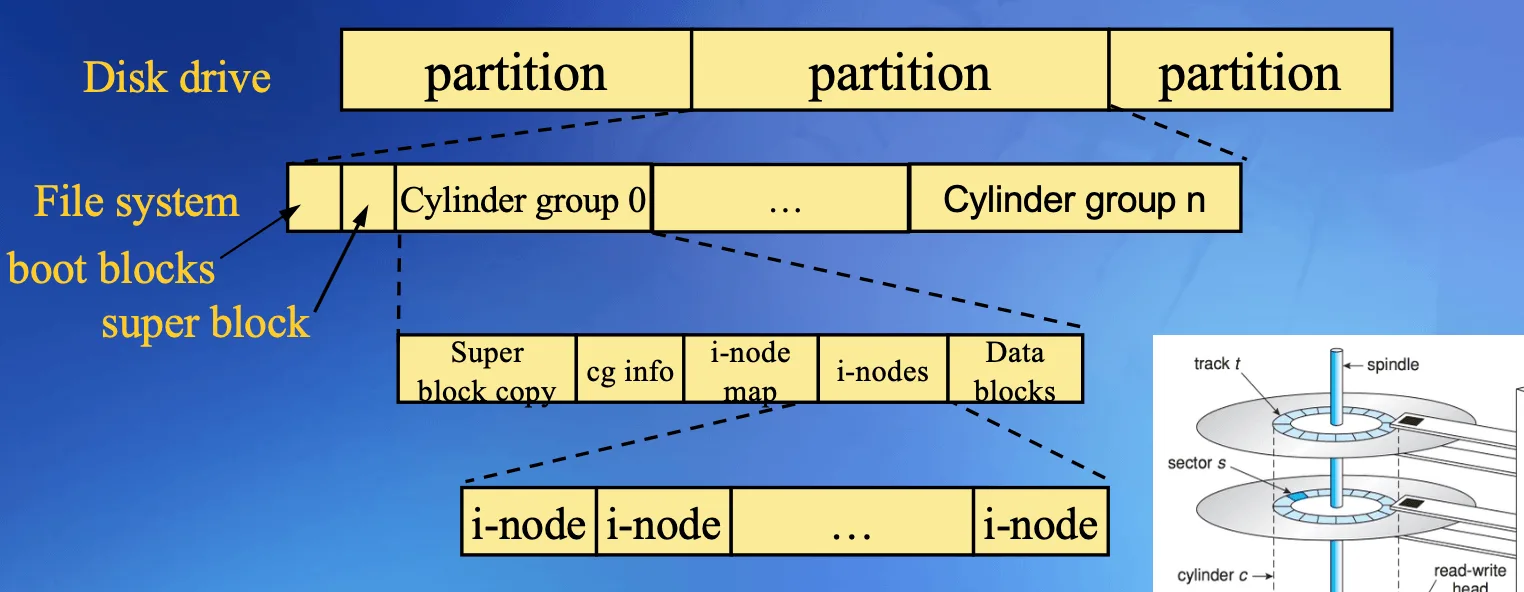
- Boot blocks: 開機相關資訊
- Super block: File system 大小、block size 等資訊,也可保留備份
- Cylinder groups: 把相關 i-nodes 與 data blocks 放近,減少 HDD 存取成本
- Maps: 記錄哪些 i-nodes、data blocks 已使用
為了同時支援大小不同的 files,i-node 使用多層 pointers:
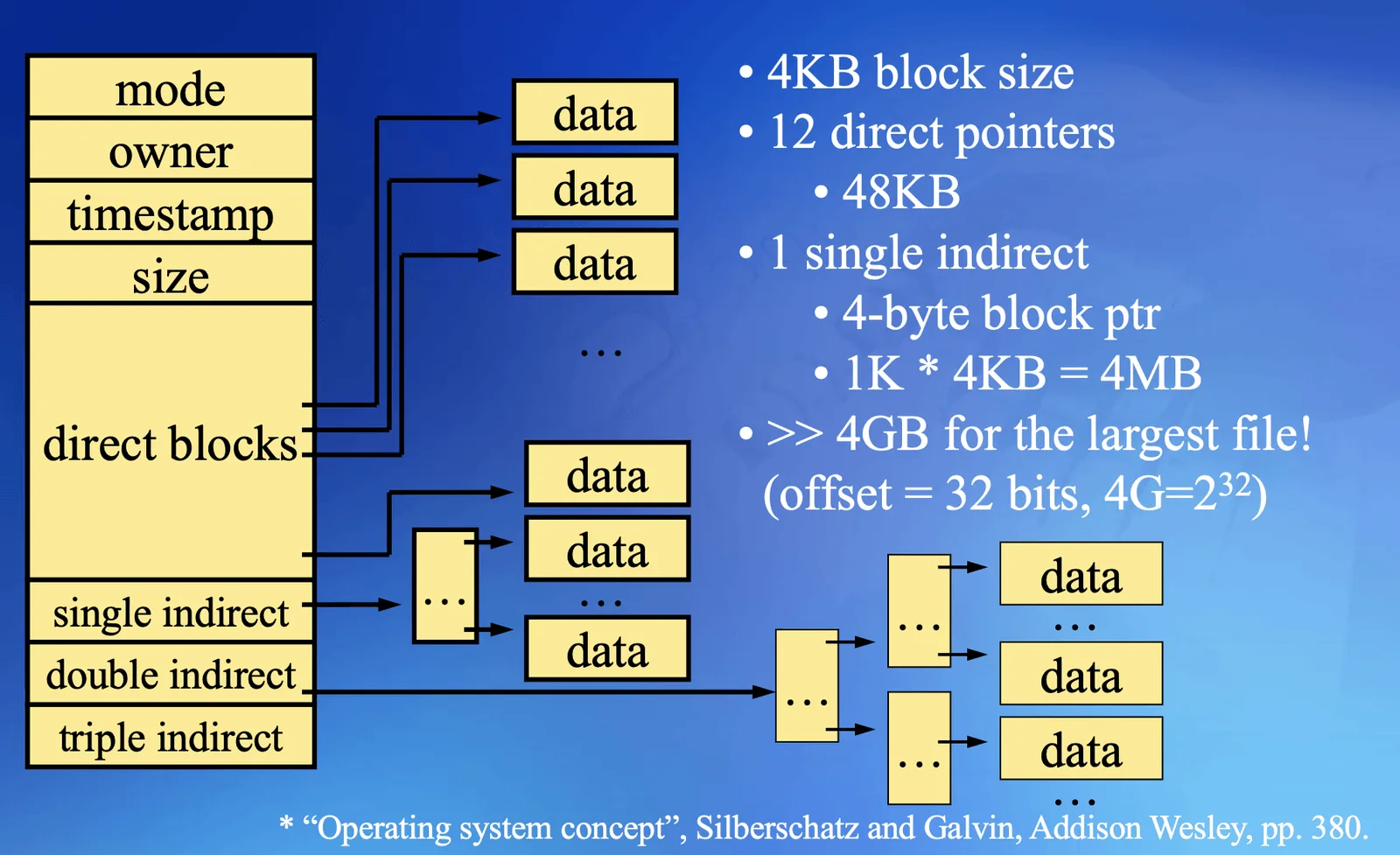
- Direct block: 直接指向 data block
- Single indirect: 先指向存放 block pointers 的 block
- Double / triple indirect: 再增加一層 / 兩層 pointers
圖中 block size 為 4 KiB、pointer 為 4 bytes,一個 indirect block 可放 1024 個 pointers,single indirect 就可對應 4 MiB 的 data。小 file 用 direct pointers,大 file 才增加層數;indirect blocks 也能留在 cache
這是課堂的 pointer-based layout,現代 file system 也可能使用 extent,圖上的數量與大小不是所有 Unix 的共同限制
接回第二章的 fd:
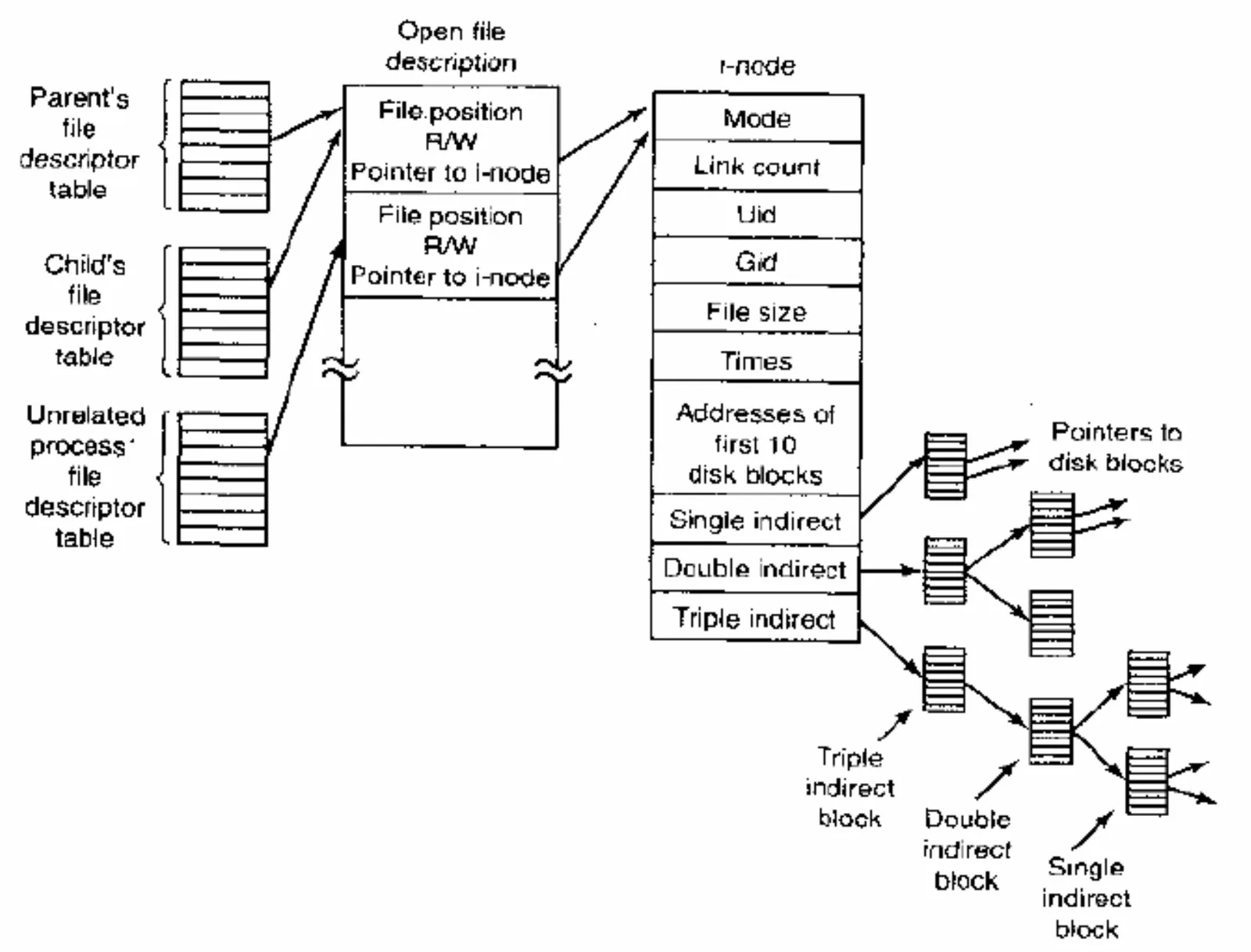
fd → open file description → i-node → data blocksFile descriptor table 是 per-process,open file description 記錄開啟時的 mode 與 offset,i-node 則記錄 file metadata。兩次 open() 通常有獨立 offset;dup()、fork() 可共享同一個 open file description
Hard link & Soft link#
Hard link
Hard link 新增一個指向同一個 i-node 的名字:
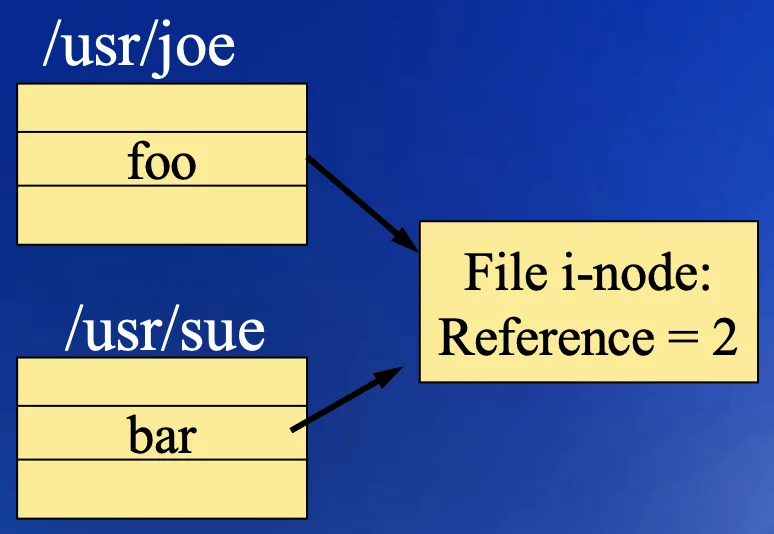
foo 和 bar 共用 metadata 與 content,st_nlink = 2。可以用下面的例子觀察:
printf 'hello\n' > file.txt
ln file.txt another.txt
ls -li file.txt another.txtls -i 顯示兩個名字的 i-node number 相同。從任一名字修改,改的都是同一份資料,沒有另外複製一份
- 不能跨 file system:i-node number 是 file system 內部的編號
- 一般不允許連到 directory:避免額外 parent 或 cycle;Linux 也不允許 superuser 這樣建立連結
- 需要 permission:新 entry 的 directory 要有
w+x,系統也可能限制連到別人的 file
Soft link (Symbolic link)
Soft link 有自己的 i-node,content 存放 target pathname,kernel 再沿這條 path 找 target:
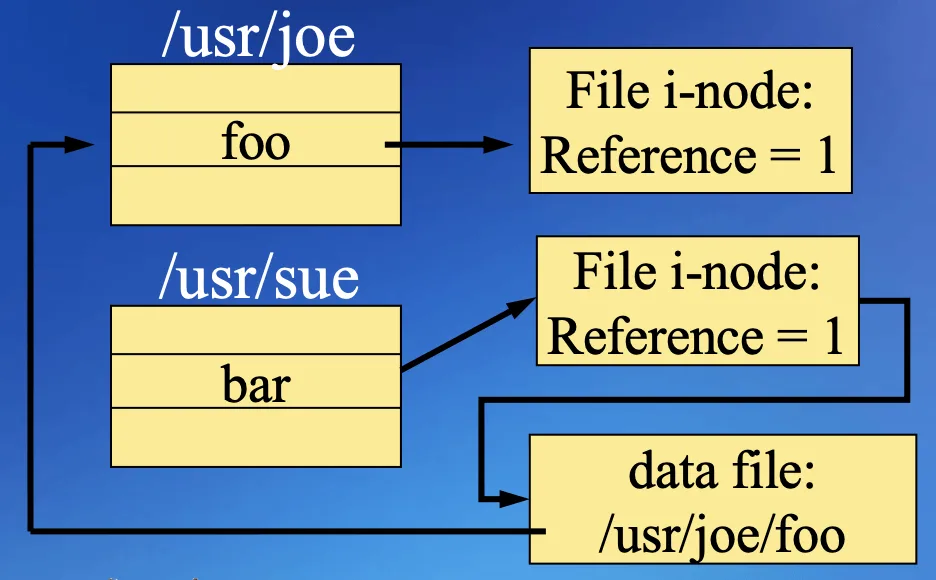
圖中的 bar 存放 /usr/joe/foo。Soft link 可以跨 file system、指向 directory,target 也可以尚未存在,不會增加 target 的 st_nlink
ln -s file.txt shortcut.txt若 file.txt 被改名或移除,shortcut.txt 裡的字串不會更新,可能變成 dangling link,詳見 symlink(2) ↗
Links 若互相指向形成 cycle,pathname 解析超過 symbolic link 次數限制會回傳 ELOOP;自行走訪 directory links 也要避免重複進入相同 directory
| Hard link | Soft link | |
|---|---|---|
| 新名字指向什麼 | 同一個 i-node | Link 自己的 i-node,content 存 target pathname |
| Metadata / content | 共用同一份 | Link 與 target 各自獨立 |
| Target 的 link count | 增加 | 不變 |
| 跨 file system | 不行 | 可以 |
| 原本的 target 名字被移除 | 其他 hard links 仍可用 | Target pathname 可能失效 |
link()
#include <unistd.h>

int link(const char *existingpath, const char *newpath);新增 newpath 指向 existing file,link count 加一;newpath 已存在則失敗,不會覆蓋,詳見 link(2) ↗
unlink()
#include <unistd.h>

int unlink(const char *pathname);移除 directory entry,hard link count 減一。若 pathname 是 symbolic link,移除的是 link 本人:
- 還有 hard links:其他名字仍然能找到 file
- 沒有 hard links,但仍有 open references:Pathname 已找不到,舊 fd 仍能操作
- 兩者都沒有:Kernel 才能回收空間
詳見 unlink(2) ↗
remove()
#include <stdio.h>

int remove(const char *pathname);C library 依 type 使用 rmdir() 或 unlink() 類型的操作,不會遞迴刪除整棵 directory tree
rename()
#include <stdio.h>

int rename(const char *oldname, const char *newname);修改同一個 file system 內的名字或移動 entry,不需要複製 file content,舊 fd 也不受影響:
rename("work/report.txt", "archive/report.txt");- Source / destination directories 需要相應的
w+x,並遵守 sticky bit - Non-directory 不能覆蓋 directory;directory 只能替換 empty directory 或使用尚不存在的名字
- 不能移入自己的 descendant,例如把
/a/b搬進/a/b/c - 跨 file system 會失敗;
mv可能改用複製再刪除來源
若 destination 已存在且可替換,rename() 會 atomically replace,不會讓其他 process 在替換中看到名字消失。可先寫好 temporary file 再 rename,讓讀者開到完整的舊版或新版,詳見 rename(2) ↗
symlink()、readlink()
#include <unistd.h>

int symlink(const char *target, const char *linkpath);
ssize_t readlink(const char *pathname, char *buf, size_t bufsize);symlink() 建立 link 並存入 target 字串,target 不必已存在;readlink() 讀出該字串,不是 target content。假設 shortcut.txt 指向 file.txt:
open("shortcut.txt", O_RDONLY):通常開啟 targetstat("shortcut.txt", &st):取得 target metadatalstat("shortcut.txt", &st):取得 link metadatareadlink("shortcut.txt", buf, size):取得file.txt字串
readlink() 回傳讀到的 bytes 數,不補 \0,buffer 太小也可能截斷;要當 C string 使用就得留空間補上結尾,詳見 readlink(2) ↗
File time#
st_atime: Access time,最後讀取 data 的時間st_mtime: Modification time,最後修改 content 的時間st_ctime: Status change time,permission、owner、link count 等狀態改變的時間,修改 content 通常也會更新
ctime 是 change,不是 creation;有些系統另外提供 birth time。一般情況下:
| 操作 | File | Parent directory |
|---|---|---|
| 讀取 content | atime 可能更新 | 不變 |
| 寫入或 truncate | mtime、ctime | 不變 |
chmod()、chown() | ctime | 不變 |
| 建立 file | 初始化時間 | mtime、ctime |
| 增加 / 移除 hard link | ctime | Entry 所在 directory 的 mtime、ctime |
Directory content 是 entries,所以新增、移除或 rename 名字才會改變相關 directory 的時間,單純改 file content 不會。open() 本身通常不更新時間,但 O_TRUNC、真正建立新 file 的 O_CREAT 會造成對應改變
Timestamp 更新受 file system 與 mount options 影響,例如
noatime、relatime可能減少atime更新,詳見 inode(7) ↗
utime()
#include <utime.h>

int utime(const char *pathname, const struct utimbuf *times);

struct utimbuf {
    time_t actime;
    time_t modtime;
};設定 atime、mtime,例如複製檔案時保留來源時間:
times == NULL:設成現在,通常 owner、有 write permission 或具有特權者可用- 指定時間:通常須為 owner 或具有特權
ctime由系統更新,不能自行指定
較高精度可用 utimensat()、futimens(),詳見 utime(2) ↗
mkdir()、rmdir()
#include <sys/stat.h>
#include <unistd.h>

int mkdir(const char *pathname, mode_t mode);
int rmdir(const char *pathname);mkdir() 建立 directory,mode 受 umask 影響;rmdir() 只移除 empty directory(不計 .、..)。刪除整棵 tree 必須先移除 children
opendir()、readdir()、closedir()
#include <dirent.h>

DIR *opendir(const char *pathname);
struct dirent *readdir(DIR *dp);
void rewinddir(DIR *dp);
int closedir(DIR *dp);opendir() 取得 DIR *,readdir() 每次取得下一個 entry,rewinddir() 回到開頭。dirent 提供 d_name、d_ino,完整 metadata 仍要另外查詢;d_type 也可能無法使用
下面列出 current directory 的 entry names:
#include <dirent.h>
#include <errno.h>
#include <stdio.h>

int main(void)
{
    DIR *dp = opendir(".");
    if (dp == NULL) {
        perror("opendir");
        return 1;
    }

    struct dirent *entry;
    for (;;) {
        errno = 0;
        entry = readdir(dp);
        if (entry == NULL)
            break;
        puts(entry->d_name);
    }

    int read_error = errno;
    if (read_error != 0) {
        errno = read_error;
        perror("readdir");
    }
    if (closedir(dp) == -1) {
        perror("closedir");
        return 1;
    }
    return read_error != 0;
}readdir() 的 NULL 可能是結束或 error,所以呼叫前清除 errno,回傳後再確認。結果不保證排序,遞迴走訪時要跳過 .、..,詳見 readdir(3) ↗
ftw()
File tree walk 走訪整棵 tree,每遇到 entry 就呼叫 callback:
#include <ftw.h>

int ftw(const char *dirpath,
        int (*fn)(const char *fpath, const struct stat *sb, int typeflag),
int nopenfd);dirpath: 起點fn: 接收 path、metadata、type flag 的 callbacknopenfd: 最多同時開啟的 directories,太小會增加關閉與重新開啟的成本
nftw() 還能設定是否解析 symbolic links、跨 file system,以及先走 parent 或 children,詳見 ftw(3) ↗
chdir()、fchdir()
#include <unistd.h>

int chdir(const char *pathname);
int fchdir(int fd);分別用 pathname 或 directory fd 改變 process 的 current working directory,需要 search permission。Shell 的 cd 必須在 shell 自己執行,否則只改到 child 的 cwd
getcwd()
#include <unistd.h>

char *getcwd(char *buf, size_t size);把 cwd 的 absolute pathname 寫入 buf,成功回傳 buf、失敗回傳 NULL;size 須包含 \0,太小會失敗
Process 記錄的是所在 directory,getcwd() 不會保留走過的 symbolic link。沿用課堂的例子,假設 /usr/spool 指向:
/usr/spool → ../var/spool執行:
char buf[4096];

if (chdir("/usr/spool/uucppublic") == -1) {
    perror("chdir");
    exit(1);
}
if (getcwd(buf, sizeof(buf)) == NULL) {
    perror("getcwd");
    exit(1);
}
printf("cwd = %s\n", buf);結果是:
cwd = /var/spool/uucppublicchdir() 已經解析 link 到 /var/spool/uucppublic,所以 getcwd() 回傳這條 path;shell 的 pwd / $PWD 則可能保留 logical path。範例的 4096-byte buffer 不保證適用所有 pathname,詳見 getcwd(3) ↗
Back to the content
NTU PJ System Programming
2025 Fall
← Back to the content