Process Environment#
main function#
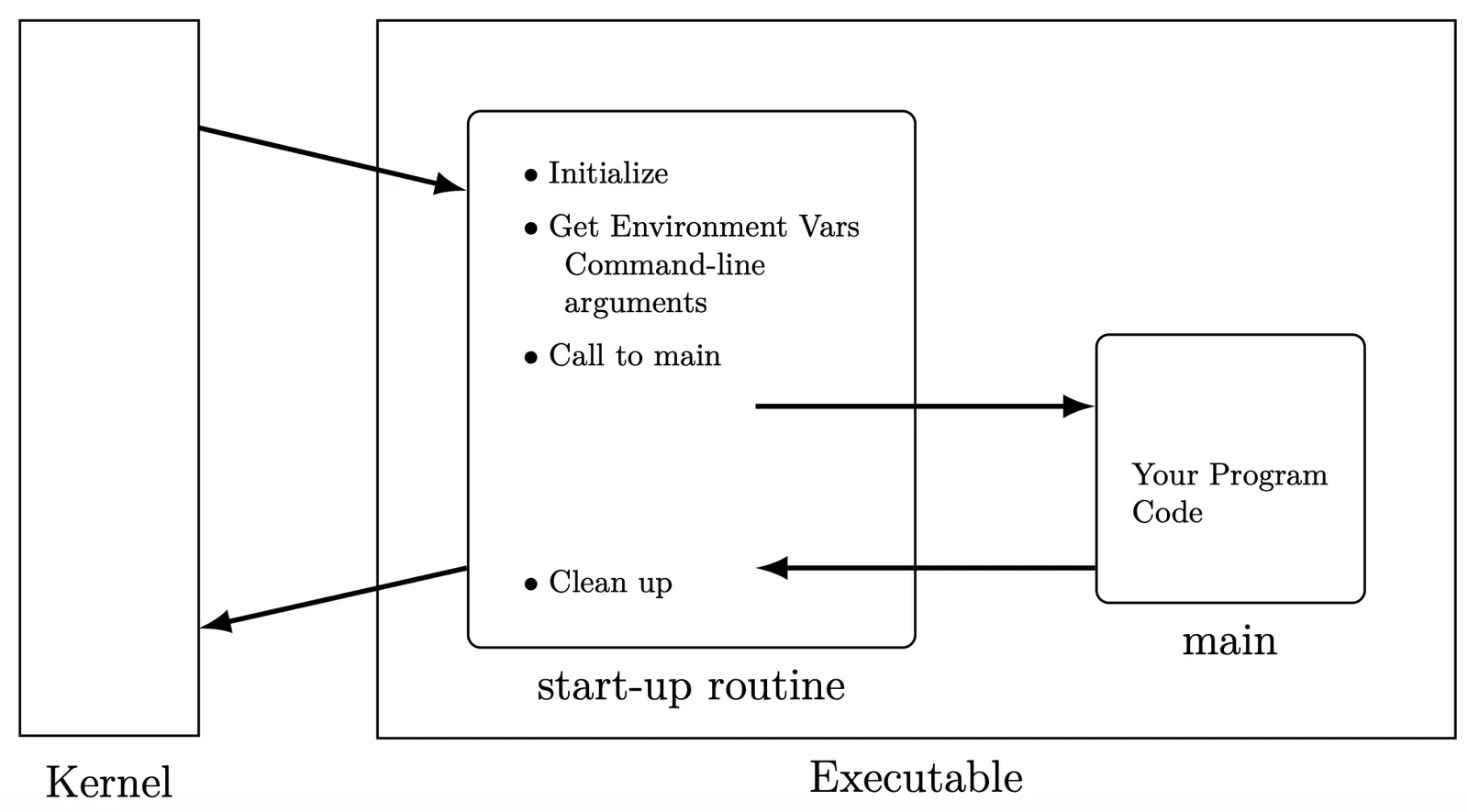
從 programmer 的角度來看,自己的 code 是從 main function 執行,但其實應該是有一個 start up routine 去 call main function 去做執行
Linker 會幫忙把你的 program 跟 start up routine 連起來
會幫忙傳各種參數跟初始化,最後 return 會幫忙做 clean up.
可以用 nm 指令來看他的 symbol name
$ nm -g hello

08049644 A _DYNAMIC
080496f0 A _GLOBAL_OFFSET_TABLE_
w _Jv_RegisterClasses
0804970c A __bss_start
w __deregister_frame_info
08049638 D __dso_handle
08049634 D __progname
w __register_frame_info
0804970c A _edata
0804972c A _end
08048584 T _fini
08048368 T _init
U _init_tls
080483d0 T _start # 這裏是 start up
U atexit
08049728 B environ
U exit
08048524 T main # 這裡才是 main
U printf可以看到,都被存在 Text 區域,compiler 會先幫你算死
$ readelf -a hello

ELF Header:
Magic:   7f 45 4c 46 01 01 01 09 00 00 00 00 00 00 00 00
Class:                             ELF32
Data:                              2's complement, little endian
Version:                           1 (current)
OS/ABI:                            UNIX - FreeBSD
ABI Version:                       0
Type:                                 EXEC (Executable file)
Machine:                           Intel 80386
Version:                           0x1
Entry point address:               0x80483d0
Start of program headers:          52 (bytes into file)
Start of section headers:          2260 (bytes into file)
Flags:                             0x0
Size of this header:               52 (bytes)
Size of program headers:           32 (bytes)
Number of program headers:         5
Size of section headers:           40 (bytes)
Number of section headers:         23
Section header string table index: 20觀察一下 Entry point address 其實是在 0x80483d0,是 start up 的位置。
- 可以透過 Magic code 看他是什麼類型的檔案
- 去
objdump反組譯 start up function 可以看到裡面在 call main function
8048450: e8 cf 00 00 00 call 8048524 <main>File Format/Layout of Program#
ELF (Excutable and Linkable File)#
對 object flie 來說,通常有這幾種,全都可以通用 ELF 格式。
- Relocatable(steady) 的 object file (
.o) - Excutable 的 object file
- Shared(dynamic) 的 object file (
.so)
C language compile#
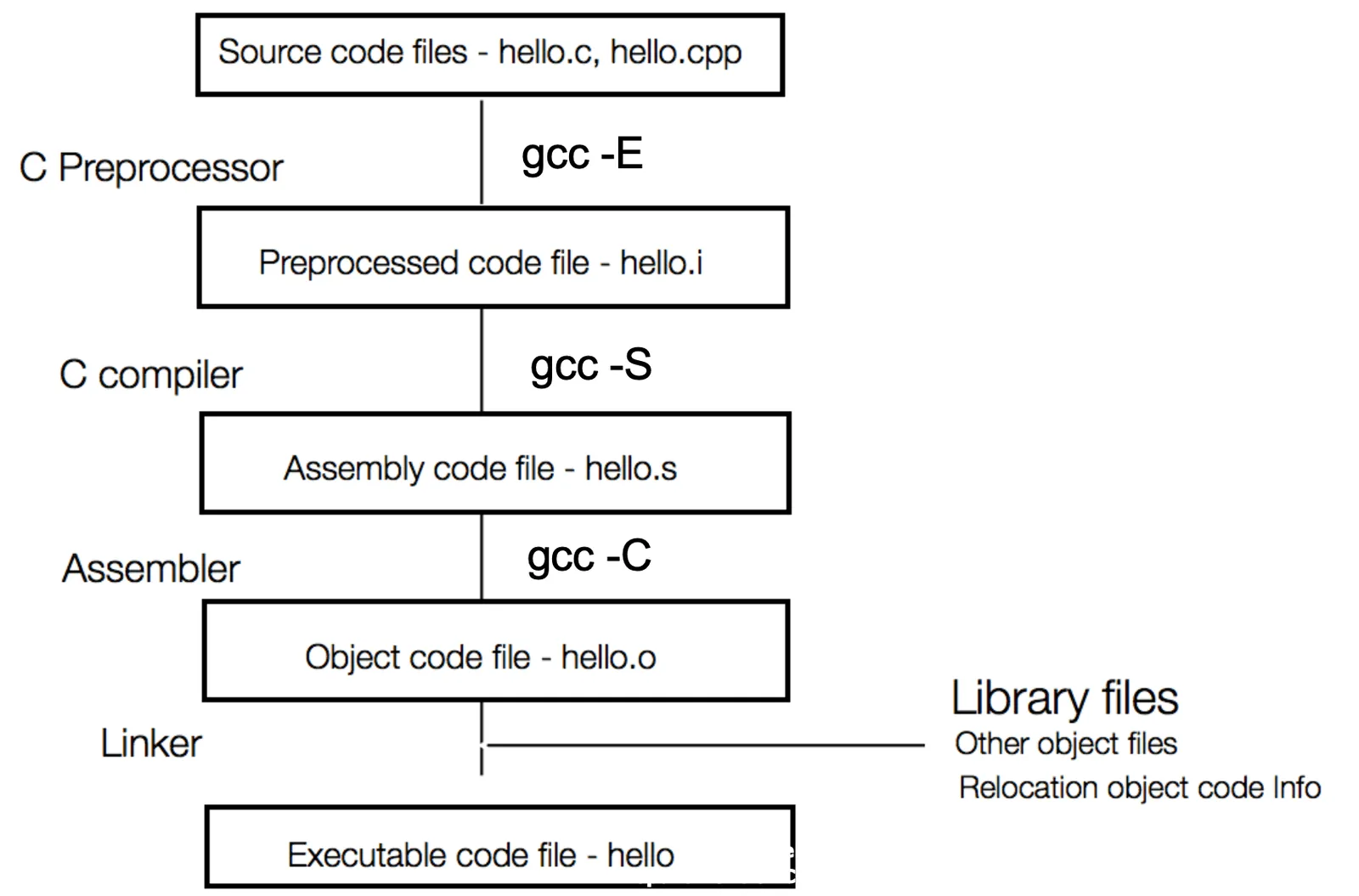
-E做 preprocessing 會把 macro 全部展開,include 也全部展開到一個.ifile 裡面-S做 compiler 換成 assembly code-C做 assamble 換成可執行的 object file- 最後會有 linker 來把標準的 library 去做連結,才可以真正執行
ELF object file format#
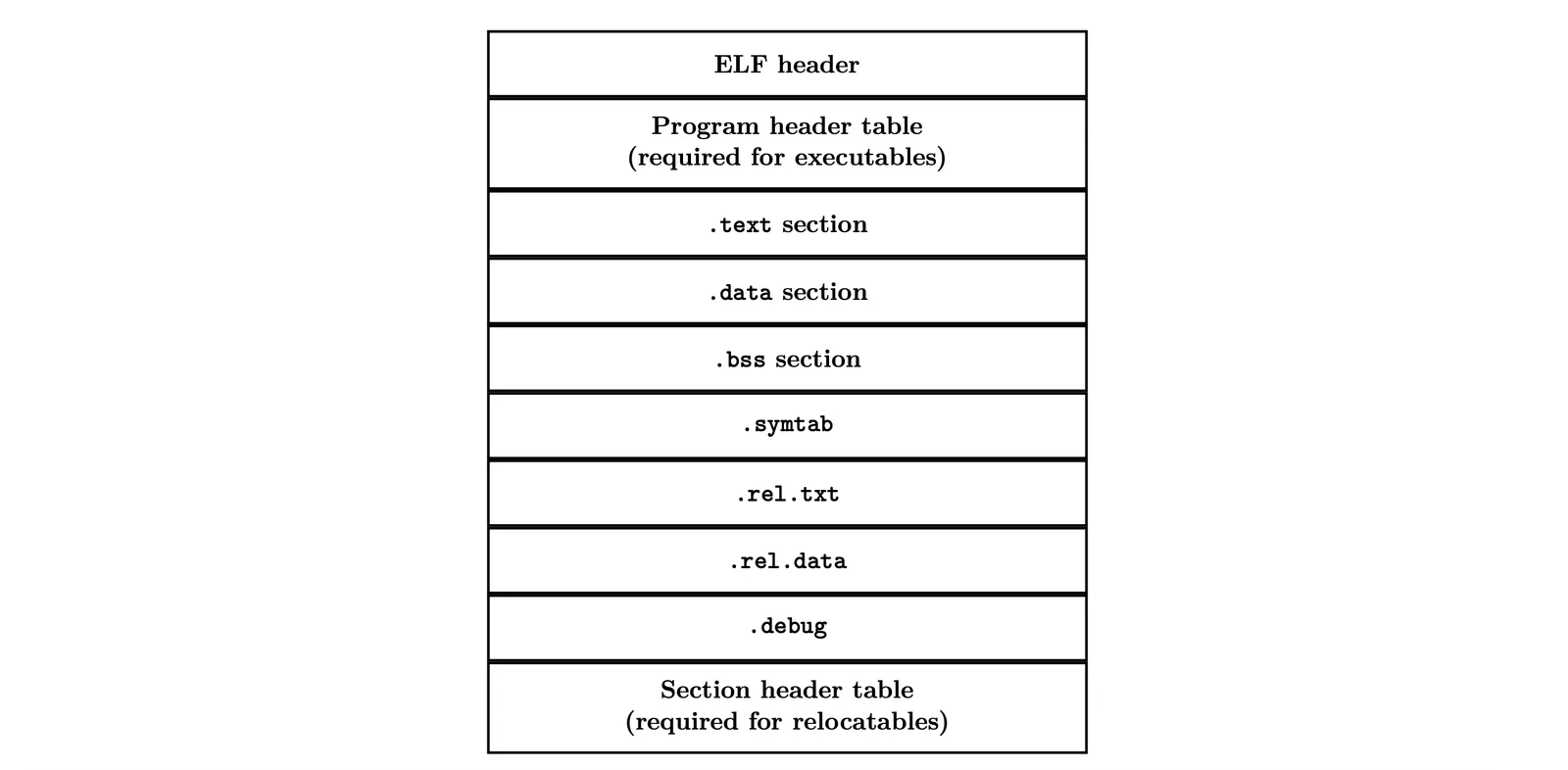
會存入這些東西
- ELF header
- type (
.o,exec,.so) - machine
- entry point
- size
- byte ordering
- type (
- Program hrader table
- page size
- segment size
- session information
.text: 就是你的 code 用來存 0101010101- 底下的
.symtab會放入所有 function 或 variable 對應的 address,讓你知道該把東西放哪
- 底下的
.data: 有初始化的靜態資料.bss: 沒初始化的靜態資料,原名是 Block start by symbol.- 其實理論上是不佔空間的,因為都在 symbol table 紀錄了。
- 有時候佔空間是方便管理
.symtab非常重要- symbol table
- Procejure、variable name
- session name and location
.rel.text,.rel.data: 做.data裡面 relocation,有些 location 在 compile 的時候是做不完,要去找外部的 file.debug
Linking#
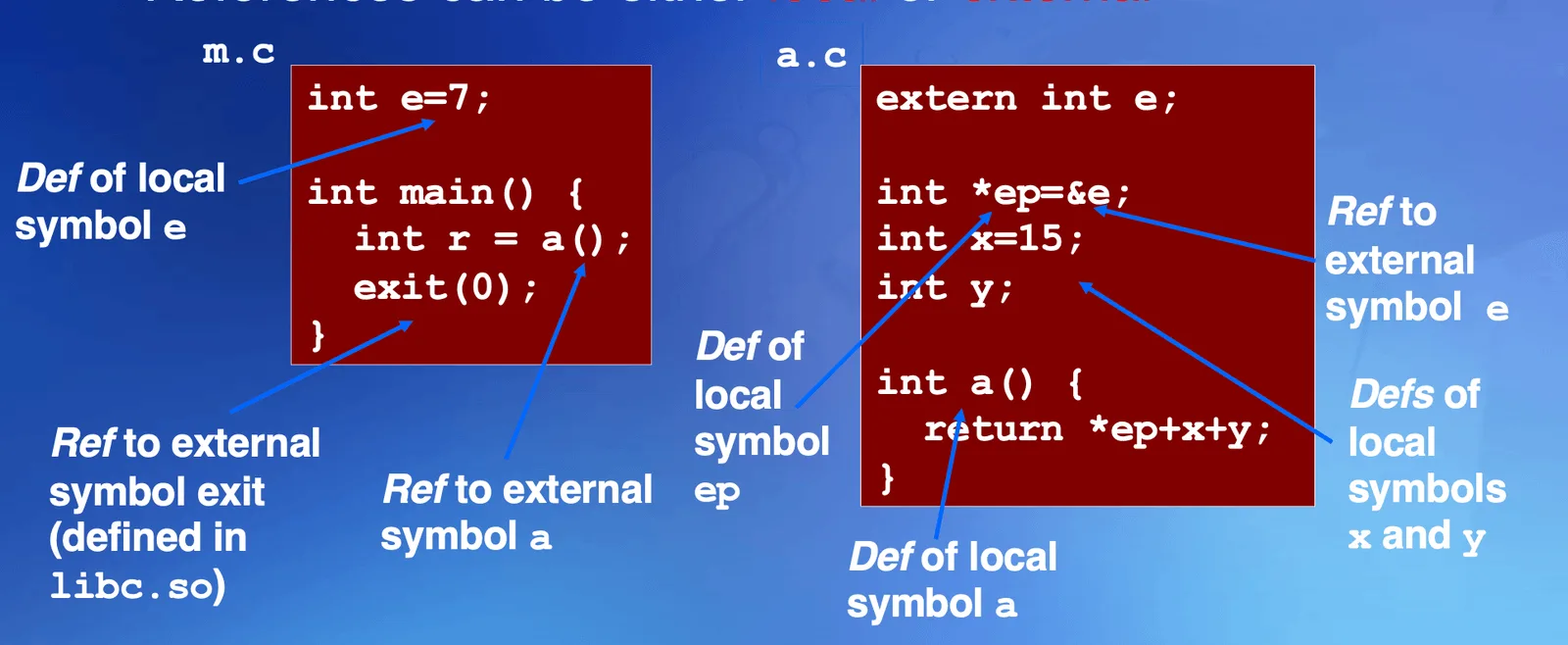
分成 Definition 跟 Reference symbol 代表我這變數 compiler 只要知道他是什麼型別就好,本人可能是在是外部定義的
extern int e;
int *ep = &e就代表這個 local def symbol ep 指標指向 ref symbol e,include 的時候才會把它替換進來,這樣就可以做到 Link 的效果,因為 external 的 symbol 你根本不知道他真實的 address 在哪裡,所以沒有辦法把它寫到 ELF 的 symbol table 裡面
exit(0): 也是 ref symbol to external,連結到libc.so.- 定義的人才知道真正的 memory 位置
Relocation#
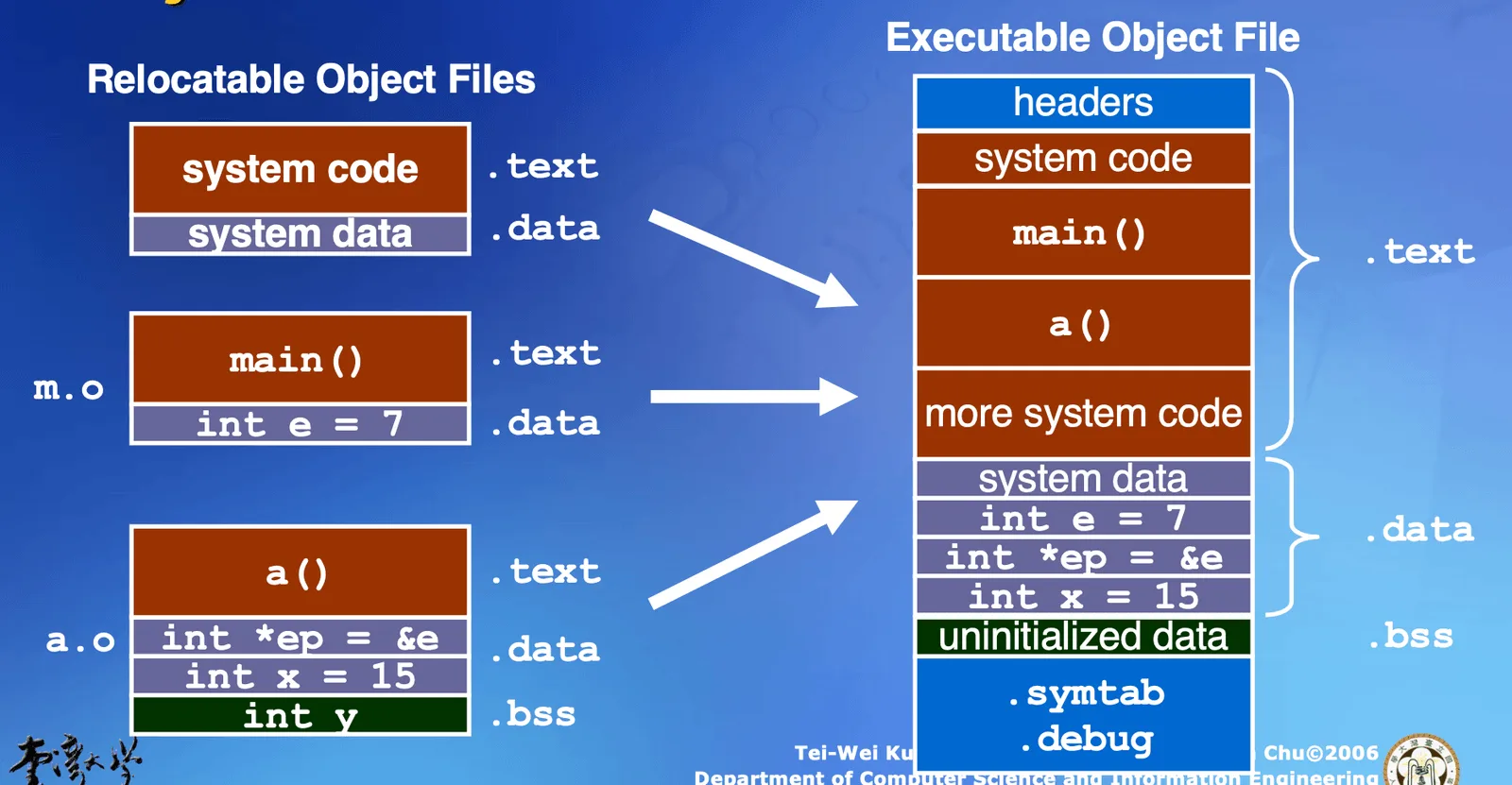
可以先把每一個 code 都產生一個 .o file ,然後才存入一個 executable 的 object file,在這裡 .bss 可以做到 relocation 的動作,Link 進去這個 ELF object file 才能知道 external 的 variable 的真實位置
- 剛剛紀錄的相對位置就派上用場,合併的時候只要知道起始位置,就可以根據 offset 算出後面的相對位置,把 code seesion 的位置變動就好
Memory Layout of Process#
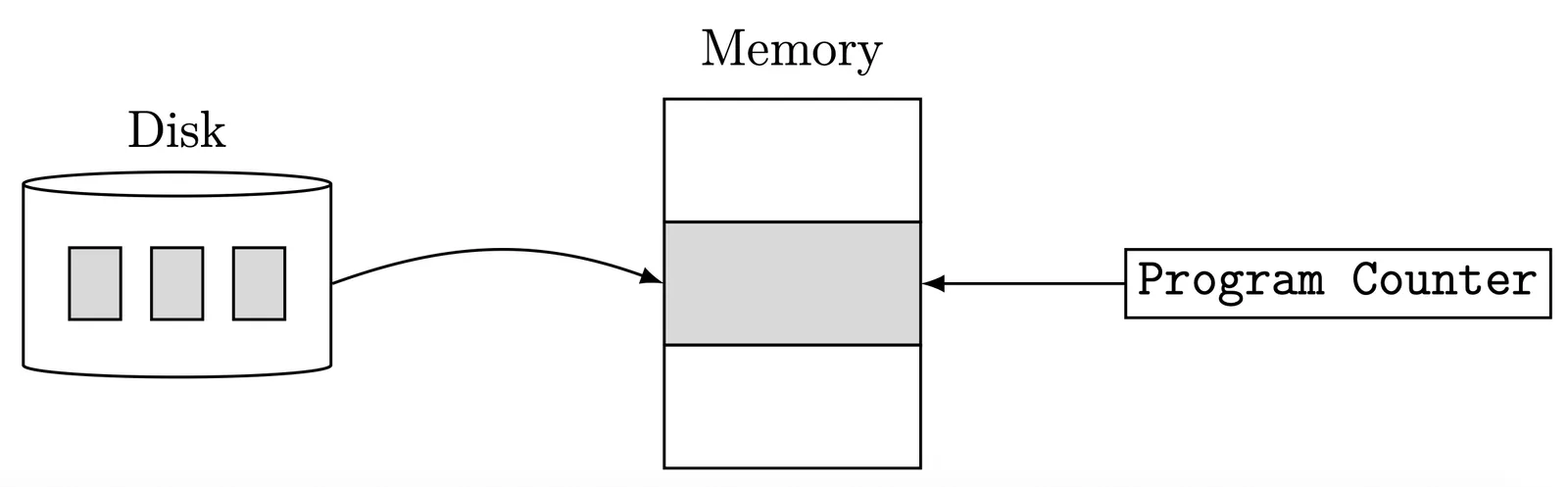
在一個 executable file 被 load 進 memory 裡面應該要有
- Text Segment:通常會是 Read-only 並且 sharable
- Initialized Data Segment
- Uninitialized Data Segment:在這裡就必須要有實體 Memory 了,才能夠知道到底要去哪
- Stack
- Heap
總而言之是會產生出在 memory 上的對應資料,也會對應到 virtual memory
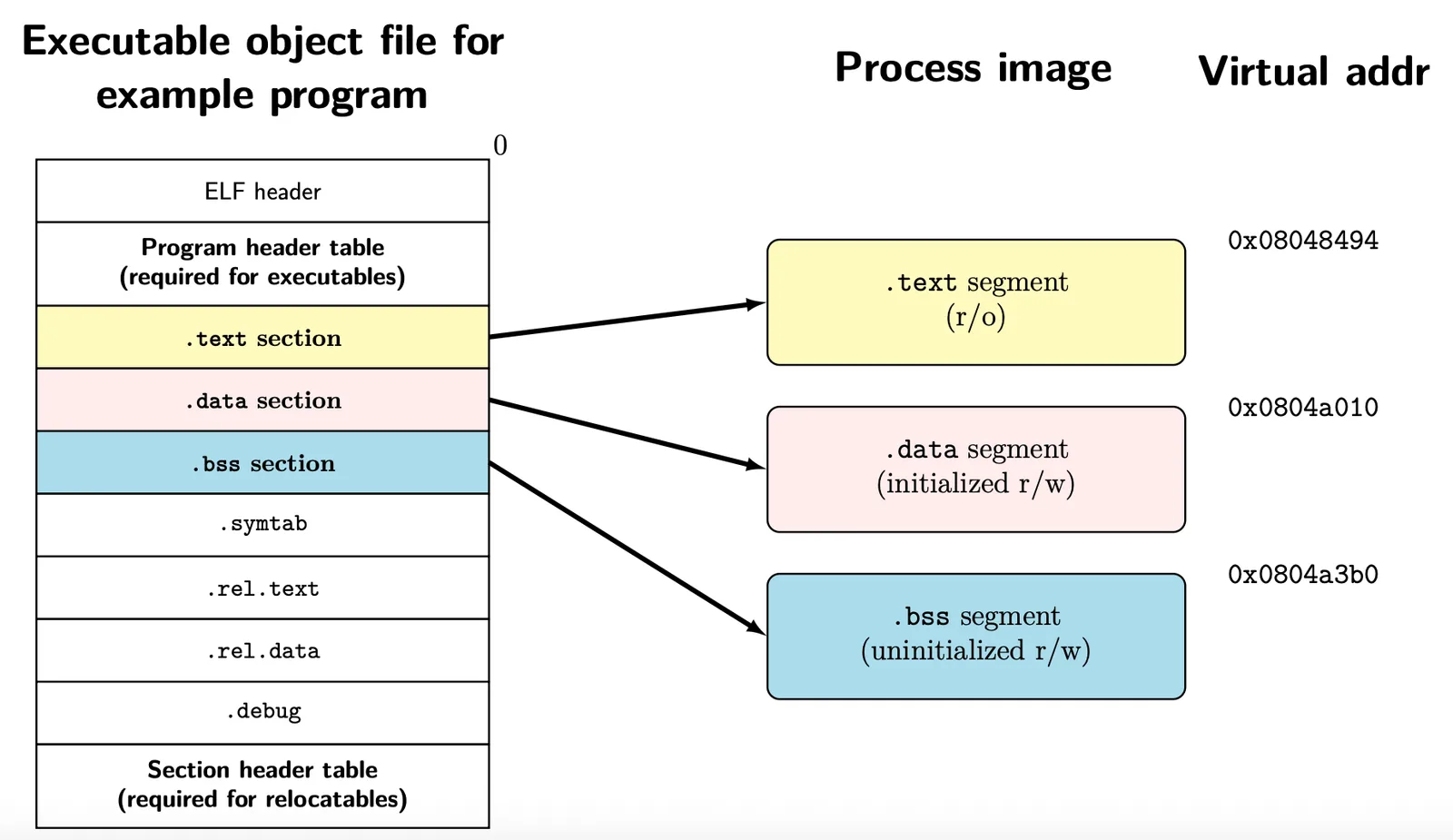
會用 Loader 把它放進去
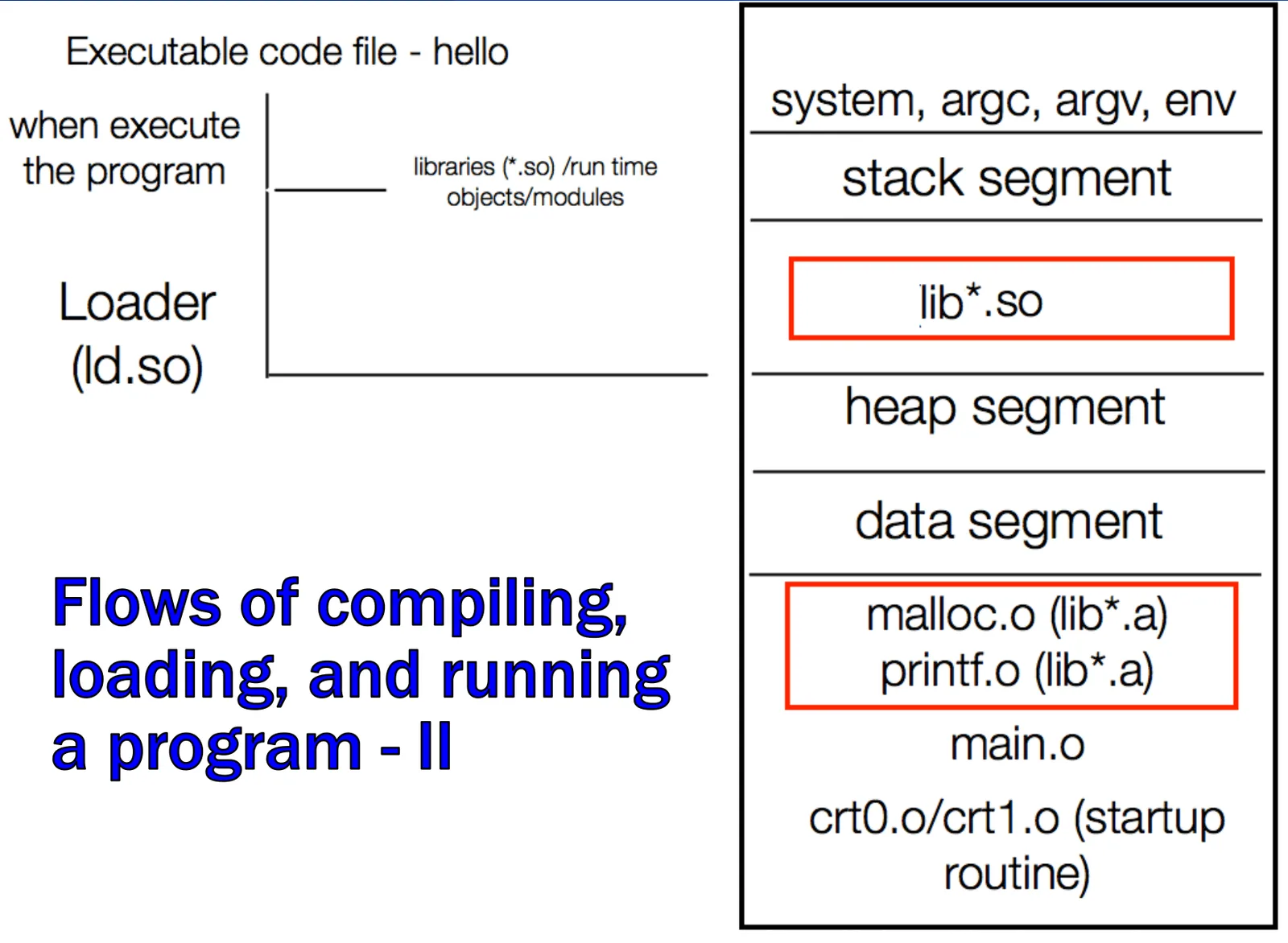
Virtual memory#
不可能讓他直接 map 到某個位置,記憶體根本不夠用,中間有一大段全都是洞,根本沒有存資料,就不用 map 上去
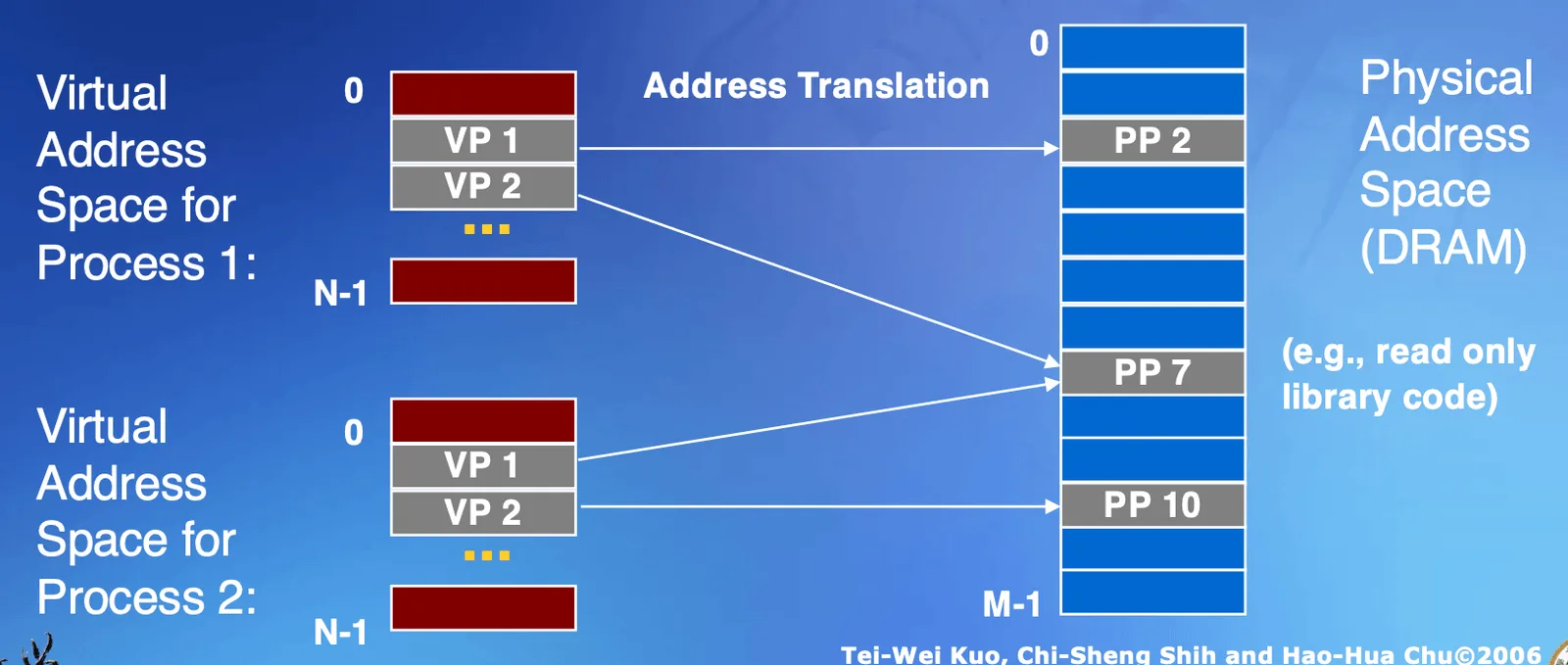
其實是用很像 copy on write 的方法,讓大家可以用同一塊 physical memory
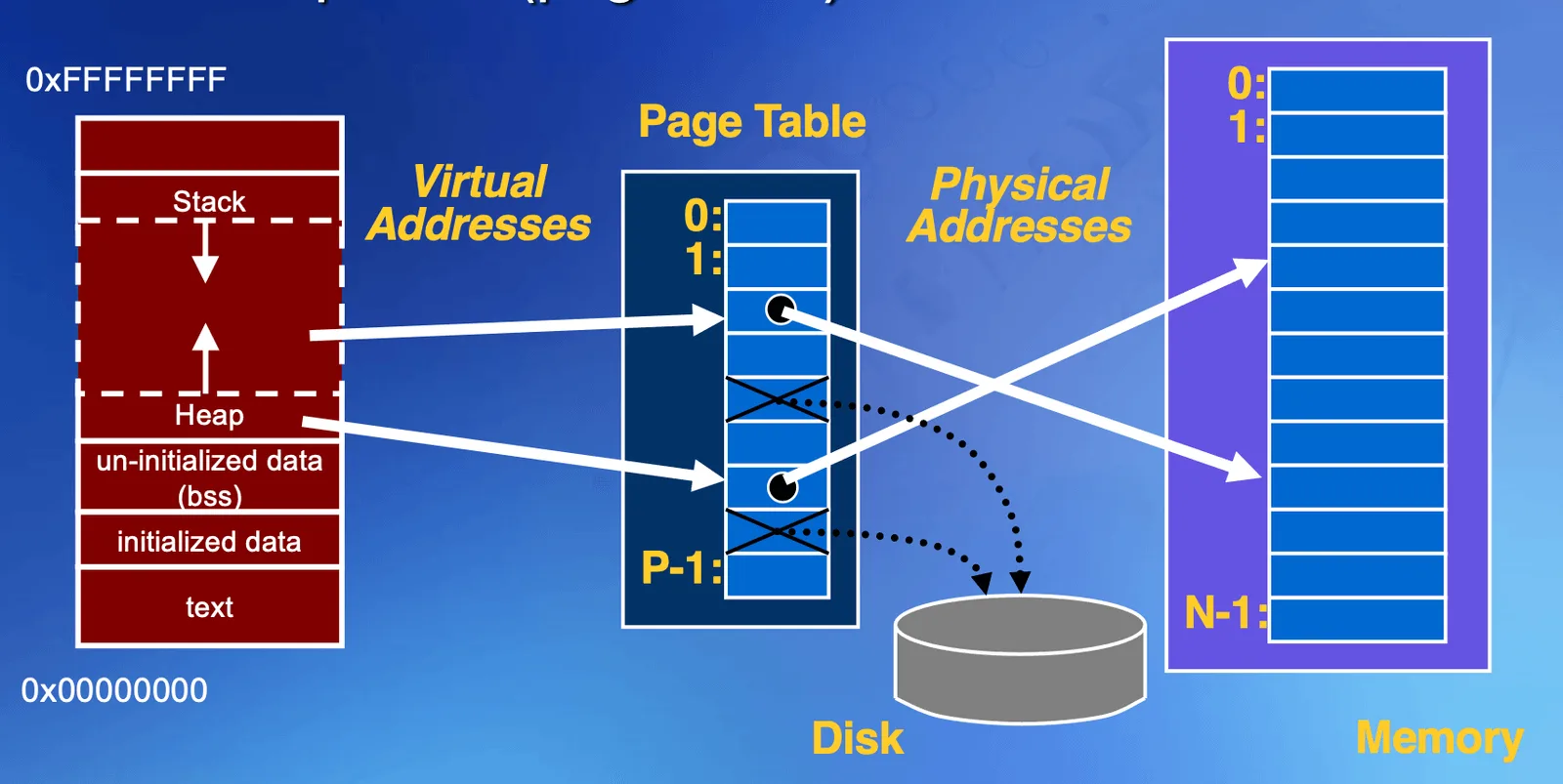
會根據 Page table 去做 mapping,map 到實體的 memeory 上,但是因為所有的 virtual memory 都必須要 map 過來,但是 physical memory 一定不夠用,有可能有時候會指到硬碟上面
- 如果發現已經滿了,但你要動某個變數,OS 就會幫你把你的閒置 virtual memory 掃描到 DISK 上,然後把你要動的那個變數 map 到 physical memeory 上
Translation of address#
必須透過軟硬體合作,才能達到好的效果
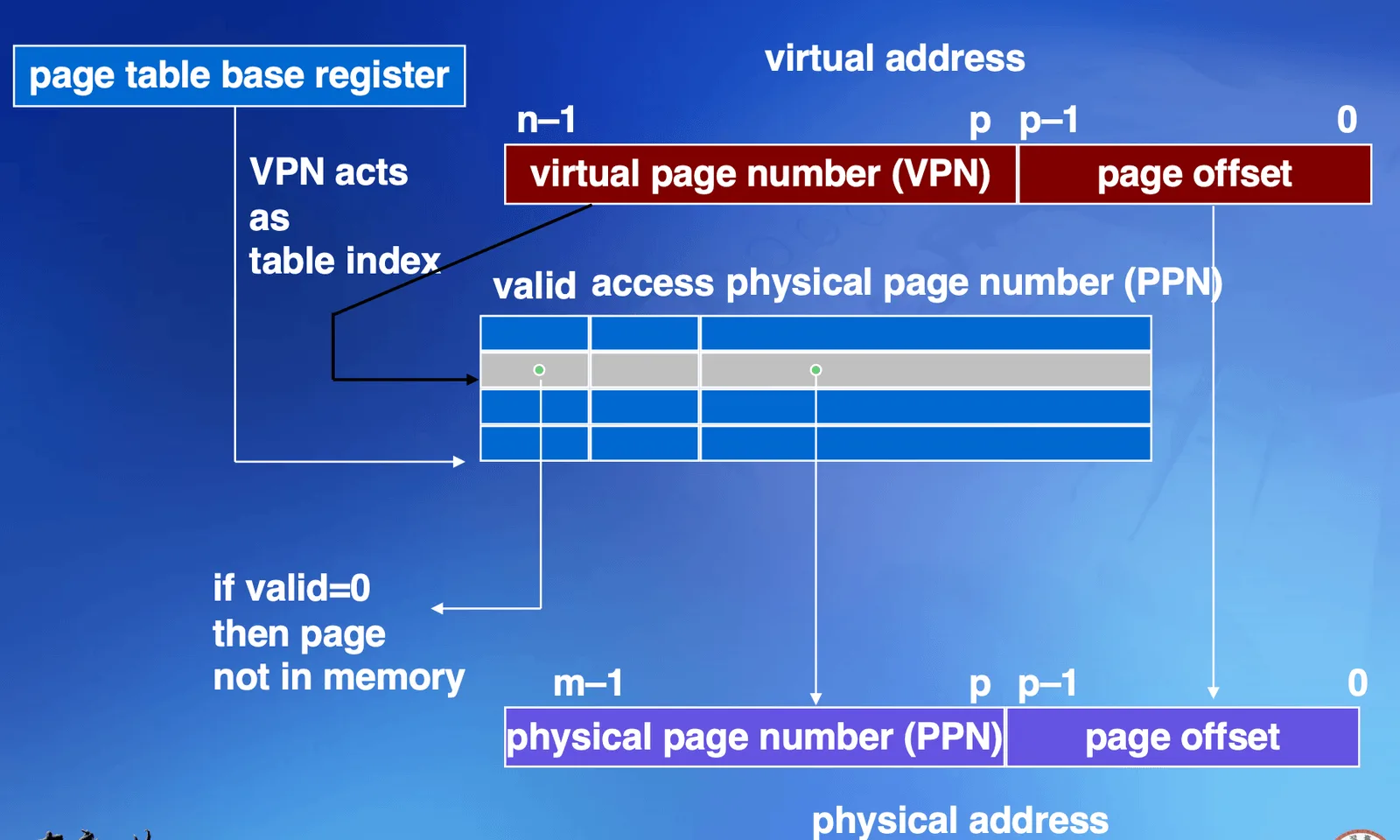
在 virtual address 裡面會存
- page offset:最後的 12-bits page offset map 上去之後不會變化,每一個值都是 page 的 address
- Virtual Page Number (VPN):前面的 20-bit 就會是選 entry 的 number,可以選出 個 entry,通常叫做 Virtual Page Number (VPN)
valid: 會記錄是否已經 map 過了access: 會記錄其他權限限制
在 Page table 裡面,前面兩個 bit 是紀錄狀態,32-2-12 = 18,可以用來表示 Physical Page Number (PPN),再加上 offset 就可以算出對應位置
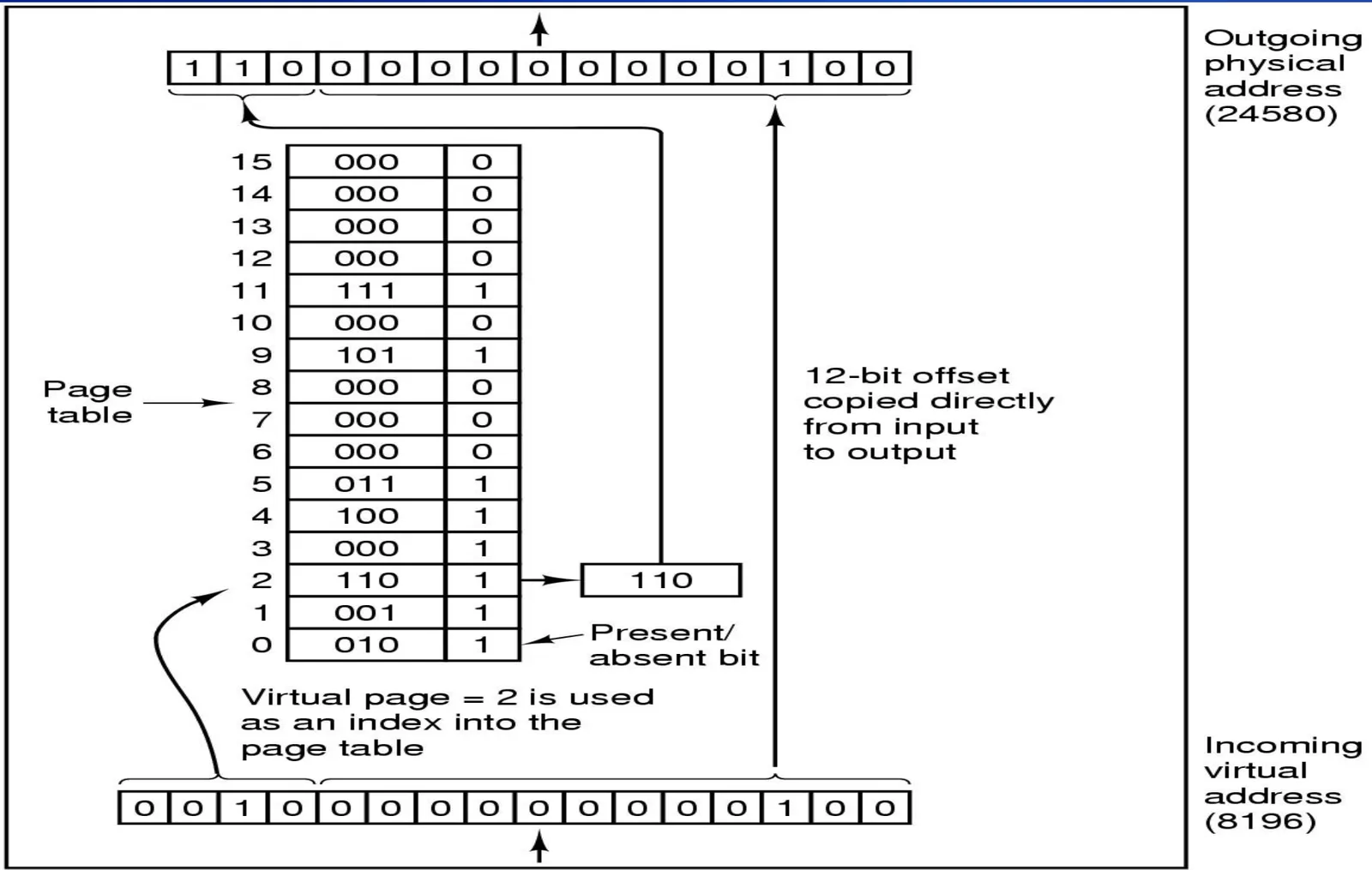
取出來之後就直接是正確的位置了
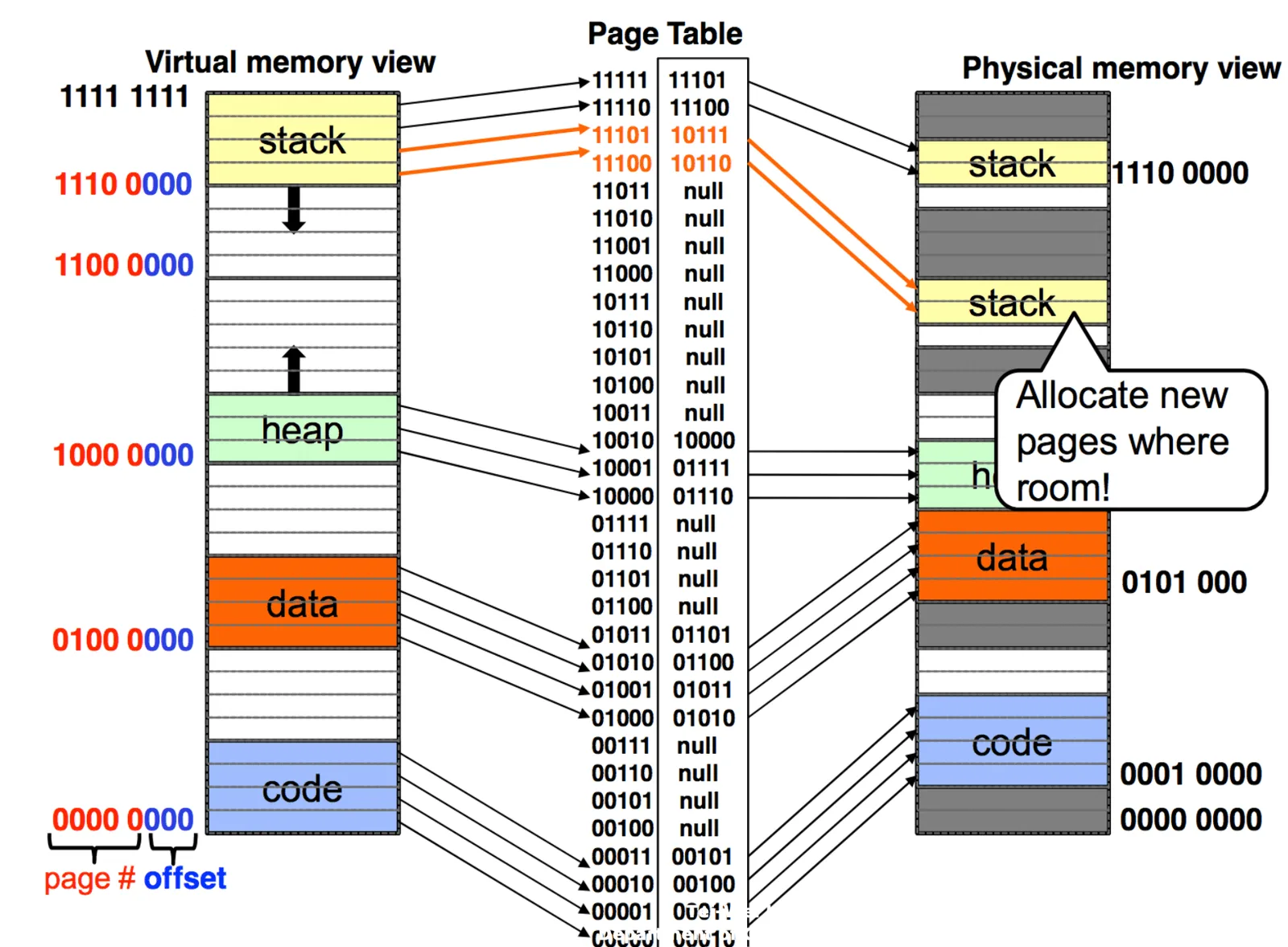
是可以分段 map 進去的,不一定要連續
Stack Frame#
在 ch.6 Signal 提過,底下這一個 code 會輸出什麼
Heap#
void *malloc(size_t size);
- 會呼叫出一塊空間
void *calloc(size_t nobj, size_t size);
- 會呼叫出多少
obj,全部 initialize 成0
void *realloc(void *ptr, size_t newsize);
- 本來已經 malloc 100 byte,但發現需要更多,就可以用這個 system call,用新的一塊 heap memory 去呼叫出來,並且把前 100 byte 變為原始的資料
這三個 function call (C lib) 有一些共同特性
- 必須要 suitable alignment 給 any type of object
- 回傳 Generatic
void*pointer free(void *ptr),可以 free 掉 memory- 底層都是用
sbrk()實現,但這個 system call 並不好呼叫 alloc()return 的記憶體會放在 stack frame 上不需要 free
Command line argument/Environment Variable#
會放在 stack 的上面一點,要傳給 main function,詳見 Ch.6 Process 介紹章節,有一些 system call 可以改動或獲取 env 參數
char *getenv(const char *name);
- 可以拿到 env 參數,ANSI C function, but no ANSI C environment variable
environment 在 compile 後就應該要是固定大小,如果有作變動,那會把參數放到 heap 裡面,並且 allocate 一個 pointer 指向他
Share Library v.s. Static Library#
可以分成 static linking 跟 dynamic linking,binary code 必須要做 linking 才能把 reallocation information 的問題解決
Static Library#
會直接 mirror 一份完整的 code 直接放到你的 ELF 檔案裡
- Linux 中通常都是用
.a當作 static library 的檔名 - 可以 self contain,保證每個 machine 都可以運作,因為執行檔都有這些功能
- 如果要 update 會很麻煩,因為每次 update 都要重新 link
- 非常佔空間
Shared Library (Dynamic Link Libraries DDLs)#
Shared Library 的 code 不會先被放進去,會動態的把各個 component 塞進去,假設我有同一個 function 要 call 很多次,在 static link 裡面就是 copy 很多份 code 進去,但 shared library 就可以只放一次
- 要有一個專門在放 share libray 的資料夾
- gcc 的 default 是 dynamic 要用
-static來更改 - shared library 跟 dynamic linking 其實有點不一樣,linking 是在 runtime 的時候
Back to the content
NTU PJ System Programming
2025 Fall
← Back to the content