File-System Interface#
File Concept#
File 是一種 logical storage unit,file 有各種不同的 type
- Text file
- Source file
- Executable file
File Attributes#
- Name: Human readable 的資訊
- Identifier: for OS
- Type
- Location: 指向 Physical memory 的 pointer
- Size
- Protection: Access-control
- Timestamps and user identification
- Extended file attributes(e.g., checksums)
所有 attribute 都會存在 directory 的 structure 裡面
File Operations#
File 就是一種 abstract data type,我們可以對他做很多操作
- Create
- Open
- Write: 在 write pointer 的 location
- Read: 在 read pointer 的 location
- Reposition (seek): 對 pointer 做操作
- Delete
- Truncate
- Close
在系統內我們通常只允許已經 open 的 file 才能被操作,因此我們需要記錄 Open-file table
裡面會有
- File pointer: 把 W/R pointers 整合成一個 current-file-position pointer 是一種 per-process 的 data
- File-open count: reference 的數量,我們需要知道 lock 的資訊
- Location of the file
- Access rights
Locking Open Files#
打開檔案我們需要想想看能不能讓其他 process 去 access
分成
- shared lock 比較像 read lock
- exclusive lock 比較像 write lock
還有兩種 mechanism 來設計 lock
- Mandatory file-locking: 讓 OS 來處理 lock,讓 user 不需要控制
- Advisory file-locking: User 自己用 access 來控制,讓 OS 比較有彈性空間(詳見 SP 筆記)
import java.io.*;
import java.nio.channels.*;

public class LockingExample {
    public static final boolean EXCLUSIVE = false;
    public static final boolean SHARED = true;

    public static void main(String arsg[]) throws IOException {
        FileLock sharedLock = null;
        FileLock exclusiveLock = null;

        try {
            RandomAccessFile raf = new RandomAccessFile("file.txt", "rw");

            // get the channel for the file
            FileChannel ch = raf.getChannel();

            // this locks the first half of the file - exclusive
            exclusiveLock = ch.lock(0, raf.length()/2, EXCLUSIVE);
            /** Now modify the data . . . */
            // release the lock
            exclusiveLock.release();

            // this locks the second half of the file - shared
            sharedLock = ch.lock(raf.length()/2+1, raf.length(), SHARED);
            /** Now read the data . . . */
            // release the lock
            sharedLock.release();
        } catch (java.io.IOException ioe) {
            System.err.println(ioe);
        } finally {
            if (exclusiveLock != null)
                exclusiveLock.release();
            if (sharedLock != null)
                sharedLock.release();
        }
    }
}File Types#
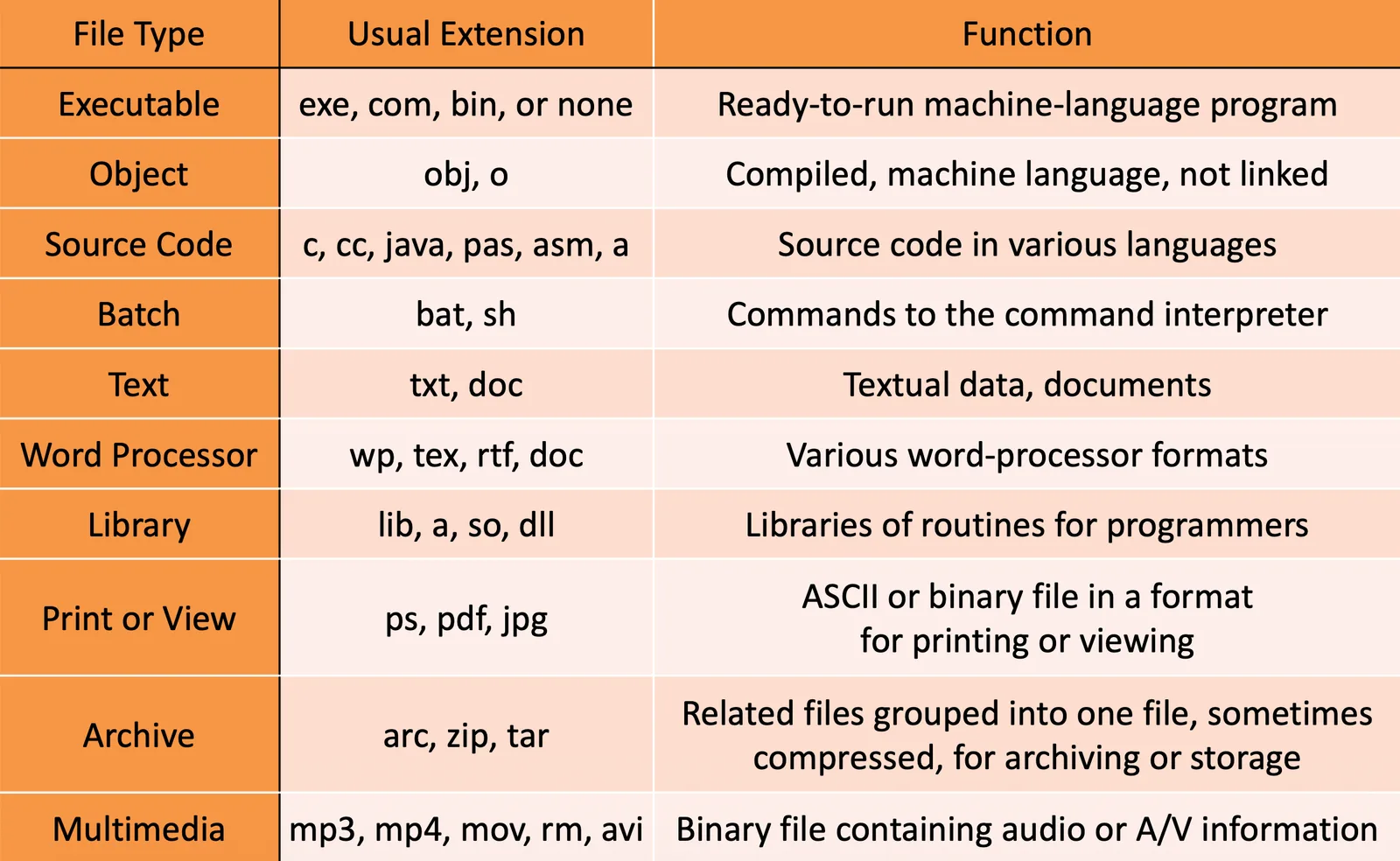
各種 File type 會有各種不同的功能,我們就會用各種方法去解讀
File Structure#
File type 某種程度決定了 file structure
- None
- Sequence of words, bytes
- Simple record structure
- Lines, fix length
- Complex structures:
- Formatted document, relocatable load file(但這兩種也可以用 None structure 加上一些 special char 模擬)
OS 跟 Program 可以決定 file structure 做讀取
Access Methods#
Sequential Access#
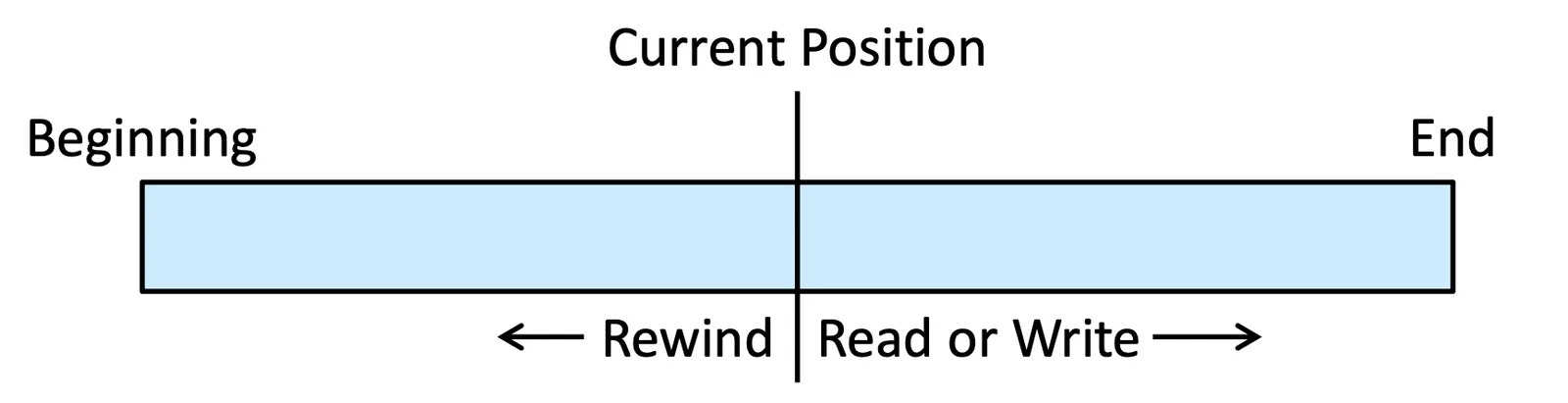
從頭到尾的讀取,所有 record 都是接續的
read_next()write_next()reset(): 回到檔案頭
Direct Access (Relative Access)#
這種 file 裡面都會有 fix length 的 logical address,可以用這個東西做參考
read(n)write(n)position_file(n),read_next()position_file(n),write_next()n= relative block number
可以讓我們做特定 block 的 access,這樣做可以讓我們分配 physical memory 的時候更加彈性
我們同樣可以做到 seq access 的原因是我們可以引入一個新的 variable cp current position
reset()cp = 0;
read_next()read cp;cp = cp + 1;
write_next()write cp;cp = cp + 1;
Other Access Methods#
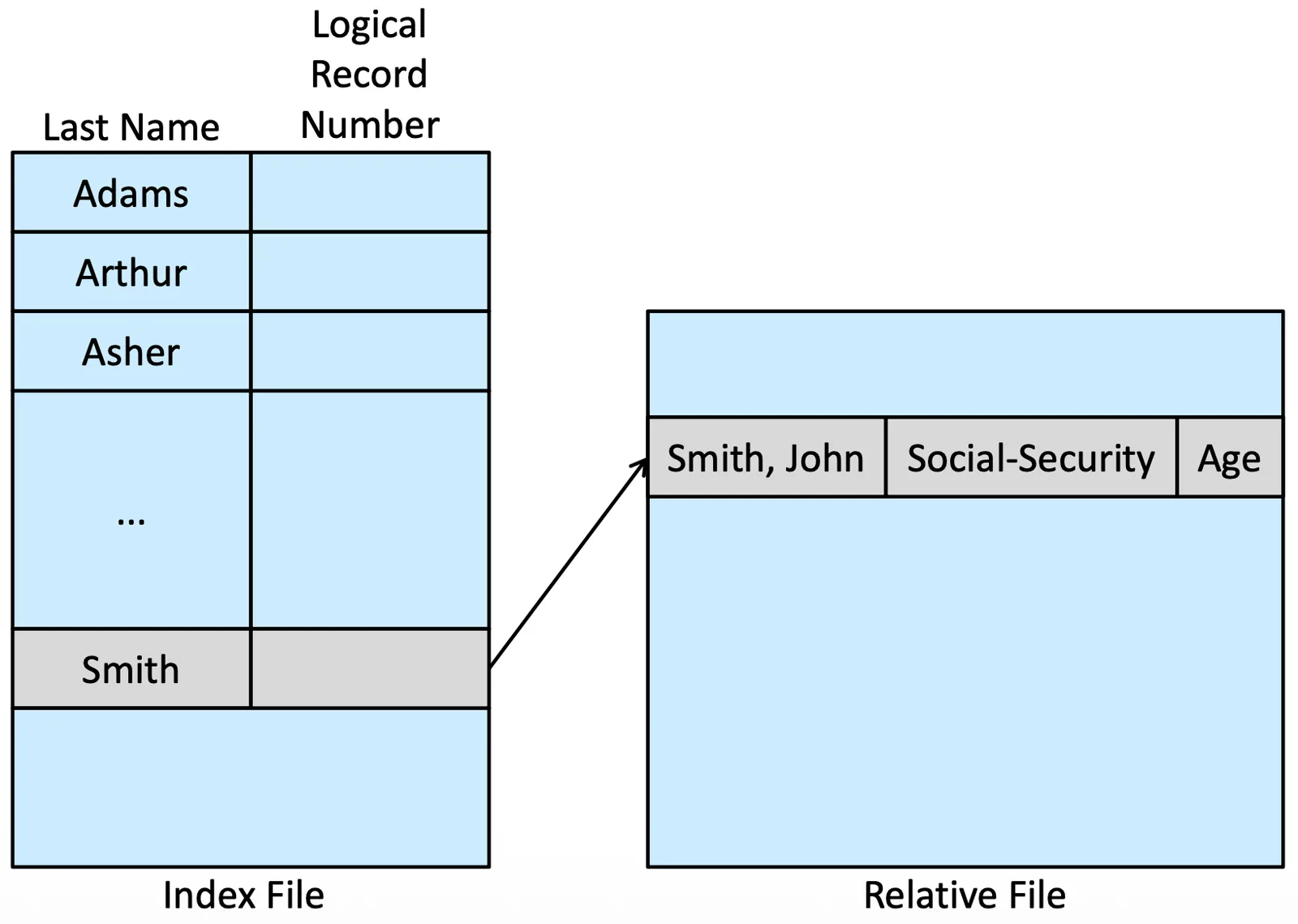
有很多建立在 Direct Access 之上的方法,通常都跟 index 有關,存一個 index table 來做存取,但如果一個 index table 太大也可能會需要 multilevel
- IBM indexed sequential-access method (ISAM)
- OpenVMS index and relative files
Directory Structure#
我們需要 Directory 有這些 property
- Search for a file
- Create a file
- Delete a file
- List a directory
- Rename a file
- Traverse the file system
Single-Level Directory#
一種最簡單的方法,把所有檔案都放在同一個資料夾底下,包含不同 User
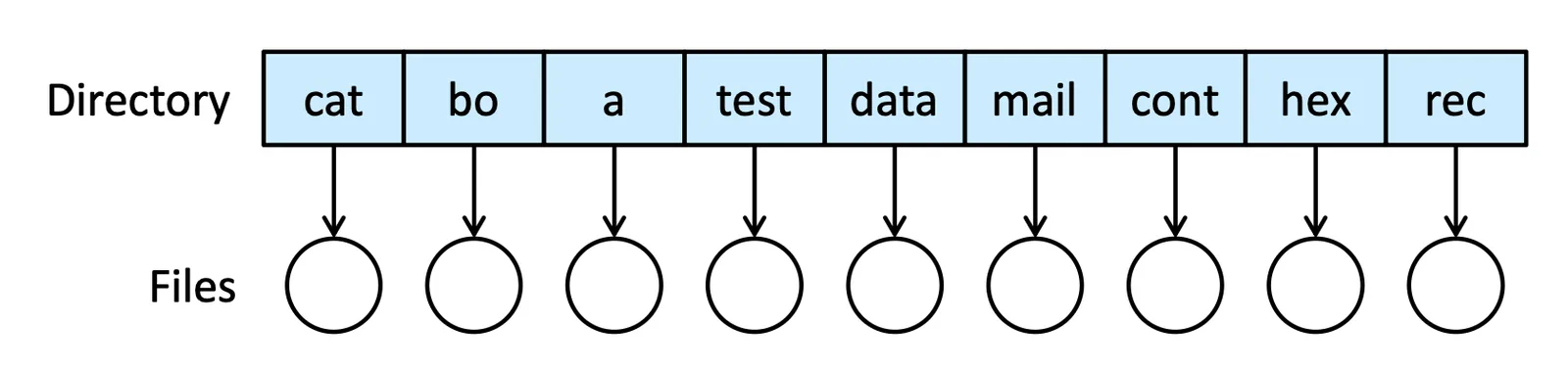
會有 Naming problem
Two-Level Directory#
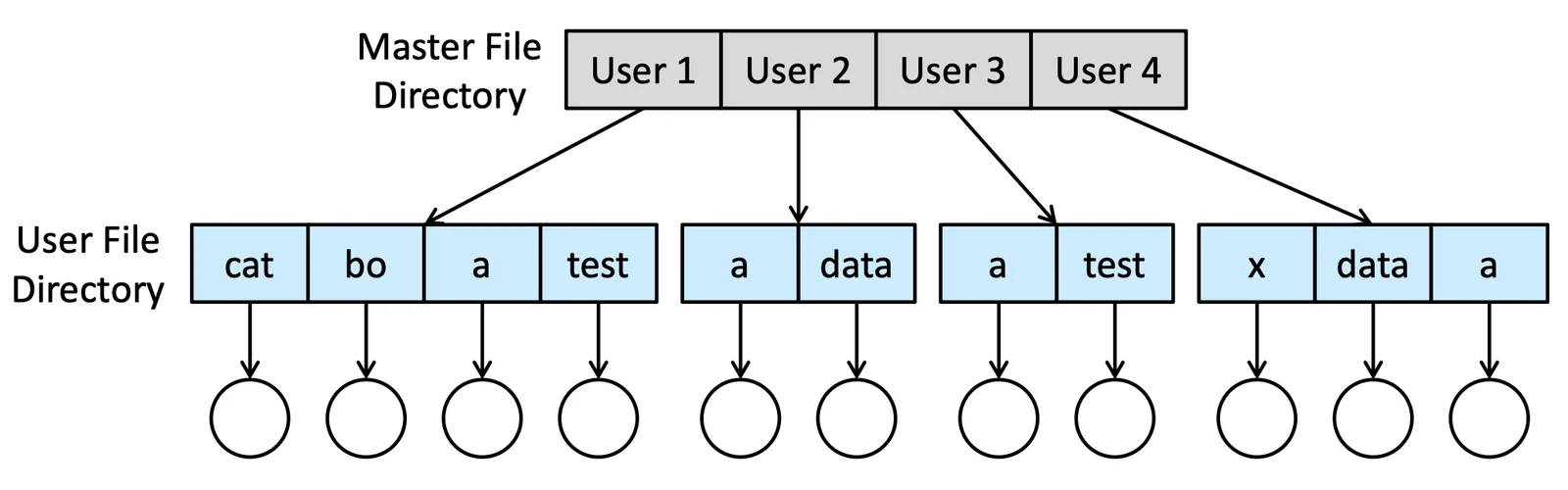
分成兩層結構,不同的 User 會有不同的資料夾
- 第一層:Master File Directory
- 第二層:User File Directory
path name 就是 User name + File name,Linux 會直接當作 directory,Windows 會把磁碟跟 directory 分開
search path 是一個 sequence of directories searched,當呼叫了這個名字的時候,我應該先找誰再找誰,因為有些 system file 是共用的,我們可能可以定義好就不用再自己 User directory 也 create
Tree-Structured Directories#
大家最常見的 directory,我們 user 自己也想分類自己的 directory 裡面的 file,所以需要 sub-directory,因此我們需要一個 bit 去 define 他是 directory file (0) or as a subdirectory (1)
我們也需要記錄 Current working directory,讓我們比較好操作
在這種架構下,我們會需要
- Absolute path name: 從
root開始寫 - Relative path name: 從
cwd開始寫
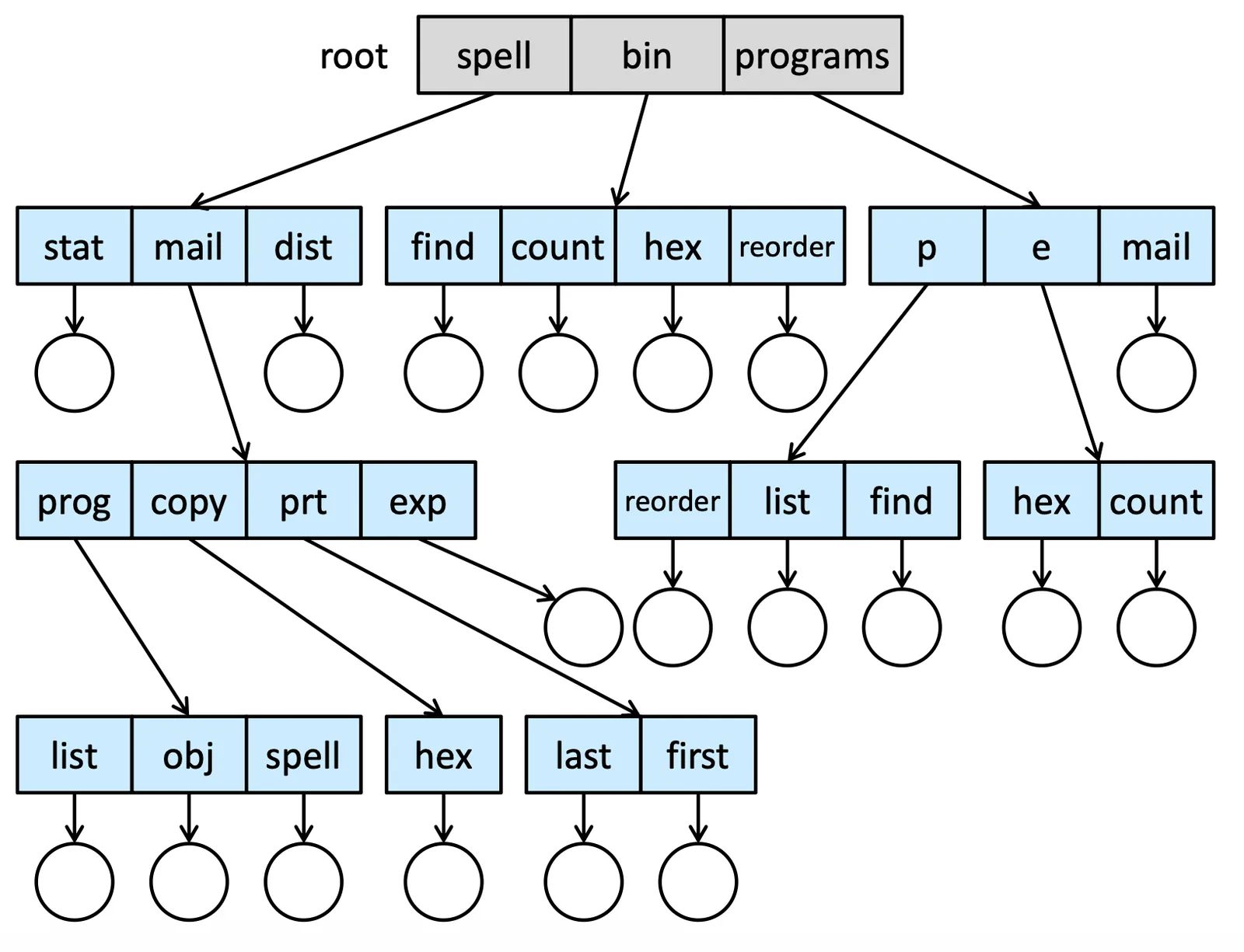
在這種 framework 底下,delete directory 是一件值得思考的事情,有些系統會 not delete unless is empty,有些則會 delete 所有底下的 file
Acyclic-Graph Directories#
是一種無環狀結構,可以指向同一個 file,但不能出現 A to B to C to A,這並不是一種樹狀結構
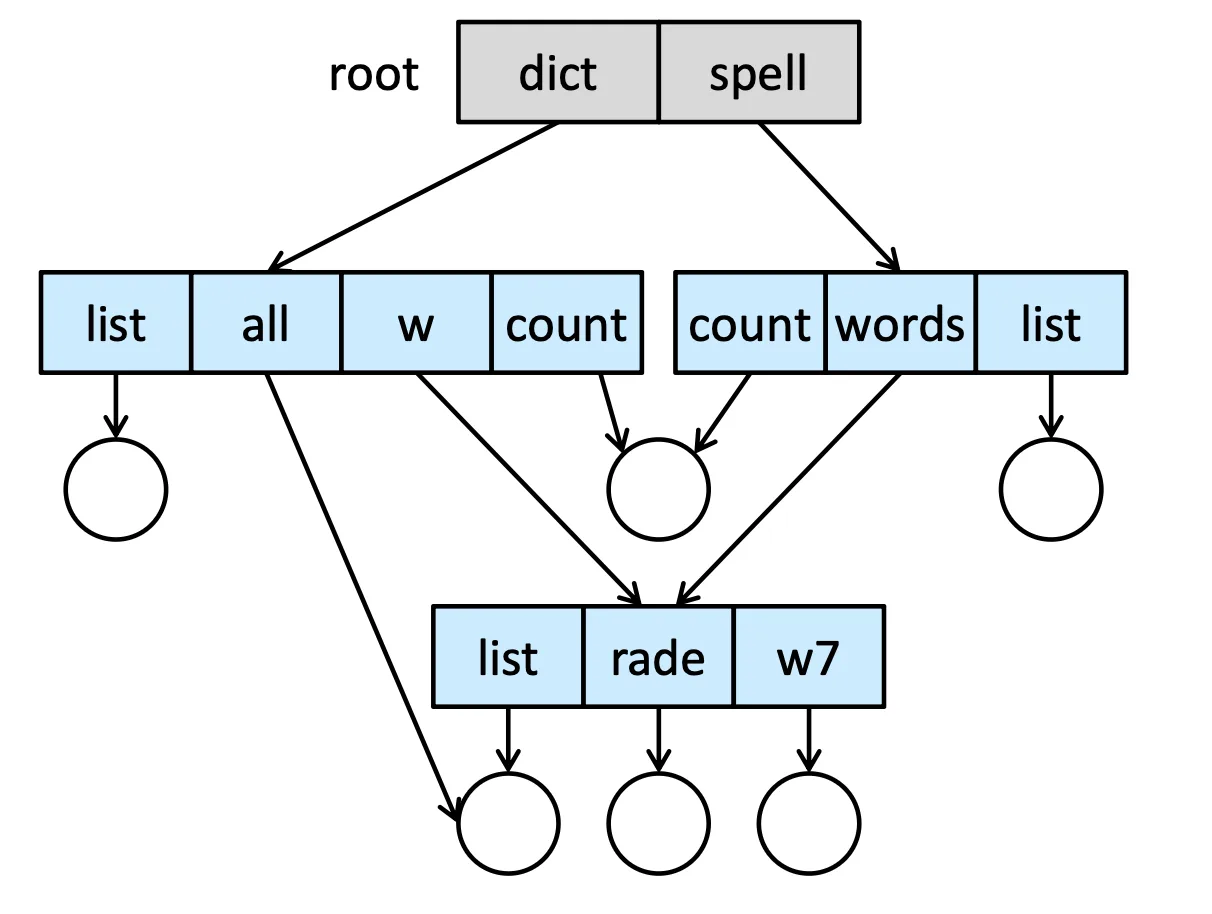
這種結構可以做到 share,我們可以用
- Link: 指向另一個真正 file 或 directory 的位置,讀取的時候做 resolve 到真正的 location
- Copy: 但我們需要一個機制保證這兩個 file 是 sync 的,我們可以放兩個檔案,讓他們指向同一個實體 file
但這會出現兩個問題
- File name not consistent: 兩個 file 在不同的地方,名字不同,但 point at 一樣的 file,我們需要在 traverse 的時候注意
- Dangling pointers: Remove 的時候會出現 dangling pointers 也就是空指標,有種方法解決
- 用 reference count 然後 traverse 去刪除(expensive)
- Link 留著,當要用的時候發現空了再刪
- 當所有 reference 都決定要刪的時候才能刪
General Graph Directory#
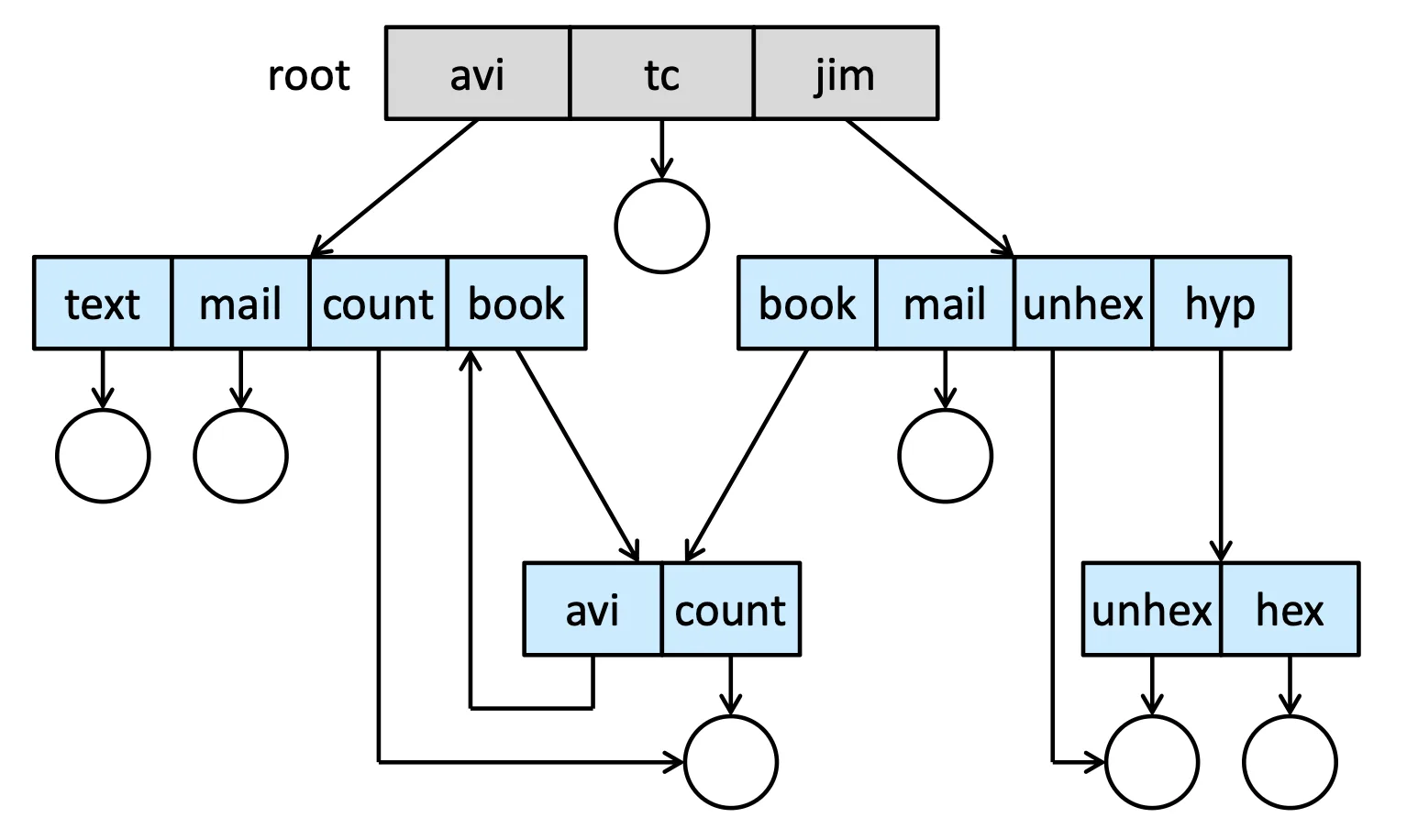
允許 cycle 出現,我們需要做到一些額外的 protection
- 互指的 cycle 會讓有些 ref count 不是
0但其實已經沒有任何 file 指向他了
Garbage collection 就會變得非常重要
Protection#
Types of Access#
每種 access 都有不同的限制
- Read
- Write
- Execute
- Load file 到 memory 上
- Append
- file 尾端寫入
- Delete
- List
- Attribute change
Access Control#
我們可以 maintain 一個 Access-control list (ACL) 來記錄這個檔案對每個 user 的 access control
- 有 overhead
- 可能會讓 fix size file 變 dynamic size
Linux, Unix 為了簡化把東西分成
- 3 種類別的 user
- Owner, group, other
- 3 種權限
- Read, write, execute
用下面的 chmod 做更改指令
chmod 761 <name>來做改動,用 2 進制作解讀
Memory-Mapped Files#
Basic Mechanism#
跟 virtual memory 有異曲同工,page-in page-out 的時候 secondary storage 會被觸及,而且有些 operation 為了加速,我們必須搬到 memory 上面做操作,所以我們需要記錄他的位置
Memory mapping a file 會讓 memory 裡面的某個 page 做到跟 secondary storage 的 file 相關,我們可以操作那個 file,但他其實是在 memory 裡面做操作,I/O 速度會大大增加
當我們要 close 的時候,我們再把它從 memory 上寫回 secondary storage,這件事情並不是 sync 的
Sharing Between Processes#
我們可以透過這樣的機制,把 data 先寫到 memory 裡面,再寫回各自的 file 裡面,就可以做到 Concurrency
這樣的方法也支持 copy-on-write,也就是先 share 一個 read only 的 file,當某個 process 想改的時候,再做 copy 就好
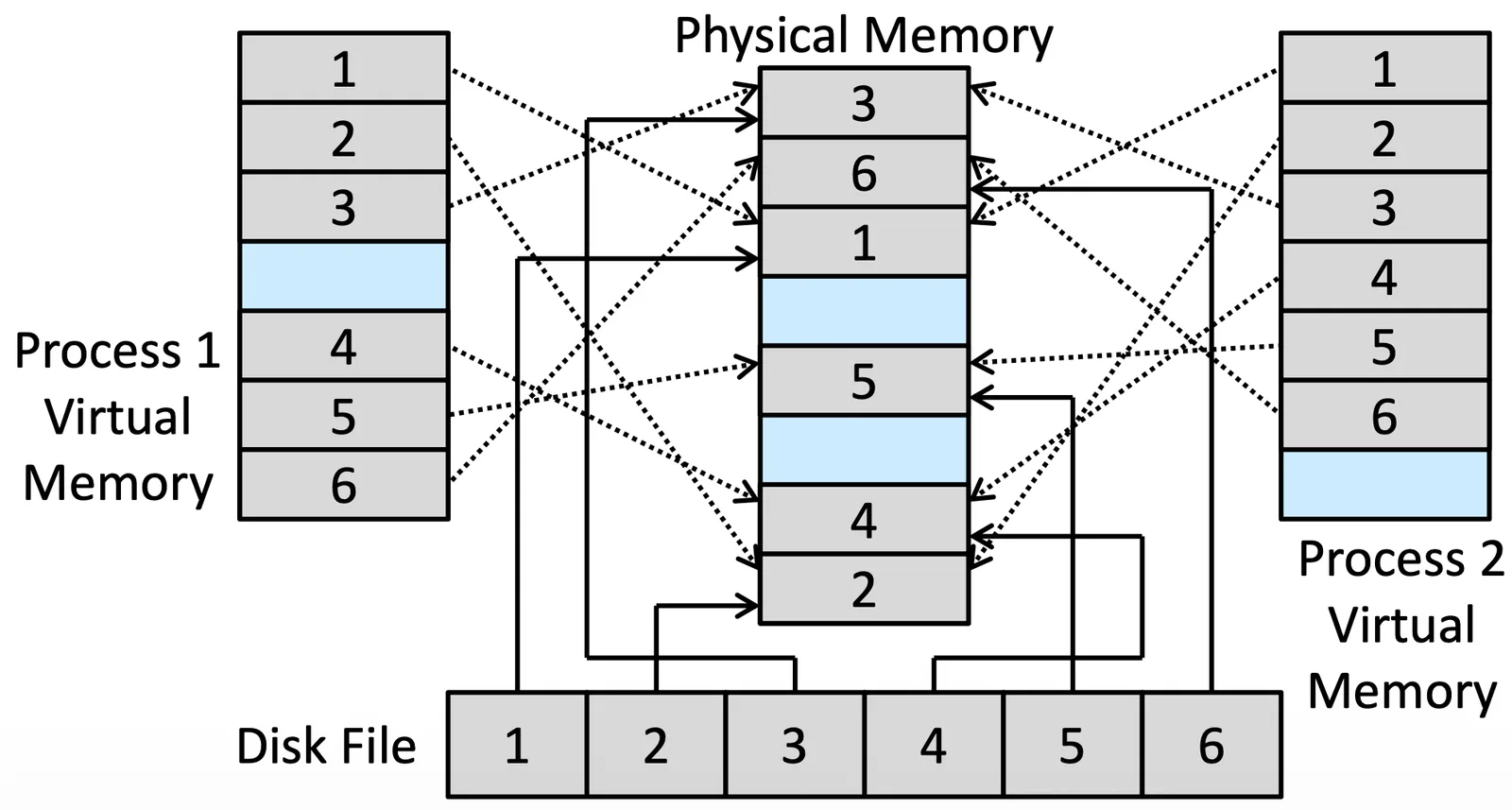
因為 memory-mapping file 本身就是一個 memory,只要兩個 process share 那個 file 就好了
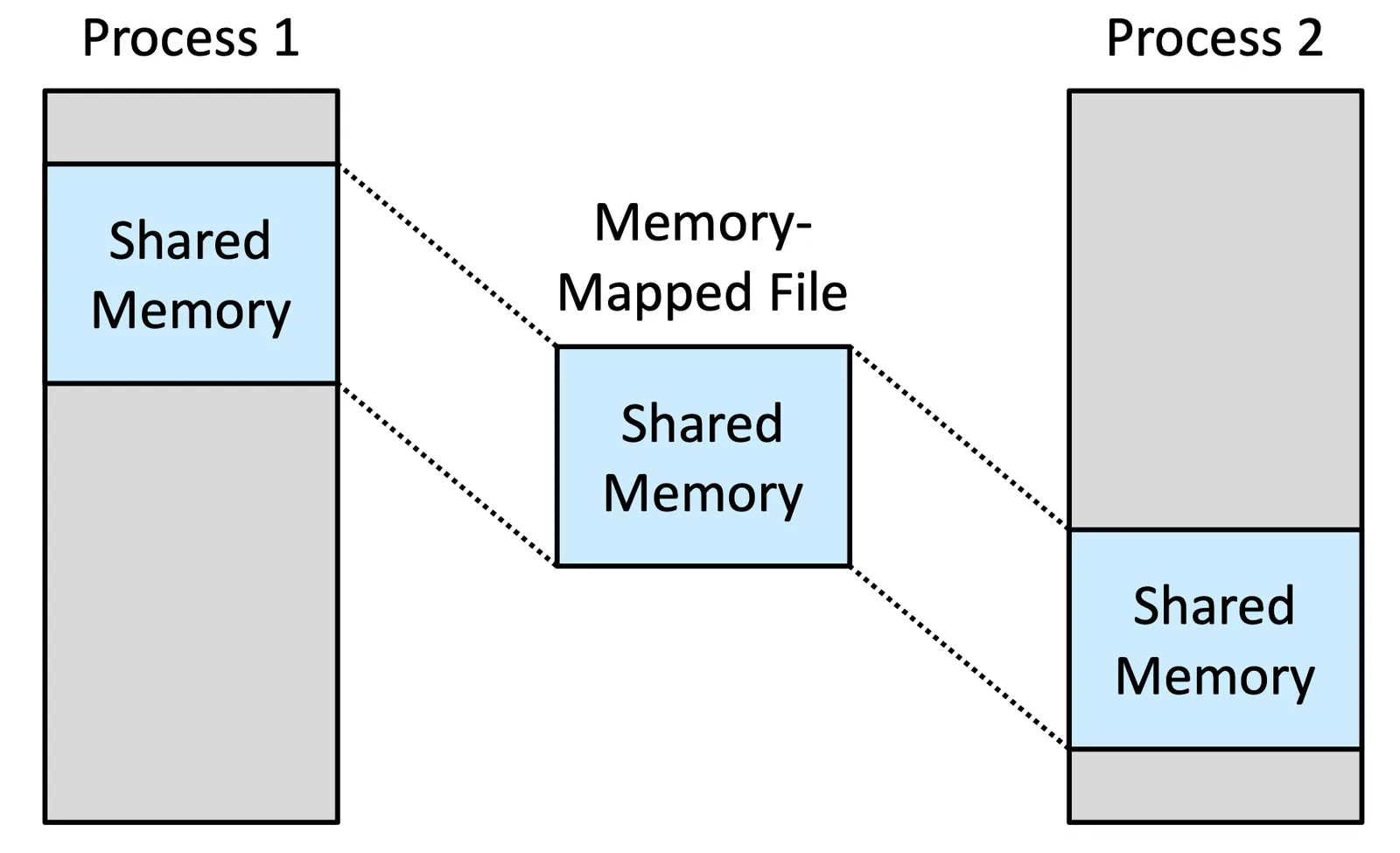
Shared Memory in Windows API#
CreateFile()可以 create 或 open 一個 fileCreateFileMapping()可以在 memory 上 create mapping of a fileMapViewOfFile()因為 system 支持 file 的一部分 mapping,是可以不用全部的 file 都 map 的