File-System Implementation#
File-System Structure#
為了要增加 I/O efficiency,我們必須引入 block 的概念 - 通常是 512 or 4096 bytes
File System 會提供 access to the storage device,要做的事情就是讓 data 可以 read, write, store, locate,也需要 support 一些 algorithm 來加速
Layered File Systems#
跟 Network 一樣 File system 也可以分層
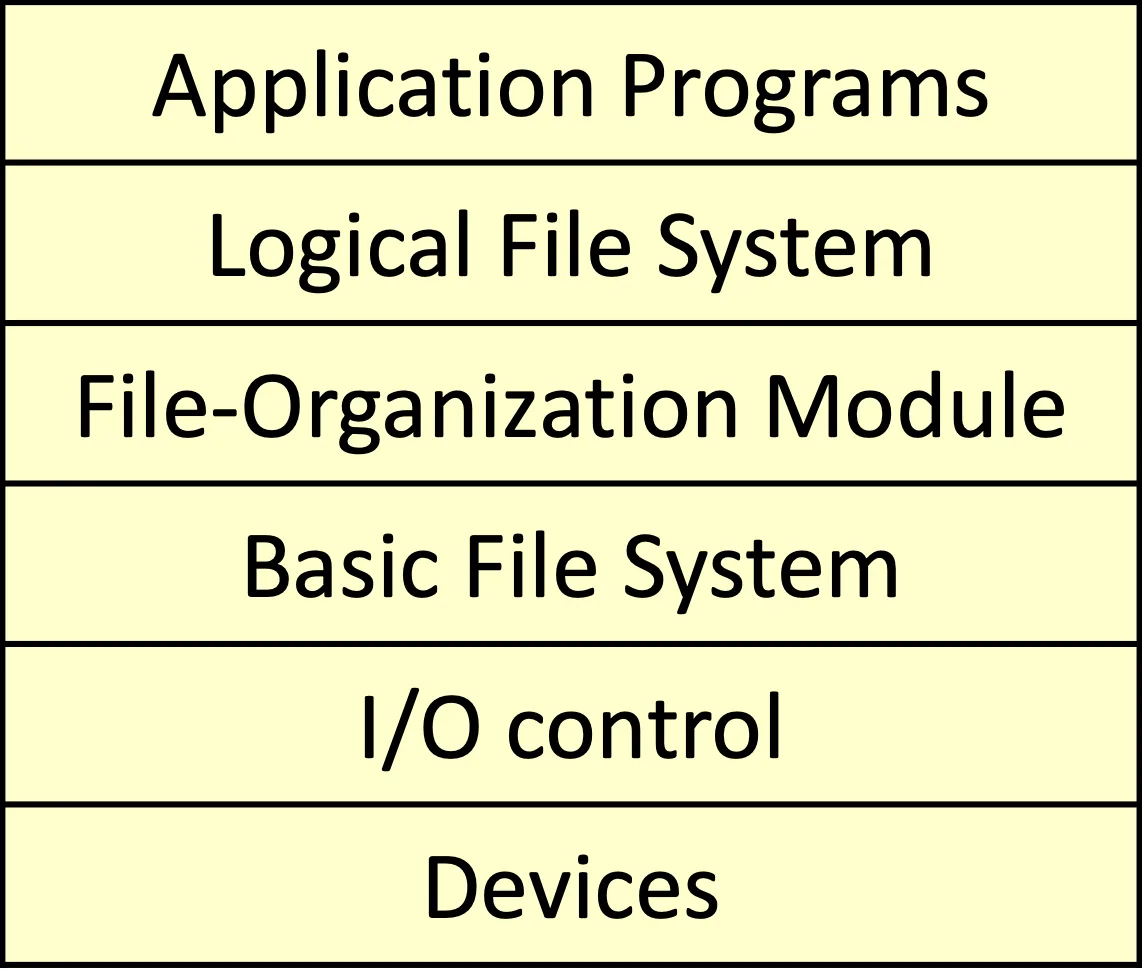
- Application programs
- Logical file system
- 有所有的 metadata 跟 file system structure,除了真實資料
- 管理 directory structure
- 用 file-control blocks (FCBs) 或是 inodes maintain file system structure
- File-organization module
- 以 file 為單位處理 data
- 要做 free space management
- Basic File system:
- 以 Block 為單位做 data 管理
- 需要處理 Memory buffer 跟 cache 的問題
- Transfer 前要先在這層處理 memory 空間、I/O request
- I/O Control:
- Device driver 跟 Interrupt handler,負責在 Memory 跟 device 之間做傳輸
- Device driver 也會送指令到 I/O controller’s memory 進行 translate
- Device: 最下層硬體
Typical File-Control Block 需要含有以下 attributes
- File permissions
- File dates (create, access, write)
- File owner, group, access-control list (ACL)
- File size
- File data blocks or pointers to file data blocks
採用這種架構有一些好處壞處
- Advantage:
- 可以快速做到替換,用 interface 嫁接
- 可以完全分離,即便有多種 interface,下層可以只要一種 I/O control
- Disadvantage:
- 無法整體考慮 optimize
- 會有額外 overhead
Linux 用的是 extended file system,但他可以支援 130 種以上的 file system
File-System Operations#
Structures on File Systems#
每個 File system 會有以下的 structure
- boot control block (per volume): 在 boot 的時候需要的,但不一定每個 volume 都需要這個,所以有些不負責開機的 file system 這個 block 是 empty 的
- 通常是第一個 block
- Boot block in UFS, Partition boot sector in NTFS
- Volume control block (per volume): 儲存 volume 的 metadata 用的 block
- Superblock in UFS and stored master file table in NTFS
- Directory structure (per file system)
- inode in UFS, stored master file table in NTFS
- FCB (per-file): access control 或其他 metadata
以下則為 In-Memory 的 File Systems structure
- Mount table: 紀錄所有被 mount 的 volume
- In-memory directory-structure cache: 近期 access 的 directory
- Open-file table (System wide): 紀錄已開啟的 file
- open-file table (Per-process): 看 process 可以操作的 file
- Buffer: read, write 做的操作
File Open and File Read#
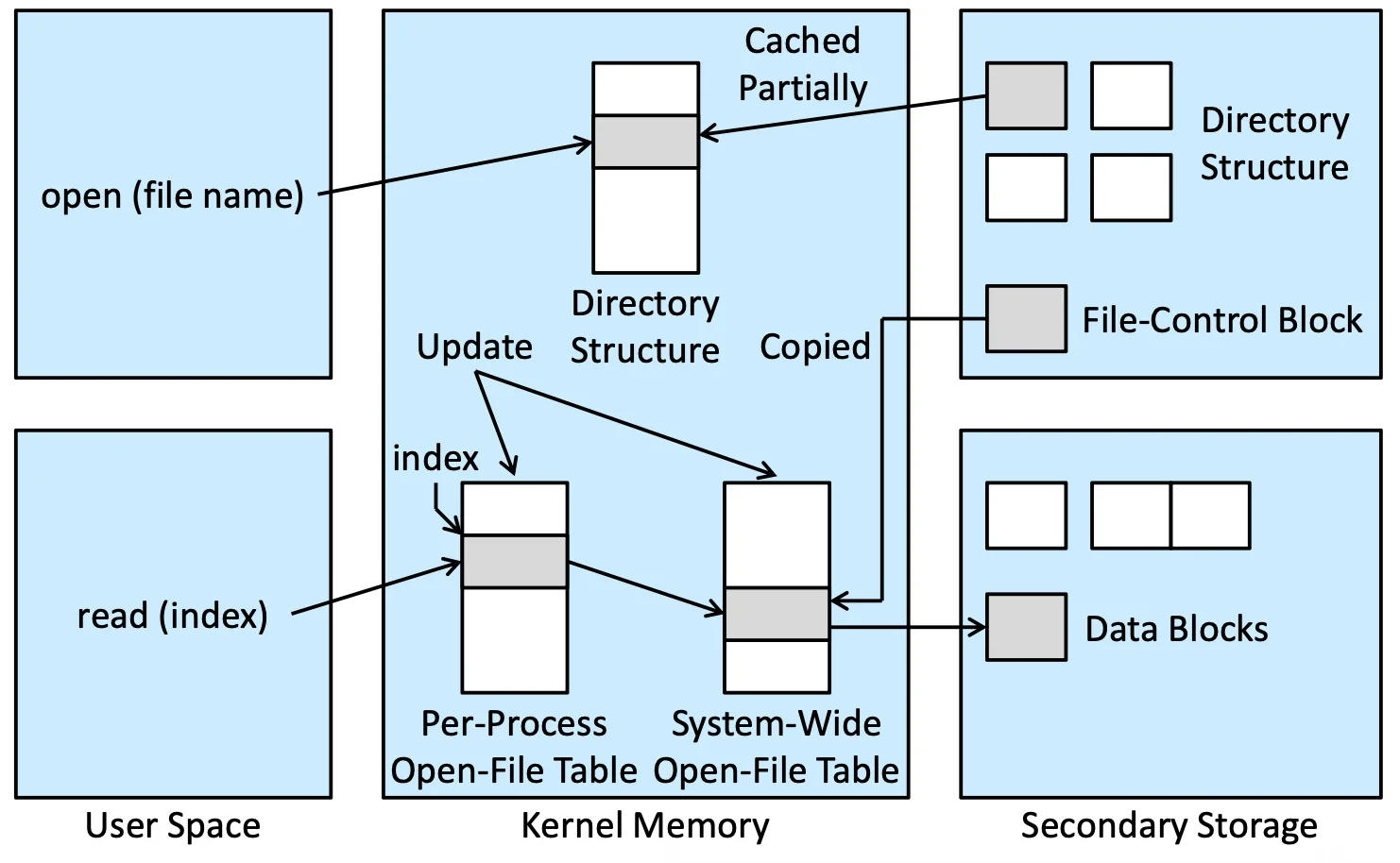
open() system call 會有兩個狀況,開了或沒開,沒開過的話
- 在 memory cache 或 secondary storage 找 directory structure
- 從 directory structure 找 FCB
- 若從未開啟,Copy 到 system wide open file table 裡面,並更新 per process open file table
- 若開啟過,只需更新 per process open file table
要 read() 就用 file descriptor 去做存取,很像一個 index 指向 open file table,open file table 再用 pointer 指向真正的 data block
Directory Implementation#
Linear list 最簡單,但 Time consuming,可以用 sorting, binary search 加速
Hash table 方便,但需要避免 collision,擴增是個大方向,也可以用 linear list + hash table 的方式
Allocation Methods#
該如何分配空間給 file,我們希望
- Access 效率高
- Space 的用法要有效能
Contiguous Allocation#
最簡單的 implementation,只需要記錄每個 file 開頭結尾,但一樣會有 external fragmentation,還會有 Free-space management 的問題
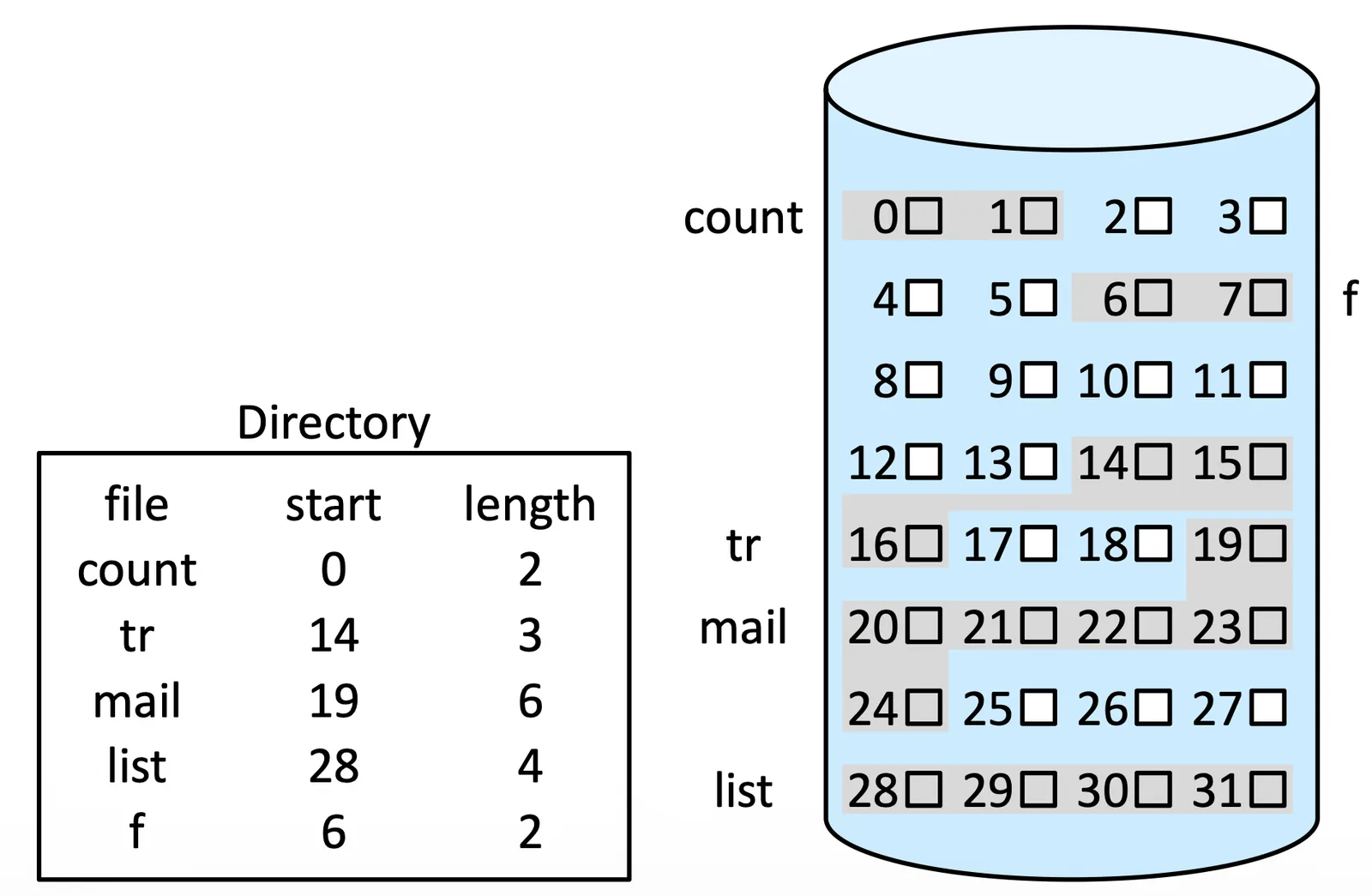
可以做 Compaction 避免這個問題,全部搬過去 memory 操作,再全部一起排好放回來,可以 Off-line(系統休眠)也可以 on-line(overhead)
Extent-Based Systems#
剛剛的投影片是假設每個 file 大小固定,但真實情況並不是,會隨時間變化,有幾種方法
- 停下 process 檢查 file,再 rerun,但會有很高的 overhead
- Over estimated 大小,空間 overhead
- 真的發現空間不夠,再做 copy 到新空間
- Extent,空間不夠就分段,用 linklist 連接每個 segment
Linked Allocation#
每個 element 都是一個 block,再用 list 連起來,這樣就可以避免 external fragmentation
但是如果要做某個 block 的 delete 或是 operation 就必須要做 traverse,並且需要花額外的空間存 pointer,並且 reliability 會因為 pointer 損壞而整組損壞
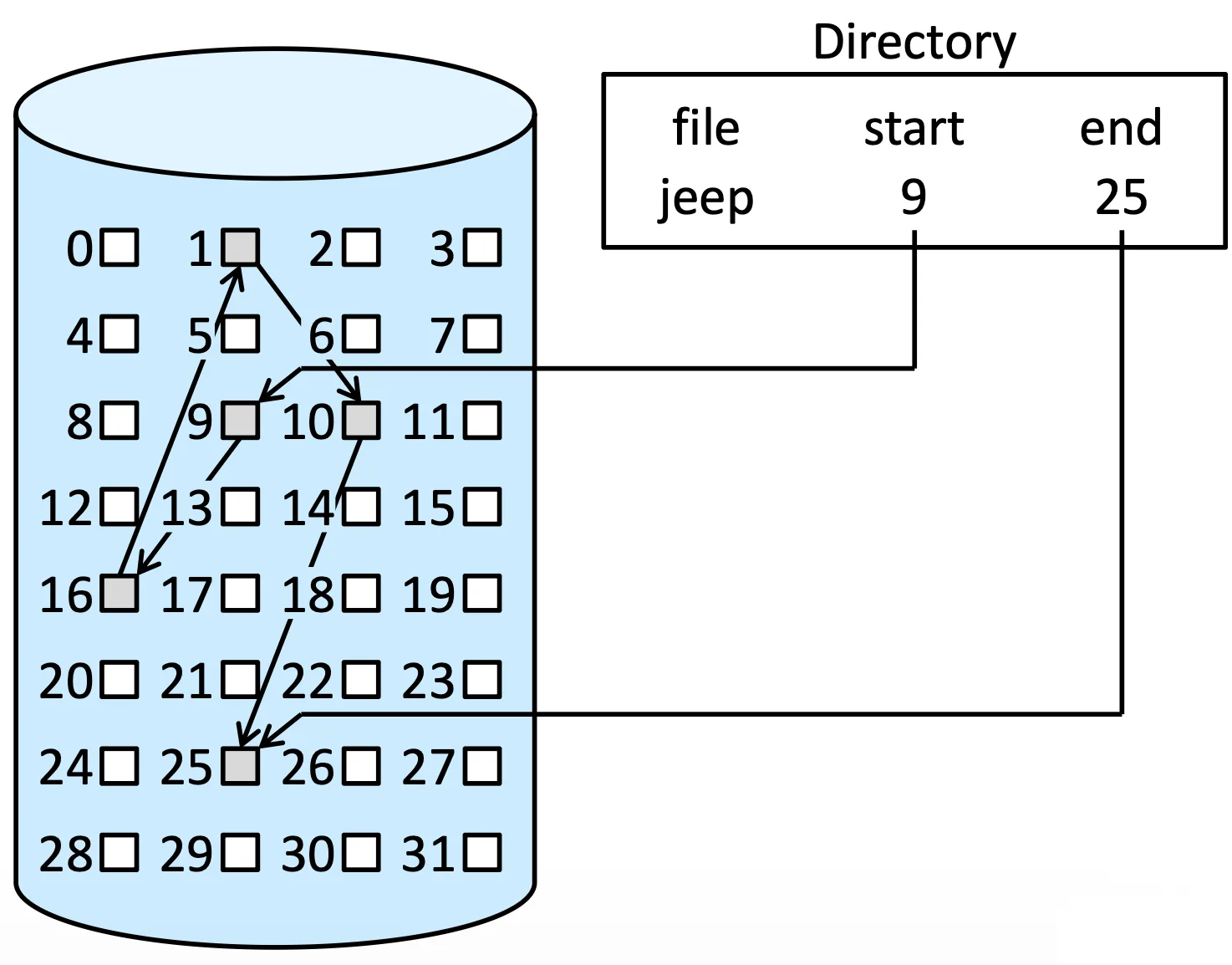
稍微緩解這種現象可以用 cluster 聚集一些 block 讓他稍微連續
File-Allocation Table (FAT)#
把每個 volume 的前面用來存每個 linklist 的行為,把 block 之間的關聯性存在一個 table 上
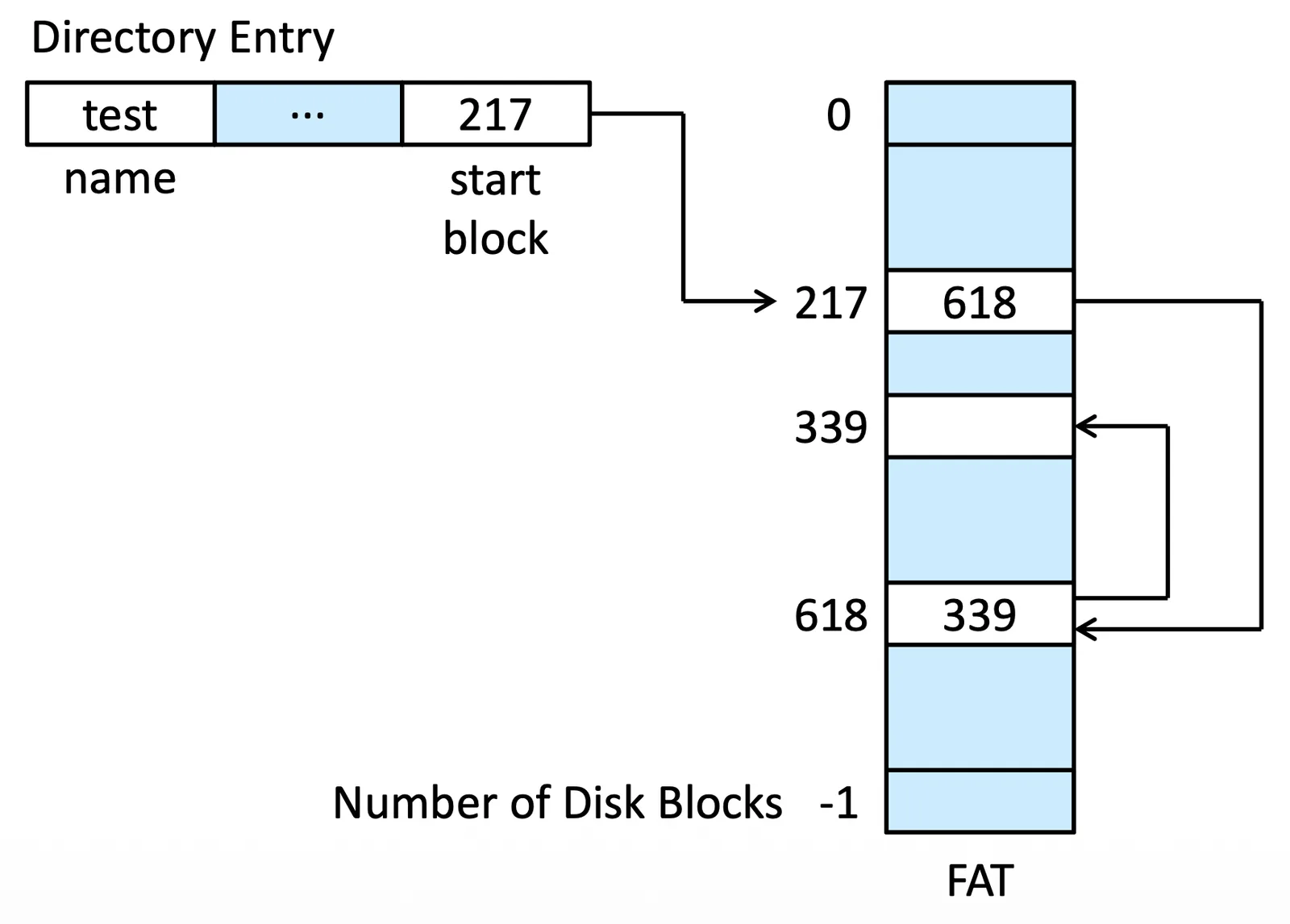
這樣 direct access 就會比較快,但在 hardware 上的 disk head seeks 就會比較多,因為要在 table 跟 list 間移動
Indexed Allocation#
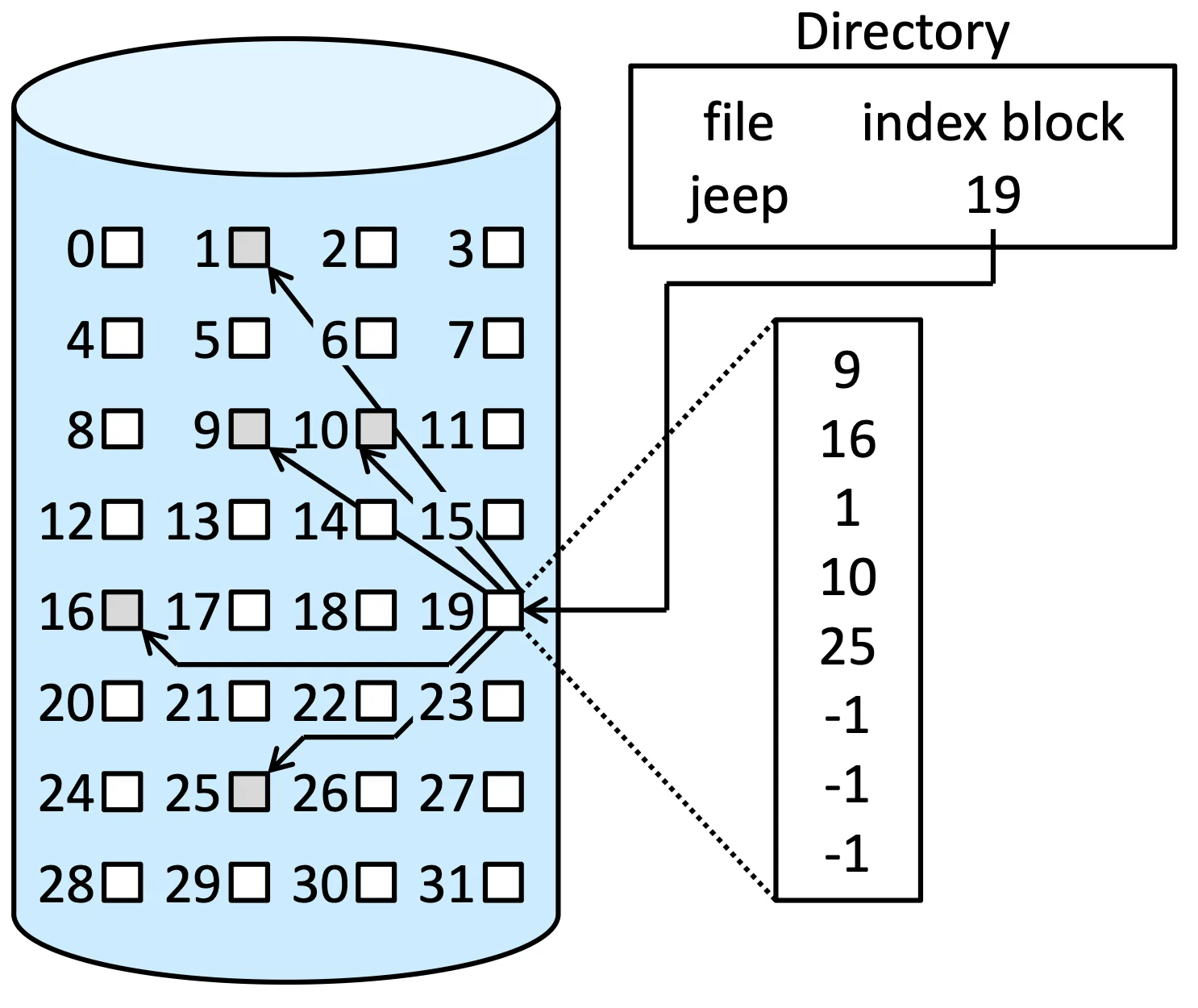
非常類似 FAT 但是存取 block 位置是採用 index block,也就是每個檔案的第一個 block
這樣的方法會造成一些 space 上的 overhead
Schemes of Index Blocks#
- Linked scheme: 當需要很多 blocks 才夠存 index,我們就用 linklist 存 index
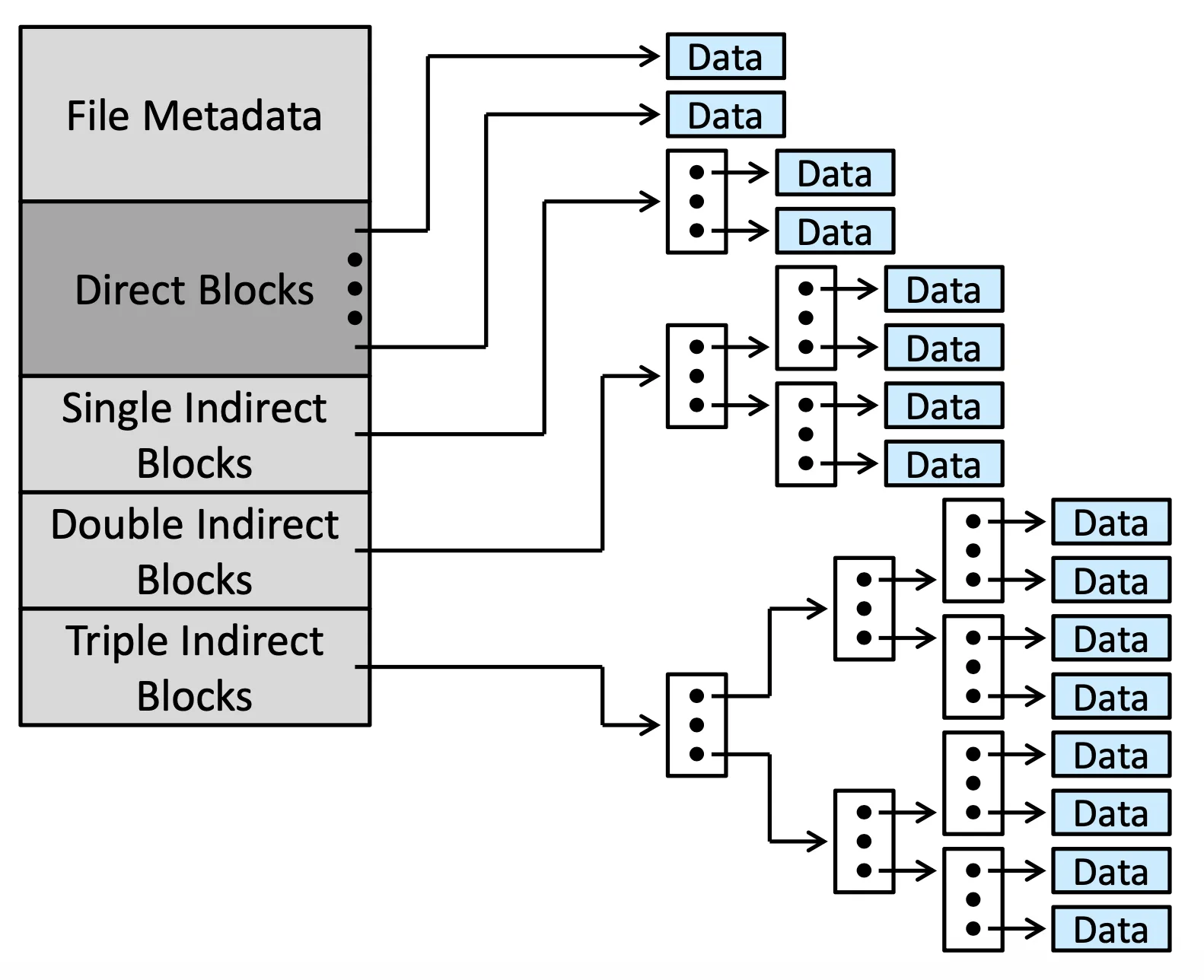
- Multilevel index: 用多層 index 來做擴增,depend on file size 決定要多少層
- With 4,096-byte blocks, we could store 1,024 four-byte pointers in an index block. Two levels of indexes allow 1,048,576 data blocks and a file size of up to 4 GB
Performance#
我們希望 storage 空間使用得當,並且 access speed 要增加
- Contiguous allocation 在 direct access 上很快,但會有 external fragmentation
- Linked allocation 做 direct access 必須 traverse,所以會慢
- Index allocation 分析很複雜,跟 index structure, file 都有關
有些是混用的方法,大檔案用 contiguous 小檔案用 Link,或根據 access 性質決定
如果是 NVM 的話我們需要其他的 algorithm 或 optimization,簡單來講要關切的重點是 instruction count 跟 overall path
Free-Space Management#
Allocation method 是紀錄哪些 block 被用了,並且屬於誰,而這個章節則是在管理還沒用到的 block
我們通常用一個 Free-space List 紀錄哪些 block 是還沒被用到的,想 create file 就在這裡找 space 然後 allocate,delete 的時候要做空間的 release
Bit Vector (Bitmap)#
如果一個 block 是 free 的那 bit 就會是 1,反之則為 0,如果要找到第一個 free block 我們用
好處就是 simple 但是如果要這個操作快的話,我們就需要把這個操作搬到 memory 上面,但這樣很耗 memory
- 1-TB (2^40 bytes) disk with 4-KB (2^12 bytes) blocks
- The number of blocks = 2^40/2^12 = 2^28
- The size of bit vector = 2^28 bits (32 MB)
- If we use 4-block clusters instead of blocks, we still need 8 MB
Linked List#
有一個 list head 指向第一個 free block,把所有 block 用一個 list 串起來,相比於 bitmap 我們需要的只是 pointer,空間會少,而且找第一個 free block 會比較短時間
但缺點是 traverse list 依然是一個 time consuming 的事情,但其實 traverse 的機會不多
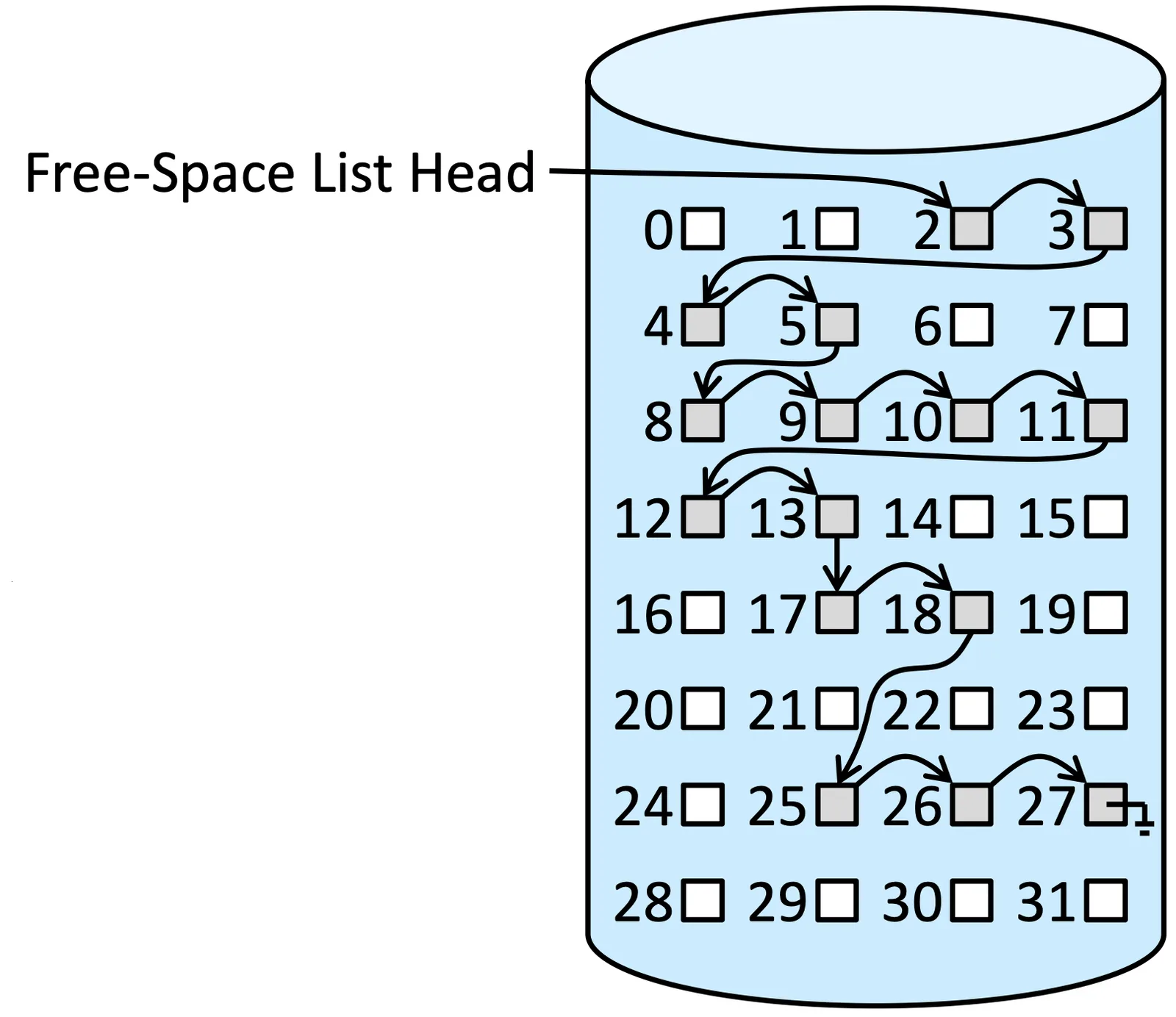
這個概念跟 file-allocation table (FAT) 是很像的只不過我們記錄的是 free-block,所以假設我們有 FAT 可以串 free block,也可以不用 separate method 來處理,只需要注記是在記錄 free block 的 list
Grouping#
是一種 link list 的變體,改成一個每個 group 有 n 個 block,上一個 group 的最後一個 block 指向 (n-1) 個 block,這樣的方法一次看一個 block 就可以看到 (n-1) 個 block
Counting#
先紀錄一個 entry 是 first free block,然後下一個 entry 紀錄接下來有幾個連續的 free block,因為系統裡面常常都有分段但連續的 block 出現,這樣的方法可以維持這個性質
連接這些 entry 的方法可以是 list 也可以是 balanced tree,但我們說 Counting 的時候不會限定方法
Space Maps#
是一個 Oracle’s ZFS 用的方法,起初是為了處理超大的檔案,採用 metaslabs,是一種比較可以處理的大小
方法是把一個 volume 切成好多個 metaslabs,每個 metaslab 會對應到一個 space map,space map 會有跟空間相關的資訊,以此為標準進行管理
Space map 會搭配 log-structured file system technique 來進行處理,簡而言之是會把 block 的 activity 存成一個 log,把 block load 到 memory 上之後再根據 log 進行一系列的 operation,就可以知道現在的狀態
TRIMing Unused Blocks#
在普通的 HDD 裡面一個 block 是 free 的他就必定能使用,新的資料進來再把 data overwrite 就好
但在 NVM 上會需要 erase 的動作,需要等整個 page 都是 free 的才能 erase,所以不能用前面的方法,需要記錄 3 種狀態
- 有東西
- Free
- Free 但還沒 erase
如果用 ATA attached 會用 TRIM,如果用 NVMe-based 我們用 unallocate 做 erase
Efficiency and Performance#
NVM 依然比 CPU memory 慢,所以處理不一樣會造成 bottle neck,以下是一些因素
- Allocation, Directory Algorithm: 可以減少 access time 或 seek time
- 儲存在 directory 裡面的 metadata (e.g., 一個 file 最後在啥時被讀取)
- Pointer 的 bit(address 相關)
- Fixed-size 還是 Dynamic-size Allocation structure
Buffer Cache and Page Cache#
剛剛都是跟 algorithm 相關的 improve 方法,現在則是對於硬體的加速方法,有分成兩種 Cache:
- Buffer Cache: 在 main memory 裡面的一塊空間,某個 file block 如果等等馬上就會用到,就把它 store 在裡
- Page Cache: 跟原本用 virtual memory 的概念相反,要存的東西是一個 block,但用 virtual memory 就會是用 memory I/O 會比 Disk 讀取快很多
- Unified Virtual Memory: 就是 page cache,但他同時可以做到 Process 的 page swap
Unified Buffer Cache#
我們現在有 Memory-I/O (Page Cache) 也有 File-system-I/O (Buffer cache),在這樣的 I/O 情況下會產生下面的情況
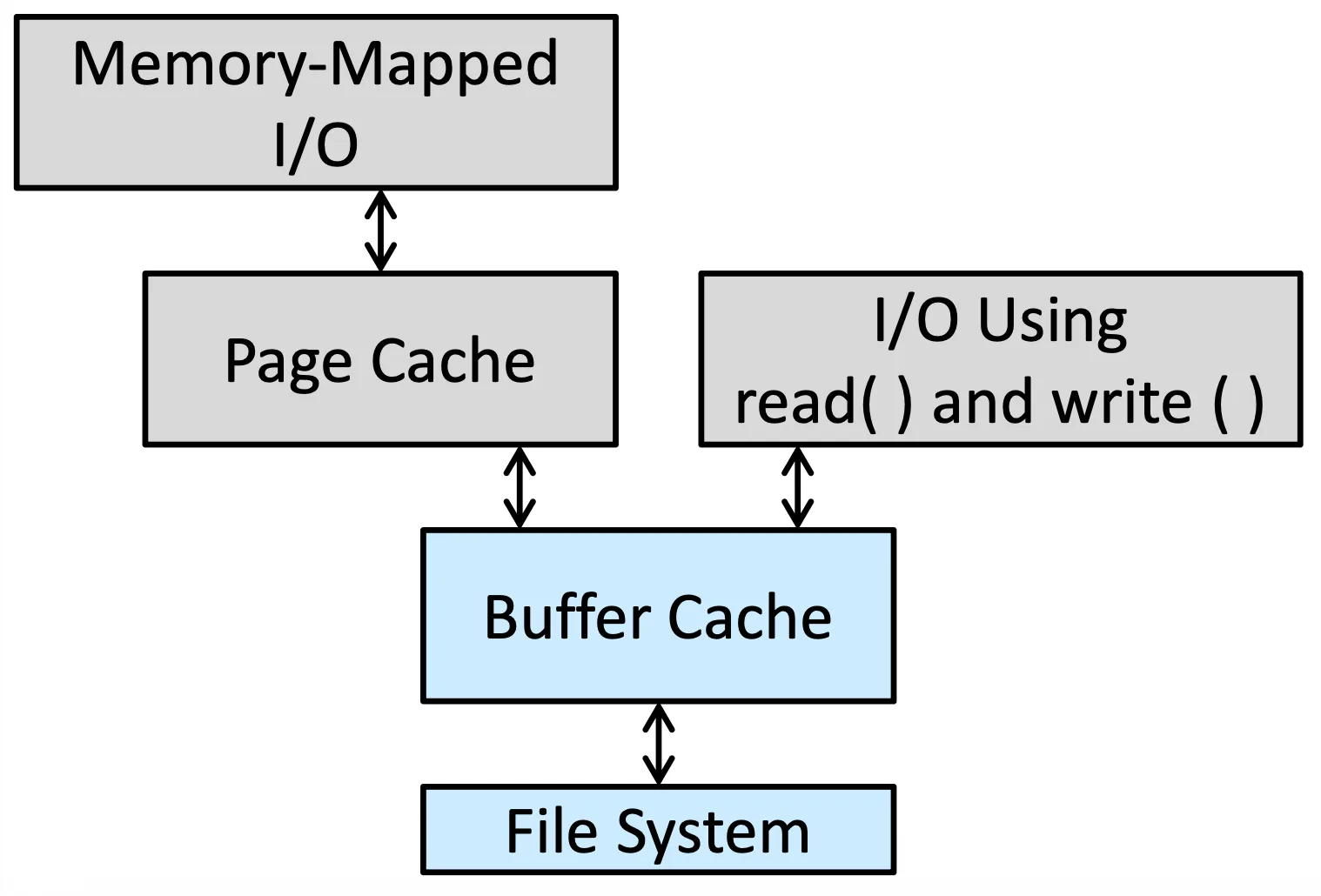
我們稱這種情況叫 Double Caching,也就是 Memory-Mapped I/O 因為先做了 Page cache 然後 Page cache 又透過 Buffer cache access file system
這樣會消耗 memory,也會消耗 CPU, I/O cycles,並且中間有出錯就會出現 not consistency 的問題
為了解決這個問題我們採用 Unified Buffer Cache
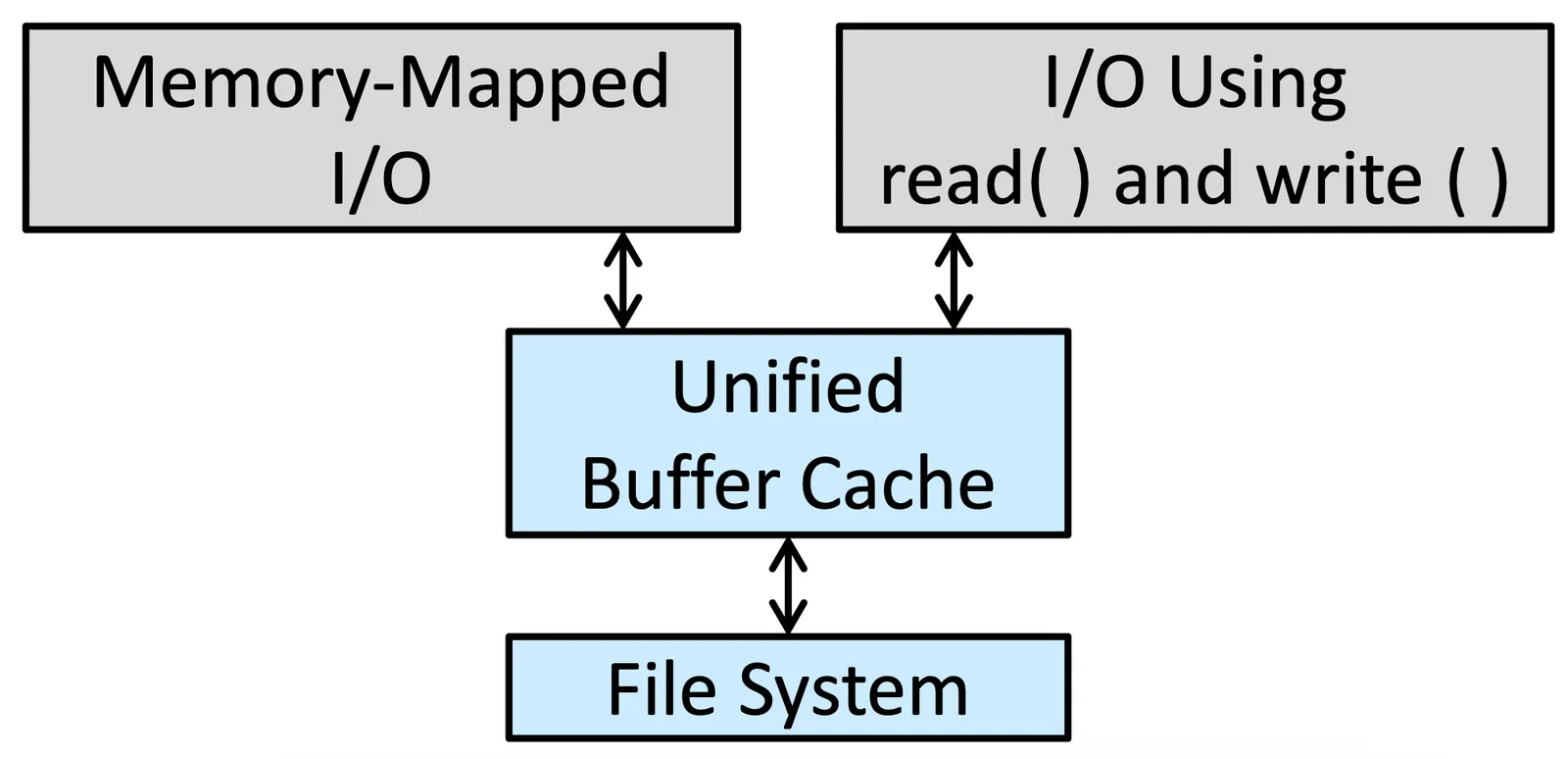
Synchronous and Asynchronous Writes#
- Synchronous write: 不會 buffer 起來的 write,會直接到 disk 裡面,而且會 block 住
- Asynchronous write: 會先存在 buffer 裡面,等到量夠大才會一次 transfer,效能比較高,大部分的 write 都是 Asynchronous
Database 有些 operation 必須保證是 atomic 的,因此需要 Synchronous write
Free-Behind and Read-Ahead#
File 是 sequence read 的時候,我們必須保證不使用 LRU (Least recently used),因為最近剛剛使用過的資料機會會越來越小,甚至再也不會
所以當 read 或 access 是 sequential 的時候,我們採用
- Free-behind: 因為用過的就不會用了,我們直接拿掉
- Read-ahead: 先把前面的 block 讀到 memory 裡面,因為等等必定會用到
Recovery#
Consistency Checking#
我們需要比較我們對 storage 的理解(藉由 metadata 或其他我們有的 information 來看一下系統狀態)跟現在真正的 storage state 到底一不一樣,Consistency Checker 應該要可以把這個錯誤修整好
但真的可以修復到什麼程度完全要看 allocate method 跟 free-space management 的方法,(e.g., contiguous method 會比 link list 好修復)
Log-Structured File Systems#
全名是 Log-based transaction-oriented (or journaling) file systems,需要把所有 file system 的資訊存起來(不一定要在同一個 file system 上面),然後等到操作結束,再一次真正把所有操作 modify 到真正的 file system 上面,把 transaction(a set of operations for performing a specific task) 一個一個從 log 移除
當 system crash 的時候我們就可以根據 log 把剩下的操作完成
但當尚未 commit 的時候發生 crash 還是會 inconsistency
另外一個方法叫做 snapshot,也就是把某些時間點的 file system 狀態記錄下來,比如在更新資料前,把新資料先寫到其他 block,不更新 block pointer,這樣就可以保住原本的 block,transaction complete 再把 block 的 pointer 指向新的 block
ZFS 也提供了 Checksums
Backup and Restore#
Backup data 有各種作法,做了 backup 就可以在關鍵時刻 restore,但系統常常分大備份跟小備份
- full backup: 很長一段時間做一次,但是會完整記錄 file system 狀態跟所有 data
- incremental backup: 紀錄從上個 timestamp 後做了什麼操作改變
Example: WAFL File System#
全名 write-anywhere file layout (WAFL),原本是用來支援 network file servers 的,在這個系統裡面因為使用者多,所以會有非常多的 random I/O 出現
通常的 protocol (NFS, CIFS) 會先做 read operation 的 cache 可以做 optimization,但 write 操作就無法做到 optimization,WAFL file system 會有 write cache 可以做 optimize
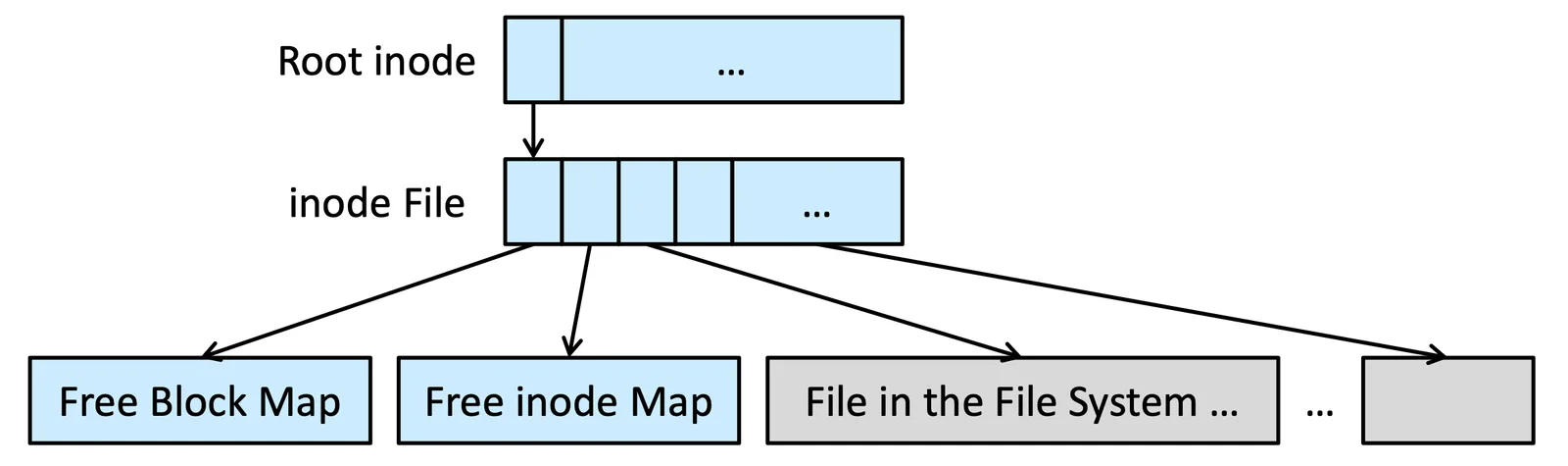
另外一個特色就是他的 metadata 都是存在 file 裡面的,像這個 free block map 跟 free inode map 都是存成一個 file
Snapshot of WAFL File System#
這個 system 還有一個 powerful 的地方,就是他的 snapshot,下面是一個例子
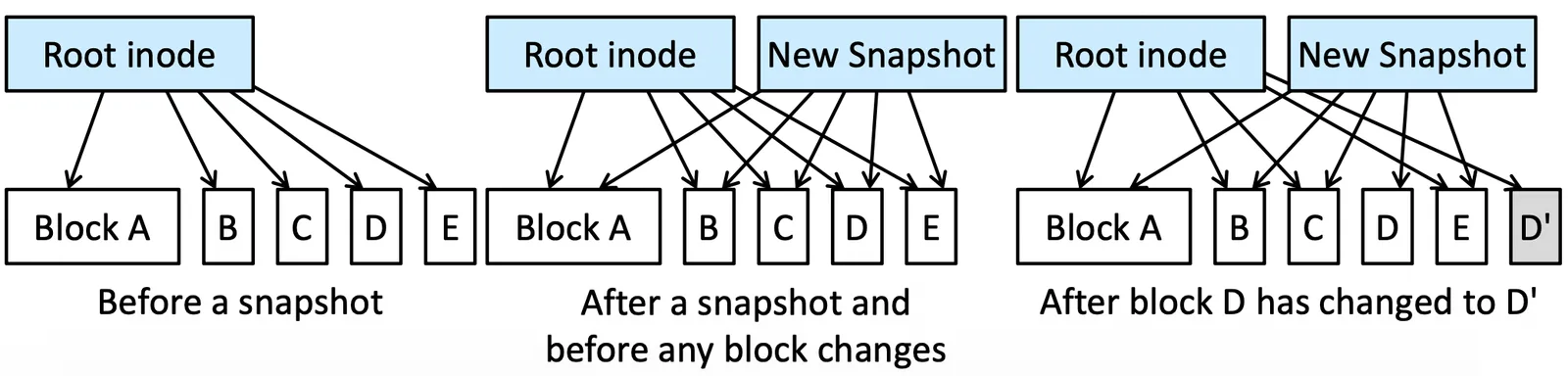
Snapshot 只需要多做一份 copy,snapshot 只需要紀錄所有 block 的指標就好,還有其他 feature
- Clone: read-write snapshots
- Replication: 可以在不同透過網路連接的系統間做 duplication