OS concept#
OS 的功能可以分為 vertical 和 horizontal 兩種:
- Vertical: 把硬體 kernel 包裝
- 有分成 kernel mode 跟 user mode => kernel space 跟 user space
- 用 system call 去 access kernel
- Horizontal: 資源管理
System call v.s Function call#
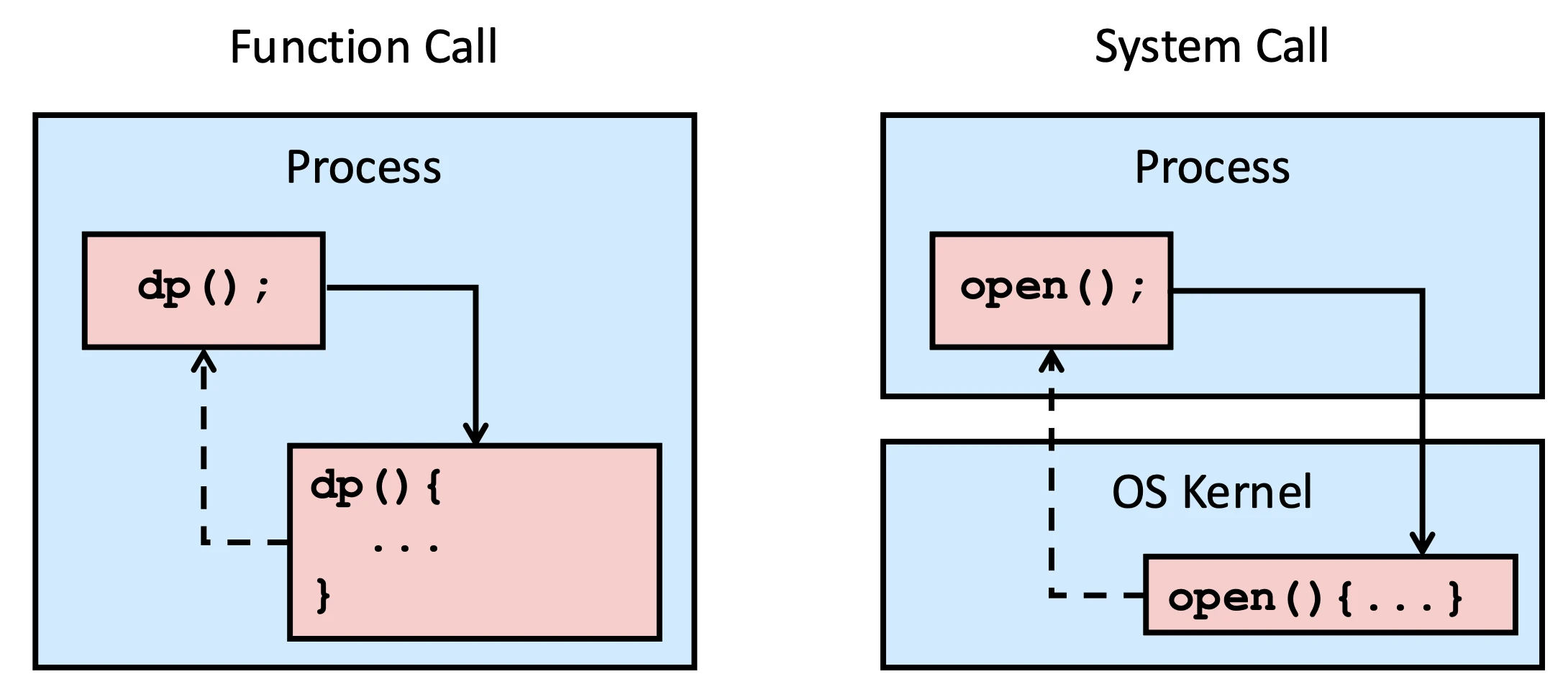
Function call 是把 callee 跟 caller 的資料放在 process 裡面,然後直接跳到 callee 的 code 執行,最後再回來 caller 繼續執行
System call 則是要把的 caller 的資料放在 process 裡面,但 callee 的 code 是在 kernel 裡面,所以要先切換到 kernel mode,然後再跳到 callee 的 code 執行,最後再切回 user mode 回來 caller 繼續執行
User space v.s. Kernel space#
System memory 通常會被分成兩個區域:user space 跟 kernel space
- User space: 普通 process execution 的地方,除非有 system call,否則 process 只能 access user space
- Kernel space: OS kernel execution 的地方,process 可以透過 system call 去 access kernel space,但不能直接 access kernel space
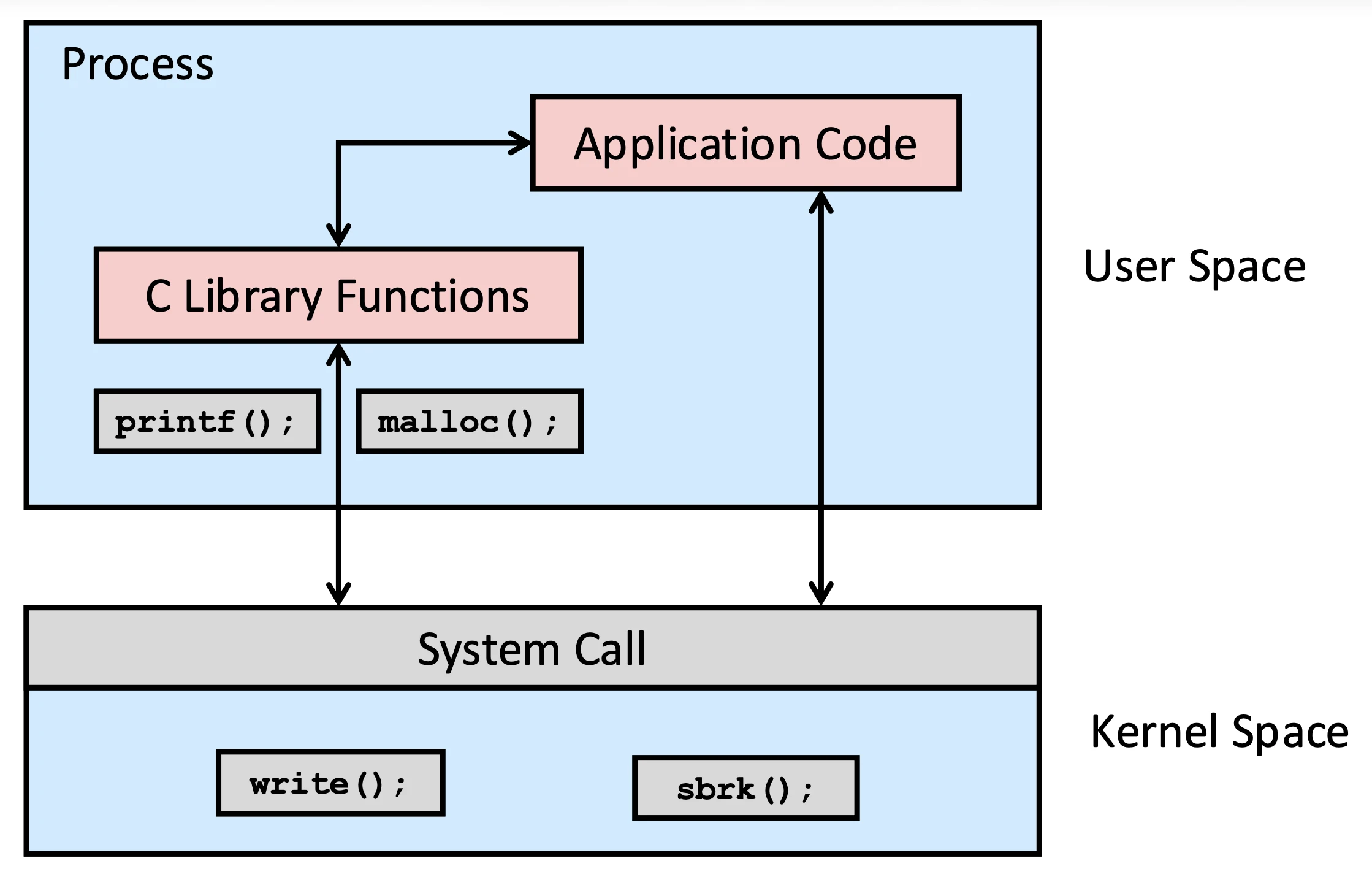
Hardware 運行指令永遠在 kernel mode
Horizontal OS services#
Horizontal 的功能可以分成很多種
- 給 Application Programs 的:
- User Identification
- Process Management
- Memory Management
- File/Directory Management
- Inter-process Communication
- Signal
- I/O Management (e.g., Terminal, Network, etc), …
- 對 OS Kernel 內部的服務:
- CPU Scheduling
- Virtual Memory
- File System
- Protection
- Security
- Synchronization
- I/O Control, …
User identification#
User 是一種權限,不一定是真實使用者,通常在 /etc/passwd(local host or NIS DB)裡面記錄
cat /etc/passwd可以取得資訊,每個 row 是一個 User,format 是:
{User-name}:{Passwd}:{User-Id}:{Group-id}:{Comment}:{Home-dir}:{Shell}root:*:0:0:System Administrator:/var/root:/bin/sh
daemon:*:1:1:System Services:/var/root:/usr/bin/false
_uucp:*:4:4:Unix to Unix Copy Protocol:/var/spool/uucp:/usr/sbin/uucico
_taskgated:*:13:13:Task Gate Daemon:/var/empty:/usr/bin/false
_networkd:*:24:24:Network Services:/var/networkd:/usr/bin/false
_installassistant:*:25:25:Install Assistant:/var/empty:/usr/bin/false若出現 /usr/bin/false 等類似,即為無法 login,只能使用 Super-user 改變身分,並且Unix 系統不認名字,只認ID(User-id = 0 為 Super-User)
User 會通過 crypt() 來驗證密碼
- 是一個 one-way func,用於登入帳號
- 第一個參數
{passwd}是真正的密碼 - 第二個參數
{salt bit}是為了製造同樣 common word 隨機性,System 會選擇 time-base 的參數 -
bashcrypt("apple", "am") → "amADBMNoVAZpc" crypt("water", "pm") → "pmRarHxhhU34U" - 系統使用你的帳號跟你輸入的密碼放入比對
man 3 crypt可以查看
Process Management#
- Program 是一個 executable file
- Process is an executing instance of a program
psis a snapshot of the current processtopis display processes
CPU Scheduling#
假設 CPU 只有一個 core 的話,但我們的電腦還是可以執行多個 process,這時候我們就需要用到 multitasking,而以下就是 Mult
Example of CPU scheduling#
我們可以利用 CPU 的速度來實現 Time Sharing,因為 CPU 切換的速度太快了,所以我們可以讓每個 process 都有一個 time slice,當 time slice 用完的時候,CPU 就會切換到下一個 process,這樣就可以讓多個 process 好像同時執行了
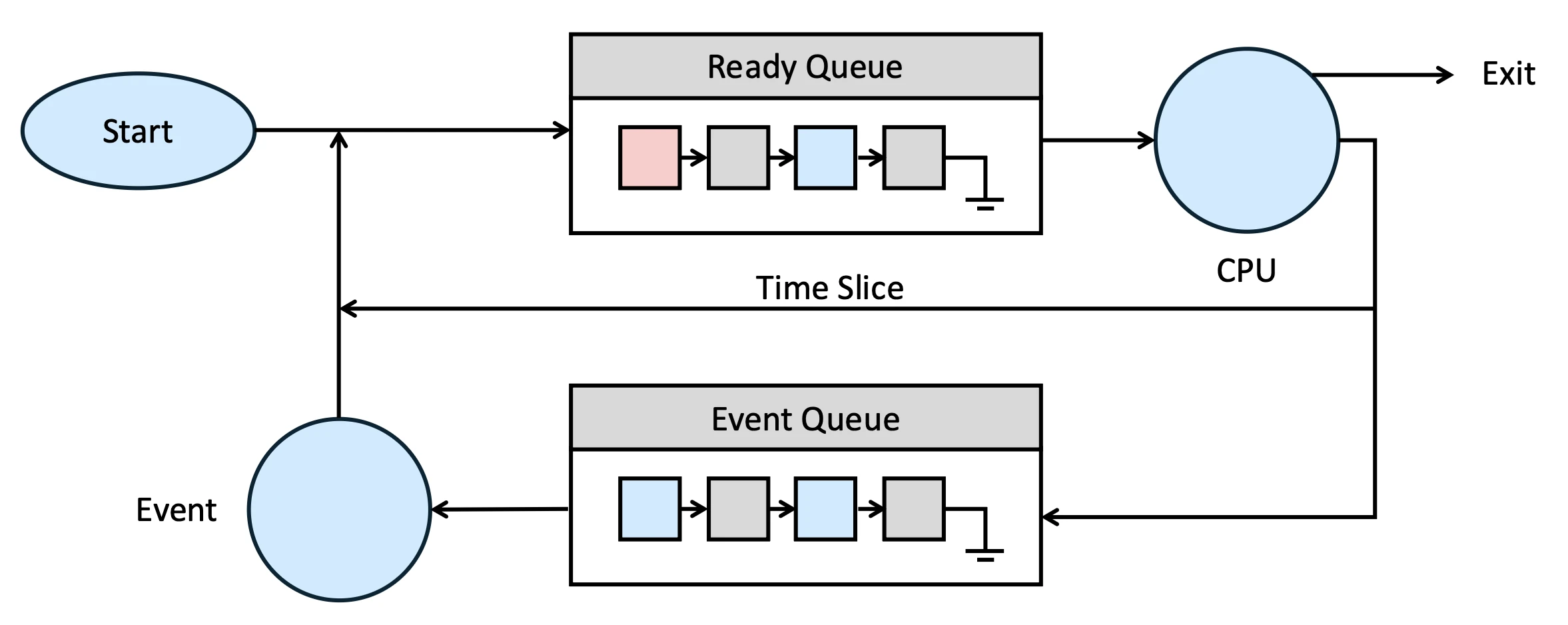
這個 Event 就是一個慢速事件,當 CPU 在執行 process A 的時候,突然有一個 Event 發生了,這時候 CPU 就會把 process A 暫停,然後去處理這個 Event,等到 Event 處理完了之後,再回來繼續執行 process A
- Event 可能是 I/O event、timer event、signal event 等等
換句話說當我們把一個 process 放到 ready queue 的時候,那個 process 的所有 data 應該要已經被 load 到 memory 裡面了
- CPU 會從 ready queue 裡面選擇一個 process 來執行
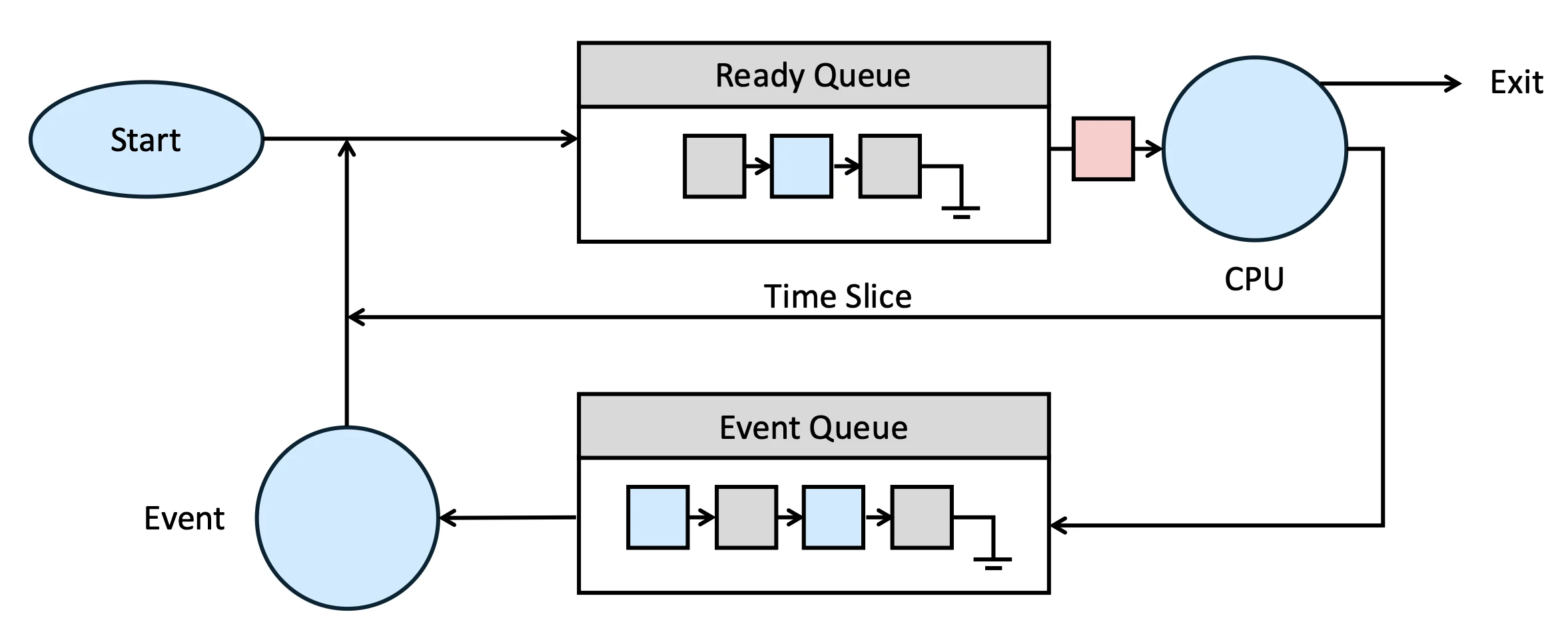
- CPU 正在執行 process
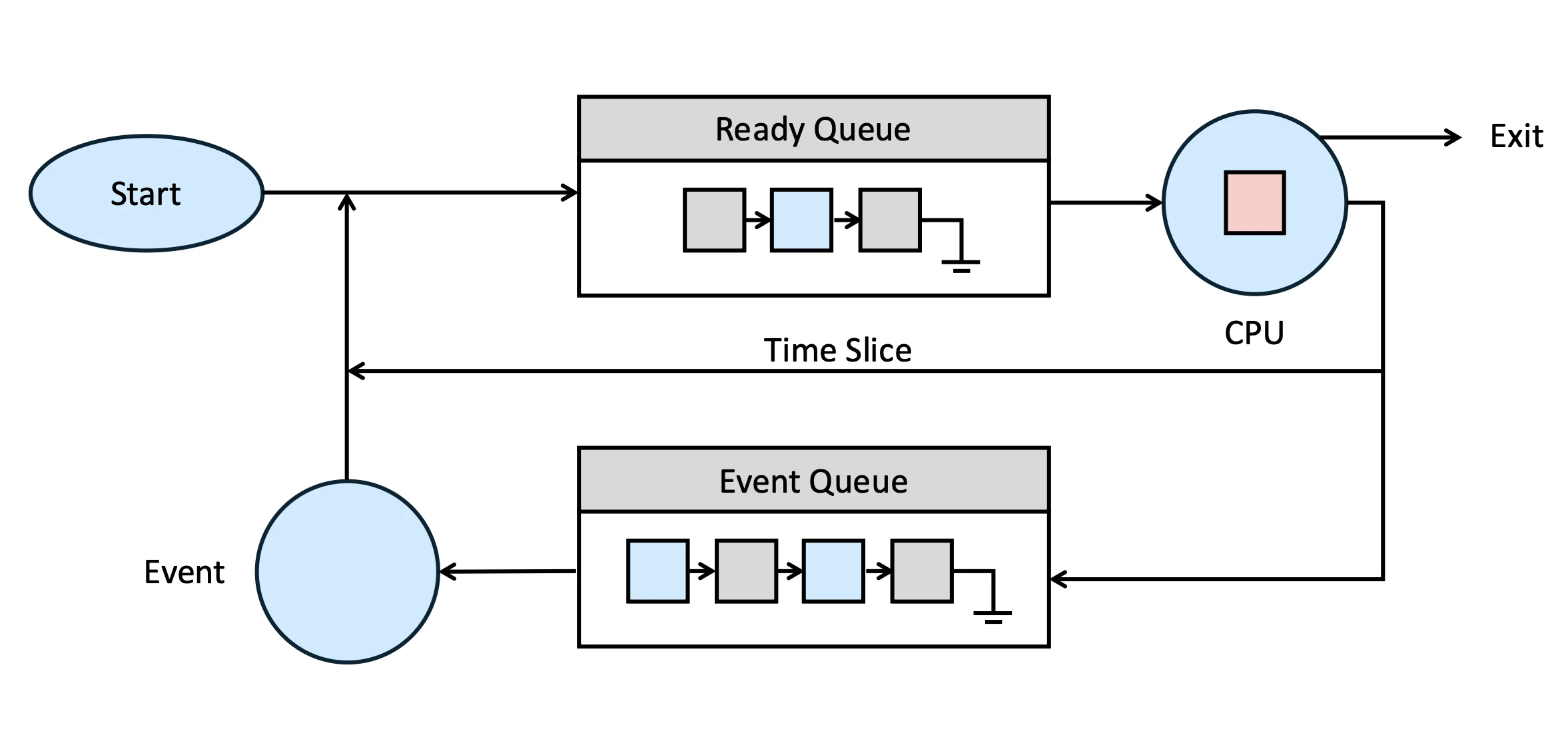
- CPU 把正在執行的 task 踢掉
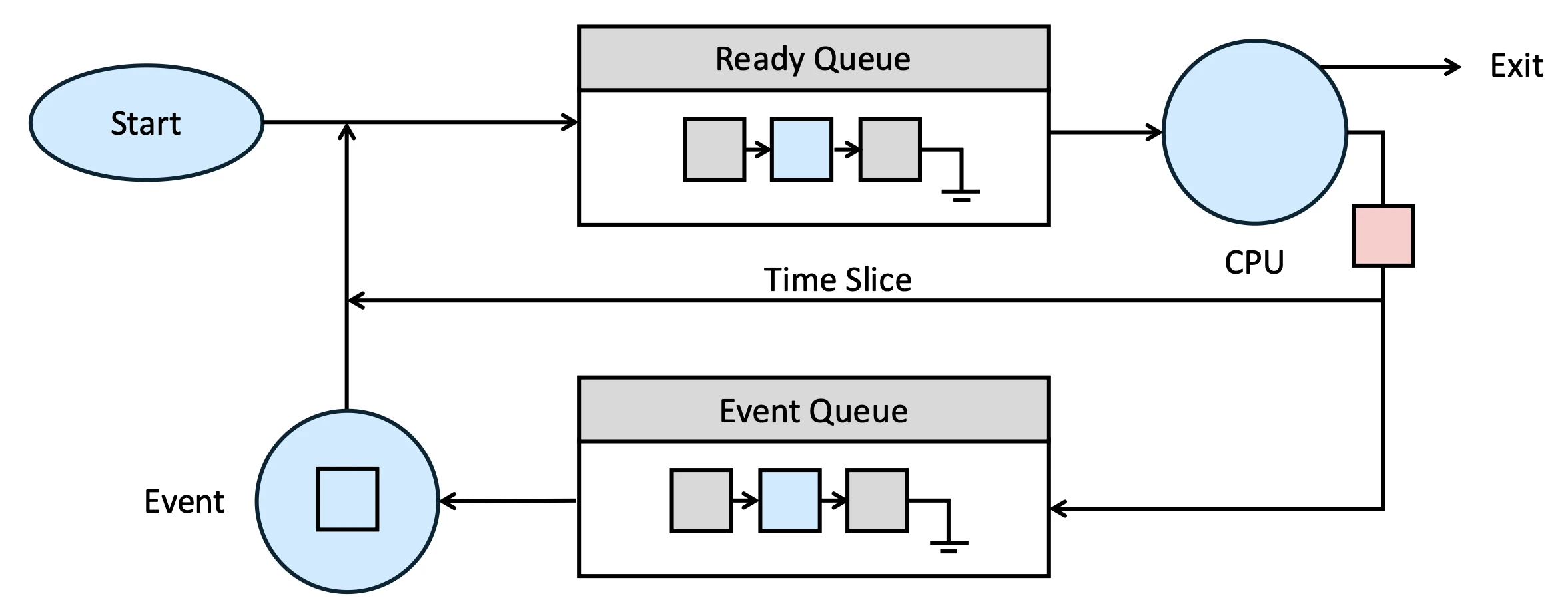
- 在這個 time slice,Process A 會被放回 ready queue 裡面,等待下一次被 CPU 選中來執行,同一時間,CPU 會從 ready queue 裡面選擇下一個 process 來執行
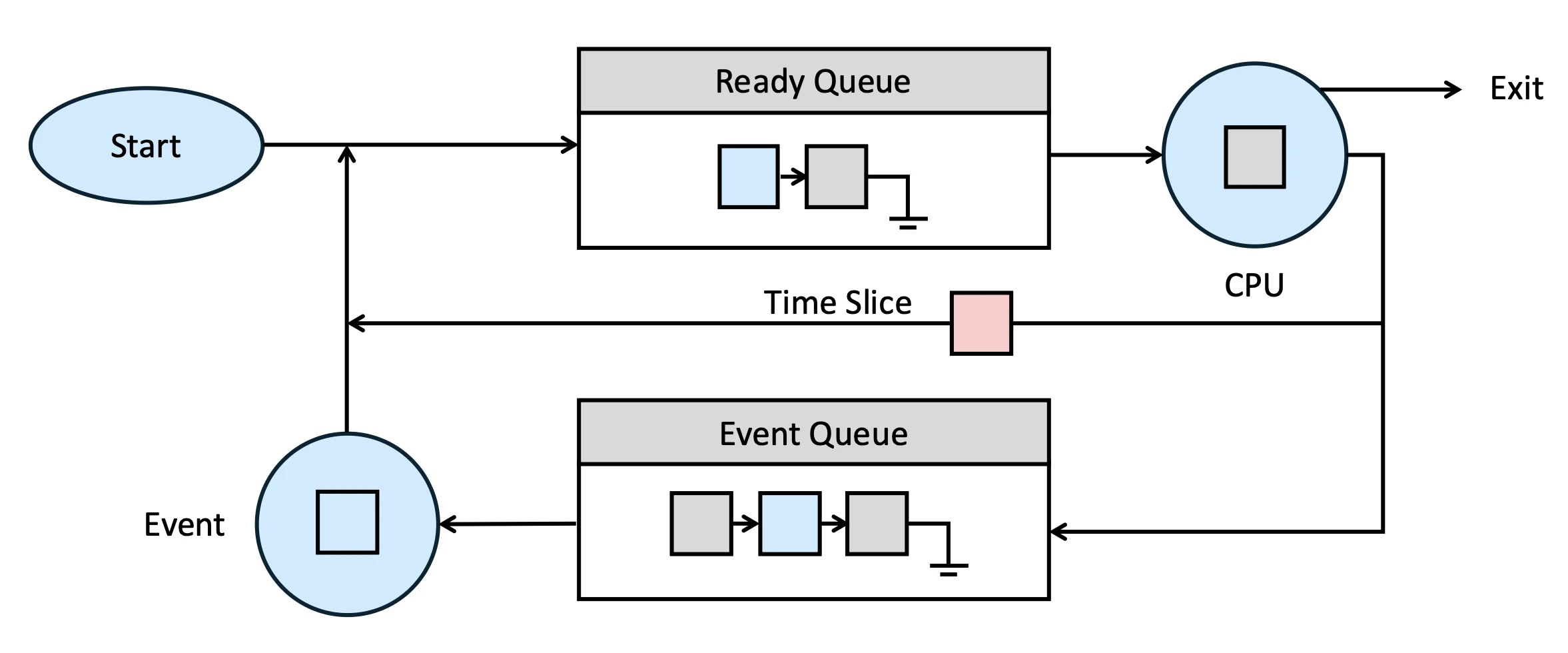
剛剛這個把 CPU 上的 process 抽換成另一個 process 的過程就叫做 Context Switch
- Time Slice 可能只有一個 nano second
- 為了下次再執行這個 process 我們必須存下這個 process 被踢出時的狀態,我們稱為 store
- 再次執行 process 時,我們必須 restore 所有存下來的 status
- 因為 Memory 的速度不夠快,這個步驟通常會在 L1, L2 cache 內運作
- 如果這個 process 被踢出是因為 Event 的話,那麼這個 process 就不會在那個 time slice 裡面被放回 ready queue 裡面,而是會被放到 waiting queue 裡面,等到 Event 處理完了之後,再把這個 process 放回 ready queue 裡面等待下一次被 CPU 選中來執行
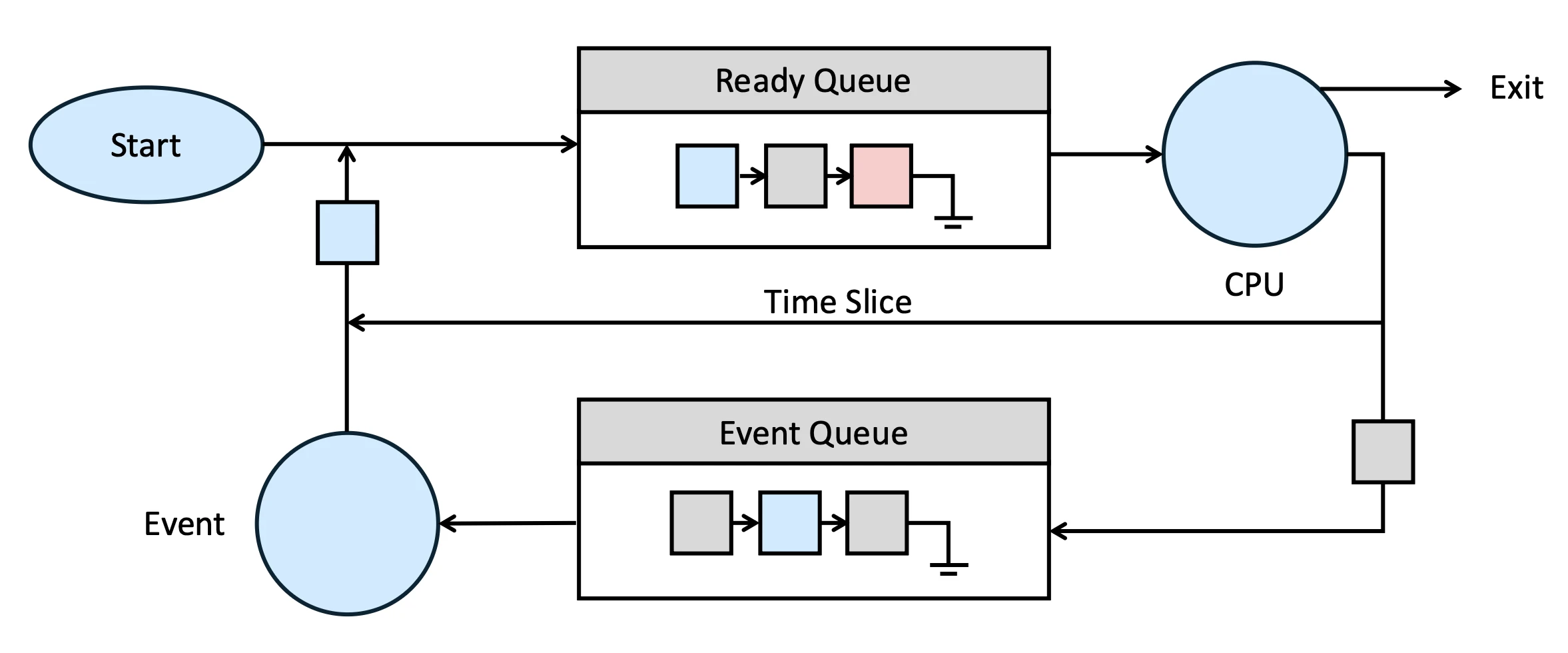
- 當 event 來的時候,這個 process 就會自行對 event 做出反應
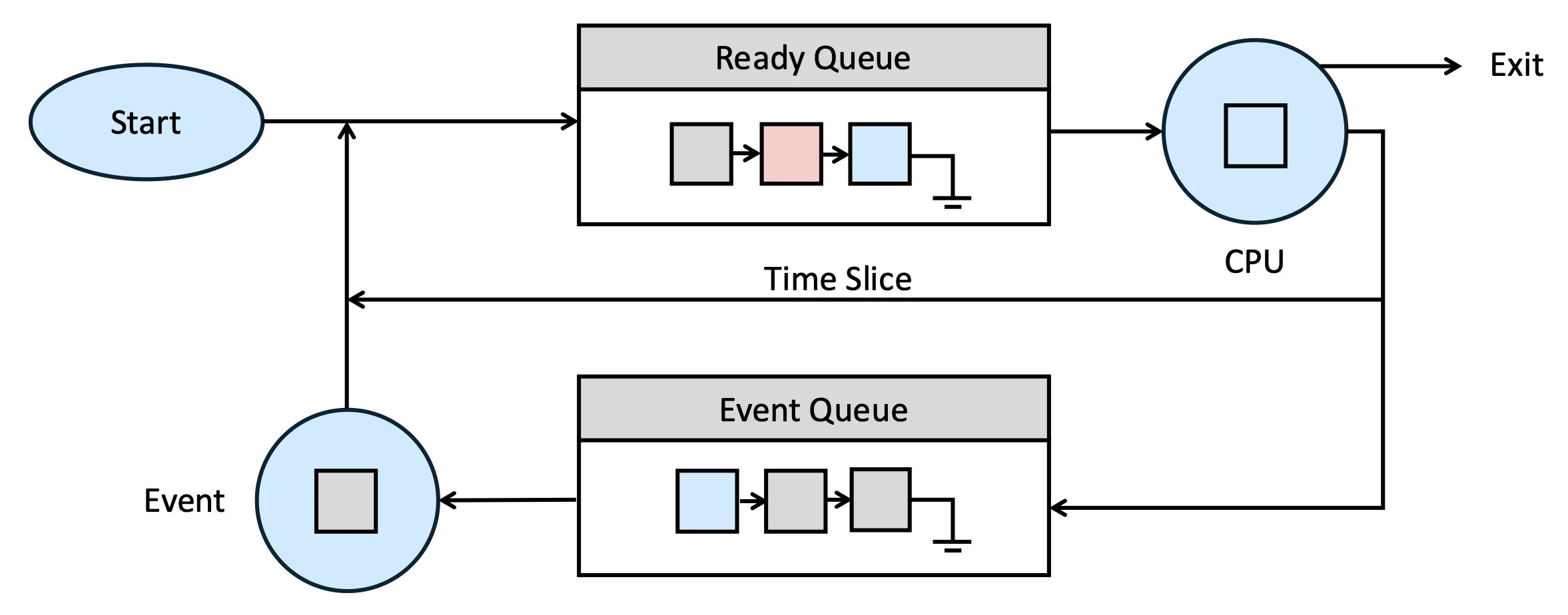
- 當 event 處理完了之後,這個 process 就會被放回 ready queue 裡面等待下一次被 CPU 選中來執行
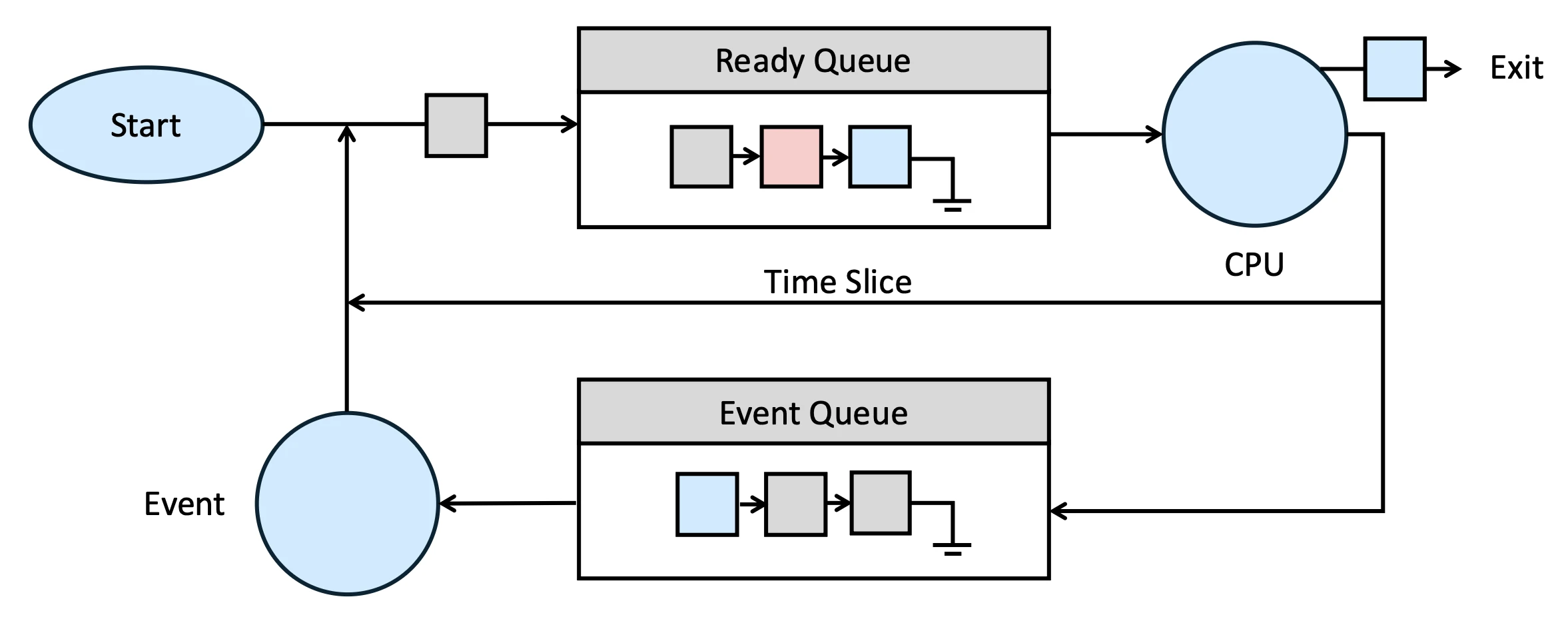
在這張圖上我們也可以看到,如果一個 process 執行完畢就會在 CPU 運行完後被踢出這個循環,我們稱為 exit,而 exit 分成很多種
UNIX Process#
在 Unix 系統裡面所有 process 都是用 fork() 這個 system call 來創建的,當 fork() 被呼叫的時候,OS 會複製一個新的 process 出來,這個新的 process 就叫做 child process,而原本的 process 就叫做 parent process,這兩個 process 會有相同的 code、data、stack,但是他們的 process ID 是不同的
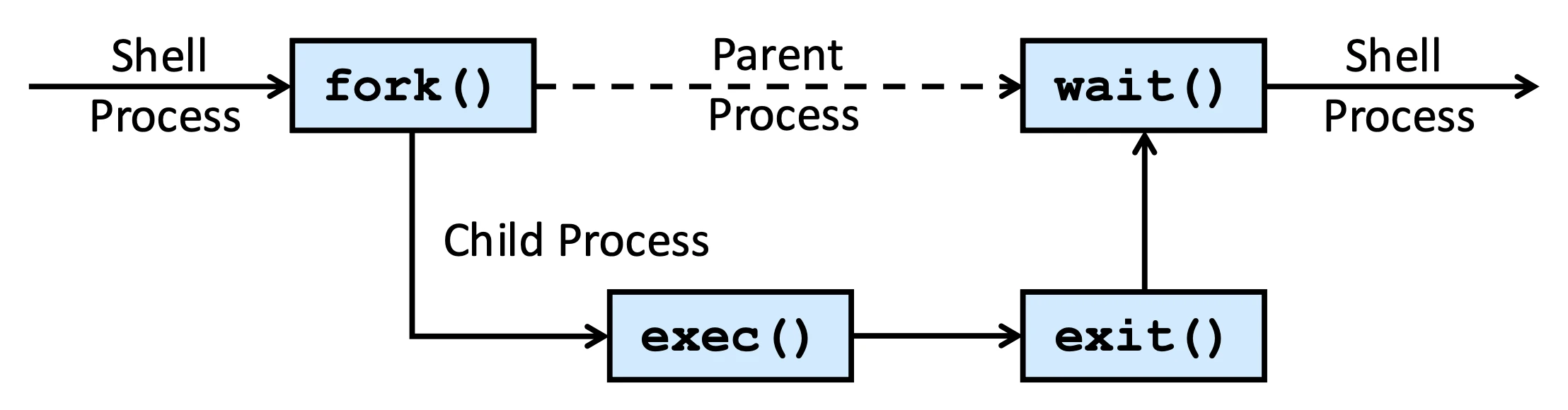
以 Unix system 為例,除了 init process 之外,其他 process 都是由 init process 透過 fork() 來創建的,這樣就形成了一個 process tree
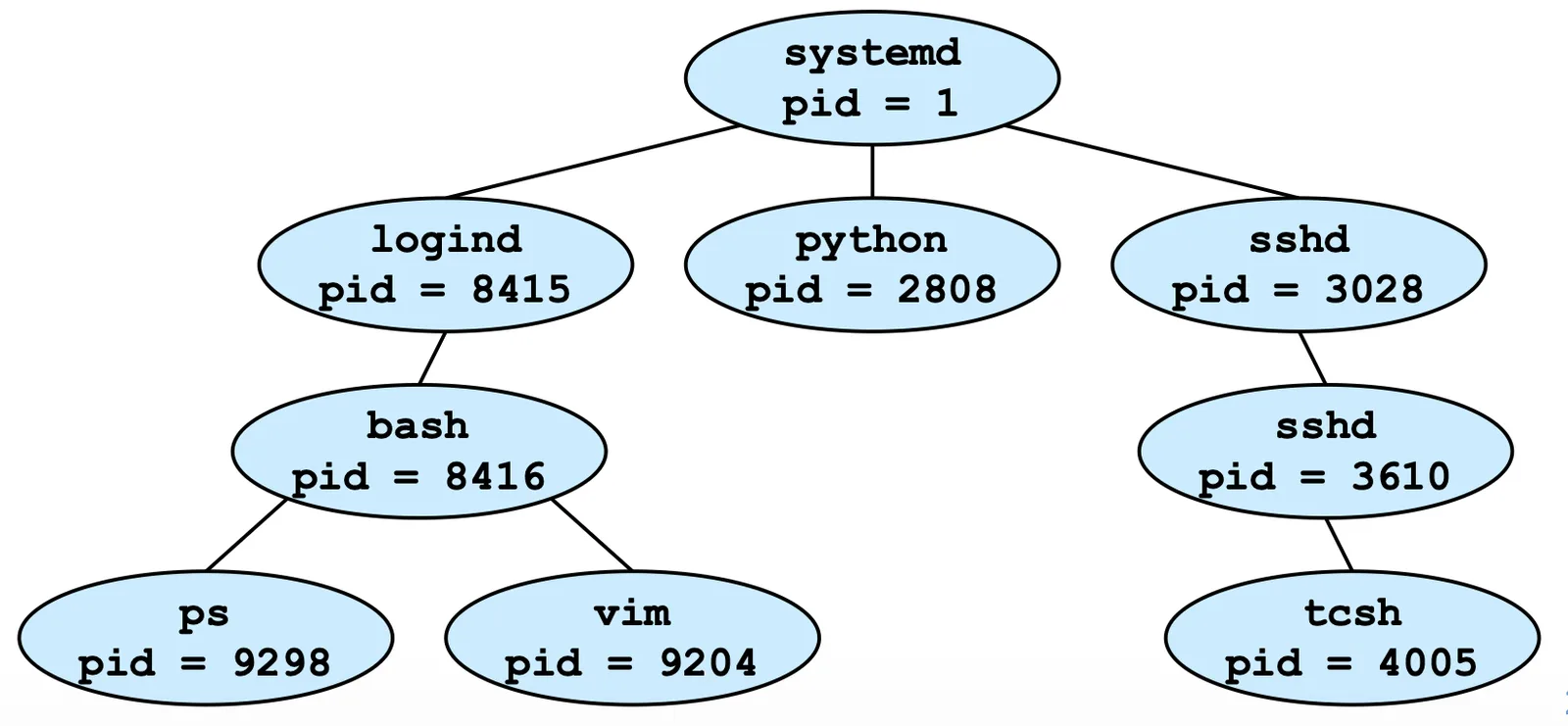
接下來介紹 Pipe,pipe 是一種可以把某個 process 的 input 轉換成另一個 process 的 input 的方法
Filter 則是一種可以對 input 做轉換的 program
wc-gives a count of words/lines/charsgrep-searches for lines with a given stringmoresort-sorts lines alphabetically or numerically
bashls -la | more
bashcat file | wc
bashman ksh | grep “history”
bashls -l | grep “bowman” | wc
bashwho | sort > current_users
UNIX philosophy:
- Write programs that do one thing and do it well
- Write programs that work together
- Write programs that handle text streams, because that is the universal interface
Memory Management#
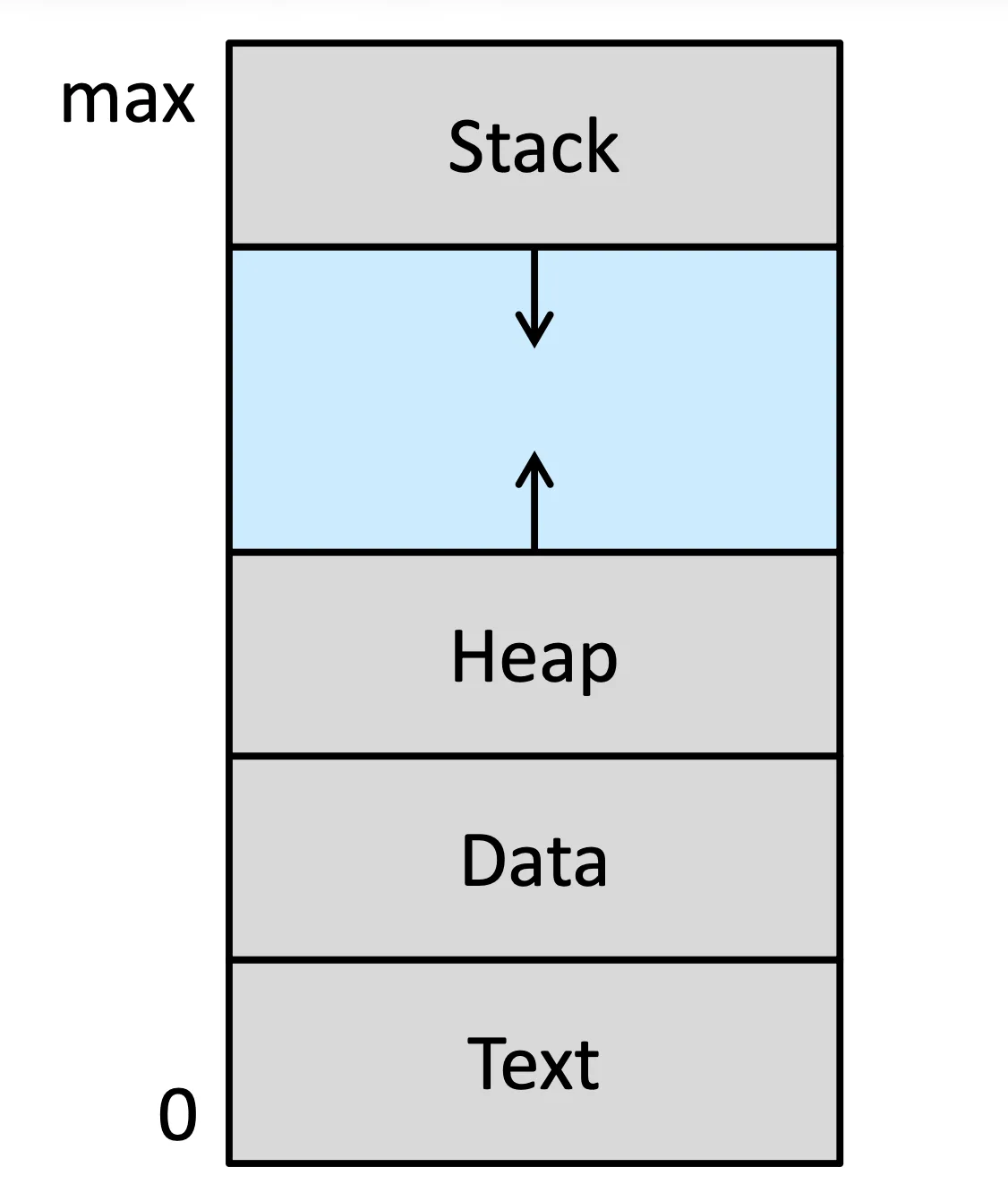
Linux 內的 memory 都是以這種 layout 來進行 process 管理的
File/Directory Management#
File 是一個 sequence of bytes,用不同的解讀方式可以被解釋為不同的資料,而 Directory 則是一個包含怎麼找到其他 file 的資訊的 file,這個資訊包含了 file name、file type、file size、file owner、file permission、file creation time、file modification time、file access time 等等
File Structure#
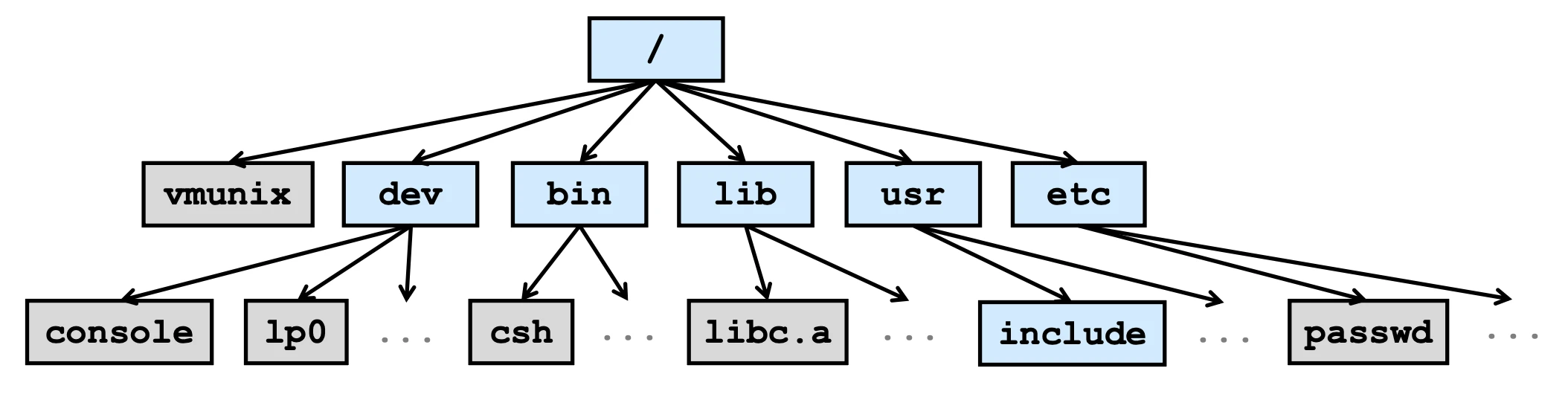
Unix 系統裡面的 file structure 是一個 tree structure,最上面是 root directory,下面是各個 subdirectory,subdirectory 裡面可以包含 file 或者其他 subdirectory
- root
/: all unix like system’s root. - lib: library, the include path
- bin: binary, 可以直接執行的程式
- var: dynamic file
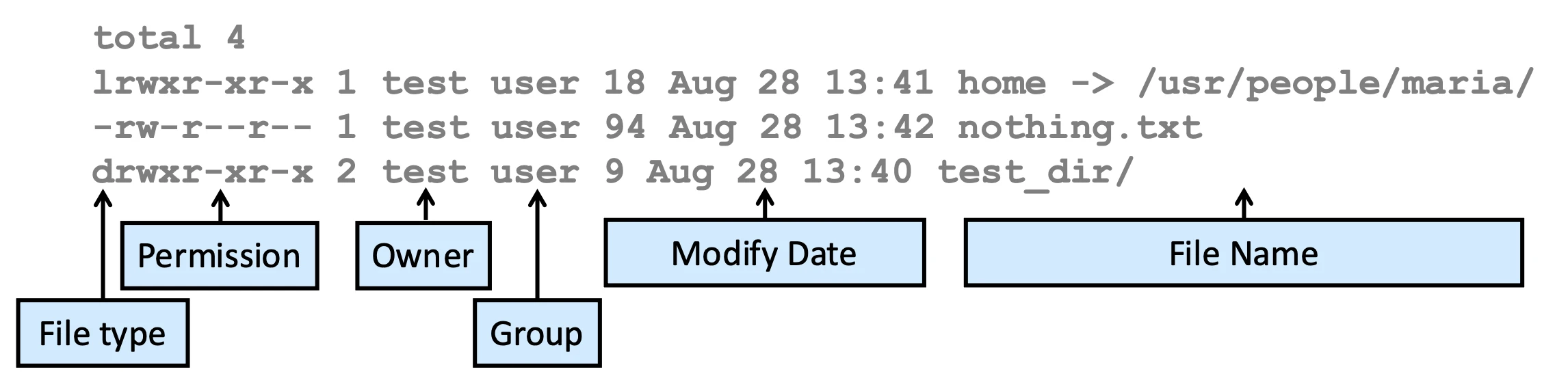
用 ls 指令可以看到
chmod,chown,touch
chmod <mode> <file(s)>
chmod 700 file.txt

chmod g+rw file.txtBack to the content
NTU PJ System Programming
2025 Fall
← Back to the content