Unbuffered I/O#
以下是一個 unbuffered I/O 的程式,做的事情是把 data 從 standard input (STDIN) 讀到 buffer 後再寫到 standard output (STDOUT),其中 read() 和 write() 是 unbuffered I/O 的 system call
#include <unistd.h>

int main(void) {
    char buf[100];
    ssize_t n;

    while ((n = read(STDIN_FILENO, buf, 100)) > 0)
        write(STDOUT_FILENO, buf, n);
    return 0;
}UNIX Standardization#
- 這個標準讓不同的 OS 都可以使用同一個 C program,讓程式碼具有 portability
- ANSI C (
stdio.h,stdlib.h,string.h,math.h,time.h,…)- 具有 portability 的 C library,提供很多 function
- POSIX (
unistd.h,pwd.h,dirent.h,grp.h,fcntl.h, …)- 提供每個 OS 都可以用來 call system call 的 API
以下就是 unbuffered I/O 的 system call,在 POSIX.1 的標準裡面,每個 read(), write() 操作都會 invoke disk I/O,這樣的效率非常低
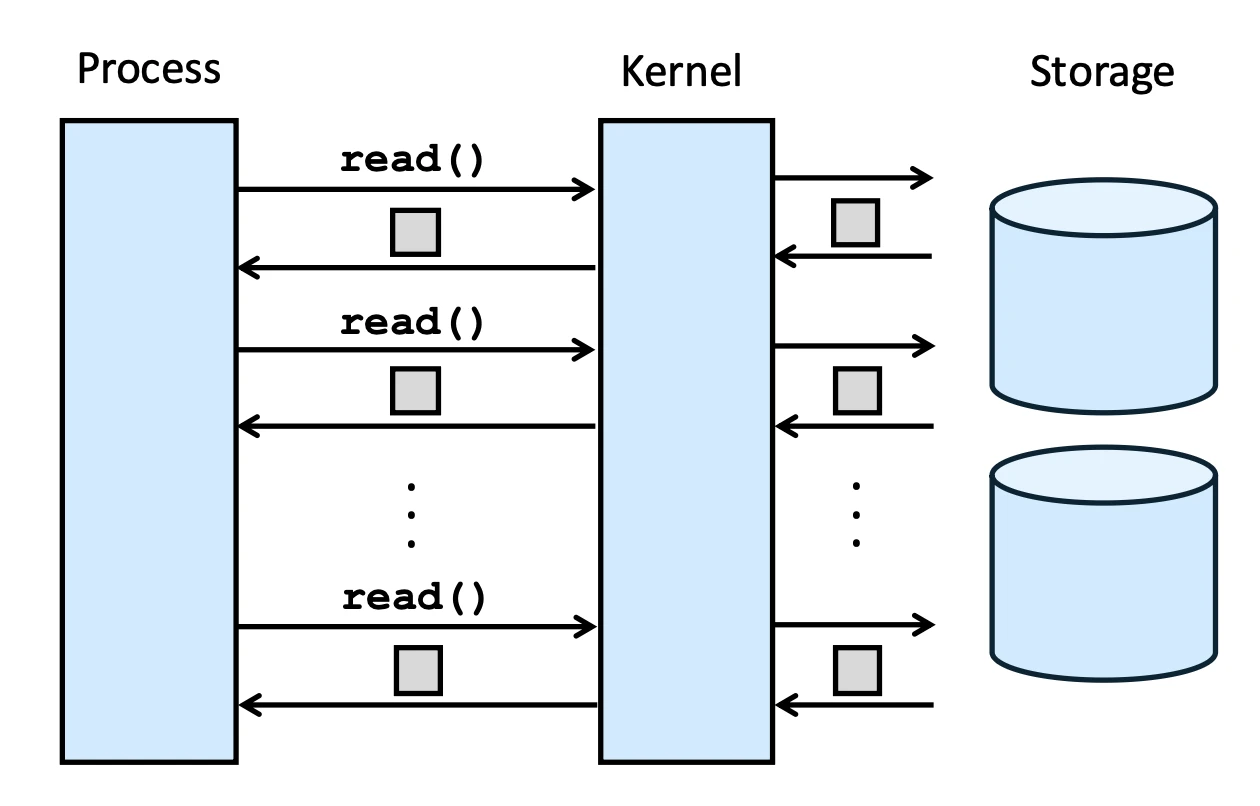
- 因為 DISK’s (HDD) 的特性,每次的 read 操作都是以 “block” 為單位,也就是 the cylinder of a section,而不是用 “byte”.
- 而 SSD 的特性是以 page 為單位,通常是 4KB,因此每次的 read 操作都是以 page 為單位,速度比 HDD 快很多,但跟 memory 的速度還是有差距,因此仍然需要 buffer cache 來提高效率
SSD/HDD 特性詳見 NTU-OS Chapter 11 Mass Storage ↗
Unix Unbuffered I/O Illustration#
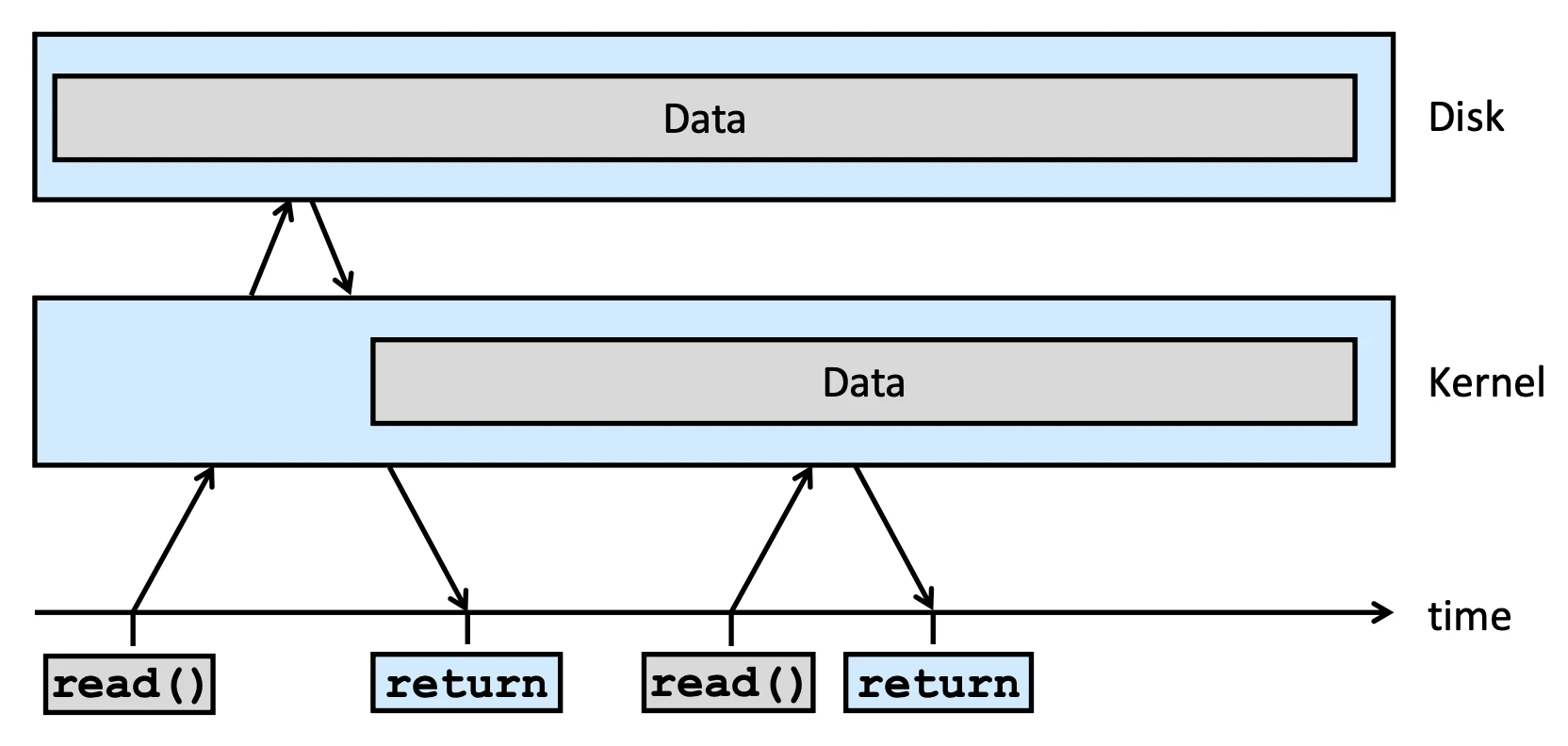
以下是 Unix 內部 unbuffered I/O 的 illustration,當 user process 呼叫 read() 時,會進入 kernel space 進行 disk I/O,然後把資料讀到 kernel 後再回傳給 user process,這樣的效率非常低,所以我們需要 buffer cache 來提高效率
Buffer cache 是 kernel space 的一塊記憶體,用來暫存從 disk 讀取的資料,當 user process 呼叫 read() 時,kernel 會先檢查 buffer cache 是否有需要的資料,如果有就直接從 buffer cache 回傳給 user process,如果沒有才會進行 disk I/O,這樣就可以大幅提高效率,以下圖為例子
- (1)
read()需要 Context Switch 因為 Disk I/O 會讓這個 processs 被踢到 waiting queue - (5)
read()則不需要 Context Switch 因為資料已經在 buffer cache 裡面了,直接回傳給 user process 就好
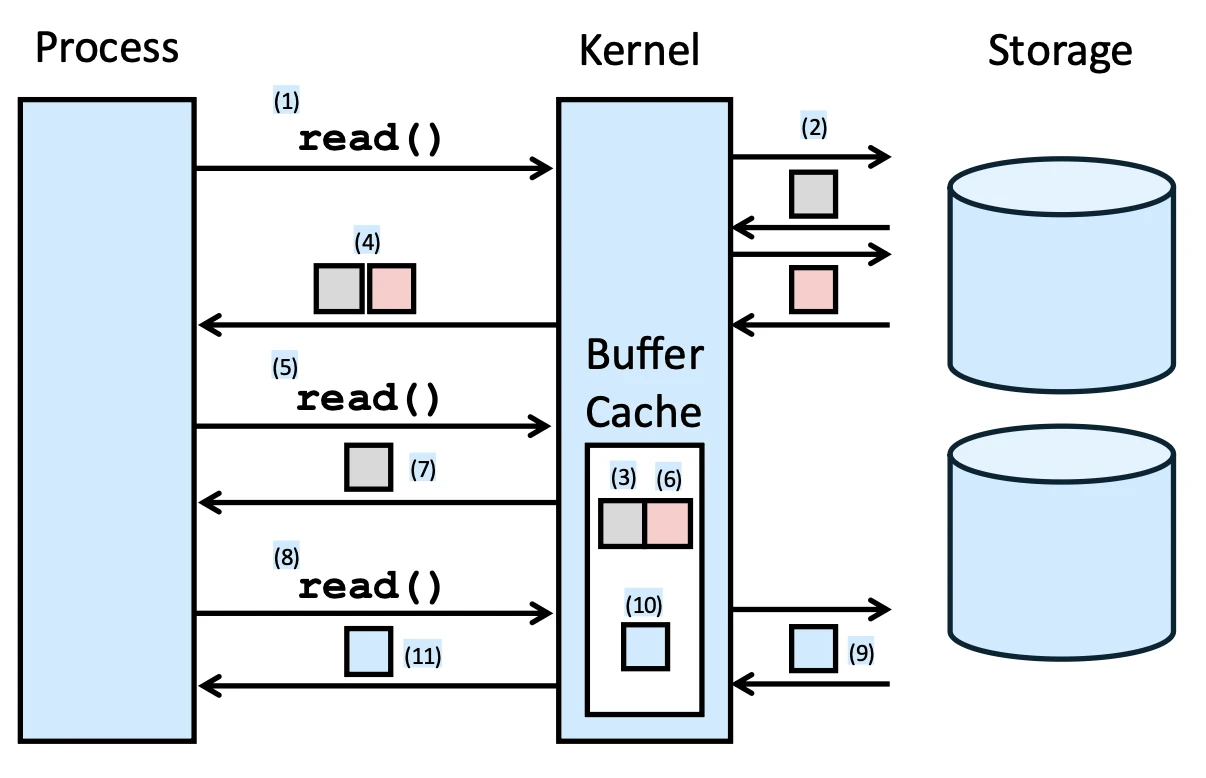
由於 Disk 的特性,我們會做一些 Prefetch 的動作,也就是讓資料先進入 buffer cache,來加速整個 I/O 流程,因此我們會希望 Disk 內的資料排列具有 locality,這樣就可以減少 disk I/O 的次數,提高效率
Disk 和 Memory 不一定是同步的也就是 synchronous,所以我們每次的
read()都會有可能需要進行 disk I/O
Buffered and Unbuffered I/O#
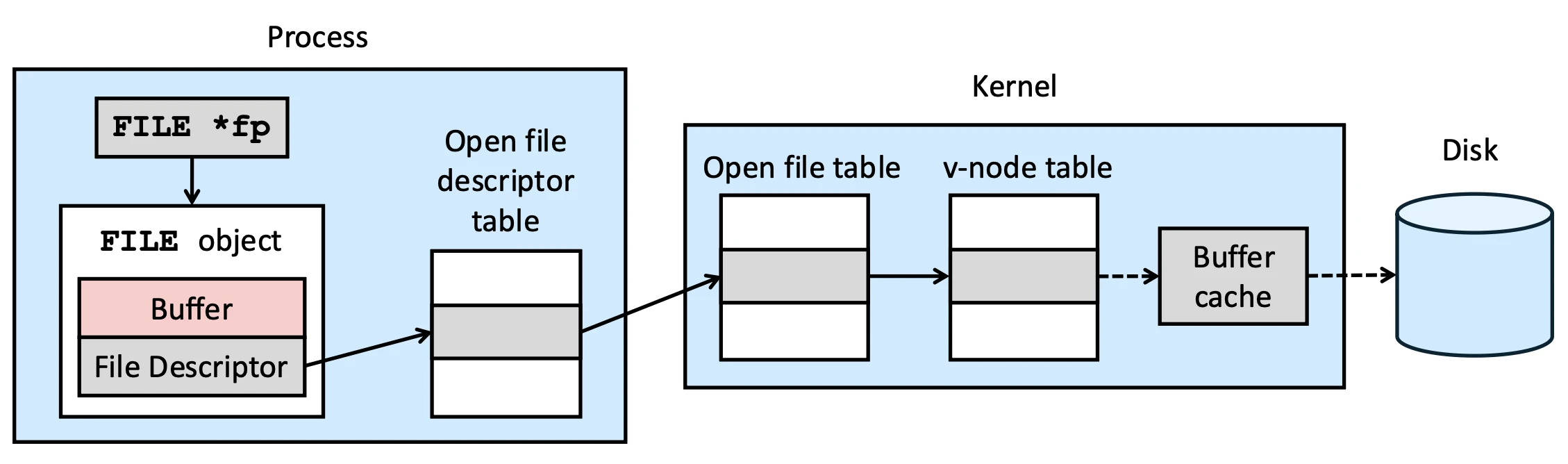
Buffer I/O 的 Buffer 是在 user space 裡的,Unbuffered I/O 代表的是在 User space 裡面沒有額外的 buffer,而非是沒有 Buffer Cache,這樣的 Buffer 在 C language 裡面是以 FILE stream 來儲存,如下圖所示
Process Structure#
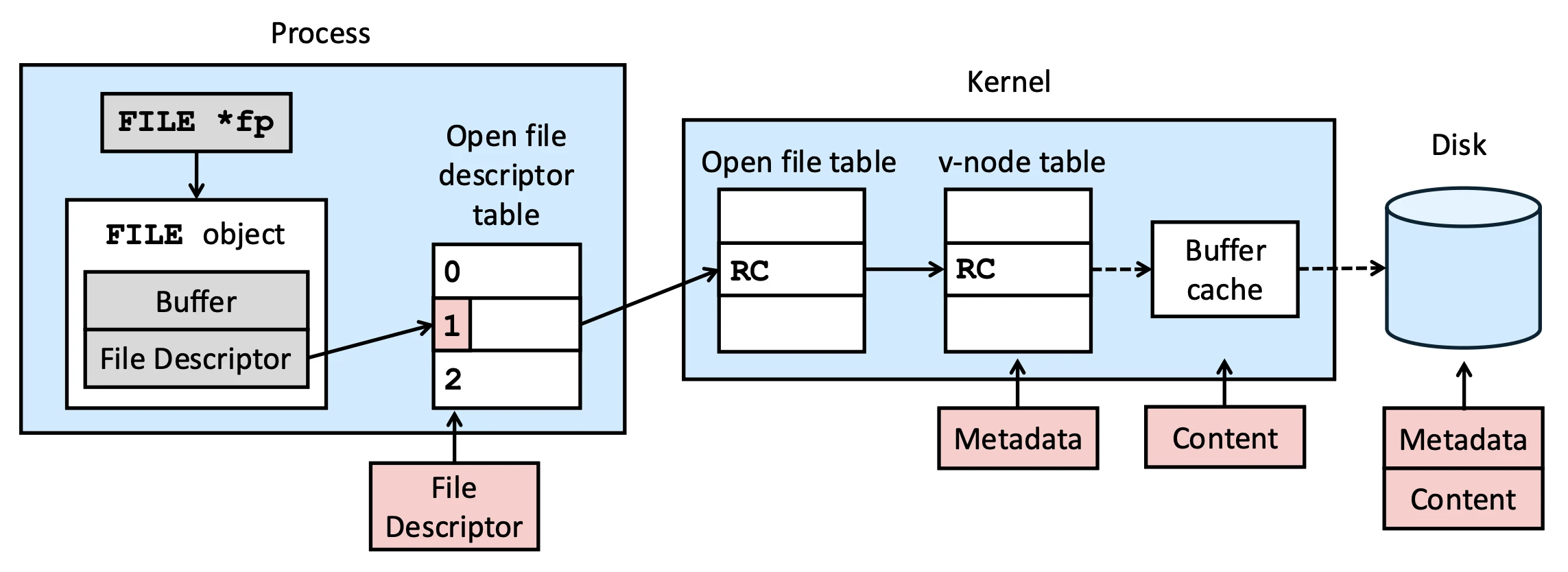
以下是在 Unix 裡面 process 的結構圖,System Call interface 就是在 open file descriptor table 跟 FILE object 之間的 interface,所以 unbuffered I/O 就是直接用 file descriptor fd 來操作 file I/O
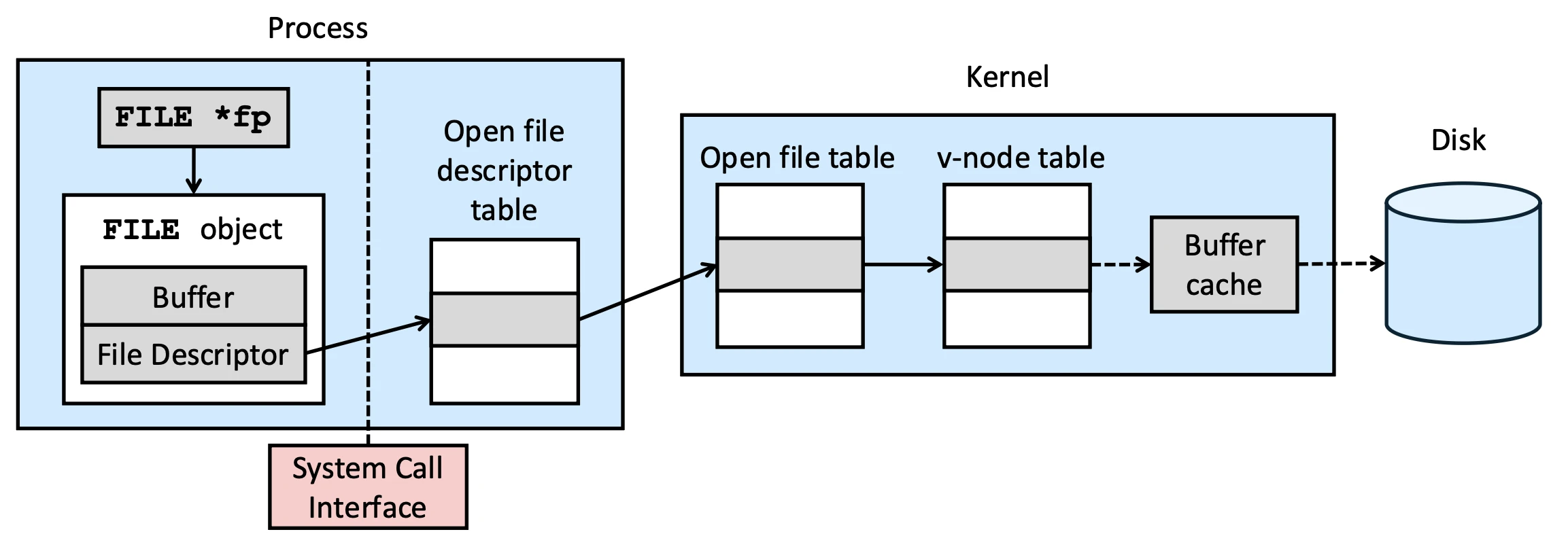
我們可以看到我們可以把東西劃分成在 User space 跟在 Kernel space 裡面的 data structure
- User space (per process):
FILEobject, Open file descriptor table 都是在 user space 裡面的,所以一定是 per process 的 data structure - Kernel space (global): v-node (i-node) table, buffer cache ,所有 process 都會共享這些資料結構
open file table 雖然是在 kernel space 裡面,但也是 per process 的資料結構
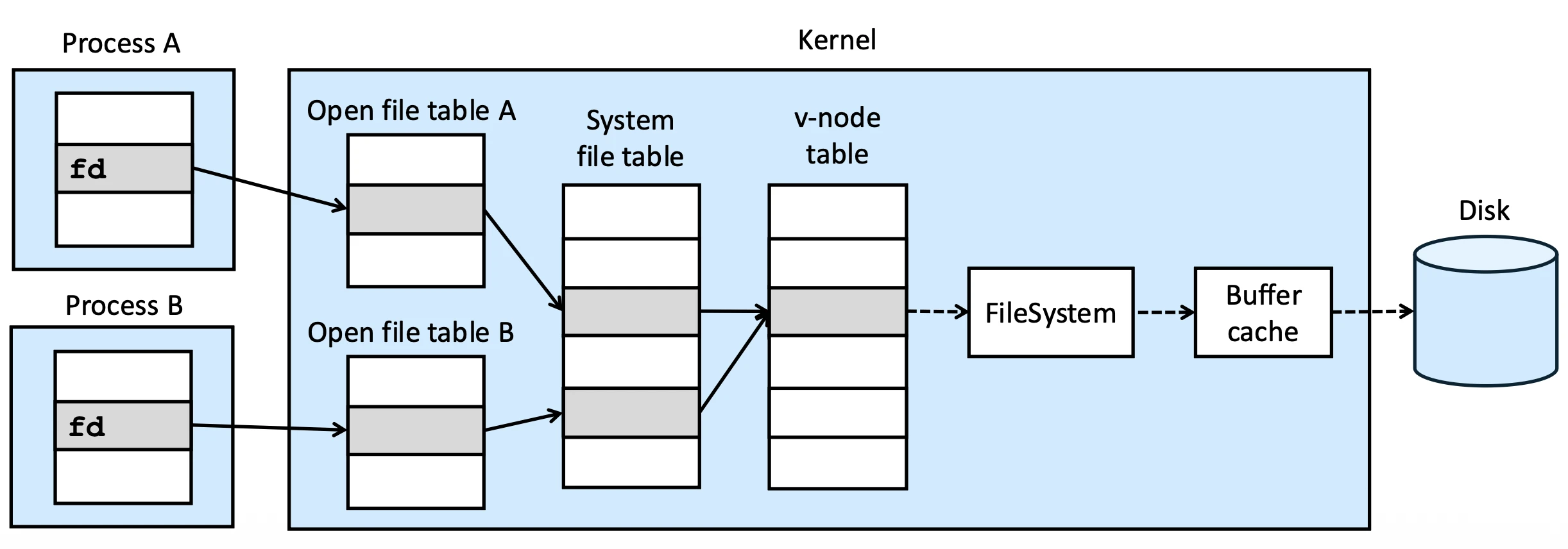
除了 Per process 的 open file table,Kernel 還會 maintain 一個 system-wide open file table,裡面會有所有 process 開啟的檔案的資訊,這樣就可以讓不同 process 之間共享同一個檔案的資訊
以下是在 Process Structure 裡面各個 data structure 的說明:
- v-node (virtual) 其實就是 i-node (index),指向 disk 上的 block 的 index,每個 entry 就是紀錄一個 i-node,一個 process 就佔一格,不管開幾個檔案都只有一個 entry,file 的 metadata 會放在這裡
v-node 跟 i-node 的需別是 v-node 實際上是在 VFS 上指向真實 storage device 的 i-node 的東西,詳見 NTU-OS Chapter 15 File System Internals ↗
-
Open File table 是 per process 的資料結構,只要開一個檔案,呼叫一次
open(),就會有一個 entry,同一個檔案開幾次就會有幾個 entry,要記錄每次 open 的屬性r,w- 雖然一次
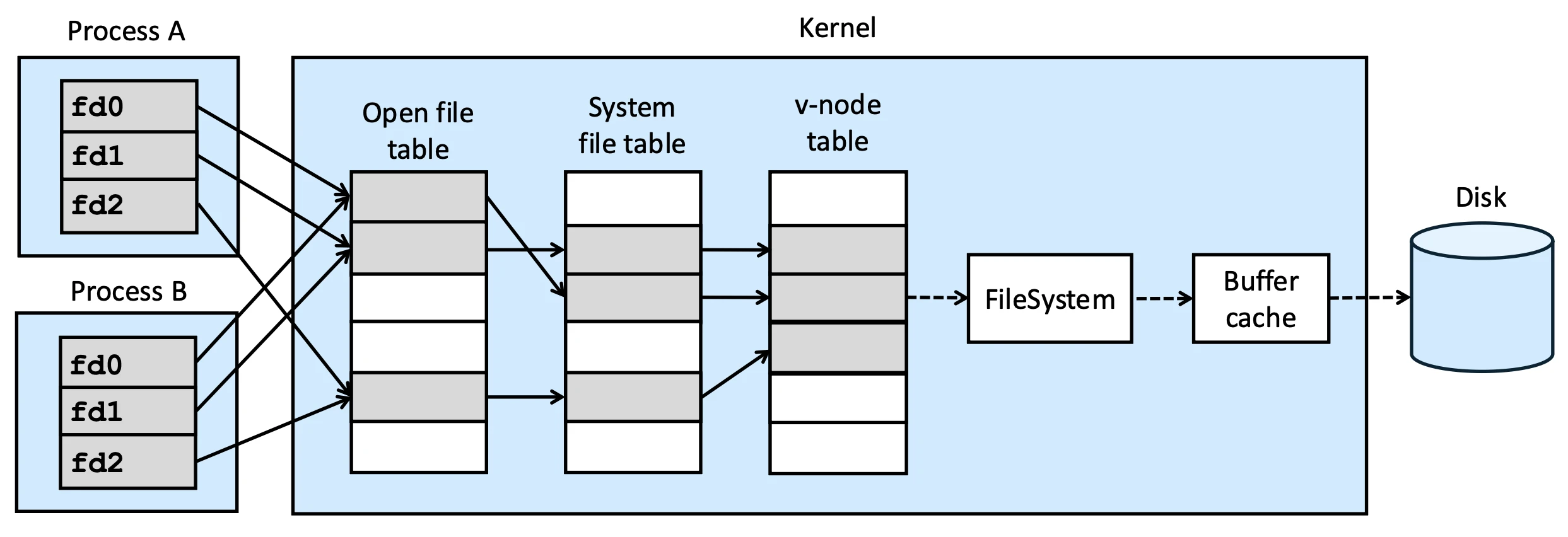
open()就佔一格 entry,但會有fork()繼承的 Open file Descriptor table 因此才會有多個指向這裡的 entry
- 雖然一次
-
System Open File Table 是一個 global 的資料結構,所有 process 都會共享這個 table,紀錄所有在 system 上已開啟的 file
-
File Descriptor Process 用來操控檔案的 handle,是 per process 的,而可以開幾個檔案記錄在
OPEN_MAX在<limits.h>裡面,但其實現代的系統,這個數字是可以在 runtime 改變的傳遞這個整數給 kernel,kernel 就知道要操作哪個檔案,因為 kernel 會用這個整數去 i-node table 裡面找對應的 entry,然後去操作檔案,以下是常見的幾個
fd:0:STDIN_FILENO1:STDOUT_FILENO2:STDERR_FILENO
-
Metadata 紀錄 file permission, file type, file size 等一系列資訊
-
Reference Count open file table 會有很多 entry 指向同一個 i-node entry,
RC用來記錄有多少指向他
File I/O system call#
open()#
int open((const char*pathname, int oflag, .../* mode_t mode */))用來開啟檔案,需要傳遞以下的參數
- path/file name
- 絕對路徑 Absolute:
/xxx - 相對路徑 Relative:
./xxx/xxx(根據 current working directory) - Limit
PATH_MAX,NAME_MAX: 給 compiler 看
- 絕對路徑 Absolute:
- file access modes
O_RDONLYfor reading only,O_WRONLY,O_RDWR,O_EXEC
- file creation(根據是否有前面參數)
O_CREAT: 檔案存在就單純 writeO_TRUNC: 檔案存在就 truncate(清空)掉,可以用|跟O_CREAT串接O_EXCL: exclusive: 一定要不存在才 create,不然就失敗
open(pathname, O_WRONLY | O_CREAT | O_TRUNC, mode)
...在 C language 中代表變動參數,printf()即為典型擁有變動參數的 function
openat()#
int openat(int dirfd, const char* pathname, int oflag, .../* mode_t mode */)dirfd: 相對於哪個 working directory,是個 directory 的 file descriptor
AT_FDCWD: Current Working Directorypathname: 相對路徑,若為絕對路徑則不會用到dirfd
這會是一個 atomic operation(後續會介紹),不然會產生 Time-of-check-to-time-of-use (TOCTTOU) 的問題,因為萬一有其他 process 在這個 system call check 完 dirfd 存在後有一個 context switch,然後其他 process 就把 dirfd 刪掉了,再回來執行 open 的時候就會出問題
Access mode#
為了要維持 multi-user 之下的 Integrity / Security / Privacy,我們必須做出 access mode 這個東西
- 例如對於
/etc/passwdprocess 應該永遠只有 read permission,對於/etc/shadowprocess 應該永遠沒有 read permission
設定 access mode 就可以很好的防止不合法的 access,另外在 performance 方面,access mode 也可以設定 O_RDONLY 來告訴系統這個檔案不會被修改,這樣系統就在 buffer cache 滿的時候就可以優先踢掉這個 file,因為他沒有被改動過不需要進行 Disk I/O,總而言之越多 information 可以更好的幫助系統做出 optimization
拿到 File descriptor 之後 access mode 就不能改了,除非你重新
open()一次
對於同一個檔案第二次的 open() 就是進行 dup(),因此第二次開啟的權限一定比第一次還低,若高於則操作會被忽略,例如第一次 open() 是 O_RDWR,第二次 open() 是 O_WRONLY,則第二次的權限就會被忽略掉,變成 O_RDWR
creat()#
int creat(const char* pathname, mode_t mode)其實等於
open(pathname, O_WRONLY | O_CREAT | O_TRUNC, mode)只能 creat() 出 write-access 的檔案,建檔後會回傳一個 w-only 的 file descriptor,在 <sys/stat.h> 裡面有一系列的 flag 可以讓我們控制新檔案的 permission,這些 flag 是八進制的,分別是
S_IRUSR,S_IWUSR,S_IXUSR代表 user 的 read, write, execute permissionS_IRGRP,S_IWGRP,S_IXGRP代表 group 的 read, write, execute permissionS_IROTH,S_IWOTH,S_IXOTH代表 other 的 read, write, execute permission
close()#
int close(int filedes)開完檔案用完記得關檔案
lseek()#
所有 file 的 I/O 全都要用到兩個 parameters:
fd知道要操作的是哪個檔案- current file
offset知道具體要操作檔案的哪個位置
lseek() 這個 system call 就是專門在做 offset 的移動
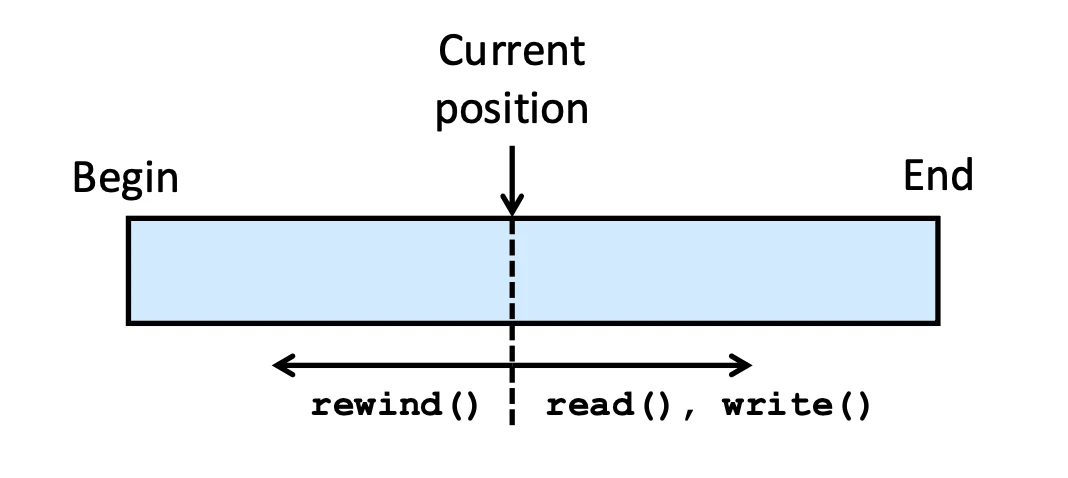
off_t lseek(int filedes, off_t offset, int whence)current file offset 會記錄在 open file table,current file offset 的精確定義是 number of bytes from the beginning of the file,他存在是因為檔案可以 random access,要有辦法明確指出位置
read(), write() 等一系列動作都會動到讀寫頭,所以需要先利用這個 system call 吧 current file offset 移動到正確讀寫位置,以下是 lseek() 找位置的方式
whence代表相對於哪個位置:SEEK_SET: 檔頭,SEEK_CUR: 目前,SEEK_END: 檔尾
offset: 偏移量,正常通常都正整數
我們無法用 lseek() 移動讀寫頭到 file beginning 前面,但可以到 file end 之後,甚至可以在移動後 write(),因為 file 這樣的特性,可能會導致
- 寫入時檔案中間有洞
lseek()到 end 後了,所以有可能
另一種情況是 Disk 的 page size 太大,如果一個 file 只需要 4 bytes 但一個 disk block 的大小是 512 bytes,但一個 file 必須起碼是一個 disk block,導致
以下是一個製作 hole in file 的例子
#include "apue.h"
#include <fcntl.h>

char buf1[] = "abcdefghij";
char buf2[] = "ABCDEFGHIJ";

int main(void)
{
    int fd;
    if ((fd = creat("file.hole", FILE_MODE)) < 0)
        err_sys("creat error");
    if (write(fd, buf1, 10) != 10)
        err_sys("buf1 write error");
    /* offset now = 10 */
    if (lseek(fd, 16384, SEEK_SET) == -1)
        err_sys("lseek error");
    /* offset now = 16384 */
    if (write(fd, buf2, 10) != 10)
        err_sys("buf2 write error");
    /* offset now = 16394 */
    exit(0);
}左邊是 page number,用八進位表示,我先在第一個 position 到第十個 position 寫入 a 到 j,然後 lseek() 到 1000 page 寫入 A 到 J,這樣就會在中間產生一個很大的 hole,全都是沒有內容的,Unix 用 \0 表示 hole
$ gcc -o a.out hole.c
$ ./a.out
$ ls -l file.hole          # check its size
-rw-r--r-- 1 sar           16394 Nov 25 01:01 file.hole
$ od -c file.hole          # let's look at the actual contents
0000000   a   b   c   d   e   f   g   h   i   j  \0  \0  \0  \0  \0  \0
0000020  \0  \0  \0  \0  \0  \0  \0  \0  \0  \0  \0  \0  \0  \0  \0  \0
*
0040000   A   B   C   D   E   F   G   H   I   J
0040012用 cat 指令的時候,這個指令會把 hole 存在的地方全都實體填入 \0 把一個有洞的檔案補起來了,比有洞的檔案佔了更多的 block
$ cat < file.hole > file.nohole
$ ls -ls file.hole file.nohole # compare sizes
 8 -rw-r--r-- 1 sar          16394 Nov 25 01:01 file.hole
20 -rw-r--r-- 1 sar 16394 Nov 25 01:03 file.nohole這邊看 with hole 的 file 實際只佔用 8 blocks,但沒有 hole 的 file 卻佔用 20 blocks,但兩者的 logical size 都是 16394 bytes
有些有些有名稱的 pipe 會以檔案形式呈現,但 pipe file 無法進行
lseek()
read()#
ssize_t read(int filedes, void *buf, size_t nbytes)nbytes 代表要讀多少 bytes,buf 代表要讀到哪個地方,而 read() 的回傳值可以代表這次讀取的狀態
0(EOF): 正常回傳,讀到 terminal device (line-input), network buffering, record-oriented devices (e.g., tape)> 0: 讀到的 bytes 數量-1: error,去看系統 maintain 的errno知道出什麼錯誤- system call 到一半可能會遇到 signal 中斷,例如
errno == EINTR,這時候就要再呼叫一次read(),直到讀完為止
- system call 到一半可能會遇到 signal 中斷,例如
write()#
ssize_t write(int filedes, const void *buf, size_t nbytes)write() default 就是寫在 current file offset
- 如果有開
O_APPEND就寫在檔尾
write() 有一個比較特殊的機制 delayed write,這個機制是為了提高效率,因為 disk I/O 的速度比 memory 慢很多,所以我們會先把資料寫到 buffer cache 裡面,然後再由 background process dupdate 去把資料寫回 disk,這樣就可以減少 disk I/O 的次數,提高效率
File offset and file pointer#
用以下 code 開啟同一個檔案獲取的 fd 是獨立的,
int main()
{
    int fd1, fd2;
    char c;
    fd1 = open("foobar.txt", O_RDONLY, 0);
    fd2 = open("foobar.txt", O_RDONLY, 0);
    read(fd1, &c, 1);
    read(fd2, &c, 1);
    printf("c = %c\n", c);
    exit(0);
}
用以下程式 fork() 兩個 process 後,兩個 process 會有獨立的 fd,但因為 fd 是指向同一個 open file table entry 的,所以兩個 process 的 current file offset 是相同的,因此兩個 process 讀取的資料也會相同
int main()
{
    int fd;
    char c;
    fd = open("foobar.txt", O_RDONLY, 0);
    if(fork() == 0)
    {read(fd, &c, 1); exit(0);}
    wait(NULL);
    read(fd, &c, 1);
    printf("c = %c\n", c);
    exit(0);
}
Atomic Operation#
剛剛有提到明明就有 lseek(),如果我們要寫東西檔案尾巴的話,為何不直接執行 lseek() 而要使用 O_APPEND?
是因為萬一出現這種情況就會發生問題,紅藍色是兩個 process
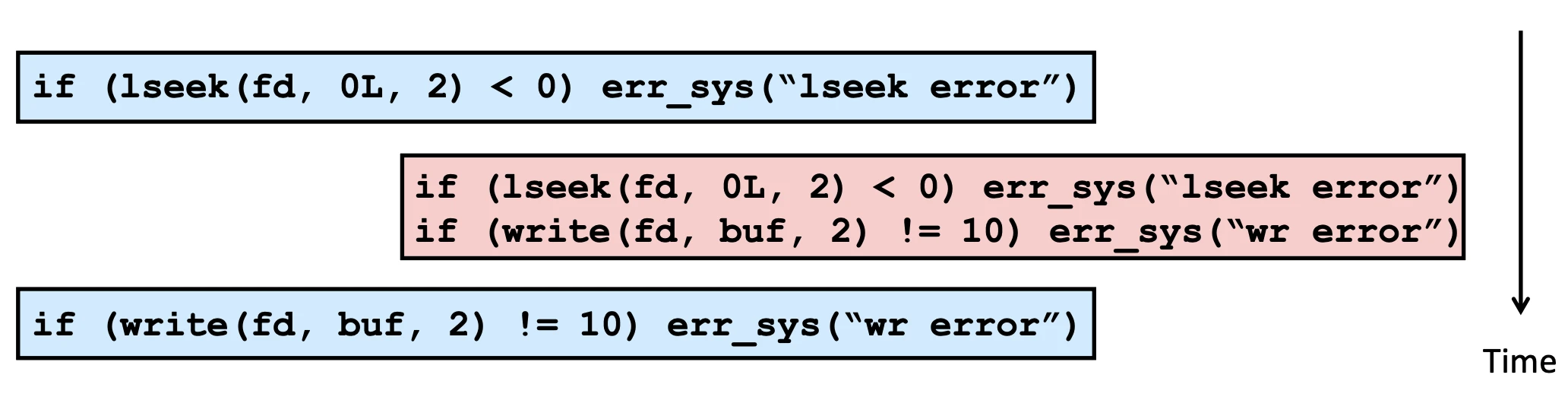
假設在剛執行完藍色 process lseek() 的時候,剛好發生 context switch,藍色 Process 被踢出 CPU,紅色 Process 就會把 current file offset 往後移動,然後寫入資料,等到藍色 Process 再回來執行 write() 的時候,就會把資料寫在錯誤的位置,造成資料被覆蓋掉了
藍紅色 Process 的 Open file table 的 current offset 會不一樣,但當藍色 Process 想寫入 file end 的時候,current offset 應該要跟紅色色同步,不然會覆蓋掉紅色 Process 的 write()
再舉一個例子,考慮下面的程式
if ((fd = open(pathname, O_WRONLY)) < 0) {
    if (errno == ENOENT) {
        /* if here is a context switch */
        if ((fd = creat(pathname, mode)) < 0)
            err_sys(“creat err”);
    } else err_sys(“open err);
}在前面的 open() 的時候,如果檔案不存在就會回傳 -1,檢查 errno == ENOENT 發現是檔案不存在,然後如果在這裡發生 context switch,其他 process 用同一個 pathname creat() 出來了,等到這個 process 再回來執行 creat() 如果用 O_TRUNC 的話就會把其他 process 剛剛 creat() 出來的檔案給清空了,造成資料遺失
time-to-use 跟 time-to-check 不同時就會出事,也就是前面提到的 TOCTTOU 問題,這種情況通常都發生在資源共享,這就是為什麼有些操作我們應該要保證他可以一次做完,而不會被 context switch 打斷,這就是 atomic operation 的概念,O_APPEND 就是一個 atomic operation,因為他會保證 write() 的時候 current file offset 是檔尾,不會被其他 process 的 write() 打斷
pread(), pwrite()#
ssize_t pread(int filedes, void *buf, size_t nbytes, off_t offset)
ssize_t pwrite(int filedes, const void *buf, size_t nbytes, off_t offset)從檔頭指定 offset 開始寫,不因 offset 移動而不一樣,讀寫完會保證 current file offset 不移動,並且這個 system call 本人不會被 context switch 打斷,因此是一個 atomic operation
dup()#
int dup(int filedes)目的是要複製一份檔案
- 傳入一個已開啟的
filedes - 從 file descriptor table 的
0entry 開始尋找,找到一個空的 entry 指向filedes背後的 open file table entry,然後把這個 entry 的 reference count 加一 - return 新的 file descriptor
dup2()#
int dup2(int filedes, int newfiledes)目的一樣是複製一個檔案,但這次可以指定新的 file descriptor
- 先進行
close()掉原本的newfiledes,原本的 open file table entry 的RC減一 - 把
filedes的 RC 加一 - 把
newfiledes指向filedes背後的 open file table entry
如果
filedes == newfiledes的話就直接 returnnewfiledes就好,不需要做任何事情
相較於 dup(),dup2() 是一個 atomic operation,因為他會先 close() 掉 newfiledes,然後再把 newfiledes 指向 filedes 背後的 open file table entry,如果在這個過程中發生 context switch,其他 process 就有可能把 newfiledes 給改掉了,導致 dup2() 的結果不正確
Blocking vs. Synchronization#
一樣是這些 System call 裡面非常重要的性質,先分成兩個維度來看:
- Blocking / Non-blocking:
- By Default Blocking 是要求全部操作都結束才能 return,但中間可能發生 Context switch,可能被踢出 CPU
- Non-blocking 是有多少就要求多少,return immediately,系統比較喜歡 non-blocking,可以讓每個 resources 獲得最好的效能
- Synchronization / Asynchronized IO:Buffer cache 是否跟 disk 隨時同步
sync(), fsync(), fdatasync()#
接下來講幾種 synchronization 的方式
O_DSYNC:不會 delay write,當有任何write()操作的時候,system 會直接執行 disk I/O,把 content 跟重要的 metadata (size) 寫到 disk 去,而不重要的 metadata 則是會再 context swtich 的時候再把 kernel buffer 的 i-node table attribute 寫到 disk i-node 去
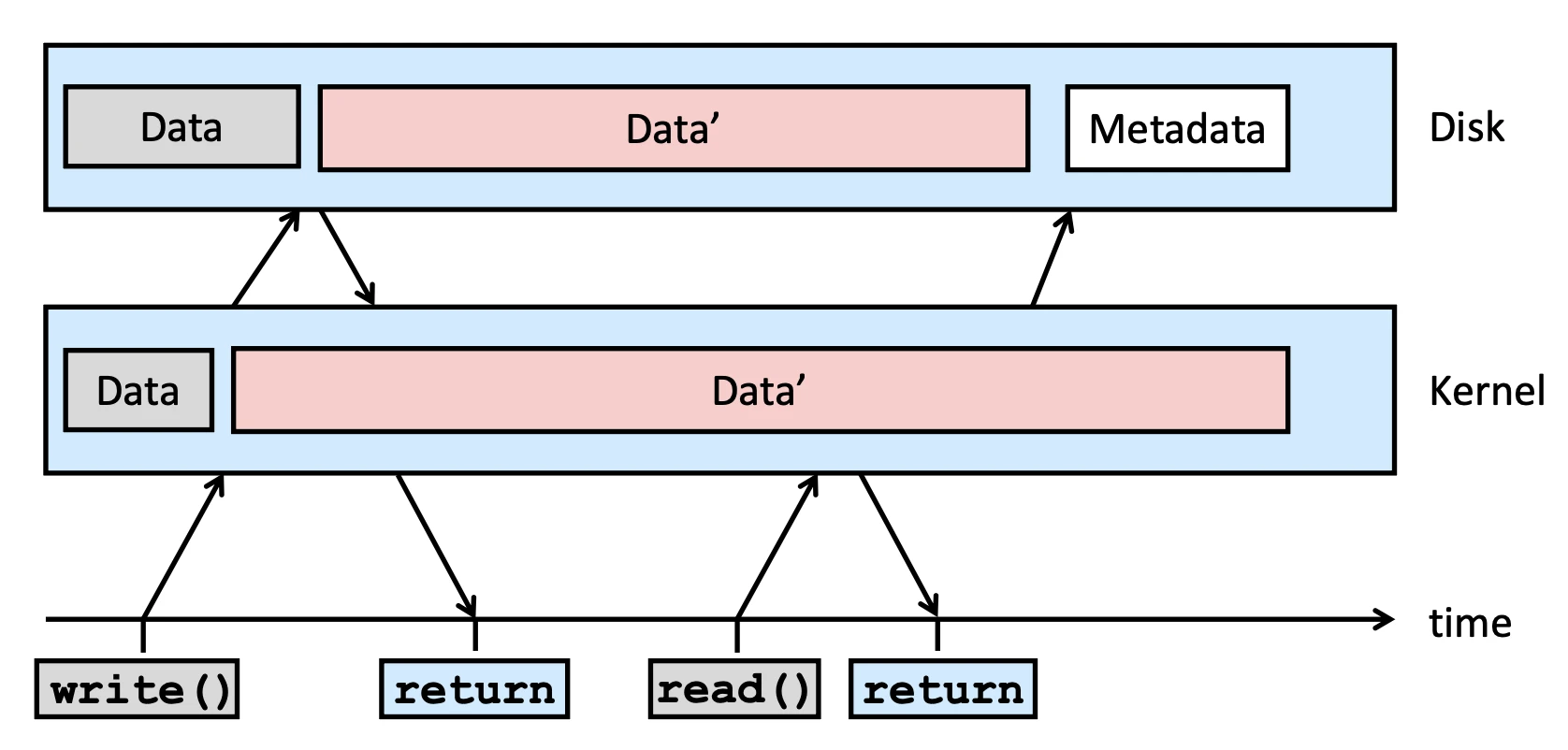
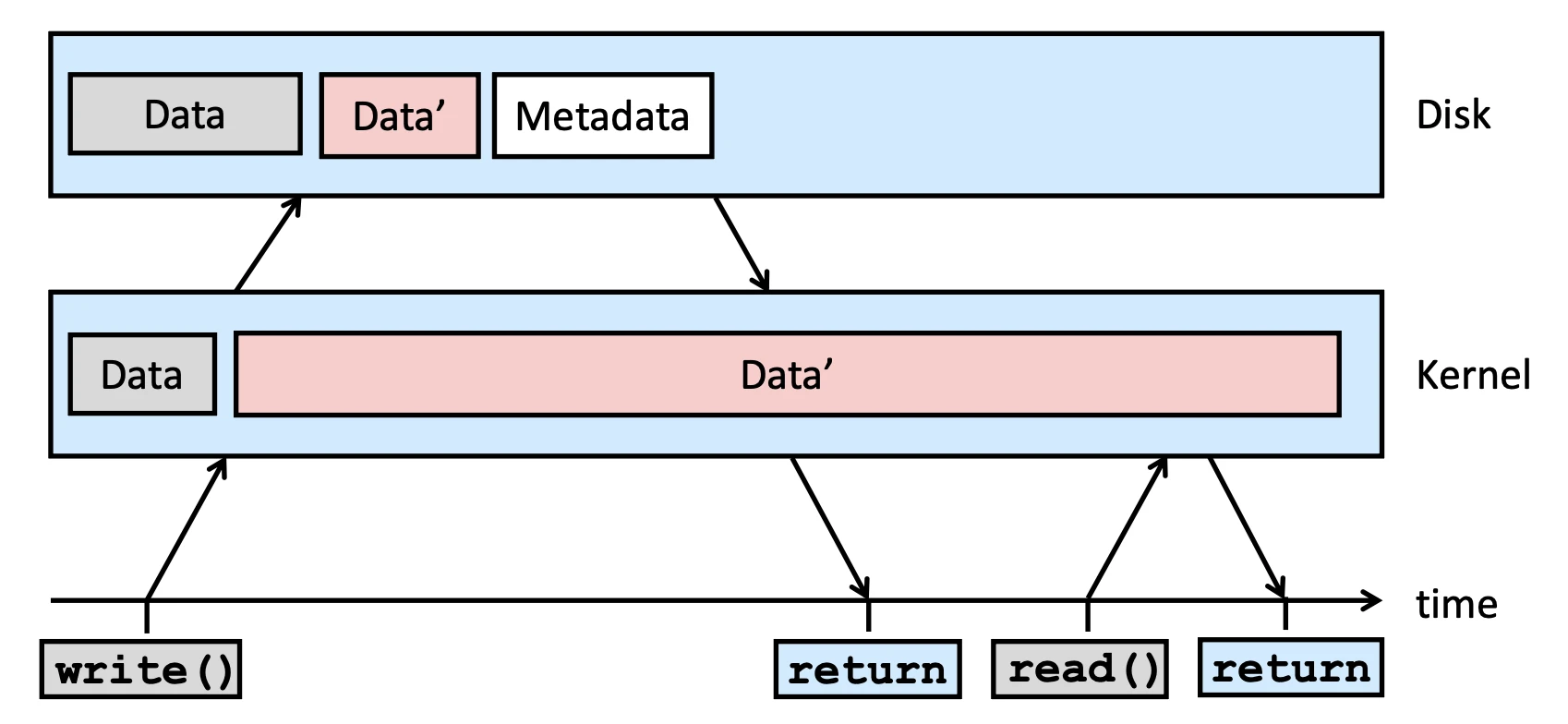
O_SYNC:對 return time 更加嚴格,當有任何write()操作的時候,system 會直接執行 disk I/O 把 content 跟 metadata 都寫到 disk 去,等到 disk 寫完了才會 return
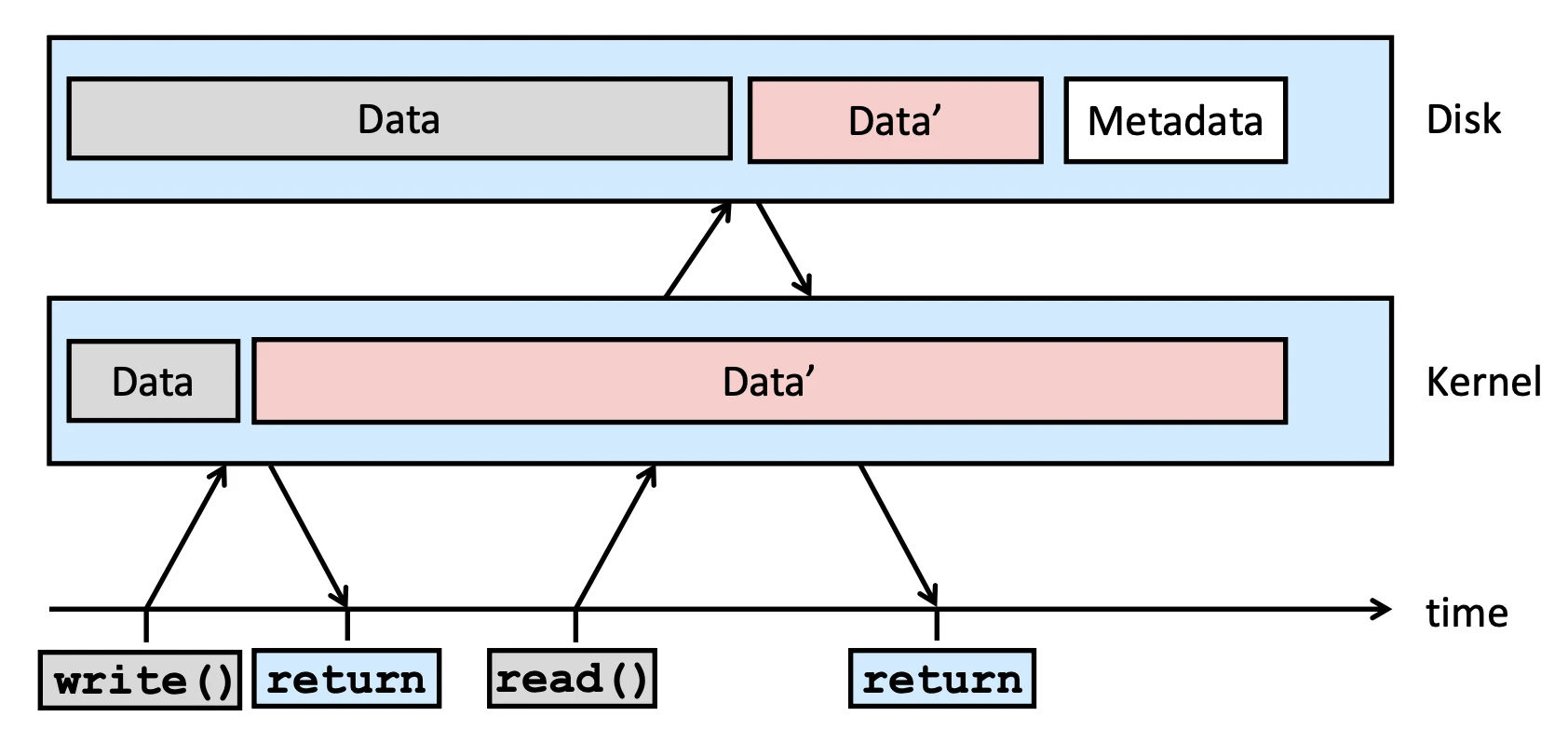
O_RSYNC:針對read()的 protection,確保在read()回傳之前,該檔案所有在 cache 的 Dirty Pages,都已經被強制同步到 disk 上
因為開 O_SYNC 開檔案會導致時間成本太大,因此通常用下面這些 function 來做 synchronization:
fsync()#
int fsync(int filedes)呼叫這個 system call 來同步,會等到 Data + meta data (file attribute) 都 sync 之後才後 return
fdatasync()#
int fdatasync(int filedes)Sync 完 data 跟必要的 meta data 後 return
sync()#
void sync(void)本來是把正個 system 上的所有 dirty page 都同步到 disk 上,但現在已經改成把所有 dirty page queue 進去 update 的 queue 裡面,然後 return,真正的 synchronization 會由 update 這個 daemon 去做
fcntl()#
int fcntl(int filedes, int cmd, ... /* int arg */)這個 system call 是用來做 file descriptor 的 control,主要有幾個功能,cmd 就是要做的事情,而 arg 是要傳入的參數,cmd 用 flag 來表示,以下是幾個常用的 flag:
F_DUPFD: 把前者 file copy 給後者 (arg),後者不可以是有指向任何 file table entry,必須要是空的- 實際上
dup2()的實作是-
dup2.c
cclose(newfile); fcntl(filedes, F_DUPFD, newfiledes); dup2()一定要是 atomic 因為newfiledes有可能被改動到,否則他就會一直往後找直到有 available
-
- 實際上
F_GETFL,F_SETFL(status flag),能改動的 status flag 有:O_APPEND,O_NONBLOCK,O_ASYNC/O_SYNC- 有些性質是不能改的例如
O_RDONLY,因為會影響到 performance - status flag 會儲存在 open file table,所以如果用
dup(),dup2(),fork()之後,status flag 都會被繼承
- 有些性質是不能改的例如
F_GETFD,F_SETFD:只有一個 flagFD_CLOEXEC代表當他 callexec()變成一個新的 program 的時候就關掉目前的 fd,這個性質會存在 fd 裡面,所以是不會被繼承的F_GETOWN,F_SETOWN:用來設定這個 fd 的 owner,通常是用在 socket 上面,當有資料要讀的時候會送 signalSIGIO給 owner,讓對方知道可以r/w了
ioctl()#
int ioctl(int filedes, int request, ...)fcntl() 複雜度遠低於 ioctl(),但 ioctl() 常用於網路,很強大
/dev/fd/n#
這個 file 可以存取第 n 個 fd,每個 process 的這個檔案不一樣,因為 fd table 是獨立的
fd = open(“/dev/fd/0”, mode)等價fd = dup(0)
I/O Efficiency#
理論上 Buffer Cache 開的很大,我們就可以大幅減少 Data 移動的時間,但我們做做看以下的實驗就會發現不是這樣的,用以下的 code 去測試不同 buffer size 的效能
這個 code 做的事 Copy Standard Input (
< file) into Standard output (> /dev/null)
#include "ourhdr.h"

#define BUFFSIZE 8192

int main(void) {
    int  n;
    char buf[BUFFSIZE];

    while ((n = read(STDIN_FILENO, buf, BUFFSIZE)) > 0)
        if (write(STDOUT_FILENO, buf, n) != n)
            err_sys("write error");

    if (n < 0)
        err_sys("read error");

    exit(0);
}| Buffer size | User CPU (s) | System CPU (s) | Clock (s) > | #loops |
|---|---|---|---|---|
| 1 | 124.89 | 161.65 | 288.64 | 103,316,352 |
| 64 | 2.11 | 2.48 | 6.76 read ahead | 1,614,318 |
| 512 | 0.27 | 0.41 | 7.03 | 201,789 |
| 1024 | 0.17 | 0.23 | 7.14 | 100,894 |
| 8192 | 0.01 | 0.18 block size | 6.67 | 12,611 |
| 131072 | 0.00 | 0.16 | 6.70 | 3,152 |
根據實驗結果,我們可以分成兩相探討看到:
- User CPU time:可以無限下降
- System CPU time:只有算
read()搬動的時間,從 kernel 到 disk 獲得資料,理論上我只要把這個 buffer 宣告的超大,我也可以搬動次數超級少,但他有一個上限值是 Disk block size,因為 random access 只保證 block 內的檔案連續,並不保證同檔案所有 block 連續,當 buffer size 超過 block size 時,系統就會把 buffer 分成多個 block 來搬動,這樣就會增加搬動的次數,導致 system CPU time 上升
Read ahead#
但注意到上面的結果,當 buffer size = 512 時,clock time 反而比 buffer size = 64 還要長,這是因為 Unix 系統會偷偷幫你做 read ahead,當 process 是 sequential 的讀一個 byte 資料,那系統會先 prefetch 一個 block,這樣就可以減少 disk I/O 的次數,提高效率
- 如果 Buffer size 太大了,做 read ahead 的時間就被稀釋了,因為一下就讀完了,read ahead 的效益就不明顯了
BUFFSIZE | User CPU (seconds) | System CPU (seconds) | Clock time (seconds) | #loops |
|---|---|---|---|---|
| 1 | 124.89 | 161.65 | 288.64 | 103,316,352 |
| 2 | 63.10 | 80.96 | 145.81 | 51,658,176 |
| 4 | 31.84 | 40.00 | 72.75 | 25,829,088 |
| 8 | 15.17 | 21.01 | 36.85 | 12,914,544 |
| 16 | 7.86 | 10.27 | 18.76 | 6,457,272 |
| 32 | 4.13 | 5.01 | 9.76 | 3,228,636 |
| 64 | 2.11 | 2.48 | 6.76 | 1,614,318 |
| 128 | 1.01 | 1.27 | 6.82 | 807,159 |
| 256 | 0.56 | 0.62 | 6.80 | 403,579 |
| 512 | 0.27 | 0.41 | 7.03 | 201,789 |
| 1,024 | 0.17 | 0.23 | 7.84 | 100,894 |
接下來真正用 write() 實際寫入檔案,看看不同的 synchronization 方式對效能的影響
| Operation | User CPU (seconds) | System CPU (seconds) | Clock time (seconds) |
|---|---|---|---|
read time from Figure 3.5 for BUFFSIZE = 4,096(write to /dev/null) | 0.03 | 0.16 | 6.86 |
normal write to disk file | 0.02 | 0.30 | 6.87 |
write to disk file with O_SYNC set | 0.03 | 0.30 | 6.83 |
write to disk followed by fdatasync | 0.03 | 0.42 | 18.28 |
write to disk followed by fsync | 0.03 | 0.37 | 17.95 |
write to disk with O_SYNC set followed by fsync | 0.05 | 0.44 | 17.95 |
- 這次把
write()真正做出來,表格第二項就是因為 delayed write 減少 disk I/O 的次數,clock time 下降了,但 user CPU time 下降不多,因為 user CPU time 主要是搬動資料的時間,這個時間不會因為 delayed write 而下降 O_SYNC會導致 DISK I/O 大量增加 clock time 會大幅增加,但這裡沒有,表示 Linux 系統有做一些 optimization,不支持O_SYNC
Back to the content
NTU PJ System Programming
2025 Fall
← Back to the content