Process Control & IPC#
以 ls | more 為例,shell 要建立 processes、連接 I/O,最後取得結束狀態。這章分別看 process 的建立與管理,以及交換資料的 IPC
Booting#
Bootstrapping#
Bootstrapping 是從開機到啟動系統的過程:
BIOS / UEFI → bootloader → kernel → System services and user programs
text
- Firmware 初始化硬體,交給 bootloader
- Bootloader 載入 kernel
- Kernel 初始化 memory management、devices、process management,再啟動 system services
課堂的傳統 Unix 流程先進入 single-user mode 做檢查與維護,再進入 multiuser mode 啟動登入、網路等服務;實際流程依系統而定
Special process
課堂使用的傳統 Unix 配置:
PID 0: Swapper / scheduler,最早的 kernel 執行環境PID 1: init,啟動 system services、接手與回收失去 parent 的 processesPID 2: pagedaemon,處理分頁相關工作
編號與名稱依實作而異。下圖的重點是 process tree:init 啟動服務,登入服務啟動 shell,shell 再建立執行指令的 children
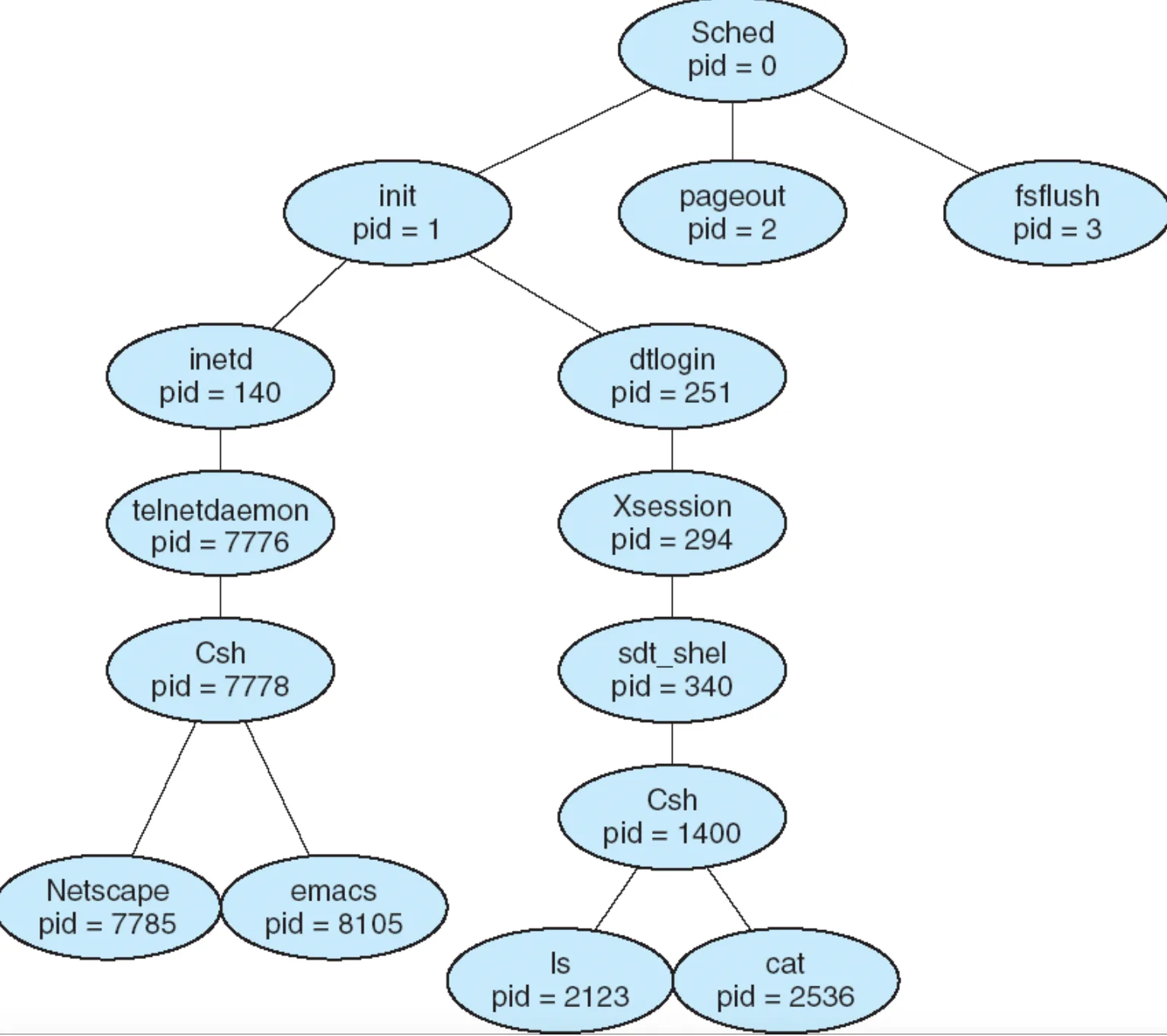 Unix process tree
Process Control Block (PCB)#
PCB 是 kernel 保存 process metadata 的資料結構,先看它記錄的 states:
| State | 意義 |
|---|
| New | 正在建立 |
| Ready | 等待 CPU |
| Running | 正在 CPU 上執行 |
| Waiting | 等待 I/O 或其他事件 |
| Terminated | 已結束 |
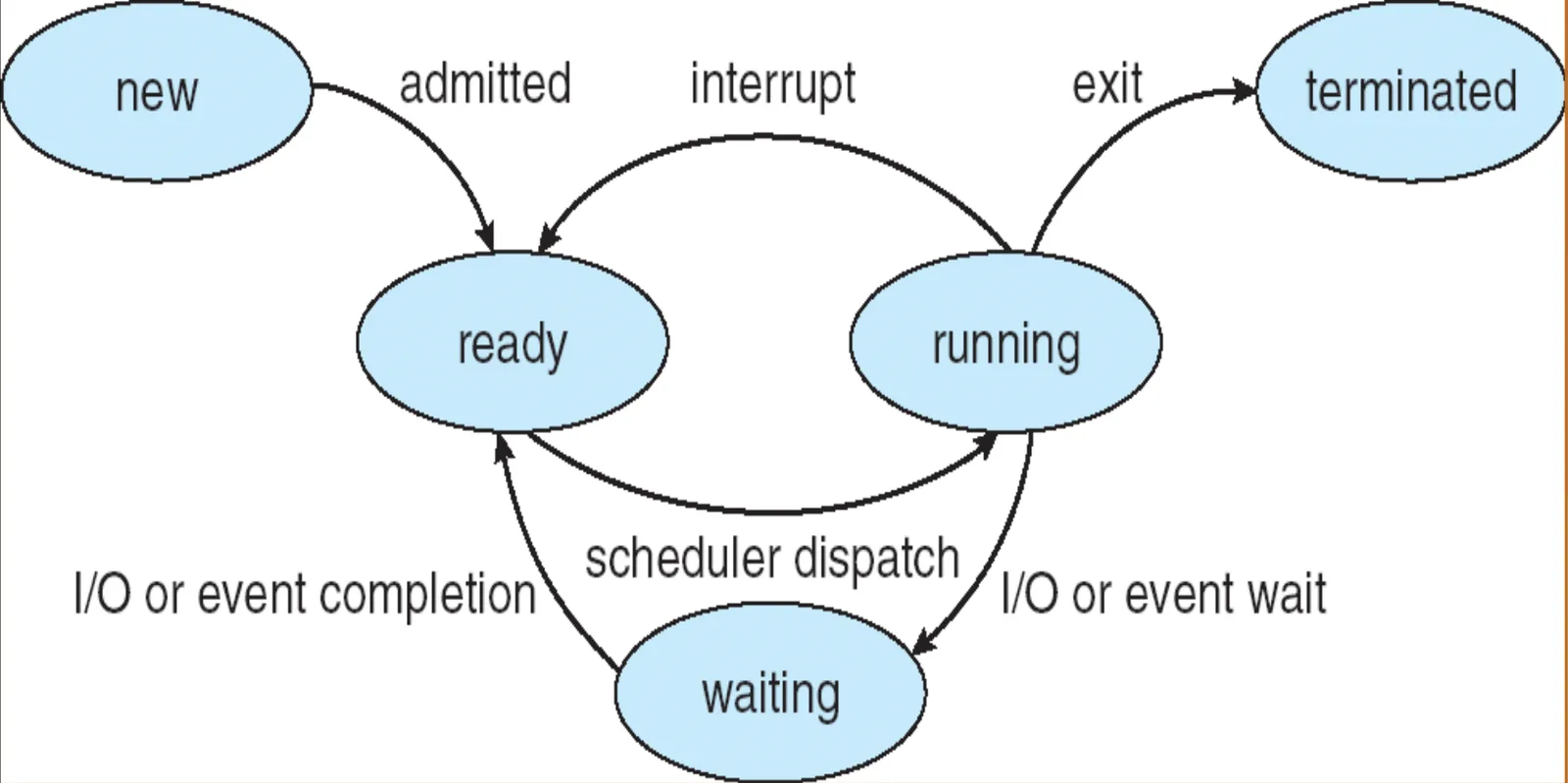 Process state transitions
例如 terminal 還沒有輸入時,process 進入 waiting;資料準備好才回到 ready,等排程後繼續執行
PCB 還記錄:
- PID / PPID: 自己與 parent 的身分
- Program Counter、CPU registers: 保存執行位置與狀態
- CPU scheduling information: Priority 等排程資訊
- Memory-management information: Virtual memory 的對應
- Accounting information: CPU time 等資源紀錄
- I/O status information: 開啟的檔案等 I/O 狀態
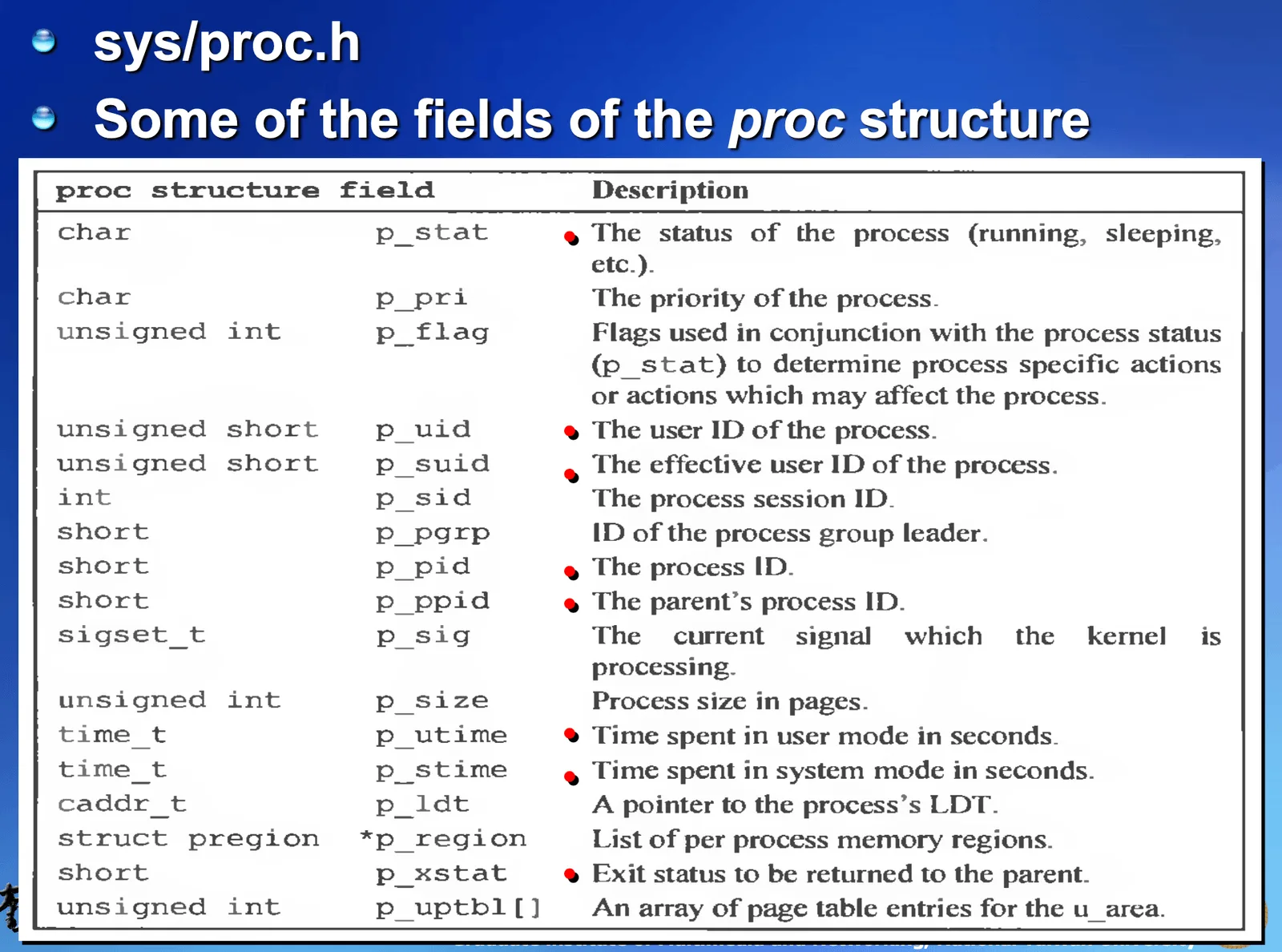 Fields of the proc structure
Process table#
Process table 管理所有 processes 的 PCB,概念上每個 entry 對應一個 process,實作不一定是連續陣列
要找某個 process 的 children,就看哪些 PPID 等於它的 PID,也可以用下面的指令觀察:
ps -e -o pid,ppid,stat,comm
bashPID 在 process 結束並完成回收後可以重新使用
Context switch#
Context switch 把 CPU 上的 process 換成另一個:
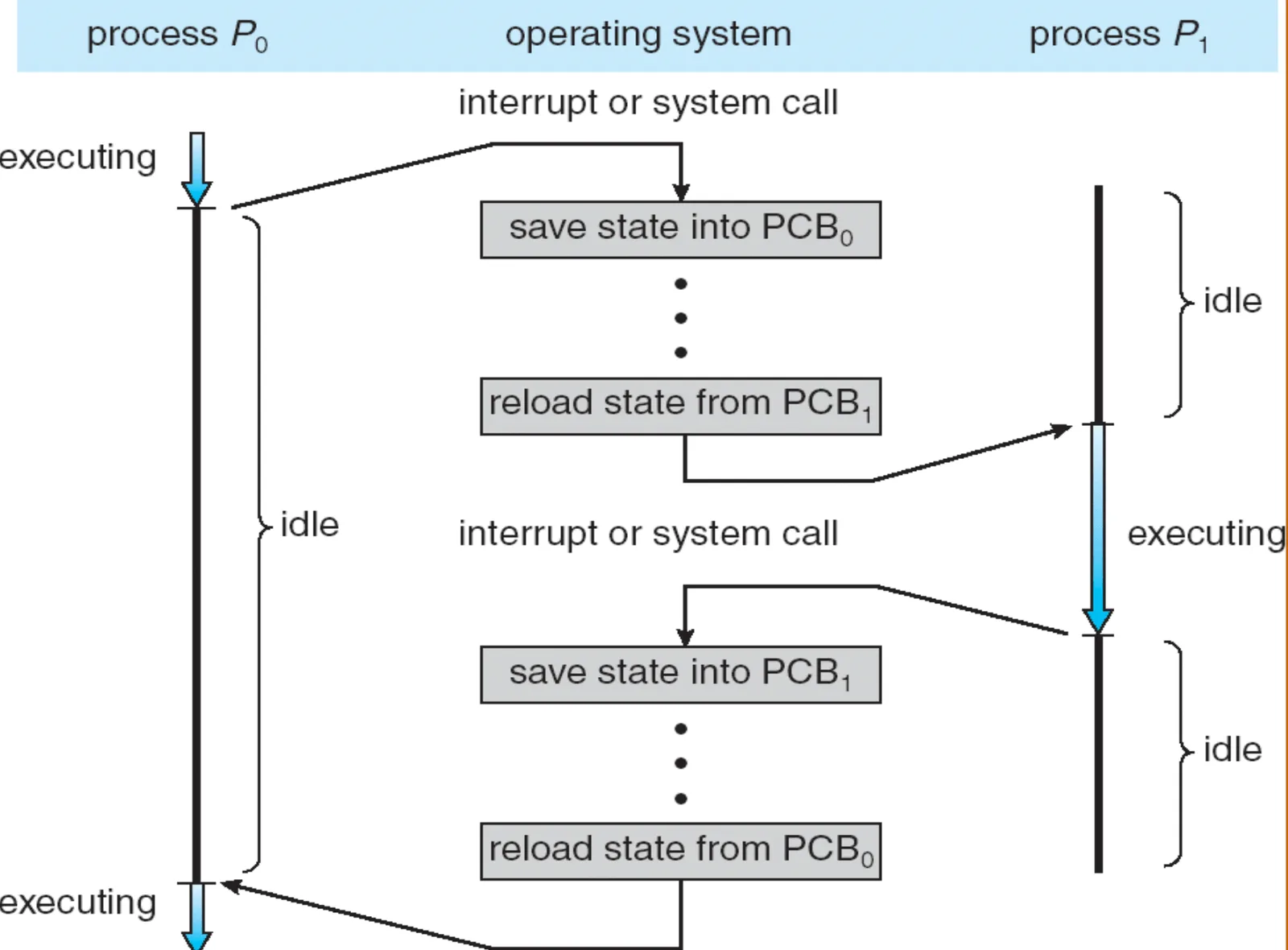 Context switch between processes
- 保存 P0 的 registers、Program Counter
- 把 P0 放回 ready queue 或對應的等待佇列
- 載入 P1 的狀態與記憶體對應,繼續執行
進入 kernel mode 不一定發生 context switch,system call 若能立即完成,可以直接回到原本的 process
Process Content & Metadata#
- Metadata: PCB 裡的 PID、state、registers 等管理資訊
- Content: Virtual memory 裡的指令與資料
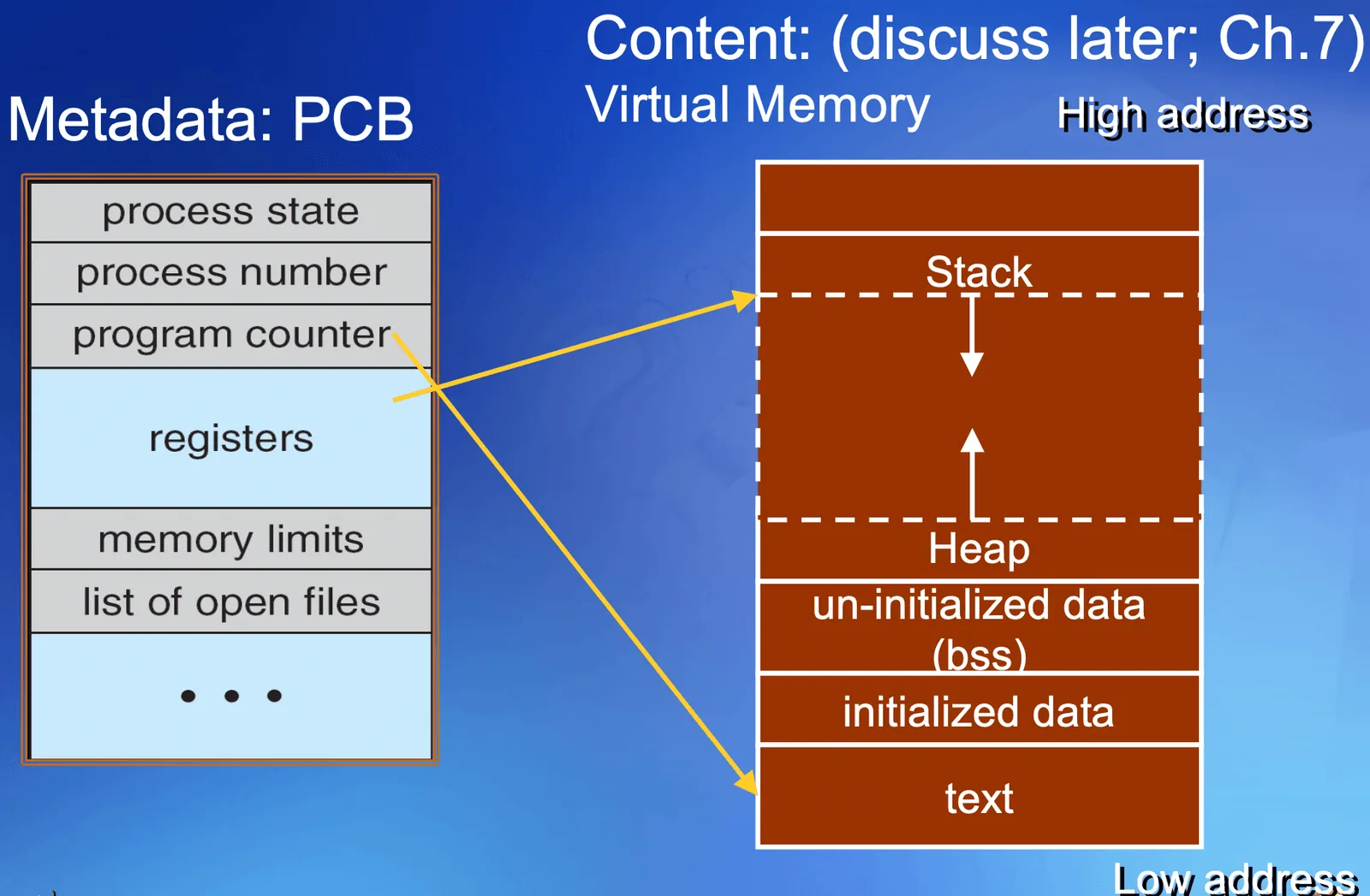 Process metadata and virtual memory
- Text: 程式指令
- Initialized data / BSS: Global、static variables,依初始化方式區分
- Stack: Function call 的 stack frames、local variables、返回資訊
- Heap:
malloc() 配置的空間
圖中的成長方向是簡化配置,實際依系統而定。free() 讓空間可被 allocator 再利用,不保證立刻還給 kernel
Process Creation & Termination#
fork(): 建立 child processexec() 家族: 替換目前 process 執行的 programwait() 家族: 取得 child 狀態、回收已結束的 child
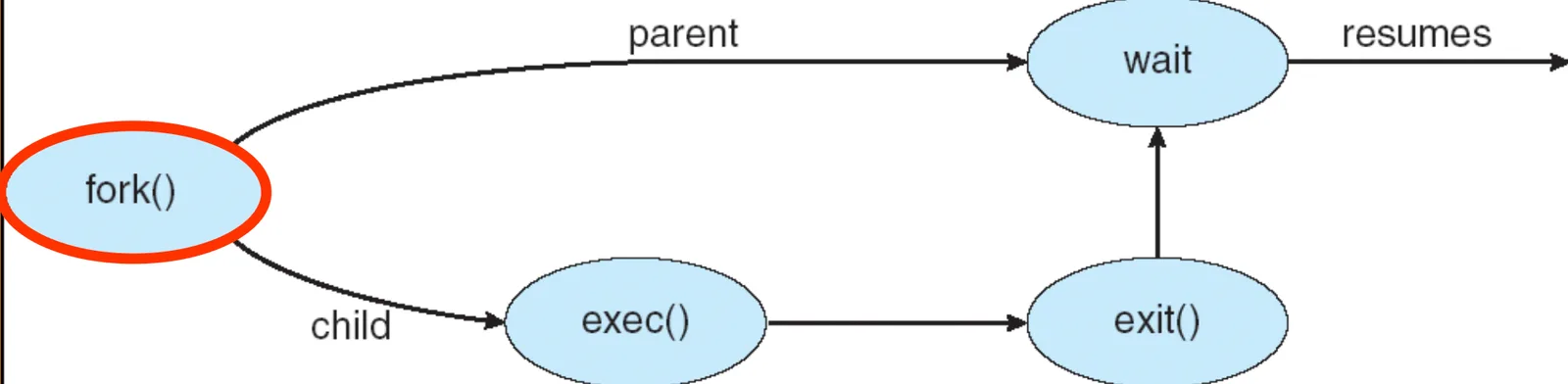 Process creation with fork and exec
Virtual Memory 的運作
立刻複製全部 physical pages 成本很高,尤其 child 可能馬上 exec()。因此使用 Copy-on-write (COW),先讓兩者的 virtual pages 共用 physical pages:
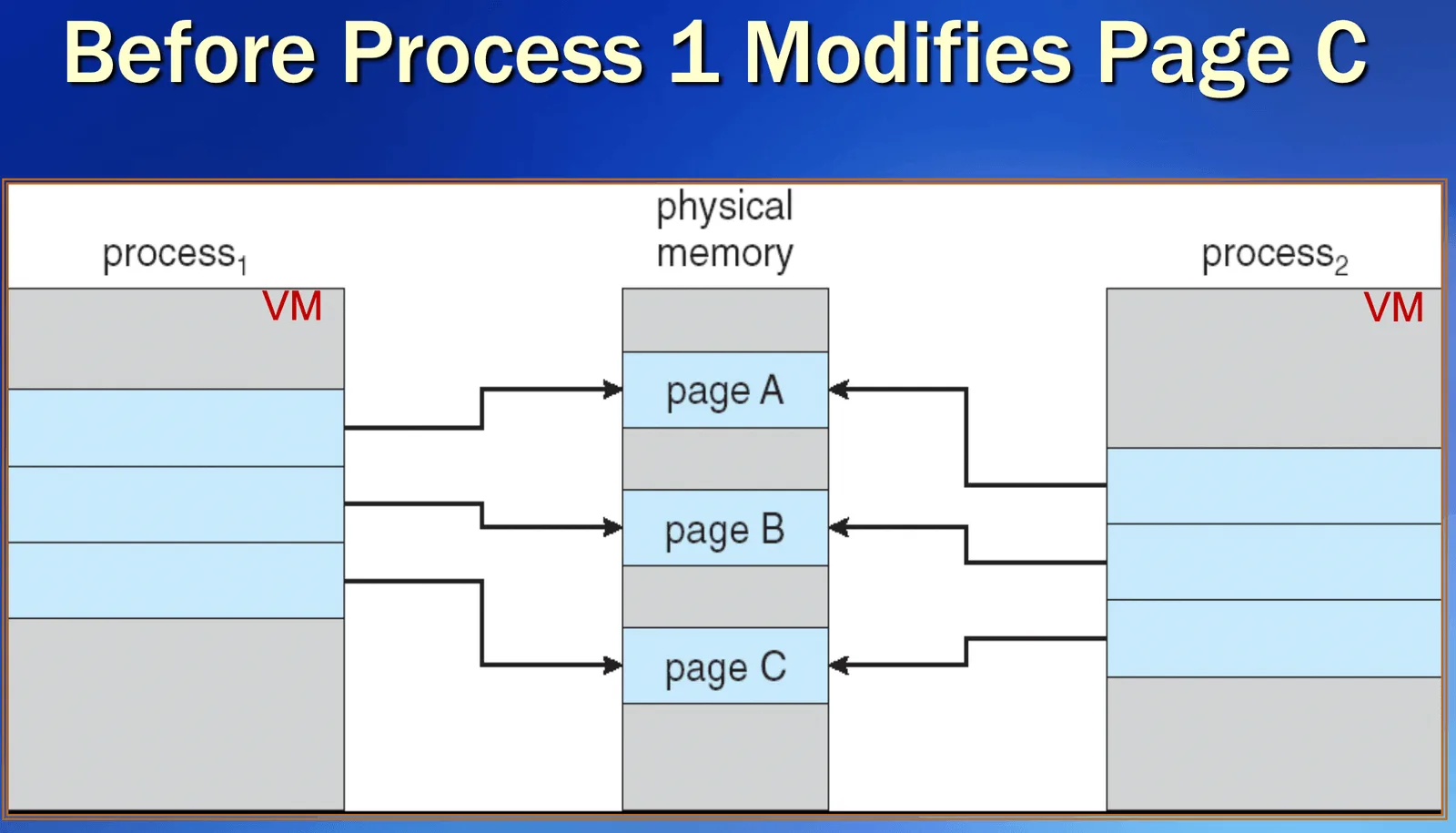 Shared pages before copy-on-write
Process 1 要修改 page C 時,才複製該頁;Process 2 繼續使用原本那份:
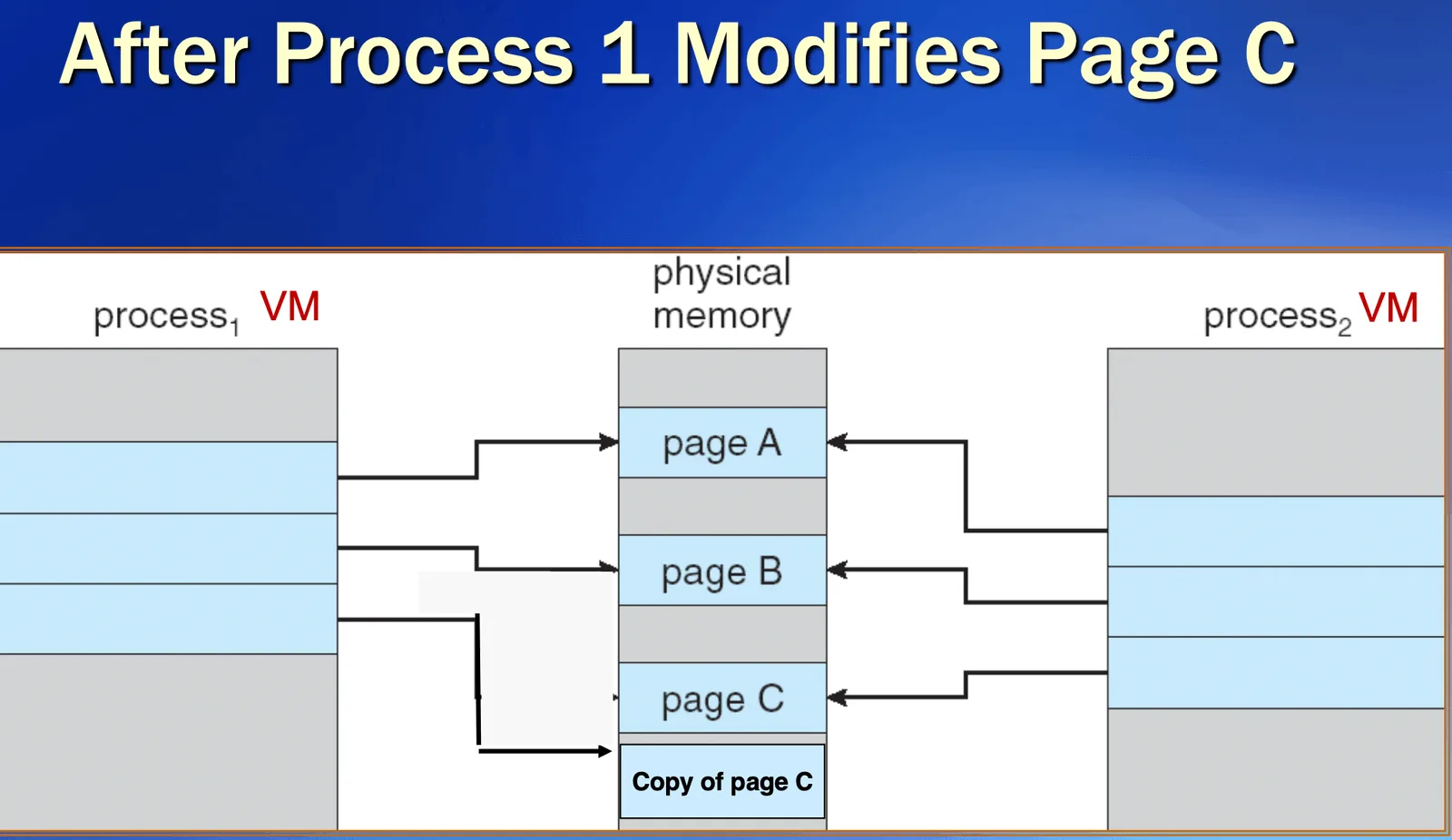 Private page after copy-on-write
所以 普通變數的修改仍各自獨立。Virtual address space 未使用的洞也不必配置實體記憶體,詳見 fork(2) ↗
Normal cases in fork#
Parent、child 沒有固定的執行先後。Parent 可以立即等待,也能先做自己的工作,再取得 child 結果。Process 數量與資源有上限,課堂用 CHILD_MAX 說明相關限制
Inherited properties
- Real / effective UID、GID、supplementary groups
- Current working directory、root directory、
umask
- Environment、resource limits
- Signal dispositions、signal mask
- File descriptors
兩者各有自己的 fd table,但對應 fd 可指向同一個 open file description,共享 offset 與 file status flags;關閉 child 的 fd 不會刪掉 parent 的 fd
Differences on properties
- Child 有自己的 PID,PPID 指向 parent
- CPU time、資源使用紀錄重新計算
- Pending signals、
alarm() 剩餘時間不繼承
- 傳統 process-associated record locks 不繼承,其他 lock 類型另有規則
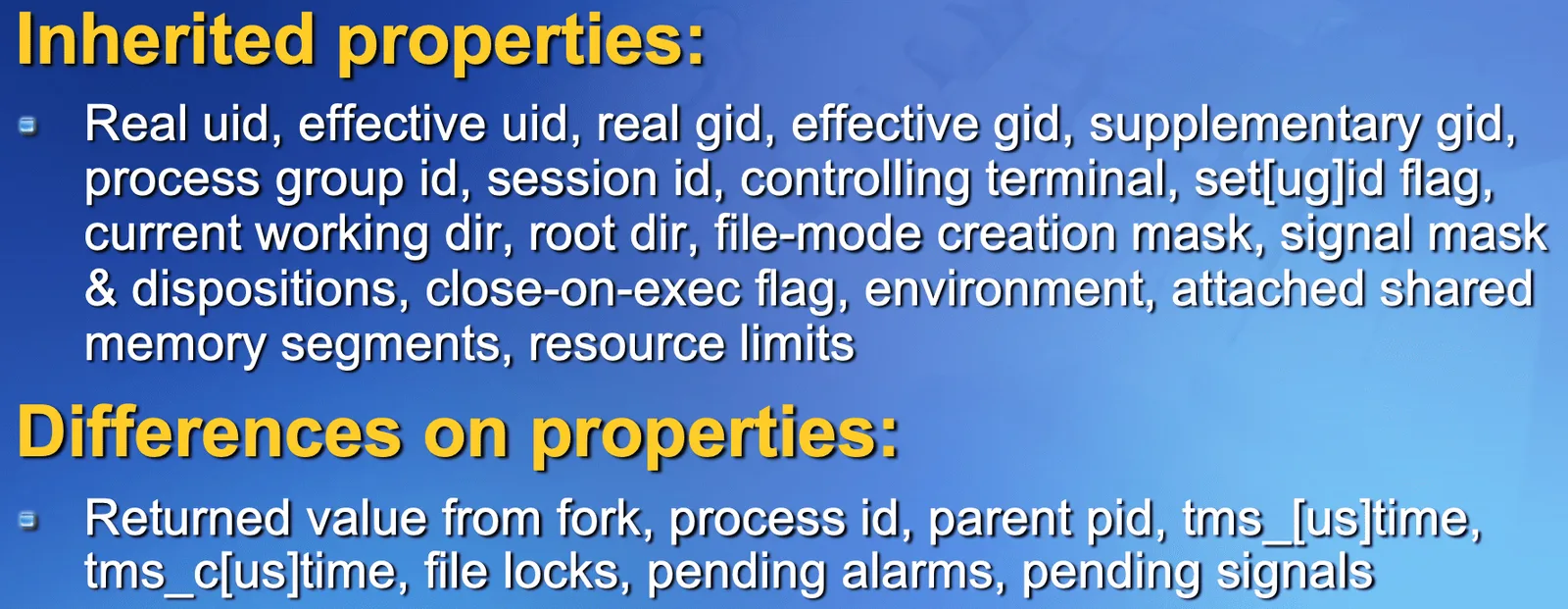 Inherited and changed properties after fork
Deadlock#
Deadlock 是互相等待、沒有任何一方能繼續。例如 child 等 parent 修改變數,parent 卻因 vfork() 暫停:
資源 deadlock 的常見條件是 mutual exclusion、hold and wait、no preemption、circular wait
Process Termination#
Normal termination 指透過正常介面結束,不代表工作成功,例如 exit(1) 仍屬於 normal termination
Normal termination
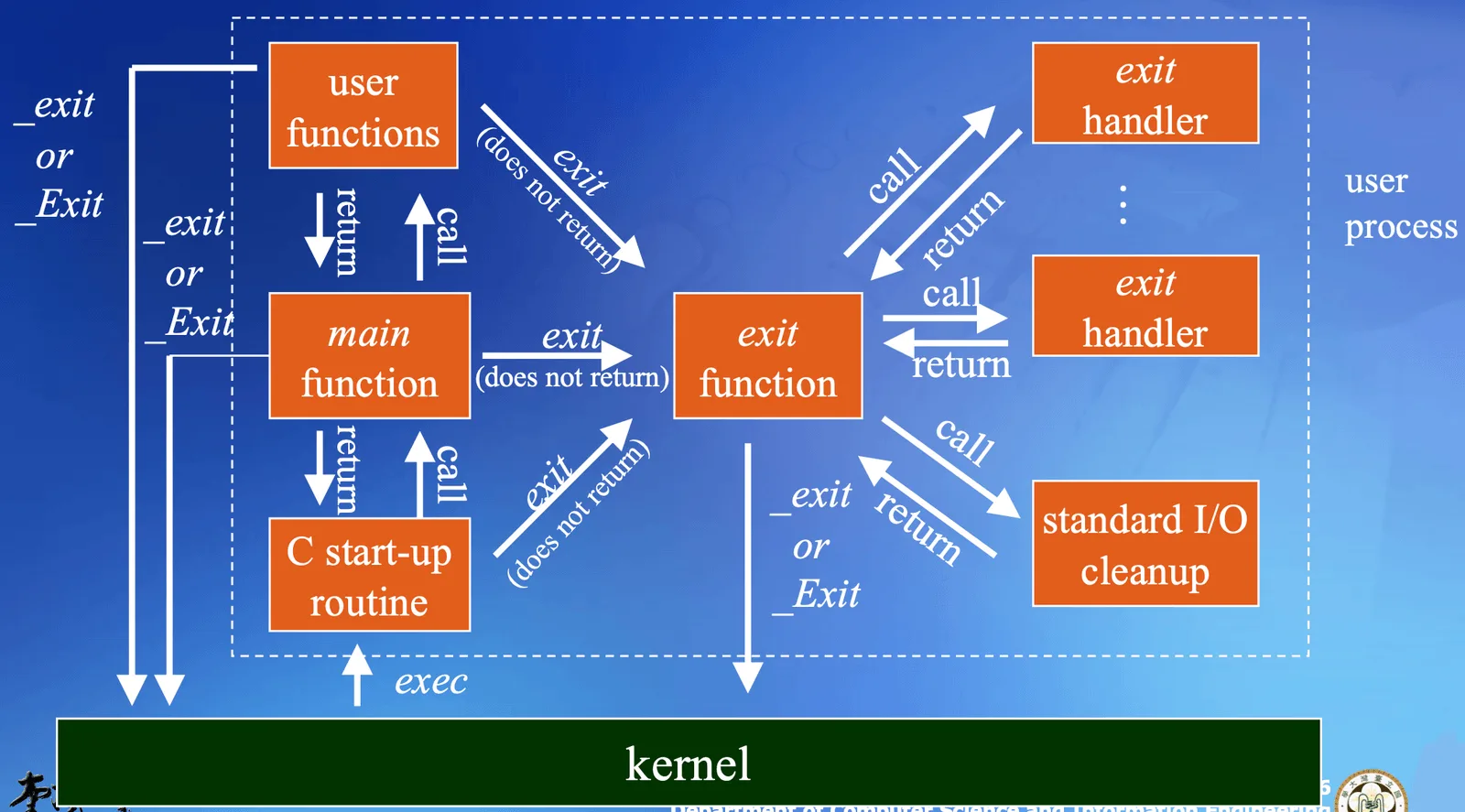 Process termination and exit handlers
main() 回傳後,start-up routine 做相當於 exit(status) 的處理:
| 寫法 | 行為 |
|---|
從 main() return status | 正常結束,執行 exit() 清理 |
exit(status) | 呼叫 exit handlers、送出 standard I/O buffer,再結束 |
_exit(status) / _Exit(status) | 不呼叫 exit handlers、不送出 standard I/O buffer |
普通 function 的 return 只回到 caller。_exit() 仍由 kernel 關閉 fds、釋放資源與保存結束狀態,詳見 exit(3) ↗、_exit(2) ↗
Abnormal termination
因 signal 被終止,例如 abort() 產生 SIGABRT,後面用 status macros 區分
int atexit(void (*func)(void));
註冊無參數、回傳 void 的 exit handler,成功回傳 0。Handlers 按註冊的相反順序執行:
atexit(cleanup_a);
atexit(cleanup_b);
/* exit() 時先執行 cleanup_b,再執行 cleanup_a */
c_exit() 或 signal 直接終止不會走這套清理流程
pid_t wait(int *statloc)
int status;
pid_t ended = wait(&status);
c
- 回傳取得狀態的 child PID,把結果寫入
status;不需要結果可傳 NULL
- 有已結束但未回收的 child 就直接取得,否則等待
- 沒有可等待的 child:
-1、ECHILD
- 被 signal 中斷:可能回傳
-1、EINTR,可重試
pid_t waitpid(pid_t pid, int *statloc, int op)
可以指定等待對象:
pid | 對象 |
|---|
大於 0 | 指定 PID 的 child |
-1 | 任意 child |
0 | 同 process group 的 child |
小於 -1 | Process group ID 為 -pid 的 child |
op 決定觀察的狀態與等待方式:
0: 等待結束WNOHANG: 無符合狀態時立即回傳 0,不代表 child 結束WUNTRACED: 也回報停止WCONTINUED: 也回報從停止繼續執行
一般只能等待自己的 children
Zombie & Orphan#
Zombie#
Zombie 是已結束、狀態尚未被 parent 取得的 child。主要資源已釋放,kernel 保留 PID、status 與資源紀錄,ps 通常顯示 Z 或 <defunct>
由 parent 呼叫 wait() / waitpid() 回收;kill -9 無法再殺一次已結束的 process。短暫出現不一定有問題,長期未回收才會累積紀錄
Orphan#
Orphan 是自己還活著、parent 先結束,kernel 會安排新的 parent。傳統 Unix 由 init 接手,Linux 也可能由 ancestor subreaper 接手,所以 PPID 不保證變成 1,詳見 PR_SET_CHILD_SUBREAPER(2) ↗
Double fork
透過兩次 fork() 把真正工作的 grandchild 交給新 parent 管理:
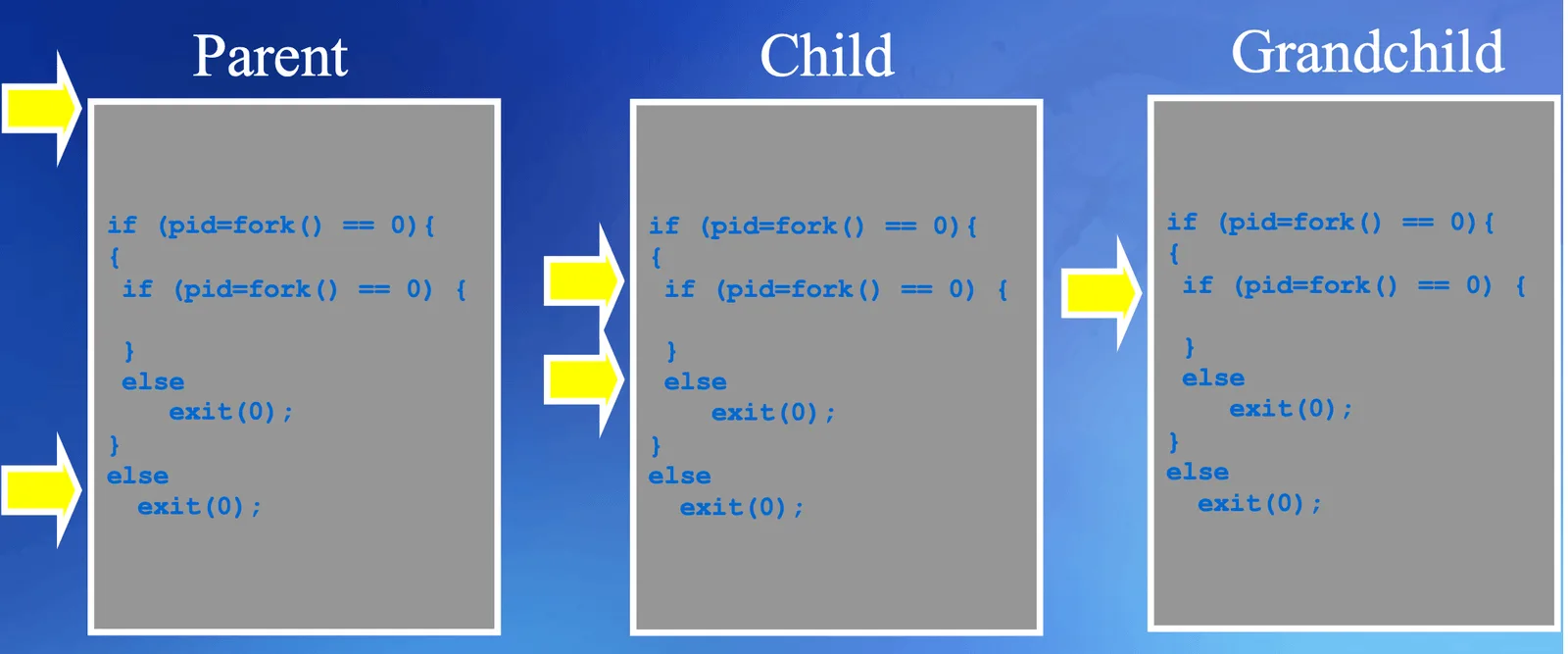 Process creation with double fork
- Parent 建立 child,child 再建立 grandchild
- Child 結束,grandchild 被安排新的 parent
- 原本的 parent 回收 child;grandchild 由接手者回收
int waitid(idtype_t idtype, id_t id, siginfo_t *infop, int options);
P_PID、P_PGID、P_ALL: 指定 child、process group 裡的 child、任意 childWEXITED、WSTOPPED、WCONTINUED: 選擇狀態WNOHANG: 不等待WNOWAIT: 查看後保留成可再次等待的狀態,這次不完成回收
成功回傳 0,child PID 在 infop->si_pid;WNOHANG 沒結果也回傳 0,不能只看回傳值
pid_t wait3(int *statloc, int op, struct rusage *rusage);,
pid_t wait4(pid_t pid, int *statloc, int op, struct rusage *rusage);
除了狀態,還透過 rusage 取得 CPU time、記憶體使用統計。這是 BSD 系列介面,Linux 也支援,但不是 POSIX 通用 API
Race Condition#
Race condition 是結果依賴不確定的執行順序。例如 parent 和 child 在同一個 terminal 逐字輸出:
int execl(const char *pathname, const char *arg0, … /* (char *) 0 */);
int execv(const char *pathname, char *const argv[]);
int execle(const char *pathname, const char *arg0, … /* (char *) 0, char *const envp[] */);
int execve(const char *pathname, char *const argv[], char *const envp[]);
exec() 替換 program,保留 process 的 PID,重新配置 text、data、heap、stack 並執行新的 start-up routine。成功不回傳,失敗回傳 -1 並設定 errno
| 字母 | 意義 |
|---|
l | List,逐個列出參數,以 (char *)NULL 結尾 |
v | Vector,傳入以 NULL 結尾的 argv 陣列 |
e | 自己提供 environment envp |
沒有 e | 使用 caller 的 environment |
下面都執行 echo hello:
execl("/bin/echo", "echo", "hello", (char *)NULL);

char *args[] = {"echo", "hello", NULL};
execv("/bin/echo", args);
c第一個參數是載入的 pathname,後面的 "echo" 是新程式的 argv[0]
int execlp(const char *filename, const char *arg0, … /* (char *) 0 */);
int execvp(const char *filename, char *const argv[]);
p 使用 PATH 搜尋,例如 execlp("ls", "ls", (char *)NULL)。Filename 包含 / 時直接使用該 path;shell built-ins 也不會由 execvp() 自動執行
遇到 ENOEXEC 時,p 家族會嘗試交給 /bin/sh 解讀,不代表任意 binary 都能變成 script,詳見 exec(3) ↗
Close on exec
Fd 通常跨過 exec() 保留,shell 才能先接好 stdin、stdout 給新程式。要在成功 exec() 時關閉某個 fd,就設 FD_CLOEXEC:
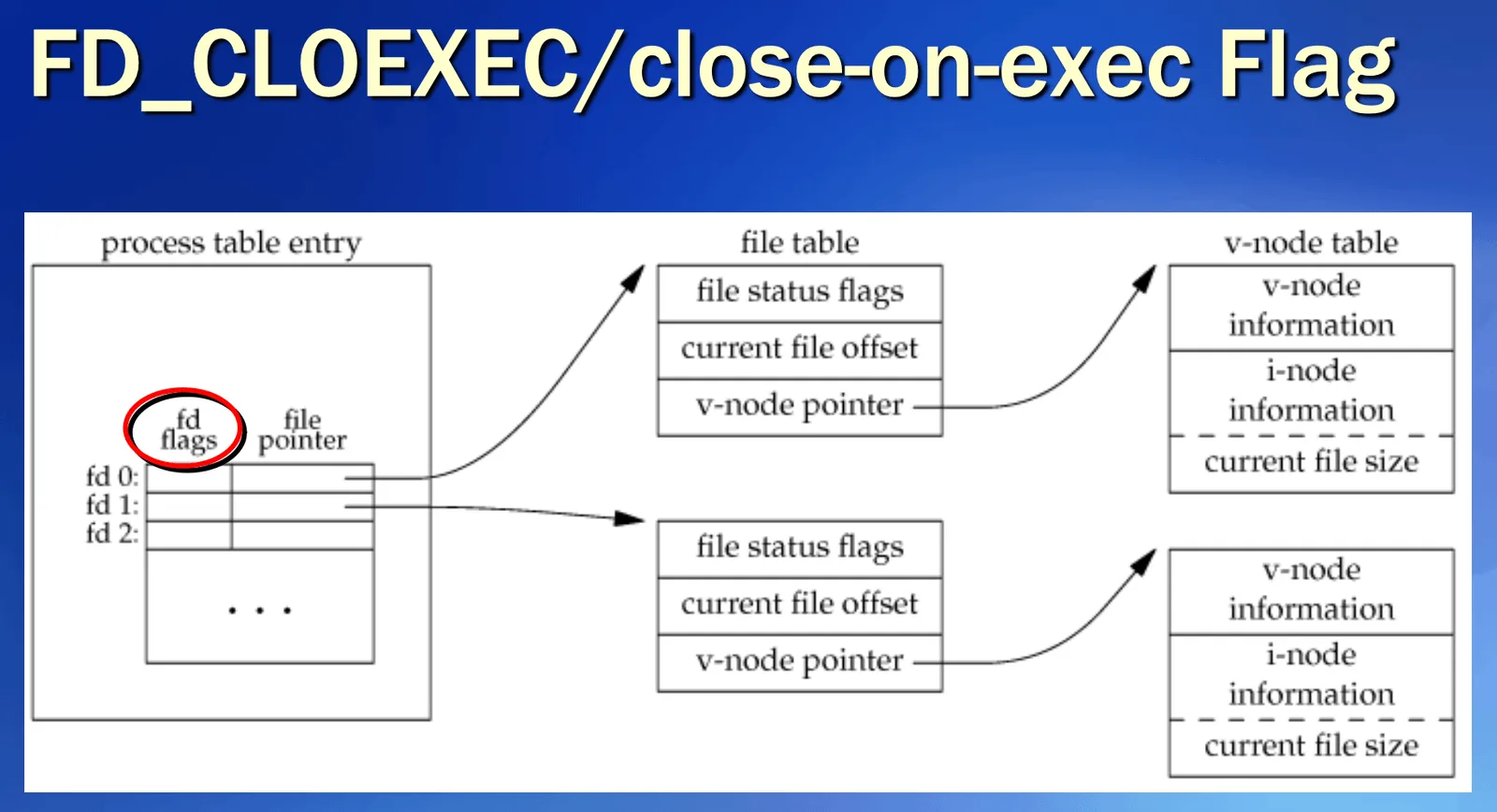 FD_CLOEXEC in the file descriptor table
int flags = fcntl(fd, F_GETFD);
/* 實際使用時要檢查兩次 fcntl() 是否失敗 */
fcntl(fd, F_SETFD, flags | FD_CLOEXEC);
c也能在 open() 加 O_CLOEXEC 一次設定。Flag 存在個別 fd,fork() 會繼承;exec() 失敗則不會因此關閉,詳見 execve(2) ↗
IPC (Inter-process Communication)#
IPC 讓 processes 交換資料或通知;這裡的 pipe、FIFO 都透過 kernel 傳送,使用 read()、write()
Pipe#
int pipe(int filedes[2]);
建立單向通道,成功回傳 0,並填入:
filedes[0]: 讀端filedes[1]: 寫端
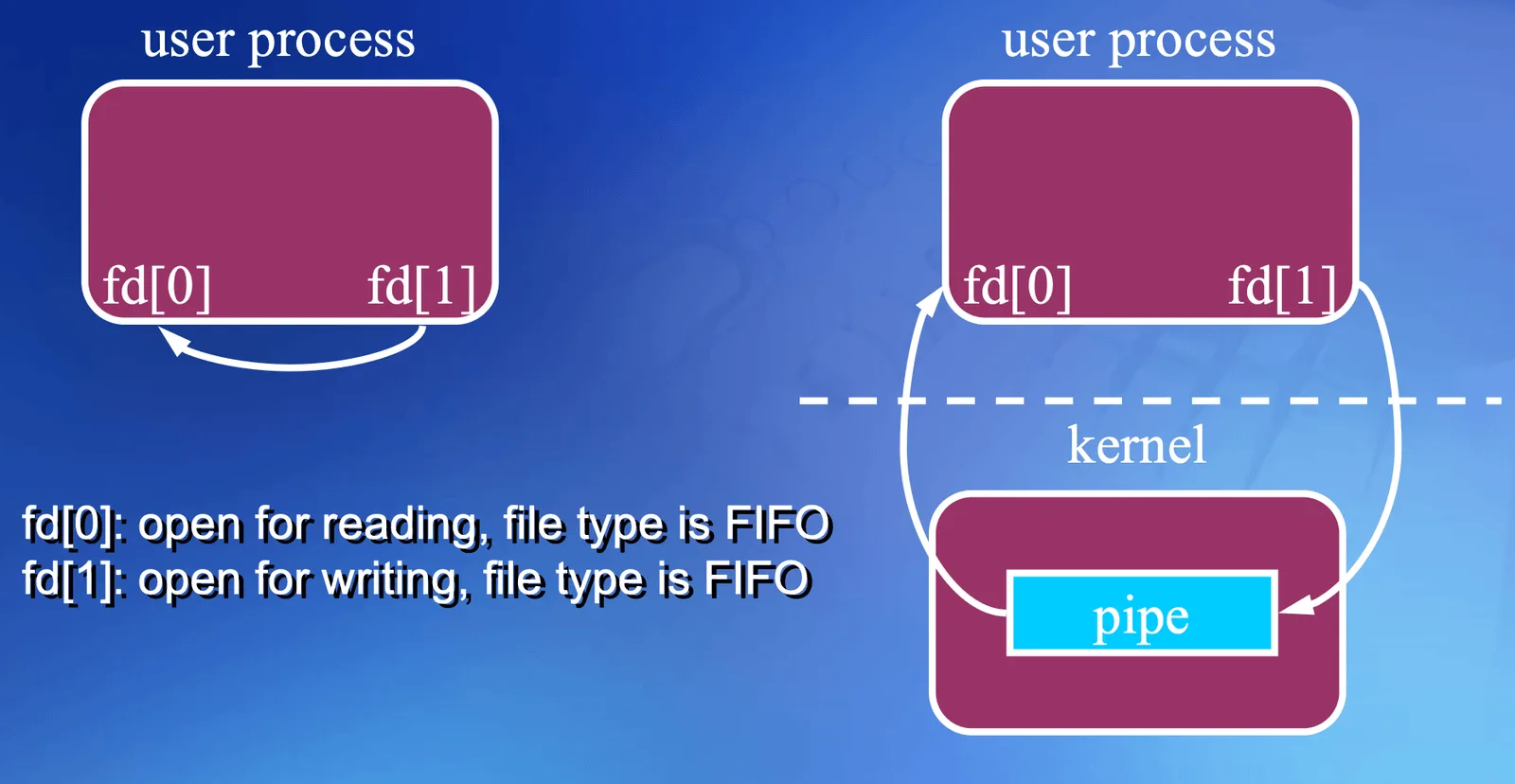 Read and write ends of a pipe
資料經過 kernel 的 pipe buffer,讀走後不保留,也不能 lseek()。先 pipe() 再 fork(),child 就能繼承兩端 fd:
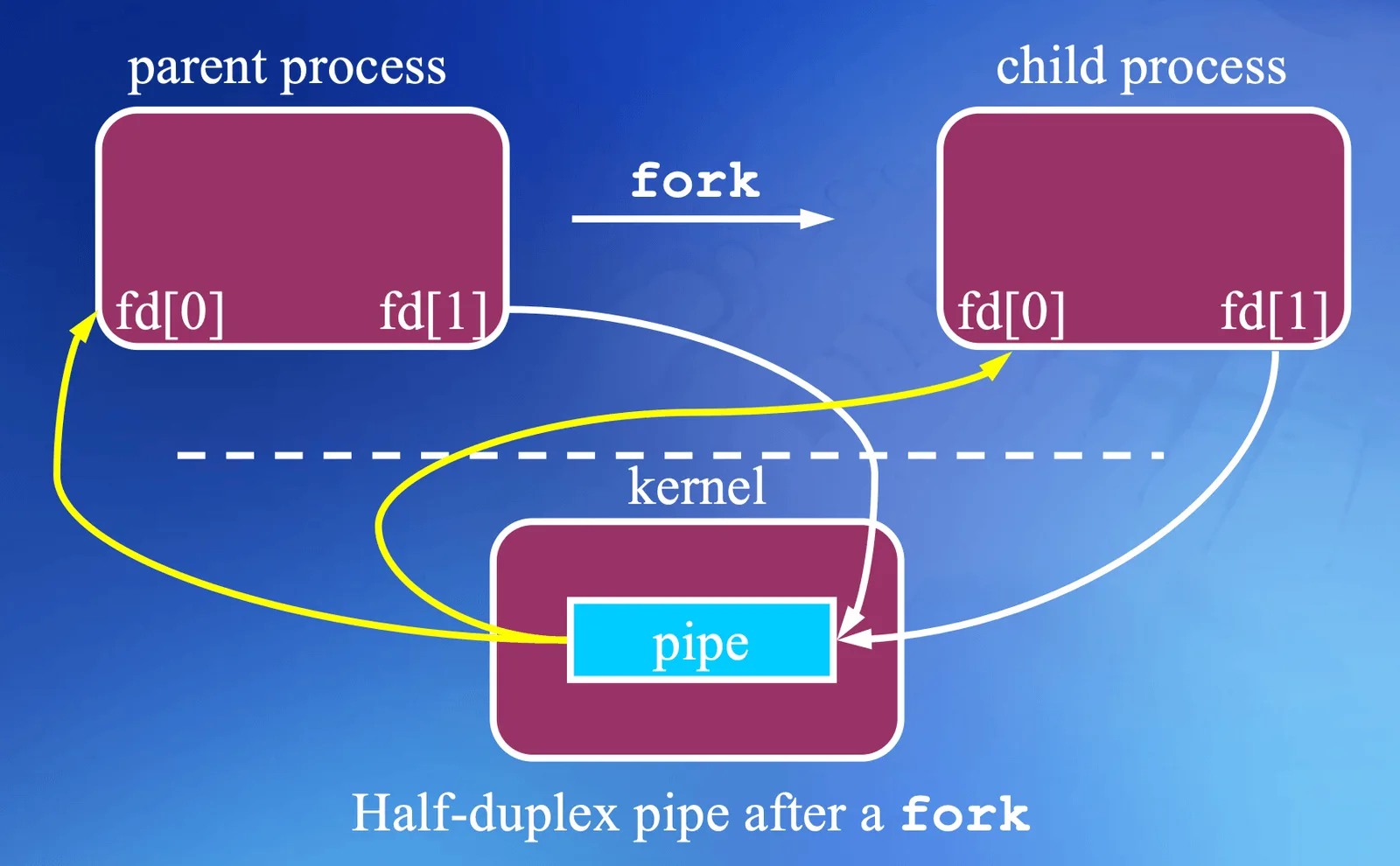 Pipe descriptors after fork
要由 parent 傳給 child:parent 關讀端、保留寫端;child 關寫端、保留讀端
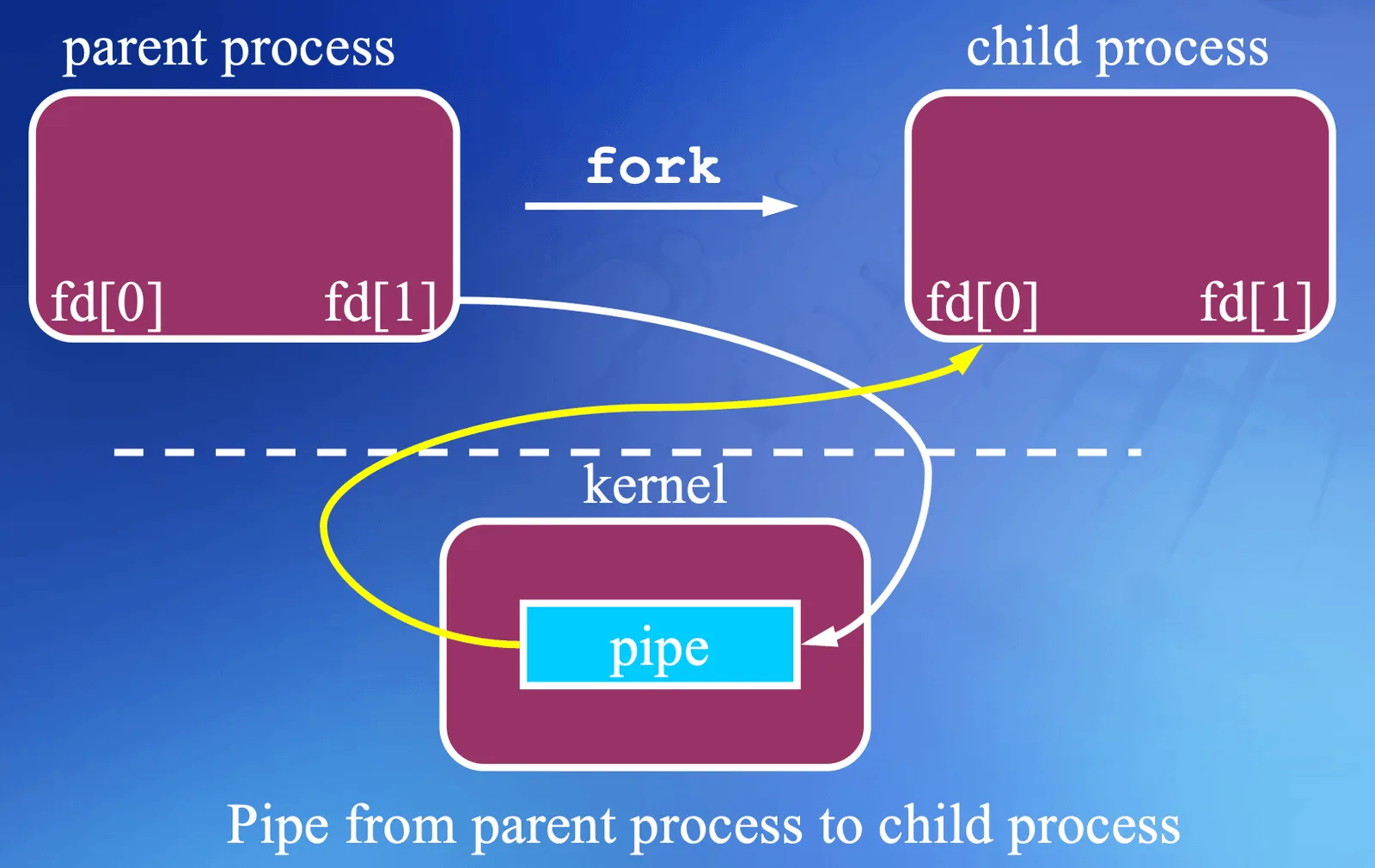 Pipe from parent to child
未使用的端點也要關閉,例如 reader 留著自己的寫端,kernel 就仍認為有 writer,導致預期的 EOF 不出現
Blocking mode 的規則:
| 狀況 | 行為 |
|---|
| 有資料 | read() 取現有資料,不必湊滿要求數量 |
| 空,但仍有 writer | read() 等待 |
| 空間足夠 | write() 放入 buffer,不必等 reader |
| 空間不足 | write() 可能等待 |
可設 O_NONBLOCK,搭配 select() / poll()。ls | more 則由 shell 建立 pipe 和兩個 processes,用 dup2() 接好 standard I/O,再分別 exec()
FIFO#
FIFO (Named pipe) 有 pathname,讓分別啟動的 processes 找到同一條通道,不必透過 fork() 繼承 fd
int mkfifo(const char *pathname, mode_t mode);
只建立命名入口,成功回傳 0、失敗回傳 -1;mode 受 umask 影響,之後再 open() 取得 fd
在一個 terminal 建立並讀取:
mkfifo /tmp/sp-demo.fifo
cat /tmp/sp-demo.fifo
bash另一個 terminal 寫入:
printf 'hello from FIFO\n' > /tmp/sp-demo.fifo
bashcat 讀完資料、writer 關閉後會看到 EOF。資料只經過 kernel buffer,不寫成 disk 內容;沒有使用者開啟後也不保留資料,但 pathname 仍存在
另一端尚未開啟時,open() 的行為:
| 開啟方式 | 結果 |
|---|
O_RDONLY | 等待 writer |
O_WRONLY | 等待 reader |
O_RDONLY | O_NONBLOCK | 立即取得讀端 |
O_WRONLY | O_NONBLOCK | 失敗,ENXIO |
開啟後遵循 pipe 的 I/O 規則;空且仍有 writer 時,non-blocking read() 得到 EAGAIN。Linux 可用 O_RDWR 同開兩端,但非 POSIX 保證,也會影響 EOF,詳見 fifo(7) ↗
Back to the content
NTU PJ System Programming
2025 Fall
← Back to the content