Virtual Memory#
Background#
我們當然可以直接把所有 Logical Address 全都放到 Physical Memory,但這樣 Memory 肯定不夠用,因此 OS 應該要幫 User 管理好所有的 Memory 問題,有些 code 雖然有存在的必要,但其實使用頻率非常之低,不可能把這些 code 一直都放在 memory 裡面(e.g. Error Handling code),因此 Executing Program only in Partial memory 對執行效率有大大的幫助
Virtual Memory#
其實使用超過 Physical Memory 的記憶體量只會造成效能問題,不會有正確性問題
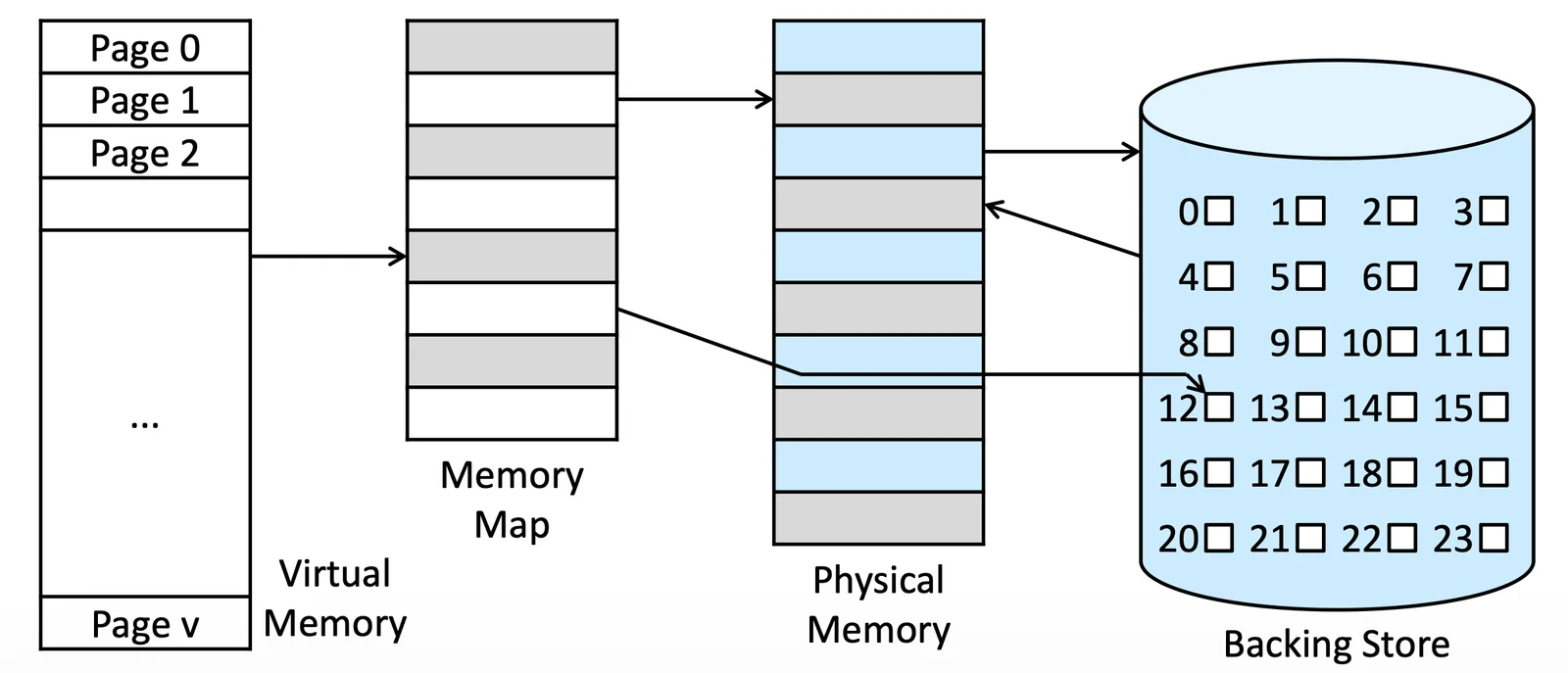
Virtual Memory Space 是一個 Process 使用的全部 Memory,會是一段 Continuous 的 Memory,但是被 map 到 Physical Memory 會變得不連續
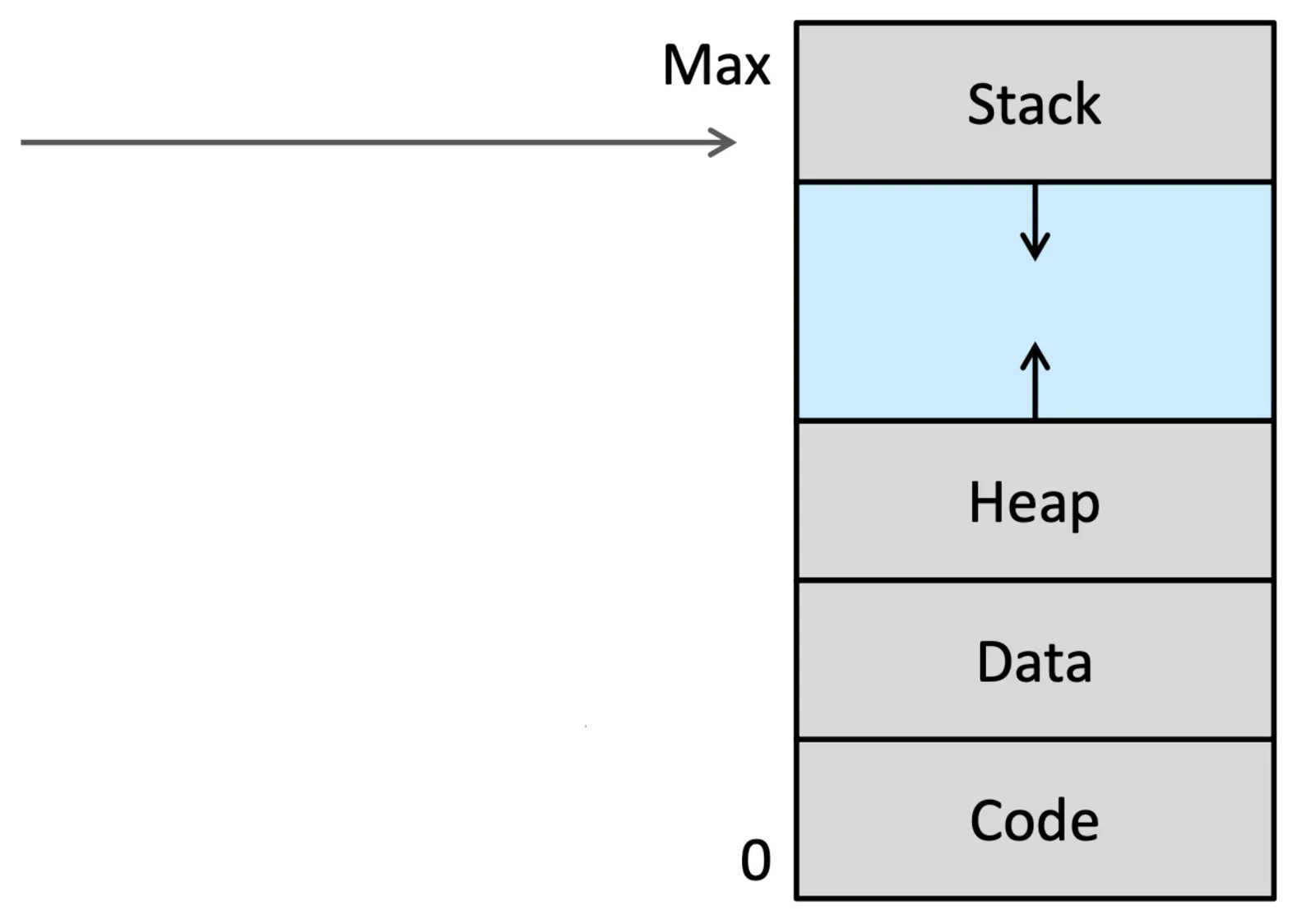
- Stack, Heap 之間的空白我們稱為 Sparse address space
Shared Library#
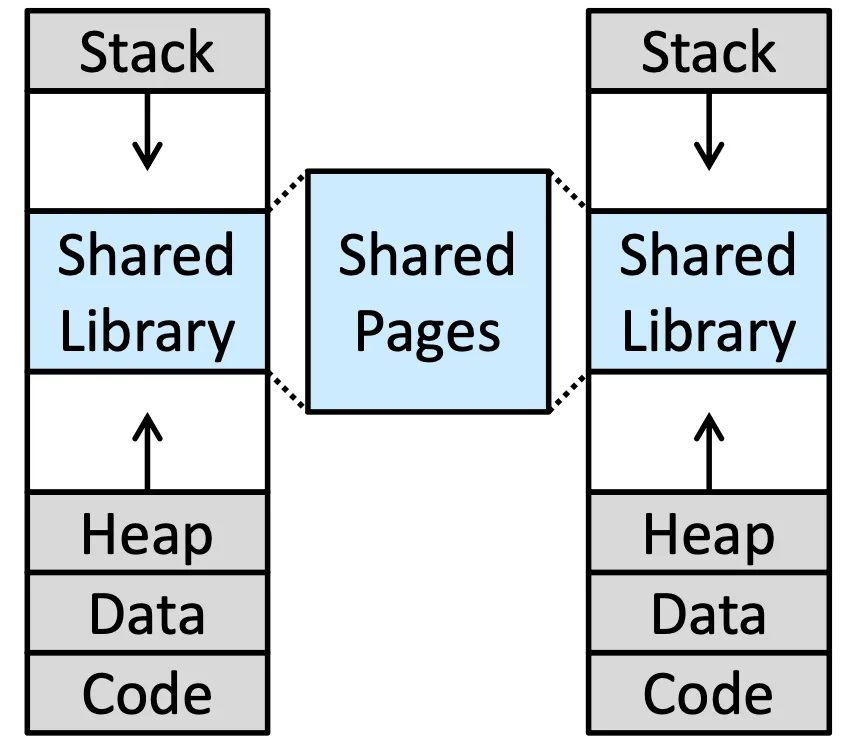
Share Library 跟 Page table 一樣是很好做 Share Library 的方法,透過 Virtual Memory 就可以讓他變成 Share Memory
fork()做 Share 的方法也可以節省空間
Demand Paging#
我們必須決定真正 load 到 Physical Memory 的時機,Demand Paging 就是只有當 Execute 到那段 code 的時候,我們才把它從 Virtual memory 放到 Memory 裡面
Basic Concept#
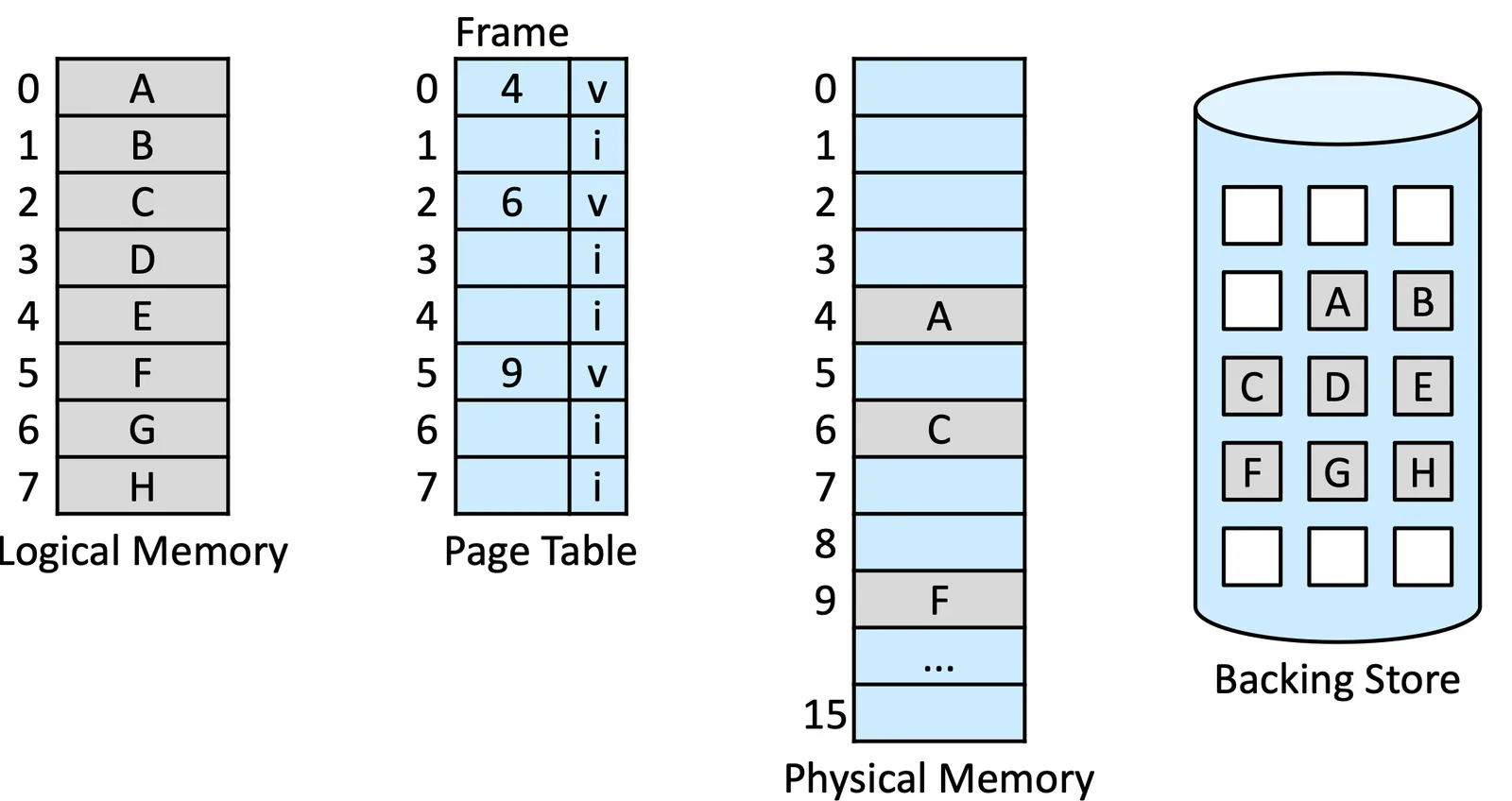
在這個章節裡面,站在 User 的角度裡我們已經不管 Page 到底在哪裡了,這時我們只看 valid bit 欄位
- If valid, 就存在在 memory 裡面
- If invalid, 有可能在 Backing store 或是根本不存在
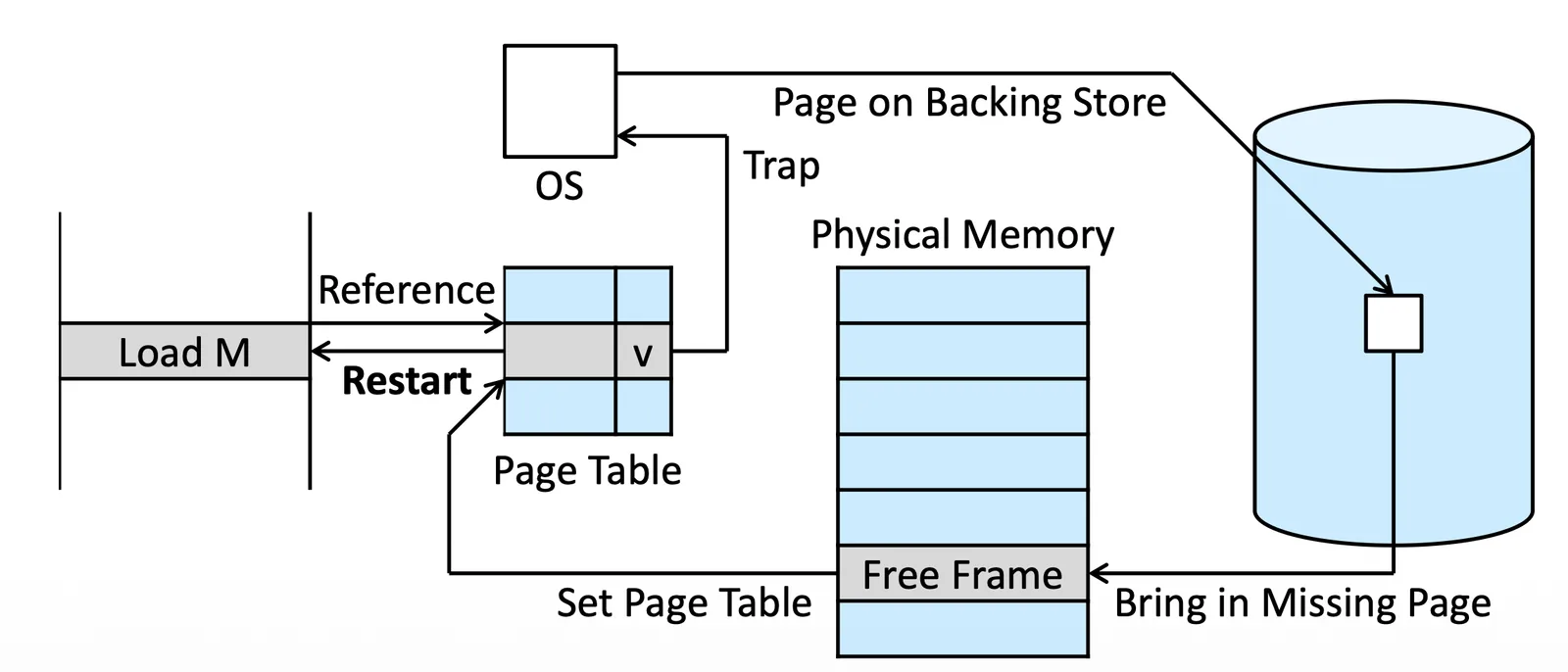
Page Fault Handling#
如果發現這格是 Invalid (Page fault),我們就會
- Trap 到 OS 裡面檢查他是否存在
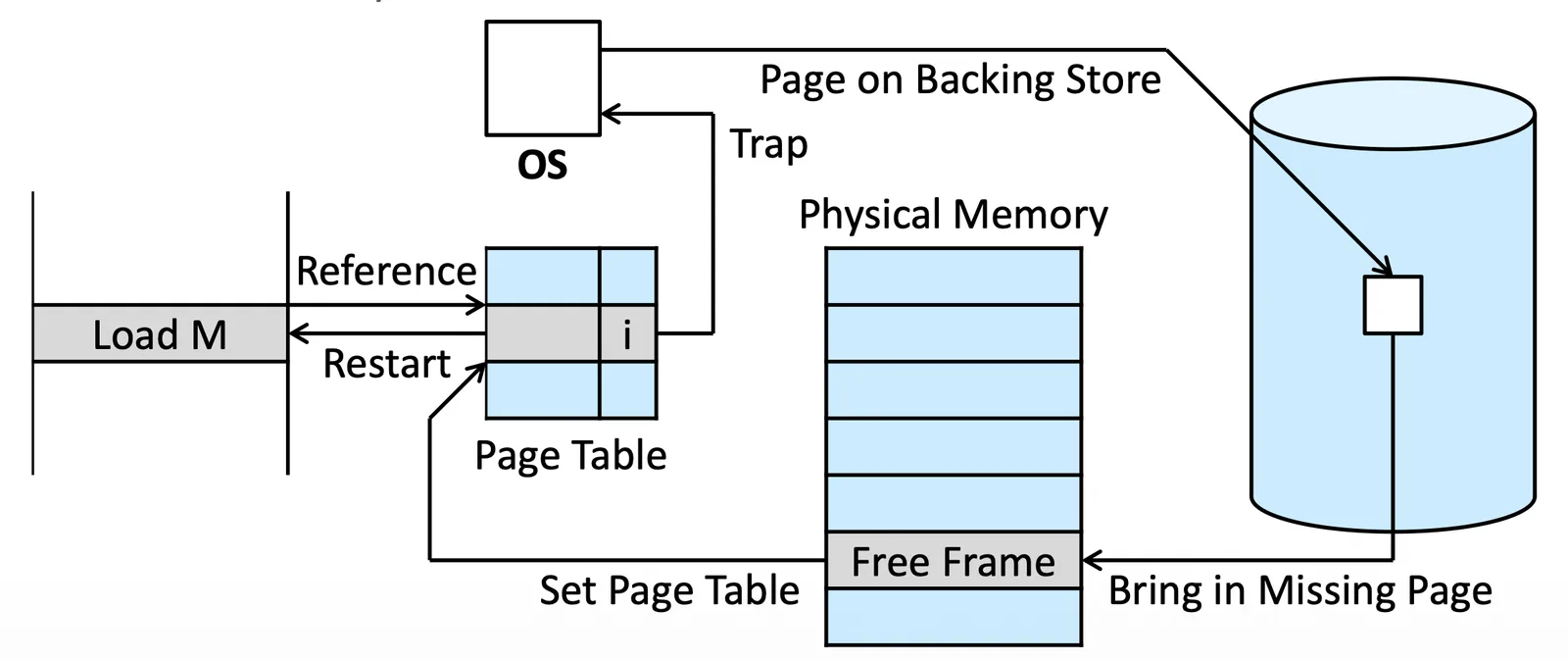
- 在 OS 裡面查表(不是 Page table)
- If vaild, 在 Backing Store 裡面,準備把它拿到 Physical memory 裡面
- If invalid, 直接把 process teminate,因為他 access 到不該 access 的 memory
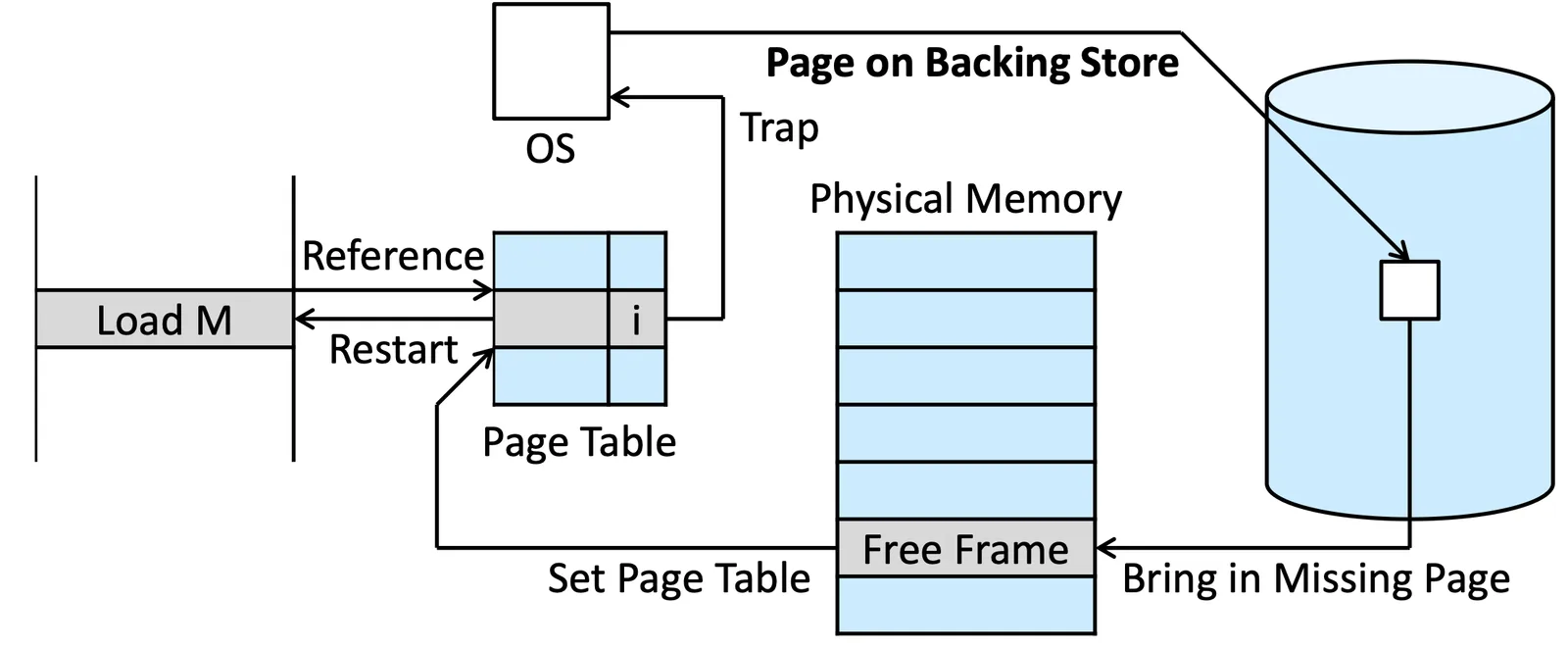
- 在 Physical memory 裡面找到 Free frame (從 free frame list 找)
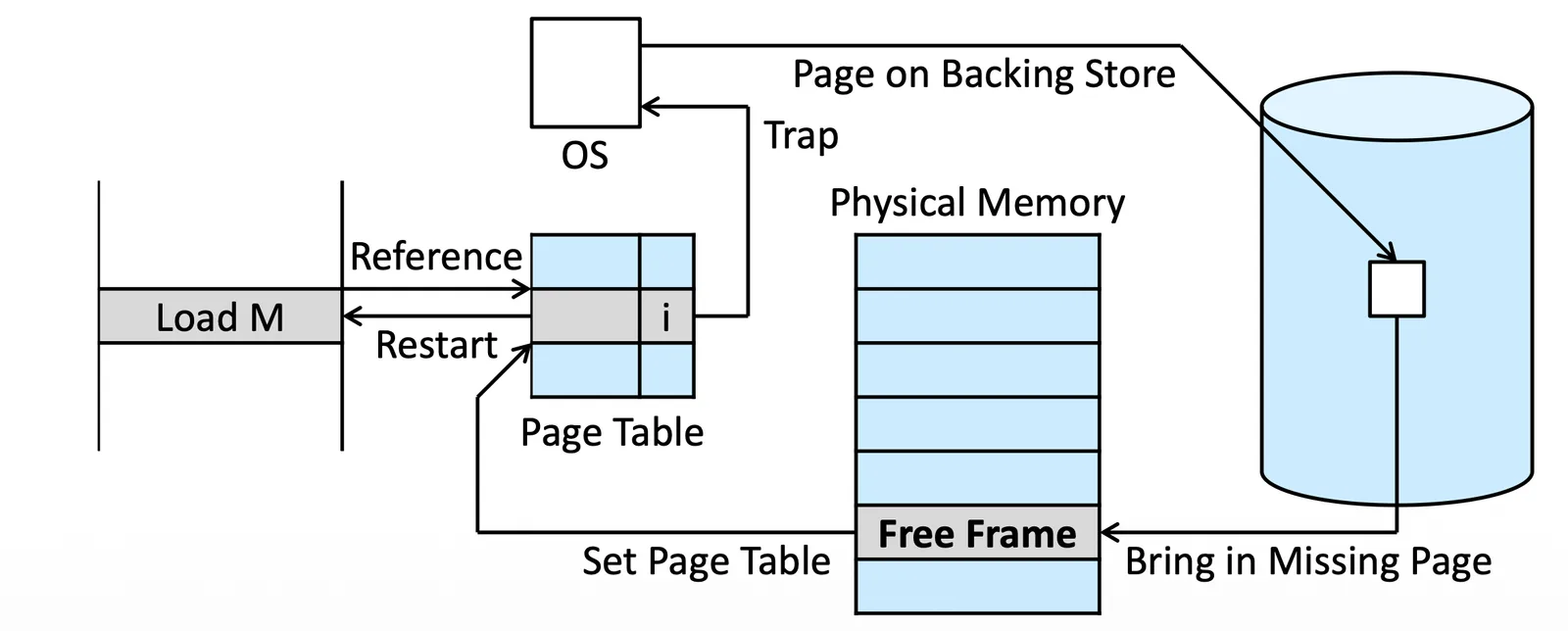
- 把那個 Page 放到 Memory 裡面
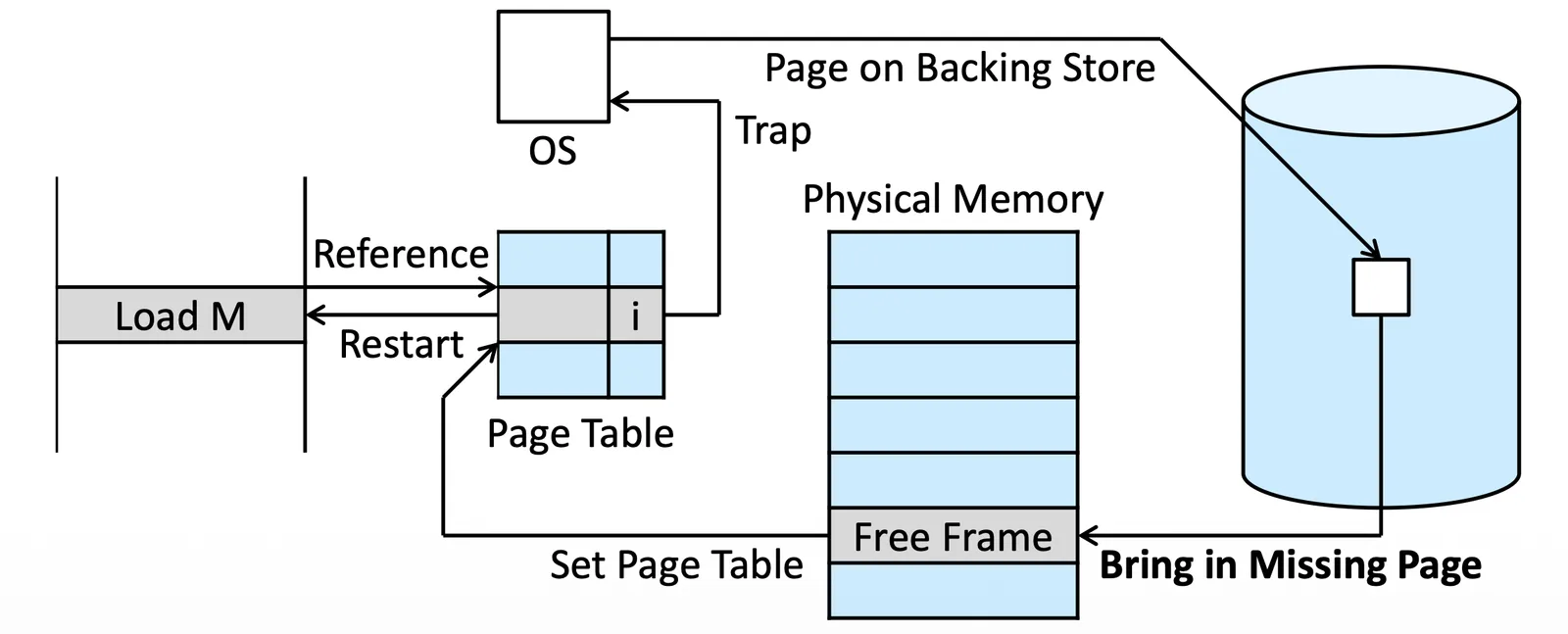
- 更新 Page table(invalid to valid)
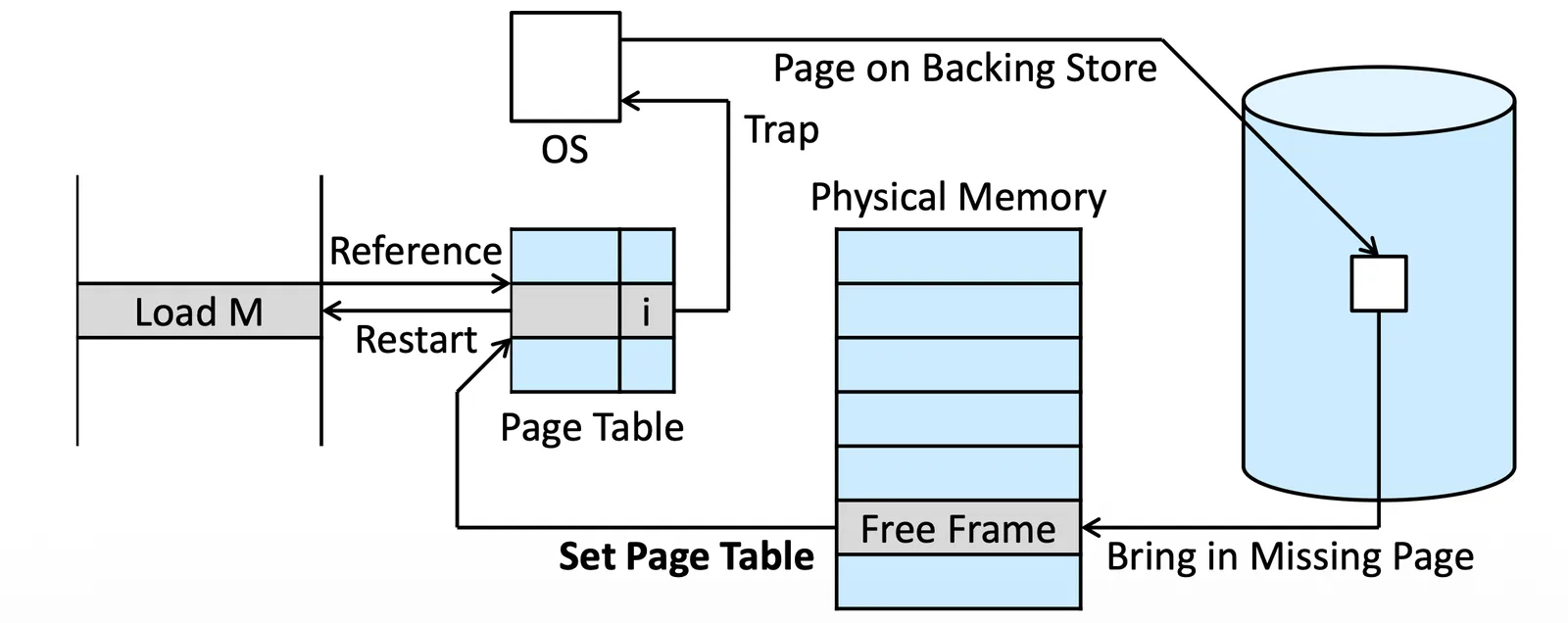
- 重新 Restart 原本的 instruction
Aspects of Demand Paging#
分成幾種
- Pure demand paging
- 真的只在要執行的時候 load 進去
- Locality of reference
- Hard disk(Backing Store)太慢了,我們不希望要一直請求記憶體
- 但其實除了一開始有大量 Page Fault,Process 會傾向一直重複讀取差不多區域的 memory,所以 Runtime analysis 上是不會太虧效能的
- Hardware Support
- 有些 Secondary memory 會有 swap space 加速
Instruction Restart#
如果有一段指令
- Fetch and decode the instruction (ADD)
- Fetch A
- Fetch B
- Add A and B
- Store the sum in C
如果 C 不在 Page 裡面,Page Fault 後,那我們得把這五個指令都重新執行一次
- 如果重新設計 CPU 把 C 也存進去會很麻煩
- 我們不如直接重新執行一次,但重新執行有時候會生問題
下面這個例子,這個指令是要把 1, 2 搬到下面的位置,假設搬完 1 了,我們要做第二個指令,此時產生 Page fault,如果在這時候搬回來 Restart,執行第一個 instruction 就會把 garbage 搬過去,因此不能直接 Restart
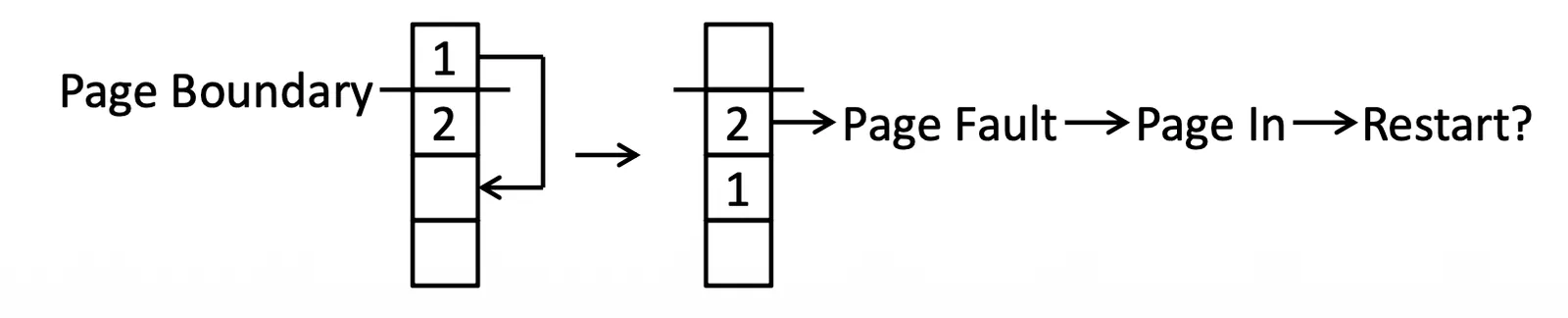
有幾種解決方法
- 我們可以用 Microcode 來得知會不會產生 Page Fault,提早把東西 load 進來,microcode 可以預先 fetch 那些位置來得知是否產生 Page fault
- 用一些 Temporary register 在發現 Page fault 的時候先把東西寫回去,等等再把它寫回去,Restart 就不會有問題
Free-Frame List#
我們需要把可用的 free-frame 全部存起來,我們用 free-frame list 來達成

從 free-frame list 拿到 free-frame 後我們需要先執行 zero-fill-on-demand 讓裡面清空,不然可能會造成 security 的問題
Performance of Demand Paging#
以下是更完整的版本
- Trap to the operating system
- Save the registers and process state
- Determine that the interrupt was a page fault
- Check that the page reference was legal, and determine the location of the page in secondary storage
- Issue a read from the storage to a free frame
- Wait in a queue until the read request is serviced
- Wait for the device seek and/or latency time
- Begin the transfer of the page to a free frame
- While waiting, allocate the CPU core to some other process
- Receive an interrupt from the storage I/O subsystem (I/O completed)
- Save the registers and process state for the other process
- Determine that the interrupt was from the secondary storage device
- Correct the page table and other tables to show that the desired page is now in memory
- Wait for the CPU core to be allocated to this process again
在這個過程中有三件是特別麻煩
- Service the page-fault interrupt
- 1—100 microseconds
- Restart the process
- 1—100 microseconds
- Read in the page,最花時間的事情,並且這是不考慮多個 Process 搶資源的情況
- 8 milliseconds
Effective access time (EAT):
- 假設 Probably of a page fault =
- Memory-access time = nanoseconds
- Average page-fault service time = milliseconds
如果要讓效能減少 就需要
Swap Space Handling#
Secondary Store 裡面可能有一塊專門的 Swap space 運作會比 File system 快,這個 region 會比較大,效率較高,兩種方法
- 可以把整塊 Program 存到 Swap space
- 放在 File system 等到執行的時候產生 Page out 才把它放到 Swap Space
有些 Swap space 會有限制
- binary executable files 不能放進去,因為這些東西不常改動,沒有必要
- 有些東西是 Execution 執行中產生的東西(anonymous memory:沒有 file 去對應他們),我們不能直接丟棄,因為會消失,我們必須讓他們存在某個地方,通常是 Swap space
- Mobile system 通常不給 swapping,如果真的要丟掉我們就丟 read only,因為他們不改動
Copy-on-Write#
跟 fork() 不一樣,複製的時候先放一個指標指向 Memory,但不複製,直到有改動出現,我們才來 Duplicate
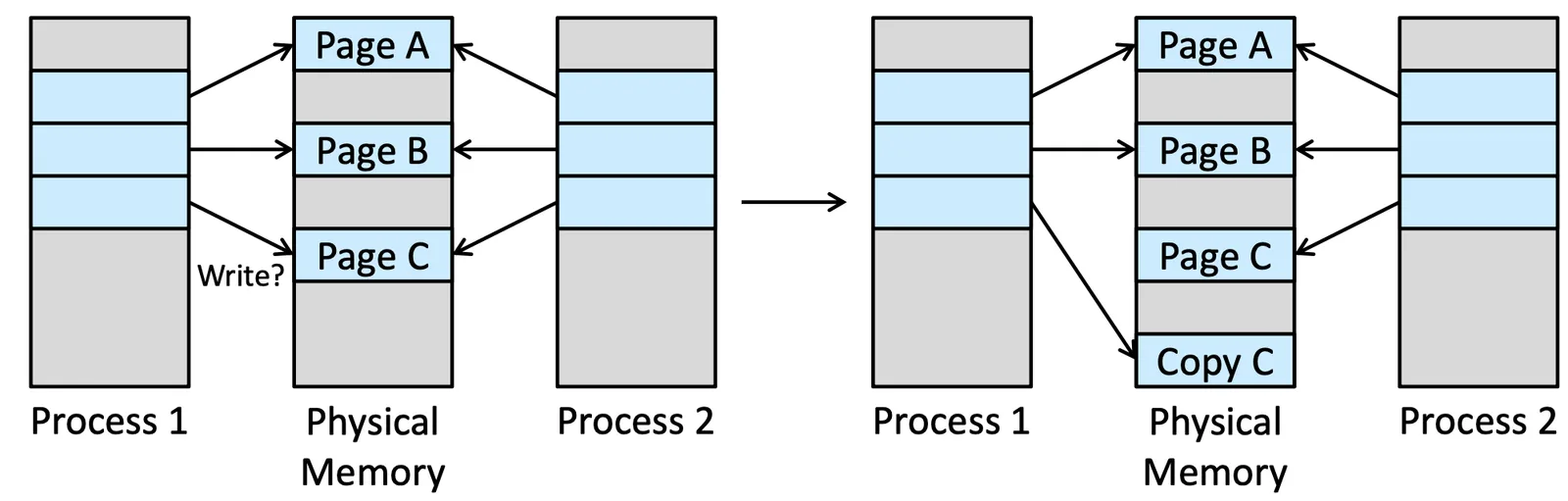
vfork() 是一種不會 Duplicate 的 fork,原始設計是要直接 execution(exec()) 用的 fork,他不使用 copy-on-write,會共用記憶體
Page Replacement#
在運行中常常都會有 over-allocating memory 也就是 Logical > Physical 的情況,有些 Page 實際上是在 Backing Store 裡面的
照理來說我們要把東西放到 Free frame 裡面,但如果沒有 Free frame 的話,我們就得執行 Page Replacement
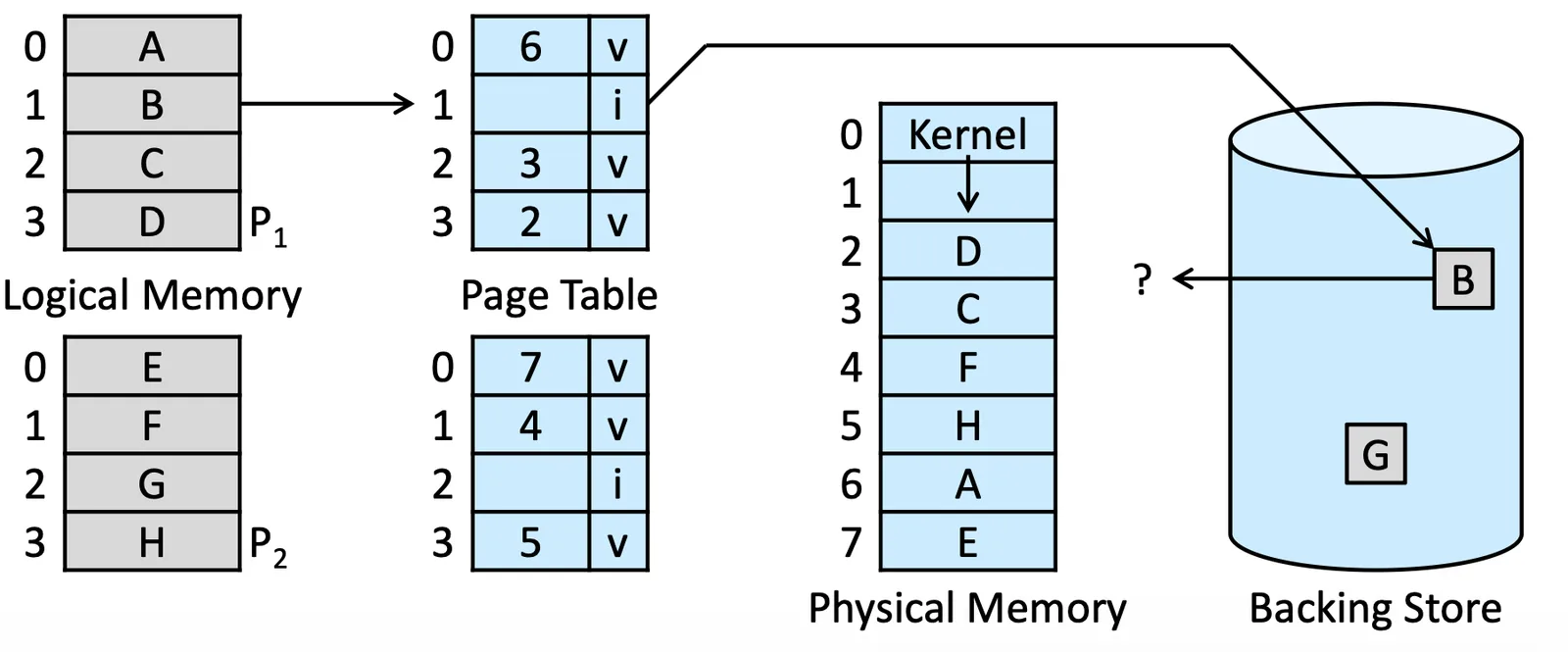
Basic Page Replacement#
- 在 Secondary Storage 裡面找到我們想要的 page
- 找 Free Frame
- 如果有,直接使用
- 如果沒有,先找到 Victim Frame,把它 Swap out
- 更新 Memory 和 Page Table
- 繼續執行 Process
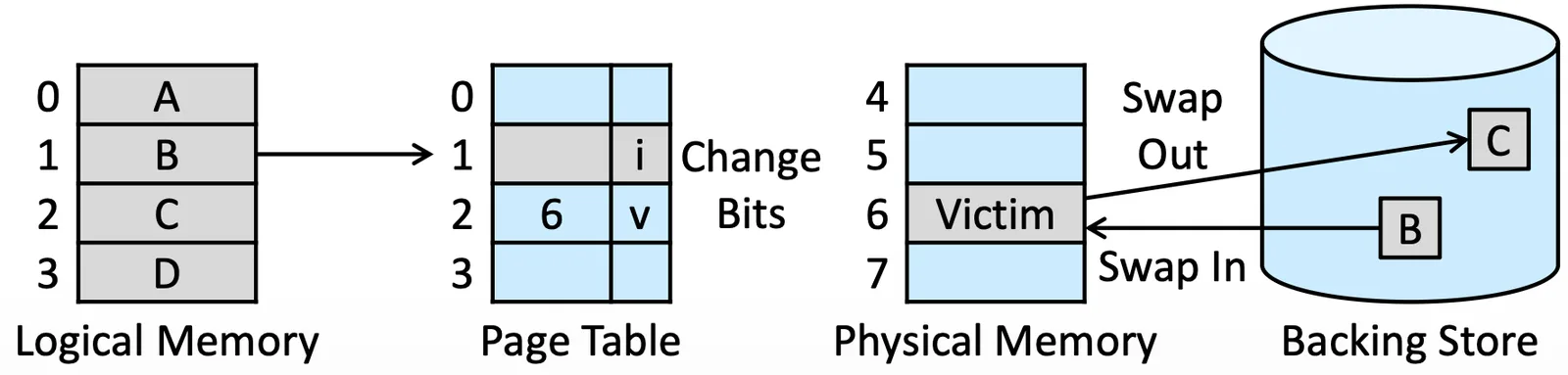
如果沒有 Frame 是 Free 的,那我們就必須進行交換,一個 Swap out 一個 Swap in,也就是兩次的 Secondary Storage I/O,可以用一些東西加速
- modify bit (dirty bit):如果被 set,代表有改動,才需要進行 Secondary Storage write,如果沒有就可以省下一次的 I/O time
還有另外兩個問題
- Frame-allocation algorithm:決定要給 Process 多少 Frame
- Page-replacement algorithm:選擇適當的 Victim Frame
Secondary Storage 太慢了,所以這兩個問題會大大影響 Page fault 的發生機率,也就是大大影響效能
Analysis#
FIFO Page Replacement#
採用 First-in-First-out 的方法
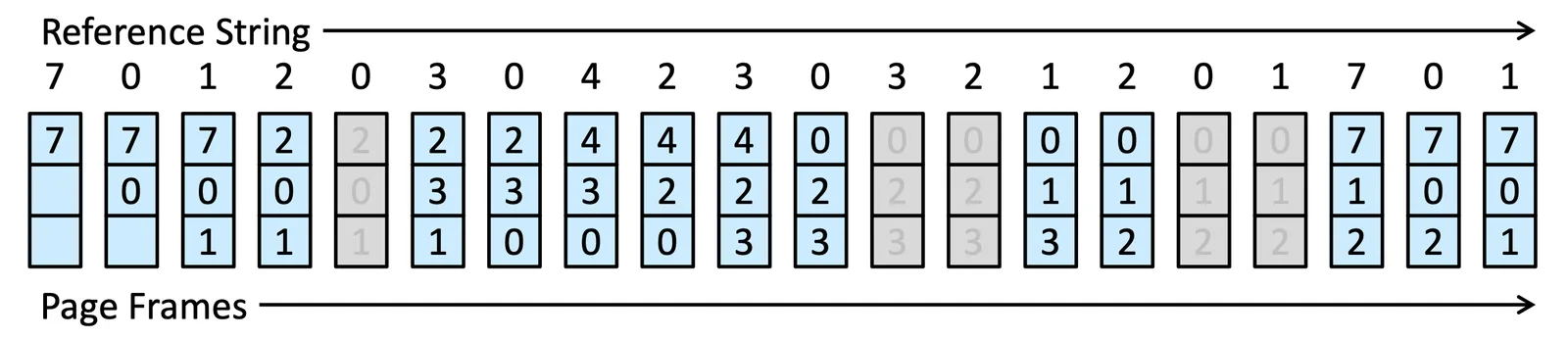
總共會產生 15 個 Page fault
Belady’s Anomaly#
照理來說 Frames 數量增加應該可以讓 Page Fault rate 降低,但對於某些 Algorithm 來說,反而會增加 Page Fault rate,而 FIFO 就有這個現象
在 3~4 這邊反而回升了
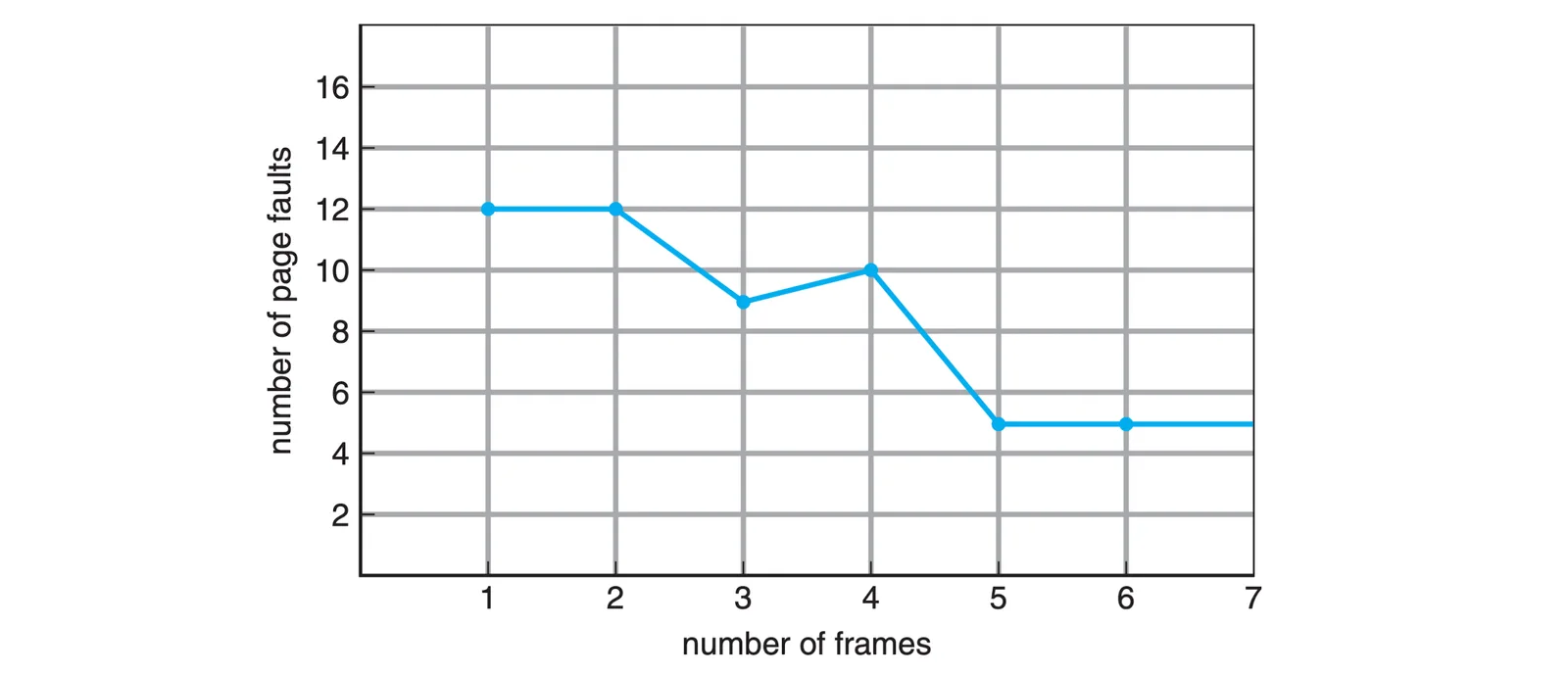
舉例來說 1 2 3 4 1 2 5 1 2 3 4 5 在一個沒有 Prefetch 的 System 之下
- If # of frames = 1, # of page faults = 12
- If # of frames = 2, # of page faults = 12
- If # of frames = 3, # of page faults = 9
1 2 3 4 1 2 5 ☺ ☺ 3 4 ☺
- If # of frames = 4, # of page faults = 10
1 2 3 4 ☺ ☺ 5 1 2 3 4 5
- If # of frames ≥ 5, # of page faults = 5
Optimal Page Replacement#
如果在已經知道 Reference String 後,想要做分析就可以針對某個做 Optimization,但如果在系統的過程中,我們要抓一個 Victim,我們是無法知道完整的 Reference String 的
每次都找最久才用到的 Frame 去做 Replacement
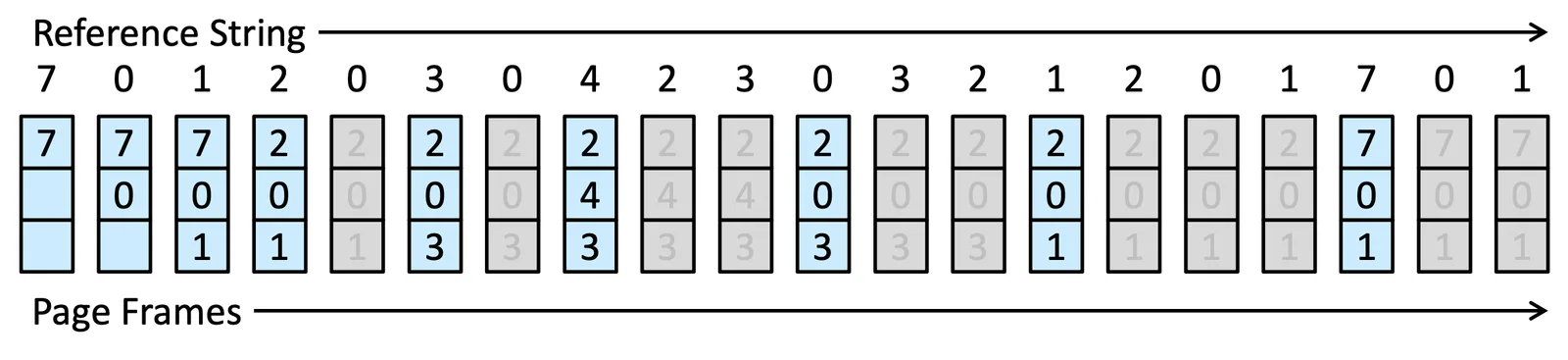
總共需要 9 次的 Page Fault
LRU Page Replacement#
去找 Least recently used (LRU) 的 Frame,往前去找最久沒用的那個
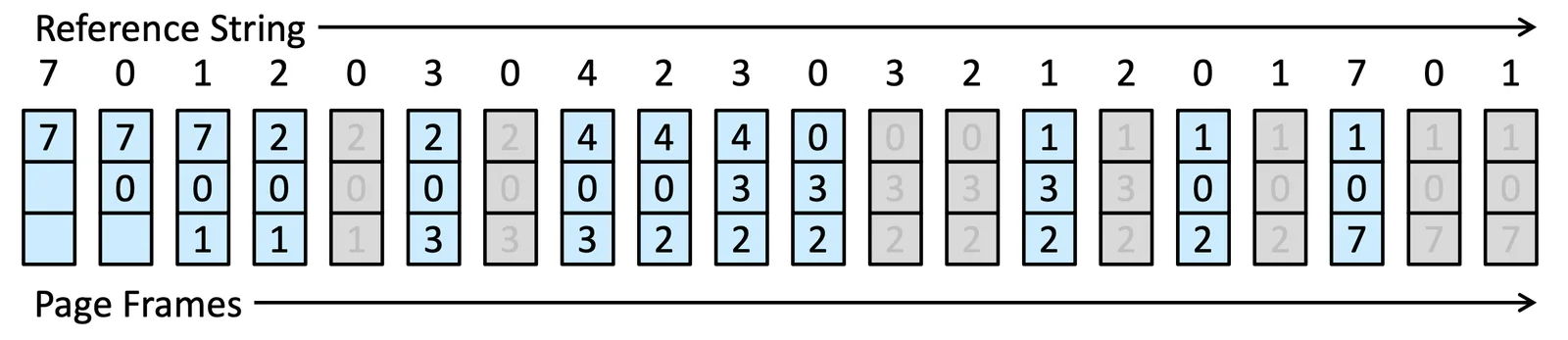
有兩種方法可以 implement 這個 Algorithm
- counters: CPU 需要有一個 Logical Clock, 把資訊記錄在一個 Time-of-Used Field,Dynamic 去做更新,這種方法的 overhead 是得在這些 frame 裡面做 search
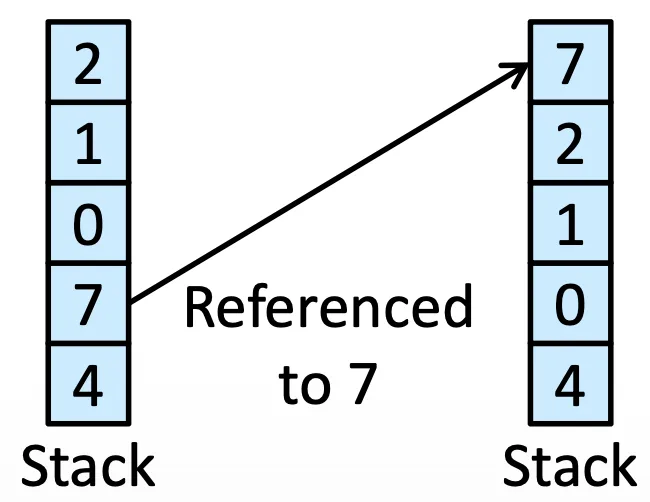
- stack: 用一個 Stack (Doubly linked list) 去把最近使用的 page number 放進去,這種方法的 Overhead 就是得每次 reference 都得改 6 個 pointer 把它挪到 tail,但就不用 search
LRU-Approximation Page Replacement#
LRU 的 Overhead 不管是哪個方法都不低,所以我們改做 LRU 的 Approximation,我們先設定一個 reference bit,存在在 page table 裡面,有些情況下,我們會把它設定成 0,如果使用了,我們就設定成 1,這樣只需要一個 bit 就可以紀錄從設定為 0 的時候開始到現在為止哪些 frame 被 reference 了,省記憶體,當然會失去一些精度,有三種衍生的方法
Additional-Reference-Bits Algorithm#
把 Additional-Reference-Bits 放在 shift registers 裡面,我們每個 interval 後 (100 millisec.) 就把 Reference-Bits 放到最右邊,然後往右 shift,也就是可以告訴你,在前八次 interval 之中,這個 page 有沒有被 reference 到
假設是 00000000 vs. 11111111 vs. 11000100 vs. 01110111,四組,我們會選 00000000 當要被排出的,因為他最久沒被使用
當然精度會低於完全記錄時間,就算 8 個 bit 都一樣,還是有先後順序的區別
Second-Chance Algorithm#
就是一種 FIFO algorithm with ref. bit,我們先 run FIFO,此時如果
- Page ref bit =
0: 已經給過機會,直接 replace - Page ref bit =
1: Set 成0,給他一個 second chance,不 replace 他
如果所有人都有,還是依照 FIFO 進行
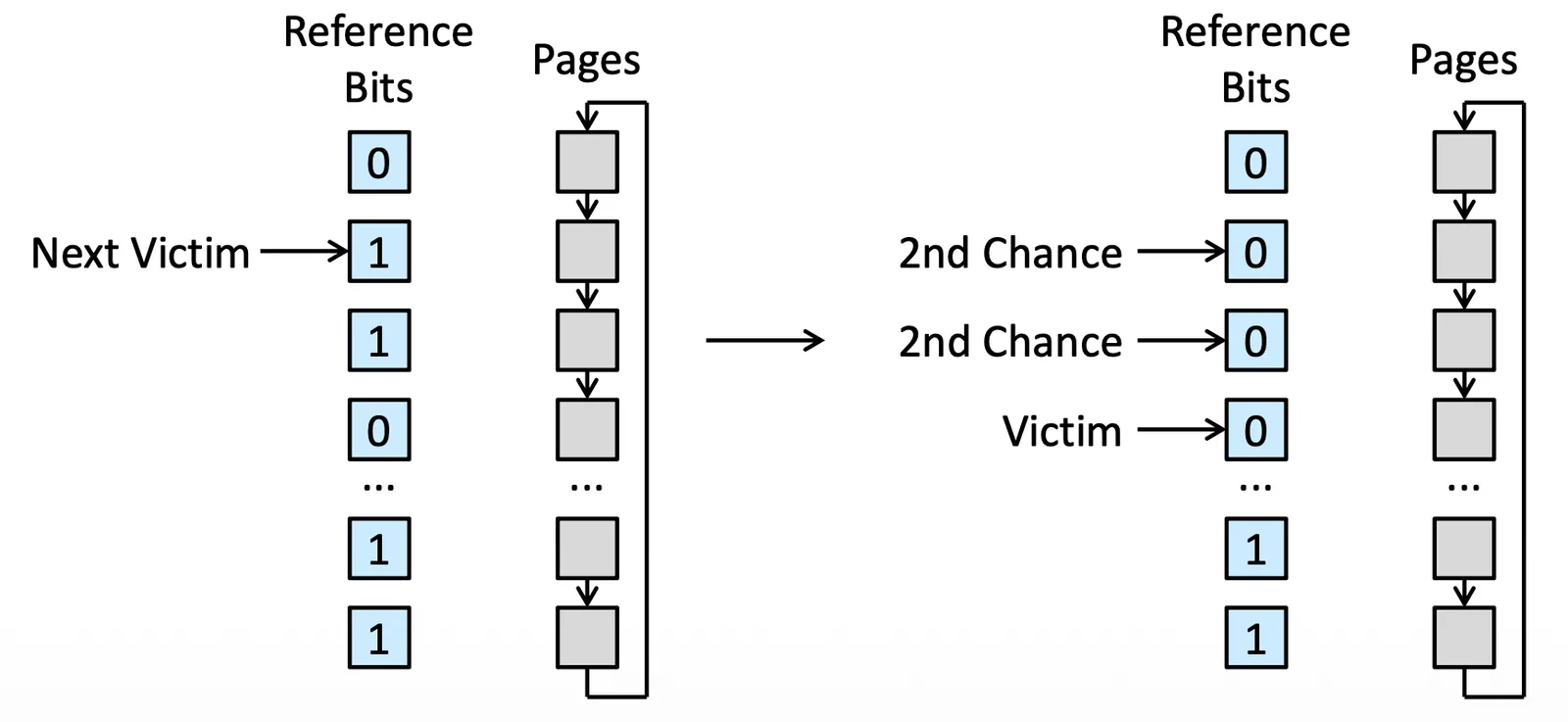
通常是一個 Circular Queue(所以有可能叫做 clock algorithm) 來 implement,檢查完之後再回到頭
Enhanced Second-Chance Algorithm#
我們紀錄 reference bit and modify bit,紀錄兩個 bit,modify bit 記錄的是有沒有任何改動,這樣我們可以獲得四種組合
(0, 0): 沒用過也沒動過 Best candidate(0, 1): 沒用過但動過- 一定得寫進 secondary storage 裡面,可能不用動
(1, 0)recently used but clean- 可能馬上就要用到了
(1, 1)recently used and modified
Counting-Based Page Replacement#
這邊的 counter 是被 reference 幾次的 counter
- Least frequently used (LFU) page-replacement algorithm
- 過去未來是正相關
- Most frequently used (MFU) page-replacement algorithm
- 之前沒用過以後應該會用
這種類的 Algorithm 通常 overhead 都比較高,不是很好,而且很好 attack
Page-Buffering Algorithms#
非演算法的設計,我們可以 Keep a pool of free frames,讓 Swap in/out 的速度大大加快,也就是把 Swap out 就先批量的挪出去,trade-off 就是要先預留空間
第二種方法是我們紀錄哪些 page 被改過了,在我們 execution 的過程, Secondary Storage 就可以先把他們挪過去,但這方法也有缺點,你可能認為 Secondary Storage 在 Idle 但在這期間可能會插入很重要的任務,對 Performance 也是會有影響
第三種我們額外紀錄 Free frame 裡面還有用的東西,檢查裡面還有沒有現在需要的東西,但一樣要紀錄 additional information
Applications and Page Replacement#
我們有時候不太喜歡用 Page Replacement,因為 Application 會對自己接下來的動作有預知,但 OS 並不知道,所以 OS 可能會做出一些不符合效能的操作,所以有些 OS 會提供 raw disk 讓大家自行管理
Allocation of Frames#
Minimum Number of Frames#
一個 Instruction 牽扯到 3 個 frame,如果只給他一個 frame,那 Page Fault rate 肯定會高到不行,甚至有些 Instruction 要做一個操作就是必須要 6 個 frames 少於這個數字這個 instruction 就是無法執行
這跟 CPU Architecture 設計有關係
我們必須要分配給他一個 minimum number of frames
Allocation Algorithms#
Equal allocation#
給每個 Process 都一模一樣的 frame,但有些 Process 可能就是需要比較多或是有些不需要那麼多
Proportional allocation#
你本來就知道哪些 Process 需要多少 Page,我們就把它照比例分
- :第 個程序所需的虛擬記憶體大小(或是它總共的 Page 數量)
- :第 個程序最終分到的實體 Frame 數量
- :實際大小
每個 application 可能只是預留空間,搞不好也用不到那麼多,所以還是有些小問題
我們可能可以加上一些 Priority,來決定到底要怎麼分配
Global versus Local Allocation#
- Global replacement:找 Replacement 可以找其他 Process 的 Victim,比較有彈性,有好 Throughput,但會有 overhead,而且有些 Process 就是會被一直干擾
- Local replacement:Swap 時只能用自己被分配到的東西換,Stable 但會慢,而且沒彈性
業界幾乎都是 Global replacement
Reclaiming Pages#
如果是用 Global 的話,就會有 kernel 裡的 reapers(收割)routine 去把東西都收回來,如果 Free memory 太少,reapers 就會把 memory 從 Process 身上 Reclaim 回來,太少我們再快速分配
但是這個 Reclaim algorithm 是很多樣化的,可以決定要砍誰
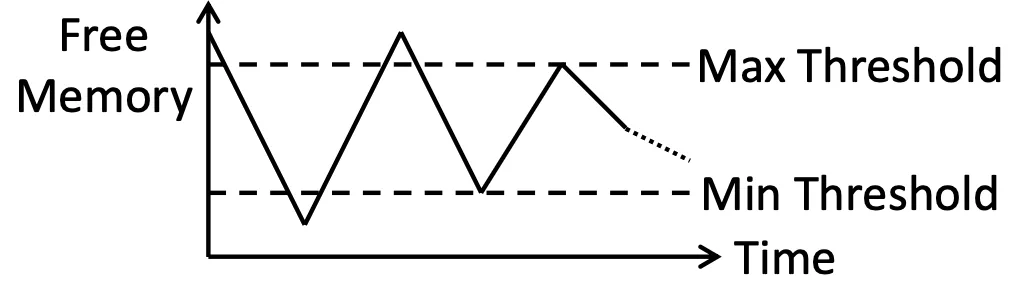
Linux 有一種更極端的手段,就是把 Process 根據他們的 Score 直接砍掉
Non-Uniform Memory Access (NUMA)#
所有的 Memory 我們不把他們當同一種東西,比如可以設定各個 Process 之間的關係,在進階的系統裡面,我們 Swap-in 的 Process 應該要跟原始 Process 是關聯性很大的
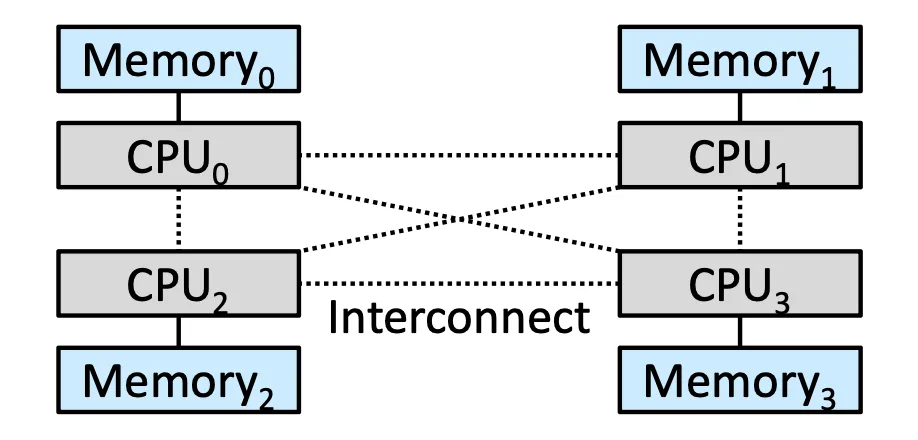
我們應該把 Frame 放到正在運行相關 Process 的 CPU 附近
Thrashing#
一個 process 不斷地 Page fault 而非 executing,我們就稱它為 Thrashing Process,會產生大量 I/O overhead
Cause of Thrashing#
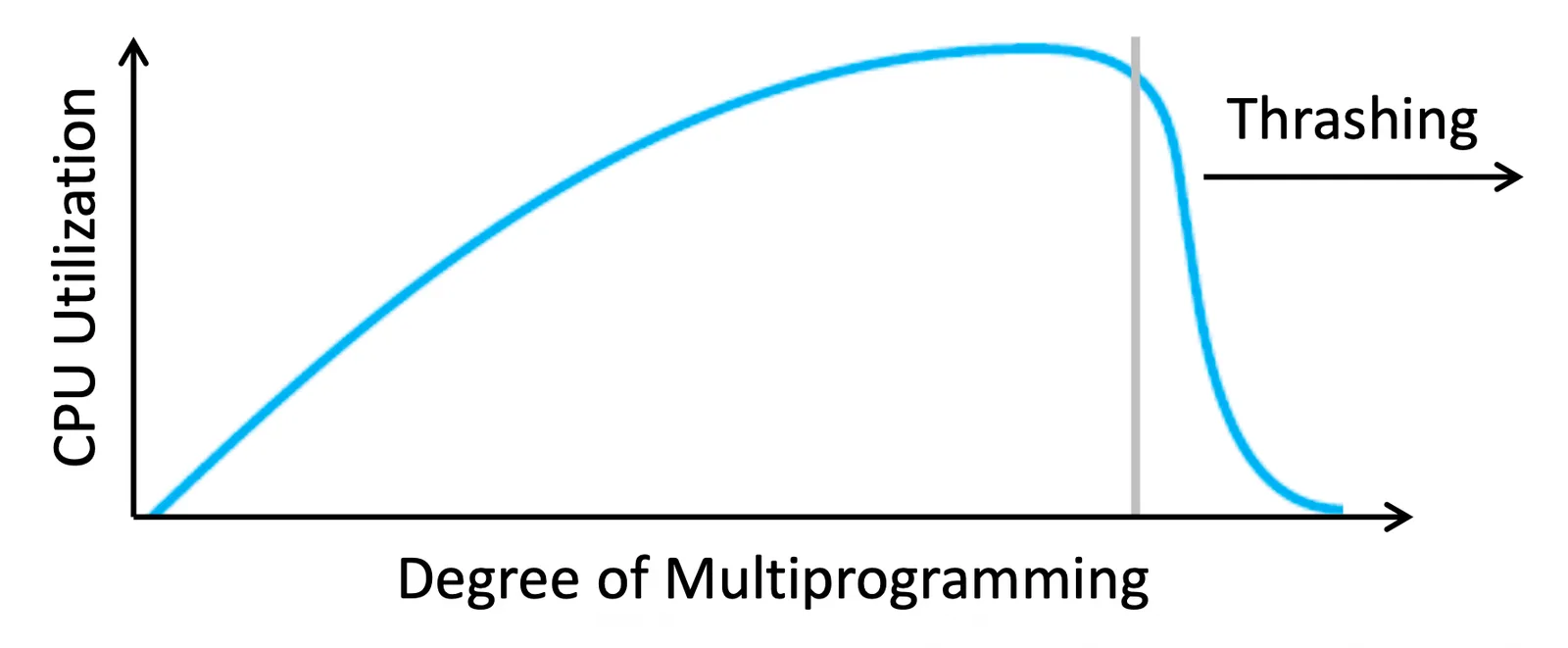
當一個 process frame 需求變高的時候,就會對別的 process frame 做 replacement,當大家都不停的 Page fault,就會產生嚴重的 Thrashing,產生 I/O 後,大家如果都在 Hard Disk 去做 waiting,CPU 的 utilization 就會大大降低,而這時候 System 可能就會讓 CPU 提高 degree of multiprogramming 是一個惡性循環
Locality Model#
我們用了 Global replacement 才會有剛剛的問題,我們可以用 local replacement,但這並沒辦法解決所有問題,allocate 沒有全局資訊的話還是會產生效能問題,所以我們使用 Locality Model
一個 Process 在執行就是讓 page 們 move from Locality to Locality,在同一個時段內可能就是同一群 page 在做運算,所以 Locality 就是 a set of commonly used together page,如果這個 Process 分到的 frame 不夠,那一群 Locality 就會產生 Thrashing
所以知道了 Locality 的資訊就可以加快運算
Working-Set Model#
Working set 就是在過去的 Page windows 內我們到底 reference 了誰
假設我們有 2 6 1 5 7 7 7 7 5 1 (t1) 6 2 3 4 1 2 3 4 4 4 3 4 3 4 4 4 (t2)
If , then and
而 長度的設計,就是一個 heuristic 的 trade-off
- 太大:就是 Global 了
- 太小:根本沒看到任何資訊
我們額外定義
如果 就會產生 Thrashing
透過剛剛那個 Algorithm 我們還是可以算出 Working set 我們當然可以考慮所有再對太多 request 的 process 做消減,但這樣依然會花很多效能
我們不紀錄得很清楚,我們只用一種 Approximation,假設
- references
- interrupt every reference
- 紀錄兩個 additional bit 在 process 裡面
- interrupt 的時候就把 bit clean 掉
- 如果有被 set 就代表他被 access 了
當你檢查這 2 個 bits 時:
- 如果值是
00:代表過去 10,000 次存取都沒用到它(不在 Working Set 內) - 如果值是
10或01或11:代表過去 10,000 次內至少被用到一次(在 Working Set 內)
這樣我們就有兩項資訊來計算,如果我們要再切得更細,我們可能就會需要做 10 個 bit 的 trade-off,但會拿到更多資訊
Page-Fault Frequency#
Prepaging 就是把一定會用到的東西直接一起拿進 memory,Working set 就是一個很有用的資訊讓 System 去做預測,但用在這裡有點太麻煩
比起 Prepaging,page-fault frequency (PFF) 可能更好,如果我們發現 PFF 很高,我們就知道他一定是 frame 太少了,就給他 我們可以設定一個 Upper bound 跟 Lower bound
Current Practice#
記憶體的價格已經漸漸變低了,所以我們的記憶體越大還是有些好處的
Memory Compression#
有時候 Page out 並不會做 Swapping 而是做 Compression,把東西壓縮進一個 Frame 裡面
- Before compression
- Free-frame list:
Head → 7 → 2 → 9 → 21 → 27 → 16 - Modified frame list:
Head → 15 → 3 → 35 → 26
- Free-frame list:
- Frames
15,3, and35are compressed and stored in frame7 - After compression
- Free-frame list:
Head → 2 → 9 → 21 → 27 → 16 → 15 → 3 → 35 - Modified frame list:
Head → 26 - Compressed frame list:
Head → 7
- Free-frame list:
- If one compressed frame is later referenced, a page fault occurs
- The compressed frame is decompressed, restoring the pages
15,3, and35
- The compressed frame is decompressed, restoring the pages
看起來可能沒啥幫助,可能有 overhead 但實際上,大部分 OS 都有實作這個功能,而這裡的 Trade-off 就是在
- speed of compression algorithm
- compression ratio
- time of compression and decompression
來做演算法選擇,這些動作全部發生在 RAM 裡面,所以速度會相對較快
Allocating Kernel Memory#
剛剛都是在講 User mode,Kernel memory 會有特殊的方法處理
- Kernel 需要 maintain 很多 Data structure 描述系統的狀態,輔助我們做決定,而這些 DS 通常都是 Fixed Size,有些根本不需要一個 Page 來存(可能會有 Internal Fragmentation)
- Kernel 有些動作會希望是 Continuous 的 allocation,如果 Virtual memory 引進會產生其他問題
Buddy System#
分配給 kernel 的時候我們會切 Continuous,並且剛剛好可以塞的下又是 的次方的大小,我們叫他 power-of-2 allocator
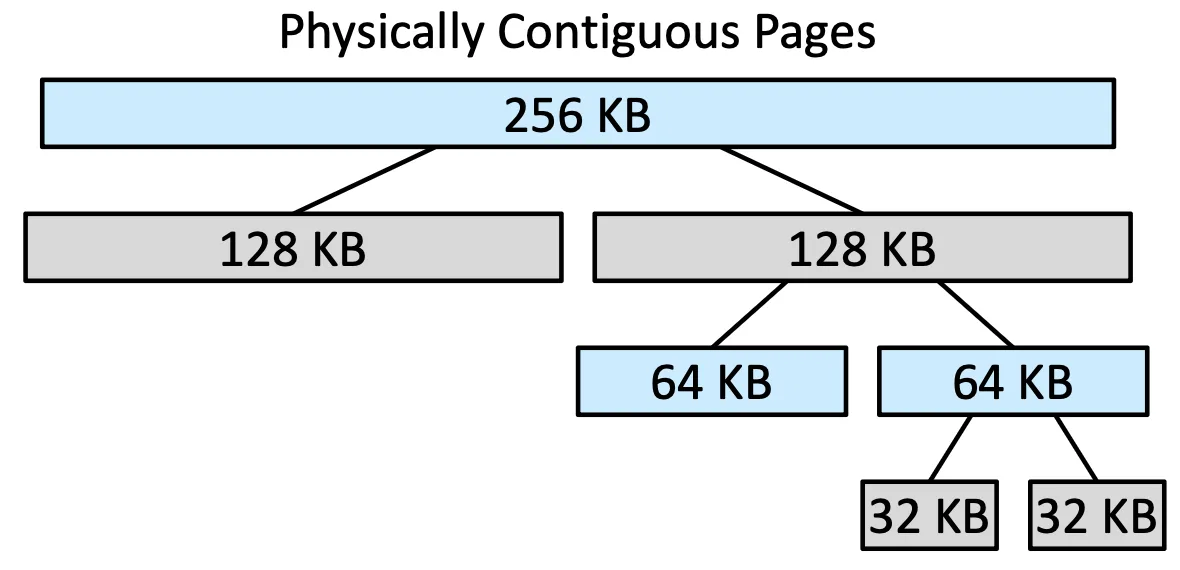
這些沒用到的 buddies 還是可以繼續組合 coalescing 成新的 segment 去使用,並且可以最大化節省空間,但壞處就是還是有 Internal Fragmentation
Slab Allocation#
- Slab 就是一個或多個在 Physical memory 上的 contigious frame
- Cache 則是一個或多的 Slab,每種 Data structure(e.g. PCB, file obj, semaphores)都有一個 Cache
而 Cache 裡面會有很多 Object,Cache可以根據他們先開好很多「空殼」,多大都是固定的,我們可以記錄那個 Cache 是 valid 還是 invalid,就可以直接把資料填進去,這樣就可以
- 消除 internal fragmentation,因為大小都提前知道了
- Memory request 會變很快,Object 都已經先開好了,而 free 的時候只需要改 valid bit 就好了
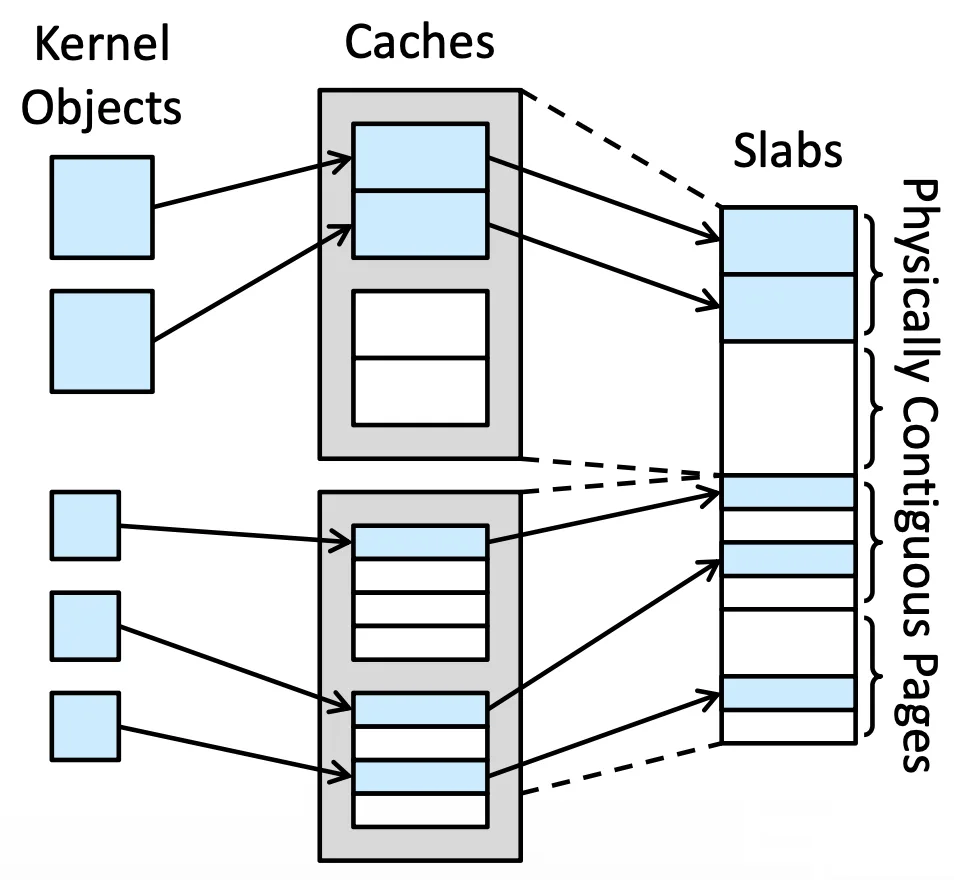
舉例來說 struct task_struct 就是一種固定大小為 1.7 KB 的 Cache,可以直接把資料填進去就好
Slab 需要維持三種狀態
Full: 滿了放不了Empty: 全空,Linux 把他們當作填資料的第二選擇Partial: 有些空間還沒填滿,Linux 會優先填他們
如果沒有空的 slab 就會重新 allocate 一個新的 slab,指定給某個 Cache
有很多變體,
SLOB是針對 embedded system 做的版本,SLUB則是做了 Optimization 的版本
Other Considerations#
Prepaging#
如果到要用了才把 page 拉進來就會產生大量的 Page Fault,所以我們可以預測後面的 code 來預先拉 page 到 frame 裡面,但有些 process 難以預測行徑,盲目預測可能會讓情況變糟
- 讀取 file 的操作通常比較重複,Linux 提供
readahead()來快速讀取
Page size#
如果要從 page size 考慮
- page table 的角度,我們要讓他變小,所以 page 越大越好
- 從 internal fragmentation 來看,我們要讓他越小越好,可以降低 fragmentation
- I/O time 來看,我們希望 page 越大越好,因為一次可以搬比較多東西
- 從 locality 以及 resolution,我們對 memory 的描述越詳細,就要越小的 page size
- 從 page faults rate 來看,page 要越大越好,可以降低 page fault rate
這是一項非常複雜的 trade-off 需要詳細考慮
從歷史因素來看 page size 是越來越大的,包含 mobile system
TLB Reach#
Translation look-aside buffer (TLB) reach 就是多少的 memory 指向了多少的 memory size
理想上我們希望他越大越好,所有東西都要可以 TLB reach
- 提高 TLB 的 entries 很好,但硬體往往 cost 比較大,而且永遠不夠
- Page size 提高會讓 internal frag. 提高
現在的系統提供了一個折衷方案,就是 multiple page sizes
Inverted Page Tables#
概念上就是 OS 有一個 table 可以把 Physical memory 指回 Logical address,但我們引入了 virtual memory 後我們知道有一些東西是存在 Secondary storage 的,所以我們需要增加其他 page table
我們需要增加一個 external page table (per process) 但這個 page table 也會有 page fault,可能會有嚴重的 overhead
Program Structure#
int[128][128] data;
這樣一個 array 在 C language 裡面是 row major 的,假設一個 row 是一個 page (frame),我們考慮下面兩個 code
for (j = 0; j < 128; j++)
    for (i = 0; i < 128; i++)
data[i][j] = 0;for (i = 0; i < 128; i++)
for (j = 0; j < 128; j++)
data[i][j] = 0;上面的 code 最後可能產生 16384 個 page fault,但第二個 code 只需要 128 個 page fault,每次都讀取一個 row,這樣 page fault 只會在換 row 的時候發生
照理來說現代的 compiler 跟 loader 都已經把這部分處理好了,並且現代的 page size 其實都足夠大到可以 cover 這部分了
I/O Interlock and Page Locking#
有時候我們不希望 Page 會被 Swap-out,有很多種方法
- 我們可以把這塊 memory 上 lock
- 不要用 user memory 改用 system memory,但這種管控方法不是很方便
Operating-System Examples#
Linux#
SLAB 的來源,Linux 採用的是 Global page replacement,採用 demand paging,從 freelist 找 free frame,並且 maintain 兩個 list
- Active list
- Contain the pages that are considered in use
- Inactive list
- Contain the pages that have not recently been referenced and are eligible to be reclaimed
Windows#
Clustering for demand paging,會把鄰近的 page 一起塞回 memory 裡面,還提供了 Working-set minimum/maximum 作為管控的建議,還有 Automatic working-set trimming 觀察到 free frame 太少的時候,會把 process 的 memory 收回來
Solaris#
有一個 Pageout algorithm,用雙指標的掃描,前面的 pointer 把 bit set 成 0,後面的如果看到某個 frame 還是 0 就代表沒用到,可以把它丟到 freelist
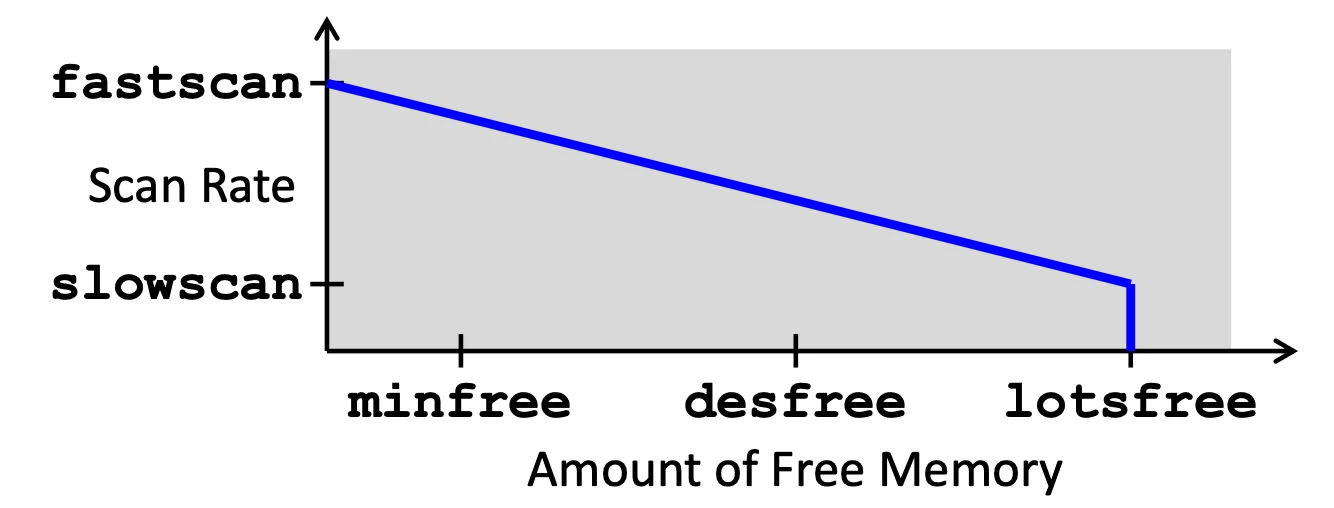
這個 algorithm 的癥結點在 scan rate,如果很多 memory 就不用巡邏那麼快,如果 free memory 快沒了就要超快速巡邏
這個系統還有做 Priority paging,重要的 page 要永遠在 memory 裡面