File-System Internals#
File Systems#
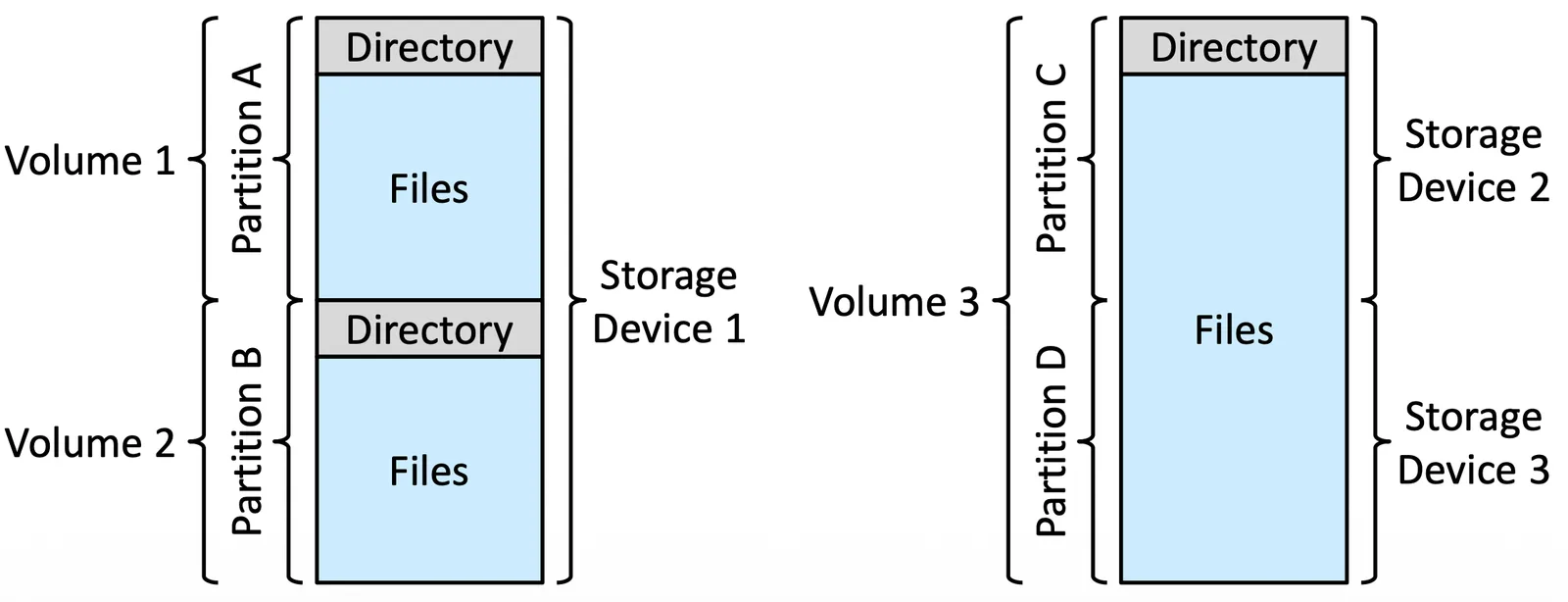
用過電腦都知道 devices 可能有好多個,也就是硬碟有很多,而硬碟又可以切成好多 partition, partition 又可以切成好多 volume,volume 上就可以有 file system
邏輯上來講 Volume 是可以切在不同 Disk 上的,但 partition 只能在同一顆 Disk 上,如果 volume manager 支援跨 partition 的操作的話,也是可以做到跨 partition 的 volume 的,甚至可以跨 device
一個 system 裡面也可以有多種 file system,以 Solaris 為例子
- tmpfs: 放在 volatile 的 memory 上面,暫存
- objfs: virtual file system,給 debugger 用,也可以紀錄 booting 的 process
- ctfs
- lofs
- procfs
- ufs, zfs
File-System Mounting#
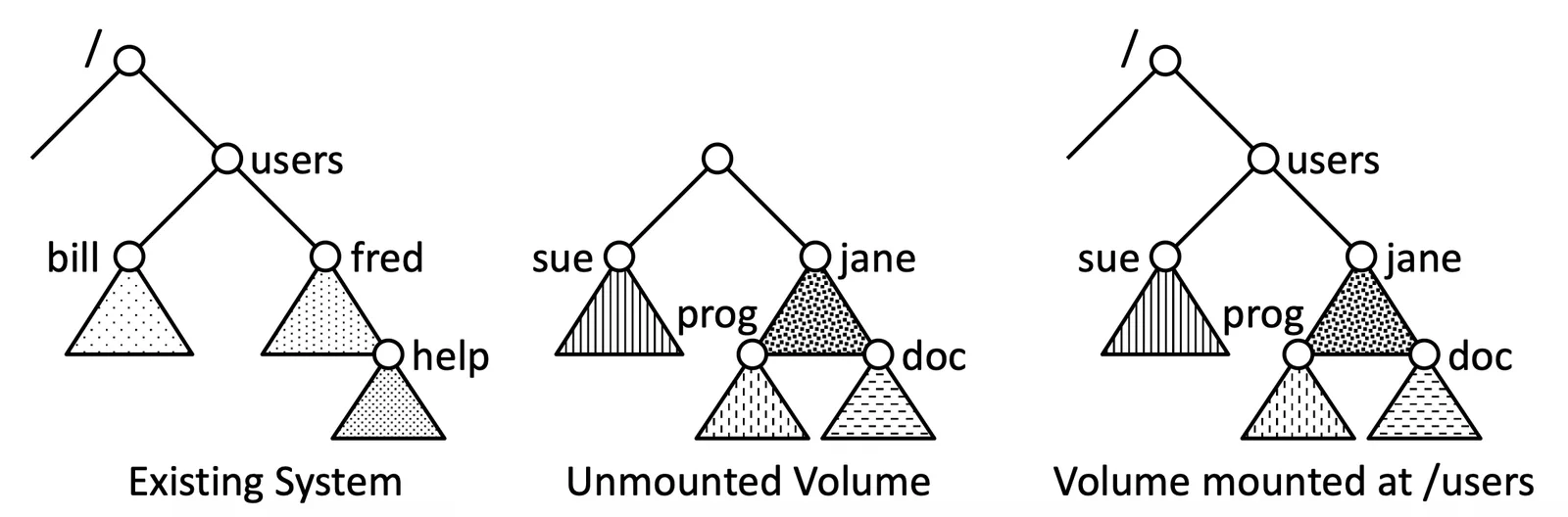
File system 一定要透過 mounting 才能被 OS 使用,我們會把 mount point(file system 要掛的 location),以及 device name 告訴 OS,也許 OS 會需要你提供 file system type
接下來 OS 會檢查 device 是不是一個 valid file system
- 向 device driver 下 read directory 的 instruction,然後檢查 directory return format
接下來 OS 就可以根據 mount point 來 traverse 整個 file system
在 mount point 上做 traverse 也會有不同的 semantics,上面的例子來看,有兩個 semantic 的例子
-
如果 mount point 上面有 file 了
- 我們不允許蓋掉他
- 我們允許蓋掉,直到覆蓋的 file system 被 unmount 才能看到原本的 file system
-
是否允許 multiple mount
- 一個 file system 只能 mount 一次
- 一個 file system 可以 mount 很多次(在不同 mount point)
Partitions and Mounting#
Raw 是沒有 file system 的 partition,Cooked 則是有 file system 的 partition
有些 application 會希望拿到的是 raw disk,因為他有針對自己 application 的優化,不需要 File system 幫忙
假設一個 partition 裡面有一個 bootable 的 file system,那他還需要額外的 boot information,因為 program 還沒被 load 到 memory 無法 booting
- 通常會先有一段 sequential 的 blocks load 以 image 的形式 load 到 memory 裡面,然後才能 booting file system
- Image 就是 bootstrap loader,有這個 program 才知道怎麼 load kernel, OS 到 memory 上
Bootstrap loader 會在 mount time 做 Root Partition 的選擇,在 Mount 的時候需要進行 verify,做完上個小節提到的測試後如果發現不吻合,就要做 consistency check,如果成功就要把 information 留在 mount table,告訴 OS file system 要在哪裡用
File Sharing#
有很多可以協作的方法,但為了 sharing 的安全性,我們會有很多 attribute
- System 通常會把 file 跟 directory 加上 owner (or user) and group 的概念
- owner 就是最高權限擁有人
- group 就是一個可以 access 這個 file 的 users 的 subset
- User 想在某個 file 上面做事的時候要先 check user ID 跟 group ID
Virtual File Systems#
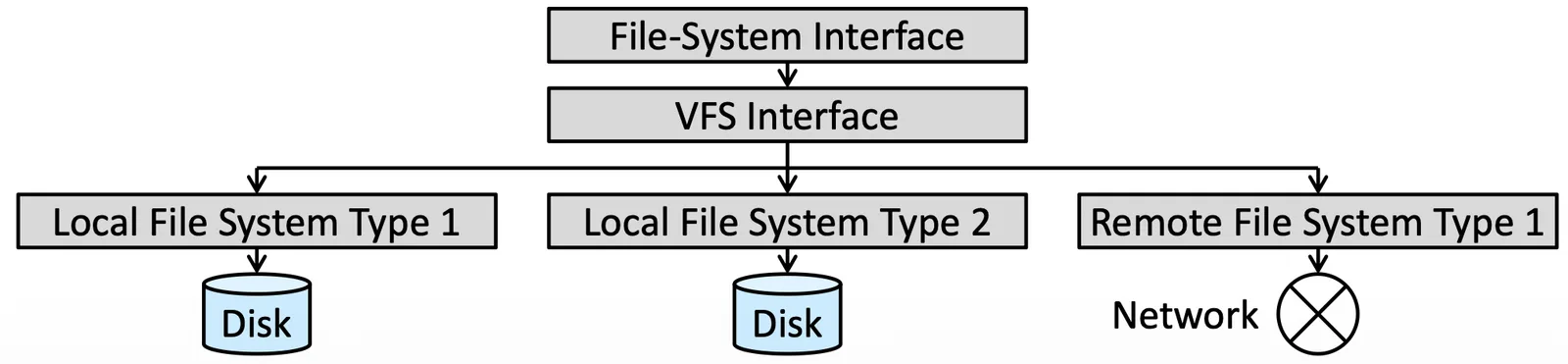
Virtualization 這個概念在 OS 裡面非常常見,File system 也可以套用,不同的 file system operation 是不一樣的,我們需要一個 virtualization 來簡化使用(e.g., local 端跟 Network 端用一樣的方法 access)
以下就是 Virtual file system layer,也就是 virtualization 的方法,因為 file system 是 base on
open()read()write()close()
這些操作可能都一樣,但 implementation 不同,VFS 會把它轉成適當的指令,VFS 會有一個 vnode 裡面有 metadata,讓 VFS 搞清楚上層要 access 的 file 是啥
我們必須確定 vnode 是 unique 的,因為 file system 裡面常常一樣名字的情況,但 VFS 必須搞清楚
VFS: Linux#
Linux 裡面有四種 object
- inode object: represents an individual file
- File object: represent an open file
- Superblock object: represent an entire file system
- Dentry object: represent an individual directory entry
每個 object 被開啟就會有一個 pointer 指向 function table 來完成正確的 function
Remote File Systems#
有了 network 就可以連接到其他 server 去做 file system 操作,有很多種 implementation
- 早期 implementation 是
ftp,是一種可以連接到其他電腦的方法 - Distributed file system (DFS) 你在 local 端可以看到某個 file,但他其實不在你的機器上
- World Wide Web 在
ftp上再多包一些 protocol 來做 file transfer
The Client-Server Model#
Remote file system 最常見的一個 model
- server: 真正擁有 file 的那個 machine
- client: 透過網路 access file 的 user
這個 model 的安全性是非常值得研究的,是否是真的 client 本人 access,會造成 spoof 或 imitate,client 想做一些 operation 要透過 DFS protocol 來傳指令後判斷權限,最後操作
Distributed Information Systems#
在一個 remote computing 的環境下,user 都是 distributed 的,我們希望 system 可以提供一個 information 整合,我們叫做 distributed naming services
- Domain name system (DNS): domain name 轉 IP
- Network information service (NIS): 提供 login 資訊以及 access 權限資訊
- Common Internet file system (CIFS): Microsoft 提供的 service,結合 network information 產生 login request
- Active directory 可以提供 distributed 的 name space
- Kerberos auth protocol 用來搭配
- Lightweight directory-access protocol (LDAP): 也是一種 distributed naming 機制,Active directory 也可以用 LDAP 實作
Failure Models#
System 本來就有各式各樣壞掉的原因
- Failure of the drive containing the file system
- Corruption of the directory structure or other disk-management information (metadata)
- Disk-controller, cable, or host adapter failure
- User or system-administrator failure
考慮了 remote 就更容易壞掉
- Network or server failure, networking implementation issues
我們需要維持 server 跟 client 之間的 state information consistent,才能夠做到 recovery
- NFS v3 implement 了一個 stateless DFS,access 或 request 會 carry 所有需要的 information,直接做到 recover
- NFS v4 是 stateful 的,但他 improve 了 security, performance, and functionality
Consistency Semantics#
是一種用來衡量或描述 file system 如何 implement file sharing 的方法
- 如果有 data 被更改,那其他使用者會看到啥
- Multiple users 如何同時 access 同個 file
通常這樣的 semantic 都會跟著 implementation 走
UNIX Semantics#
分成兩點
- 一個 user 對 file 做 write,其他 user 都會看到
- 每個檔案都有一個 pointer,所有 user 會 share 這個 pointer
對 Unix 來說一個 file 就是 single physical image,也就是說是一個所有 user 都能碰到、共享的東西,這種情況下就會出現 contention,需要去 handle 這件事
Session Semantics#
Andrew file system (OpenAFS) 採用這種方法,做的是 delay write 的概念,其他 user 不會看到操作的 user 做了什麼改動,除了操作的 user 在某個 session close 掉 file,下一個 session 開檔案的 user 才會看到那個改動
可能會同時存在好多個 image,就不會出現 contention
Immutable-Shared-Files Semantics#
user 把 file 設定成 share 之後 file 就會變成 read only,無法做任何改動
NFS (Network File System)#
NFS 是一種 implementation,是一種基於 client-server 的 model,藉由 LANs 或 WANs 做 file transfer
以下是一種他 mounting 的方法,有幾個特色
- 有些 workstation 沒有 disk,可以借用別的 machine 的 disk
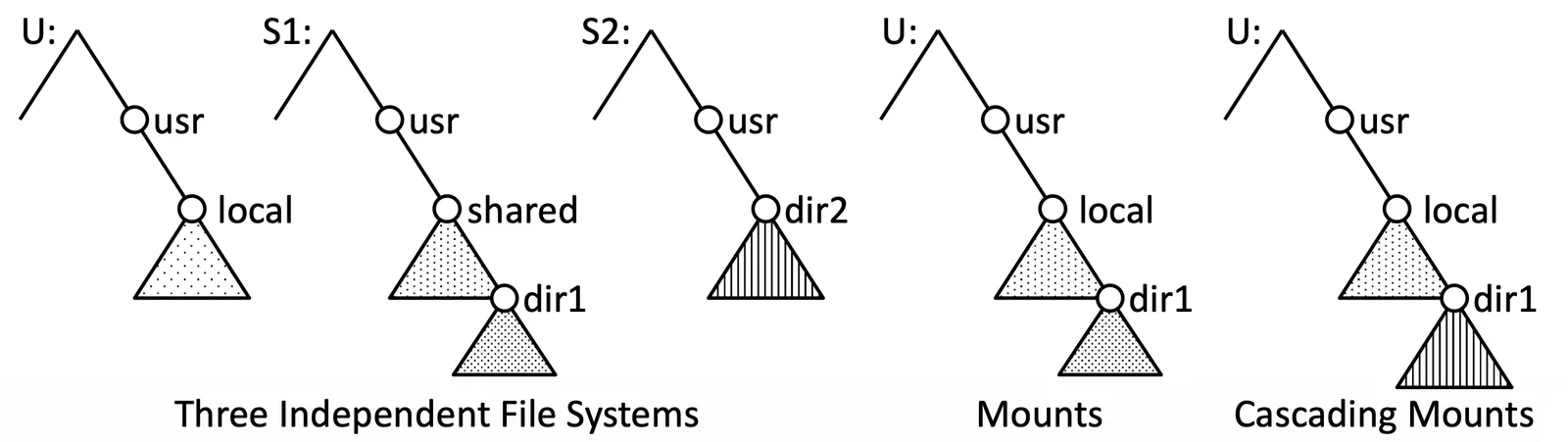
- 可以做 Cascading mounts,也就是下圖
- 把
S1的share下的結構掛到U的local - 把
S2的dir2底下結構掛到dir1底下 - 最後的
U是U+S1的shared掛成local+S2的dir2掛成dir1
- 把
NFS 為了 remote file access 每個 machine 的 OS architecture 都不一樣,必須要 handle 這個部分,希望 NFS 可以 independent from hardware,要設計出一套新的 protocol 把 remote procedure call (RPC) translate 成 external data representation (XDR) protocol
等等的討論把 NFS 分成兩層
- The Mount protocol
- Access file (NFS protocol)
The Mount protocol#
需要包含兩個訊息
- 要用哪個 directory 做 mounting
- 要用哪個 server machine 做 mounting
這是一個 logical 的 connection 不會改動 server 的結構
Mount request 會先被轉成 RPC 送到 mount server,mount server 會 maintain 一個 export list,會比對哪個 file system 要去哪個 server mount,如果在 export list 上合格了,就會送給指定的 server
最後會生成一個 handle 給 client,讓 client 可以根據這個 handle 來 access 這個 mounted file system
The NFS Protocol#
NFS 透過 RPC 來完成 file operation,以下都是 RPCs 提供的 operation
- Search for a file within a directory
- Read a set of directory entries
- Manipulate links and directories
- Access file attributes
- Read and write files
透過 mount server 提供的 file system handle 去對 file 做各種 operation
NFS v3 剛剛有提到是 stateless 的,所以必須提供完整的所有資訊,也就是說任何 modify data 的行動一定要在被 return 之前就先 commit 到 server
站在 client 角度,server 如果跟 client 説做好了,那就應該要確定已經可用了,而不是等到 server 有時間再做,不然不符合 client server model
Schematic View of NFS Architecture#
假設一個 remote file 已經 open 我們要對他做一些操作
- 下一個 system call 給 VFS Interface
- VFS 檢查是 local 還是 remote data
- NFS 會送出 RPC 經過 XDR 把 system call 透過 network 傳輸
- XDR 轉換回 RPC,讓 NFS server 去做轉換給 VFS
- VFS 轉成 system call 給 file system 去 access disk
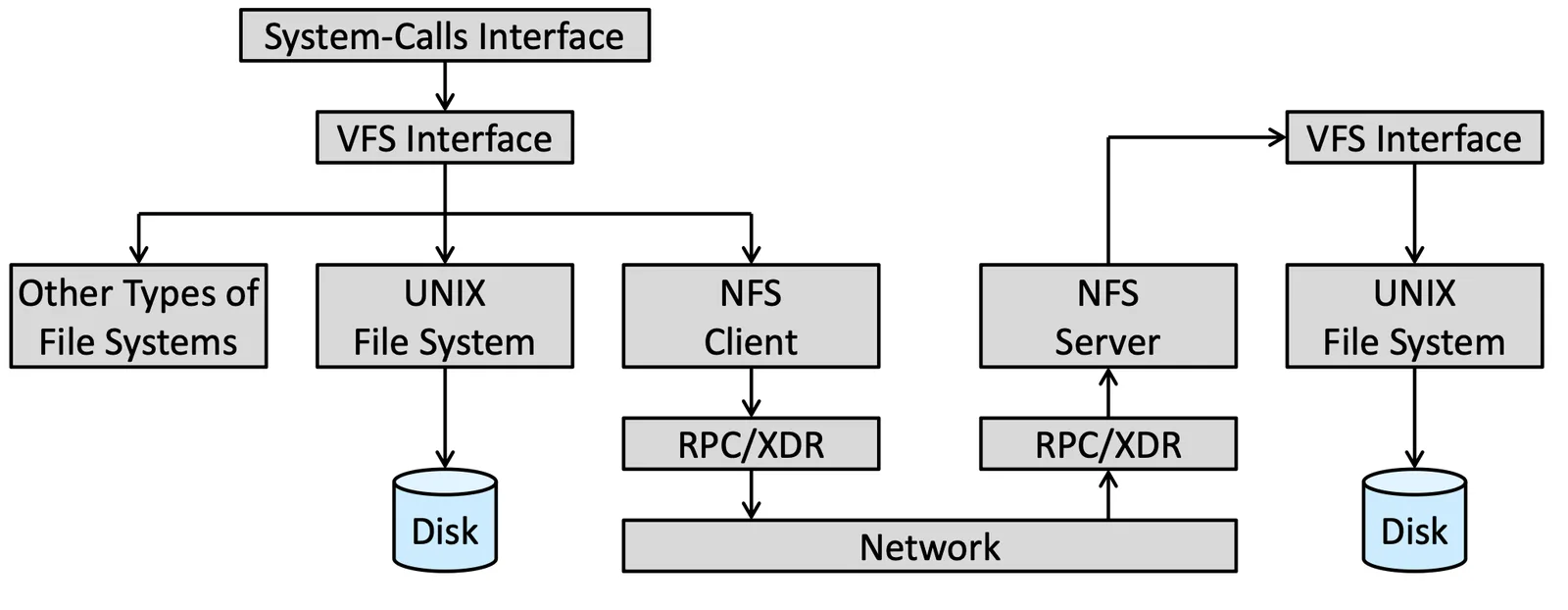
Path-Name Translation#
會牽扯到很多層 directory,對於每一層 directory NFS 都會下一個 lookup call 去找到 directory vnode,得到 mounting information,可以透過 cache 加速
Remote Operations#
Unix system call 跟 NFS RPCs 基本上是 one-to-one 對應的,但實際上不是這樣,通常是用 buffer, cache implement 來加速,操作跟之前的 cache 很像,先檢查 cache 裡面的 data 是不是我們要的
Cache 有兩種
- file-attribute cache,會記錄 inode 資訊,需要在 file update 的時候更新
- file-block cache,只能在 file-attribute cache up to date 的時候使用
Read-ahead, delayed-write 都有在這裡 implement